Copyright ã 2023 Meko Outdoors Incorporated. U.S.A. All rights reserved. HTGA
⑨ Once all the fan blades are in place, turn the
Master Power Switch to the “ON” position
BEFORE
raising the canopy. It will be hard to
reach otherwise.
⑩ Stake the canopy legs securely, place the fabric
top on the canopy, and raise it to full height.
⑪ Remove the clear plastic tab from the back of the
remote and discard before use. You can now operate
the fan using the remote control. The fan blades will
spin in a
clockwise
direction.
Uninstalling Canopy Breeze®
1. Turn the fan off using the remote.
2. Lower the canopy back to the half-height position.
3. Flip the Master Power Switch to the “OFF” position.
4. Remove the fan blades. While holding the motor assembly, grasp the front of the blade firmly. Slightly wiggle the blade from side to side while pulling until the blade slides out. If the blades
still won’t release, remove the fan from the canopy frame and place it upside down on a firm surface, such as a table, to remove the blades. Note that the blades will become easier to remove
over time.
5. Lift the fan unit up over the canopy frame and rotate clockwise ¼ turn to remove.
6. Lower the hooks and snap them back into their cradles on the top of the battery housing.
7. Place all components back into the case and locks clasps securely.
⚠"#Please be sure Master Power Switch is in the “OFF” position when storing the fan. If not, the remote could inadvertently start the motor
and cause damage to the fan and or case.
Center Hoop for Hook Mounting
Your fan comes with a hoop on the top for installation on a hook. This will allow for use in other applications in addition to
canopies. Please use extreme care when hook mounting.
1. We recommend a hook that is #12 size or bigger, and must support at least 10 lbs.
2. If hanging from a ceiling or gazebo, please be sure the hook is attached directly into the wooden frame or stud
under drywall. Do not use hooks that are mounted only in drywall, even if using a drywall anchor.
3.
NOTE: HOOK MUST BE COMPLETELY THREADED INTO WOOD FRAME AS TORQUE FROM THE FAN COULD
UNSCREW IT, CAUSING IT TO FALL.
4. Allow a minimum of 7.5’ of clearance between the fan blades and ground, or 6” higher than the tallest occupant.
5. Once the fan is placed on the hook, secure it with a zip or wire tie for extra safety.
Due to the height and roof pitch of certain canopy frames, air flow created by Canopy Breeze may need to be closer to the
occupants. The included down rod extension allows the fan to hang an additional 10” lower than using the four hooks on top of
the fan. This puts the breeze from the fan blades closer to the occupants, and also allows the fan to circulate air that is slightly
cooler than the air next to the fabric canopy roof.
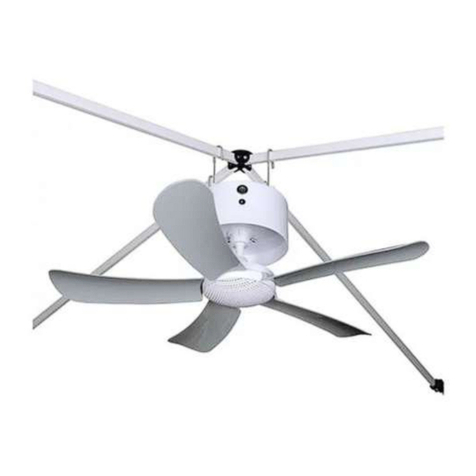
1. To install, simply open the extension into a “V” shape, and hang it over two of the four canopy frame roof joists that
are aligned with each other.
DO NOT
hang it on roof joists that are perpendicular to each other.
2. Hang the fan on the bottom hook of the extension via the center hoop mounted on top of the fan.
3. Allow a minimum of 7.5’ of clearance between the fan blades and ground, or 6” higher than the tallest occupant.
Should the fan blades be lower than this, remove the extension and hang the fan using the four hooks as outlined in
Steps 1-5.
4. Be sure all fan blades are completely inserted so the fan will be balanced, and be sure to test the fan for wobble by
turning on the motor before occupants are underneath.
5. If the fan wobbles, this usually indicates one or more fan blades are not inserted completely.
Charging and Battery Care
⚠#$WARNING: Only recharge this product with the supplied charger.
1. Plug the charger into a standard 120 Volt 60 Hz electrical outlet. While charging, the LED in the charger will illuminate red. When charging is complete, it will illuminate green. If the charger is
blinking red, this indicates a faulty battery. Please contact us for further guidance.
2. Typical recharge time after use is 5 hours from 10% battery charge.
3.
NOTE:
The fan will run indefinitely while the charger is connected to power.
ALWAYS
disconnect power when the fan is not in use and the battery is fully charged. Permanent connection to
AC power will shorten the life of the fan’s circuitry and void the warranty.
4.
Battery disposal.
This product uses a Lithium-ion rechargeable and recyclable battery. When the battery will no longer hold a charge, it should be removed from the fan and recycled. It
should not be incinerated or composted. Contact your local recycling center for information on where to dispose of it properly. In the event the battery in your fan needs replacing, please
5.
Battery Tips.
The powerful lithium-ion battery included with your fan is by far its most expensive component. Maximize the life of your battery with these handy tips:
a. Try to avoid “deep discharge” by not letting the battery drain completely.
b. It’s best to store the fan in an environment of 80°F or cooler. Try not to leave the fan in a hot car for an extended period of time.
c. Once the charger illuminates green, unplug it. The battery will discharge approximately 5% over the next several days, and you can “top it off” the day before its next use.
d. When storing the fan for long periods of time, only charge the battery to 30-50%. Try to avoid storing the battery at 100% charge for an extended period as this will shorten
battery life.
e. When using the fan regularly, it is OK to run it for a short period of time, then recharge the battery back to full. Lithium-ion batteries do not have “battery memory,” so partial
discharge/recharge will not harm them.
Troubleshooting
If after installation the fan will not operate, try one of the following:
1. With the power off, can you rotate the fan motor (the lower portion of the fan body that holds the fan blades) clockwise with a soft clicking sound? When spinning the motor, you will feel a
stop approximately every ¾” inch, and this is considered normal. If the motor will not spin, do not use the fan. Contact us
at [email protected] for further guidance.
2. Was the fan fully charged before first use, with the LED on the charger illuminating green?
NOTE:
If the LED on the charger is blinking red when plugged into the fan, this indicates a faulty
3. Was the Master Power switch on the fan body moved to the ON position before raising the canopy to full height?
4. Was the clear plastic battery safety tab removed from the back of the remote?
5. Does the LED on the front of the remote light up red when any buttons on the remote are pushed?
NOTE:
The LED on the remote should illuminate brightly. Should the LED look dim or
pinkish in color, this could indicate a low battery or defective remote.
If all the above steps have been taken, and the fan still will not operate, please contact us at
[email protected] for further assistance.
For questions and further information, please visit our website, www.mekooutdoors.com or email us at service@mekooutdoors.com.