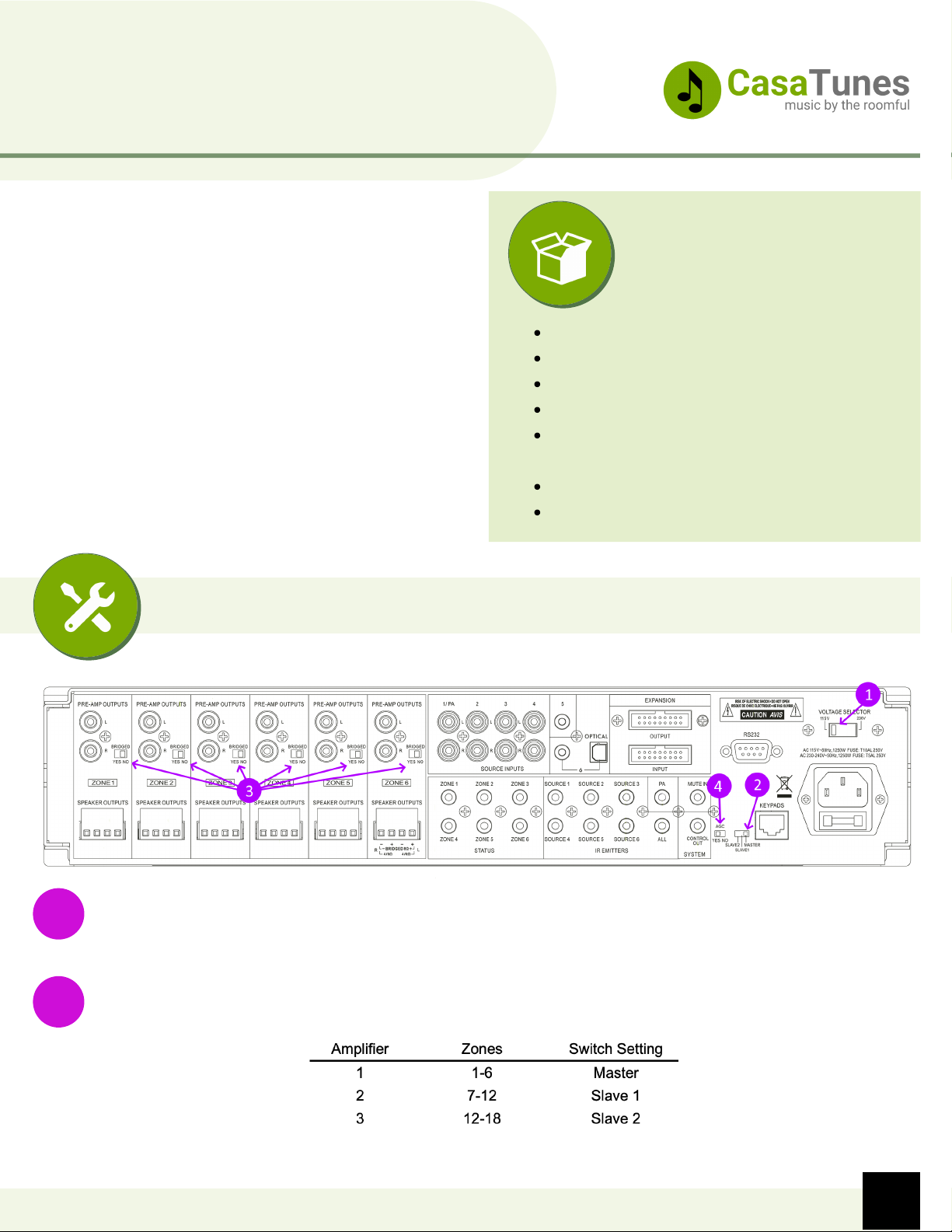
Connect the speaker outputs on the amplifier to your room speakers. You can use up to 12 AWG
wire (although typically 16 AWG is sufficient for most installations). 8-ohm speaker are
recommended, although the amplifier is 4-ohm stable (except when using bridged mode). If
using bridged mode, you must use 8 ohm speakers or you could damage the amplifier.
3
QuickStart Guide
CasaTunes CT-6X6MA Matrix Amplifier
You can use the pre-amplified outputs with a secondary power amplifier, an AV Receiver, or a
powered subwoofer. Refer to the Tech Note "How to add a secondary power amplifier, AV
Receiver or subwoofer" in the Resources section for more information.
4
If using more than one amplifier, you must use the expansion cable to inter-connect the
amplifiers. Connect the expansion cable to the OUTPUT of the first amplifier, and plug the other
end of the cable to the INPUT connector of the second amplifier, repeat for each additional
amplifier.
5
Installation of the amplifier keypads are optional. If you plan to install the keypads, then connect
the cat 5e/6 cable provided, from the Keypads port on the amplifier to the keypad in-wall hub, and
connect your keypads to the keypad hub, using cat 5 network cables (not provided). Refer to the
Keypad Manual in the Resources section for more information on how to install and configure the
keypads.
6
Once you have completed configuring the matrix amplifier switches and connections, power on the matrix
amplifier, then the music server, and complete the software setup.
The switches on the back of the keypad are used to configure which zone the keypad controls.
You cannot configure more than one keypad for each zone.
In addition, the Keypads port is not an ethernet/network/internet connection. Do not connect
your network to the Keypads port, as this will prevent the amplifier from functioning.