WIRING
Use wires that are capable of handling the required current. Route the wires properly to prevent wear, overheating and interference
with air bag deployment. Ensure that all connections are tight and double check wiring before connecting to the vehicle battery.
ELECTRICAL CONNECTIONS
Electrical connections to the unit are made by using block plugs and screw terminals. Route all wiring to the power module and
secure onto block plug terminals, then plug onto the power module. The plug can be easily removed without unwiring when the unit
requires servicing. The power supply for the fused unit (12-P plug) must be capable of delivering peak currents up to12A for
adequate short circuit protection and proper operation. It is recommended to wire directly to the vehicle battery.
WARNING: ensure that all wires are firmly secured onto the block plug, and plug is firmly secured onto the power module.
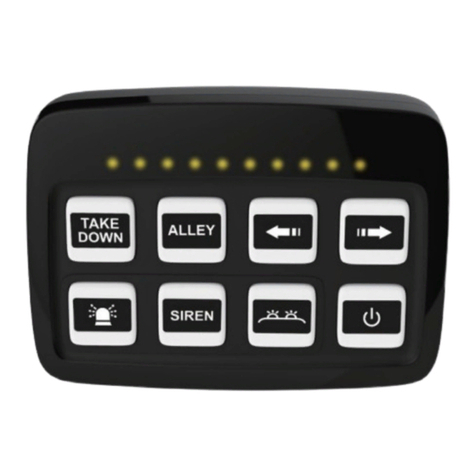
CONTROL PANEL / FUNCTION
To turn on the control panel, apply positive voltage to the IGN (Ignition) terminal at the rear of the power module.
4.4"(112.0mm)
3.5"(90.0mm)
CTL_PANEL
S_DISPLAY
SW8
SW1
SW2
SW3
SW4
+VDC
IGN
-GND
SW5
SW6
SW7
CTL_PANEL:
Connect to the unit control panel.
S_DISPLAY :
Connect to the data transmission wire of the compat-
ible lightbar, or directional/warning advisor to display
current activity through LED indicators.
SW8, SW1, SW2, SW3, SW4 :
+VDC Output Connections – each connects to
one auxiliary device / input up to 0.2 Amps max.
+VDC :
Power Input Connection –
Connect to power source or vehicle battery.
IGN :
(Ignition) Input Connection – This serves as the power
switch for the entire unit. Connect to a positive circuit
controlled by the vehicle ignition switch, usually a
terminal at the vehicle fuse panel. It is not recom-
mended to make permanent power connection as this
may drain battery.
-GND :
Power Input Connection –
Connect to Chassis Ground
SW5, SW6, SW7 :
+VDC Output Connection – each connects to
one auxiliary device / input up to 10 Amps max.
Signal Display / LED Indicator:
Displays the flash signal or traffic director signal when
S_DISPLAY input is connected to a compatible lightbar, or
directional/warning advisor.
Button B1, B2, B3, B4:
Activates SW1, SW2, SW3 or SW4 Connection respectively;
each may be set as an ON/OFF or a momentary switch.
Button B8:
Activates SW8 Connection; may only be set as an ON/OFF
switch.
Press and hold for 3 seconds to turn off all activated buttons,
or press and hold for 5 seconds to turn the backlit and the
unit completely OFF.
While the unit is OFF, press and hold button B8 for 3
seconds to turn the unit and the backlit back ON.
Button B7:
Activates SW7 Connection; may be set as an ON/OFF or a
momentary switch.
This button may be configured to map with Button B5 to be
turn ON or OFF by Button B5. (Button Mapping, see
“PROGRAMMING” section for more details)
Button B6:
Activates SW6 Connection; may be set as an ON/OFF or a
momentary switch.
This button may be configured to turn Button B5 ON when
activated and turn itself OFF when Button B5 is deactivated.
(European Siren Interlock, see “PROGRAMMING” section
for more details)
Button B5:
Activates SW5 Connection; may be set as an ON/OFF or a
momentary switch.
This button may be configured to turn Button B7 ON or OFF
upon activation or deactivation. (Button Mapping, see
“PROGRAMMING” section for more details)
This button may be configured to turn Button B6 OFF when
deactivated and turn itself ON when Button B6 is activated.
(European Siren Interlock, see “PROGRAMMING” section
for more details)
Recommended Wire Size
Amps Size
5-10 #16
10-15 #14
15-25 #12
25-40 #10
40-60 #8
Use next larger size if longer than 3m (10ft).
- 3 -- 2 -