manuals.online logo
Brands
  1. Home
  2. •
  3. Brands
  4. •
  5. Cellphone-Mate
  6. •
  7. Extender
  8. •
  9. Cellphone-Mate SureCall CM-SOLO-19 User manual

Cellphone-Mate SureCall CM-SOLO-19 User manual

Other Cellphone-Mate Extender manuals

Cellphone-Mate SureCall CM-Triflex-V User manual

Cellphone-Mate

Cellphone-Mate SureCall CM-Triflex-V User manual

Cellphone-Mate SureCall Home Pro-5 User manual

Cellphone-Mate

Cellphone-Mate SureCall Home Pro-5 User manual

Popular Extender manuals by other brands

Paugge ENT-EXT20B user manual

Paugge

Paugge ENT-EXT20B user manual

REIGN XRE-100 manual

REIGN

REIGN XRE-100 manual

Lindy 42805 user manual

Lindy

Lindy 42805 user manual

Digi ConnectPort Network Device user manual

Digi

Digi ConnectPort Network Device user manual

British General N300 instructions

British General

British General N300 instructions

VPI ST-WLHDMI-L-30M Installation and operation manual

VPI

VPI ST-WLHDMI-L-30M Installation and operation manual

Gefen EXT-DIGAUD-141 user manual

Gefen

Gefen EXT-DIGAUD-141 user manual

AMX netlinx NXC-MPE Dimensional drawing

AMX

AMX netlinx NXC-MPE Dimensional drawing

SY HDBT-60T installation guide

SY

SY HDBT-60T installation guide

Appsys ProAudio ADX-16 user manual

Appsys ProAudio

Appsys ProAudio ADX-16 user manual

Atlona RS232 user manual

Atlona

Atlona RS232 user manual

IDK OPF-TH1000-A user guide

IDK

IDK OPF-TH1000-A user guide

Enable-IT 824WP quick start guide

Enable-IT

Enable-IT 824WP quick start guide

Worx Landroid RadioLink WA0864 Get started

Worx

Worx Landroid RadioLink WA0864 Get started

TP-Link TL-WA730RE user guide

TP-Link

TP-Link TL-WA730RE user guide

Camplex CMX-HDMI-SFPL user manual

Camplex

Camplex CMX-HDMI-SFPL user manual

SC&T HE03-4K user manual

SC&T

SC&T HE03-4K user manual

Samsung SCS-26UC4 user guide

Samsung

Samsung SCS-26UC4 user guide

manuals.online logo
manuals.online logoBrands
  • About & Mission
  • Contact us
  • Privacy Policy
  • Terms and Conditions

Copyright 2025 Manuals.Online. All Rights Reserved.

®
User Manual
CM-SOLO-19
Safety Information
The Federal Communications Commission (FCC) has tested this product and found it to comply
with their RF Exposure Requirements, pursuant to FCC Part 22 and 24.
To comply with the FCC RF exposure requirements, keep the human user’s body at least 8”
(20cm) from the indoor antenna of the booster.
Don't expose this product to extreme low or high temperature (-4°F or -20°C and 150°F or
70°C).
There are no consumer serviceable or modifiable parts inside this booster product. Alteration or
abuse of the booster or other components will void this product’s warranty, and could be
dangerous to the user.
SureCall Signal Booster Kit
Upli nk Freq. Range (MHz) 1850-1910 824-849
Downlink Freq. Range 1930-1990 869-894
Supported standa rds
Input/Output impeda nce
Average ga in
Nois e figure
VSWR
AC power transformer
Max output power
Cable
RF connectors
Power cons umpon
Di mensi ons
We ight
FCC ID (USA)
Canada IC
0.57 lb (260g)
RSNMINI-40UNDER
7784A-M40UNDER
110VAC,60Hz IN / 5-15V DC OUT
3W Cellular / 2W PCS EIRP
RG174
SMA Femal e (both ends )
4.72”x2.72”x0.98” (120mm x 69mm x 25mm)
19dB Signal Booster Specifications
CDMA, GSM, WCDMA, EDGE, HSPA
50Ω
19dB
5dB
≤2.0
5. EXCEPT AS EXPRESSLY SET FORTH HEREIN, THERE ARE NO WARRANTIES, CONDITION
GUARANTEES OR REPRESENTATIONS AS TO MERCHANTABILITY, FITNESS FOR A PARTICULAR
PURPOSE OR OTHER WARRANTIES, CONDITIONS, GUARANTEES OR REPRESENTATIONS, WHETHER
EXPRESSED OR IMPLIED, IN LAW OR IN FACT, ORAL OR IN WRITING. CELLPHONE-MATE, INC.’S
AGGREGATE LIABILITY IN DAMAGES OR OTHERWISE SHALL NOT EXCEED THE PAYMENT, IF ANY,
RECEIVED BY CELLPHONE-MATE, INC. FOR THE UNIT OF PRODUCT OR SERVICE FURNISHED OR TO BE
FURNISHED, AS THE CASE MAY BE, WHICH IS THE SUBJECT OF CLAIM OR DISPUTE. IN NO EVENT
SHALL CELLPHONE-MATE, INC. BE LIABLE FOR INCIDENTAL, CONSEQUENTIAL, OR SPECIAL DAMAGES,
HOWSOEVER CAUSED.
6. All matters regarding this warranty shall be interpreted in accordance with the laws of the State of
California and any controversy that cannot be settled directly shall be settled by arbitration in
California in accordance with the rules then prevailing of the American Arbitration Association, and
judgment upon the award rendered may be entered in any court having jurisdiction thereof.
7. If one or more provisions provided herein are held to be invalid or unenforceable under applicable
law, then such provision shall be ineffective and excluded to the extent of such invalidity
or unenforceability without affecting in any way the remaining provisions hereof.
Cellphone-Mate, Inc.
CM-SOLO-19 (06/28) v1.1
888.365.MATE (6283) phone - (510)996-7250 fax
www.surecall.com www.cellphone-mate.com
48346 Milmont Drive Fremont, CA 94538
<10W
(For use with data cards and laptops)
Package Contents:
▪ 19dB signal booster
▪ Magnetic mount antenna
▪ RG174 extension cable
▪ AC power supply
▪ SMA to FME connector
▪ Velcro and screw mounting kit
▪ User manual(this document)
Connect the Power Cord: To prevent damage to the booster, before plugging in the booster to an AC
power outlet, make sure the booster’s power switch is in the OFF position. Then connect the AC power
cord to the booster using the USB connector end. Then connect the free plug to the outlet. Make sure
that all of the connections to the booster are tight and secure, then turn on the booster’s power switch.
The LED light will glow indicating that the booster is ready to use.
Note: This booster is also capable for mobile use. Please find more information at www.surecall.com
Using the Booster
The booster is ready for use as soon as all connections are made and the unit powers up without the
red light coming on. You may now place and receive cellular phone calls with powerful signal
amplification.
Note: The booster case may become warm during operation. This is normal. Press any key on your cell
phone to refresh communication with the base station.
Troubleshooting
If the booster interferes with your radio or other electronic receivers, move the booster further away
from those devices. For a list of Frequently Asked Questions and a complete, up-to-date
Troubleshooting Guide, please visit our website at: www.surecall.com. You may also consult a
Cellphone-Mate technical specialist directly by emailing us at [email protected].
Warranty
1. Cellphone-Mate, Inc. warrants to the buyer that each of its products, when shipped will be free from
defects in material and workmanship and will perform in full accordance with applicable
specifications. The limit of liability under this warranty is, at Cellphone-Mate, Inc.’s option, to repair or
replace any product or part thereof which shall within TWO YEARS of purchaseas determined by
examination by Cellphone-Mate, Inc., prove defective in material and/or workmanship. Warranty
returns must first be authorized in writing by Cellphone-Mate, Inc. Disassembly of any Cellphone-Mate,
Inc. product by anyone other than an authorized representative of Cellphone-Mate, Inc. voids this
warranty in its entirety. Cellphone-Mate, Inc. reserves the right to make changes in any of its products
without incurring any obligation to make the same changes on previously delivered products.
2. As a condition to the warranties provided for herein, the Buyer will prepay the shipping charges for
all products returned to Cellphone-Mate, Inc. for repair, and Cellphone-Mate, Inc. will pay the return
shipping with the exception of product returned from outside the United States in which case the
Buyer will pay the shipping charges.
3. The Buyer will pay the cost of inspecting and testing any goods returned under the warranty or
otherwise which are found to meet the applicable specifications or which are not defective or not
covered by this warranty.
4. Products sold by Cellphone-Mate, Inc. shall not be considered defective or non-conforming to the
Buyers’ order if they satisfactorily fulfill the performance requirements that were published in the
product specification literature, or in accordance with samples provided by Cellphone-Mate, Inc. This
warranty shall not apply to any products or parts thereof which have been subject to accident,
negligence, alteration, abuse, or misuse. Cellphone-Mate, Inc. makes no warranty whatsoever in
respect to accessories or parts not supplied by it.
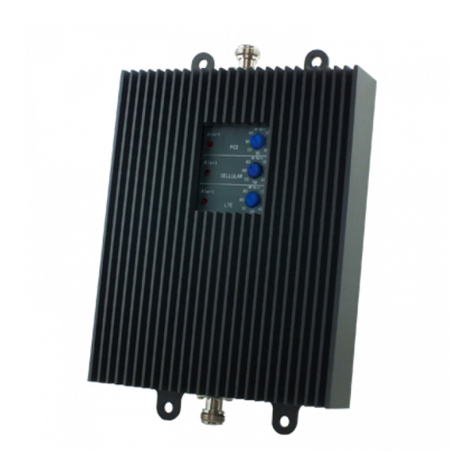
The 19dB Booster by Cellphone-Mate, Inc. provides significantly increased cellular signal strength and
quality. You will see the difference in the number of bars on your display and hear the difference during
your conversations.
Mounting & Connecting the Booster
Connecting the Booster: The signal is received by the outside antenna from the cell tower, then
AMPLIFIED and transmitted through the cable to the amplifier, which sends it through the extension
cable to the universal connector on your cell phone or data card, sending the improved signal to your
laptop through the data card.
When the cell phone or data card transmits, the signal goes through the universal connector, sent
through the cable and boosted by the amplifier and broadcast back to the cell tower through the
antenna.
Connect the Antenna: The magnetic antenna should be placed near window with best available cell
signal. Antenna works best magnetically mounted to metallic surface, but can be placed on any surface.
The best location will be clear of obstacles. Make sure the area under the magnet is clean. Connect the
magnetic antenna cable to the “OUTSIDE” connector of the booster and tighten it. If using another
antenna other than a SureCall antenna, use the included adapter to connect the cable leading from
OUTSIDE connection to antenna.
WARNING: The outside antenna must not be co-located or operating in conjunction with any other
antenna or booster.
Connect the Data port: Connect included RG174 cable to booster connection labeled INSIDE and the
other end to connection on data card in use with laptop or data port with cell phone.