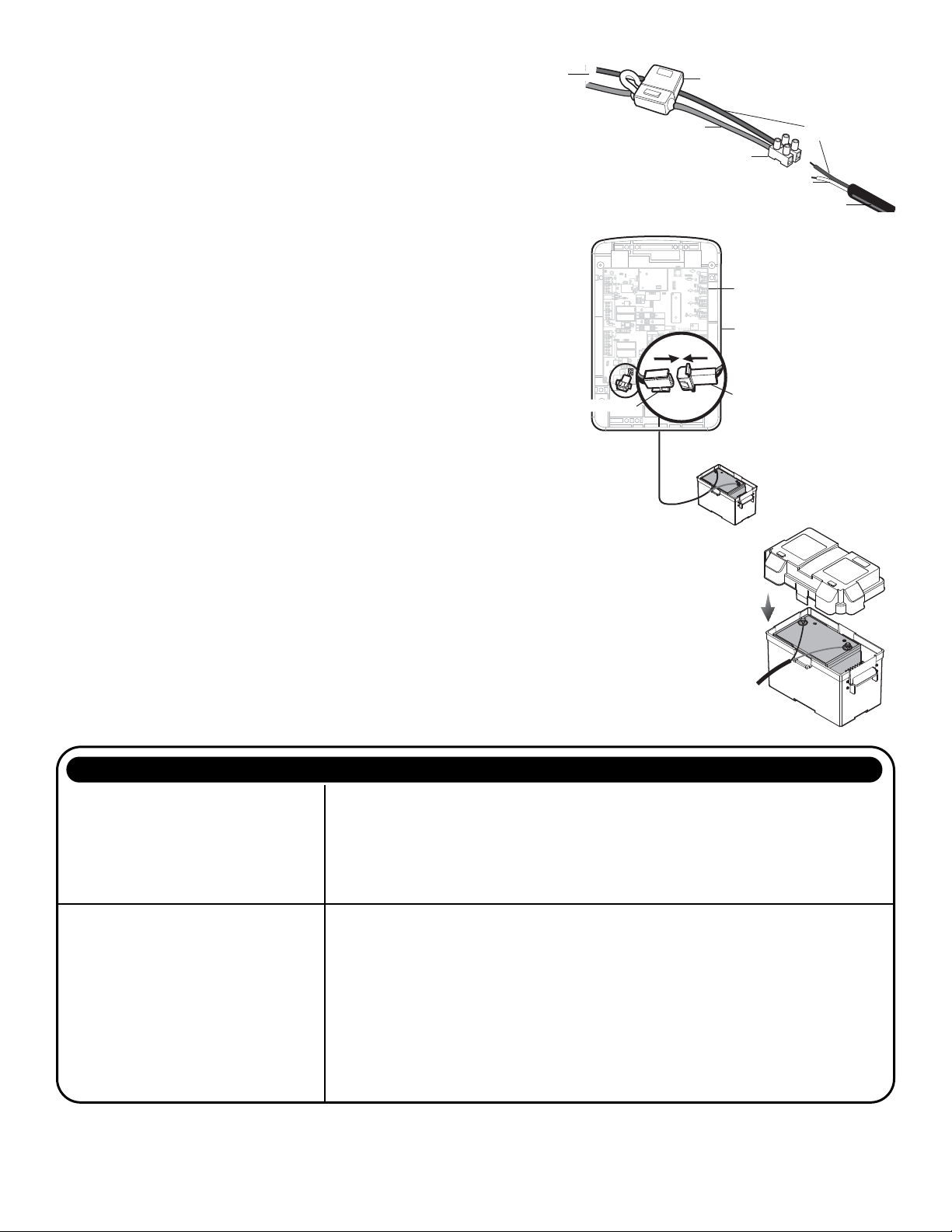
CONNECT TO GATE OPERATOR CONTROL BOX
1. Disconnect all power to the gate operator before proceeding.
2. Use a screwdriver to punch out the plastic knockout at the bottom
of the control box. Install the watertight connector.
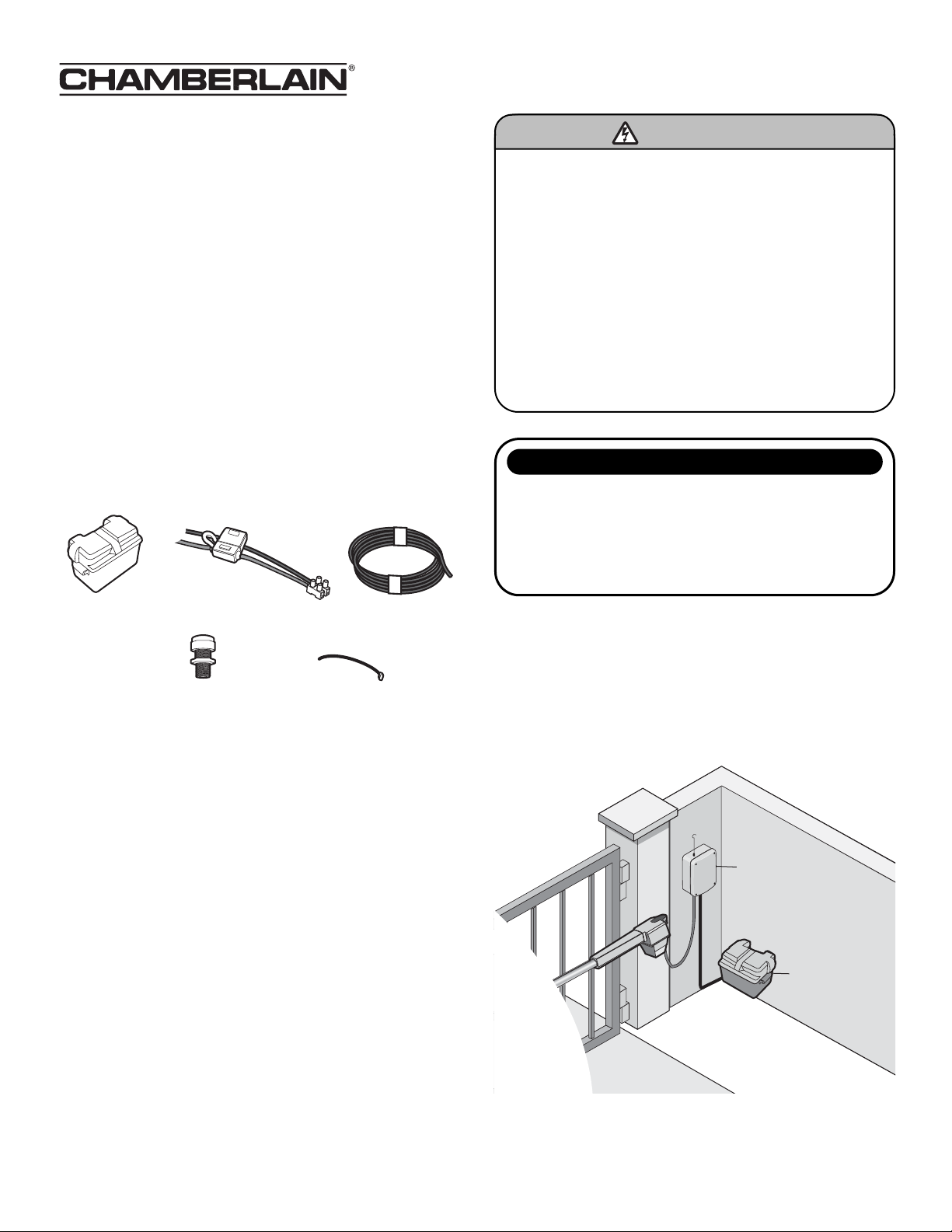
3. Feed the non-connector end of the extension cable through the
watertight connector from the inside of the control box. Tighten
the watertight connector until the cable is secure.
4. Run the extension cable to the battery box and connect the black
wire of the extension cable to the black wire of the terminal block
on the battery cable. Connect the white wire to the red wire.
5. Connect the battery connectors on the control board to the
connector on the extension cable in the control box.
NOTE: Some systems may have both battery connectors in use.
Disconnect one of the internal 7 AH batteries and use the connector to
connect the external battery. The unused 7 AH battery can be removed
from the system.
6. Verify that the gate operator operates correctly.
IMPORTANT NOTE: If the gate operator does not operate correctly, the
wiring may be incorrect. Also, if the battery has been discharged,
disconnect it and charge separately. Refer to troubleshooting for more
tips.
7. Use the wire ties to secure the cables.
8. Reconnect power to the operator.
9. Close the cover on the control box.
10. Place the cover on the top of the battery box. Be sure all drain
holes and air vents are properly opened.
Terminal Block
Fuse Holder
Black
Red
White
+
–
Control Board
Control Box
18
R93
L1
D42
K2
D1
Z22
P1
F2
MOV1
D1
Q12
U4
OFF
MAX
OPEN
SINGLEBUTTON
RESET
STOP
CHGR
OVLD
COM
COM
D129
Z4
U3
D2
D44
C11
C13
C12
D16
F9
R1
R1
ØØ
K1
Q22
F3
K3
K4
R196
F1
Z12
GATE2
GATE1
MAGR
SOL
GR
WH
YL
BL
RD
BR
GR
WH
YL
BL
RD
BR
F7
24V
CTRL
OVLD
TIMER
RUNNING
GATE2
SET
OPEN
LIMIT
SET
CLOSE
LIMIT
LEARN
LIMITS
GATE1
LEARN
XMITTER
LOCK /
ON
OFF
C69
OFF
MAX
J2
PWR
ACPWR
/SOLAR
D8
D4
R9
R329
R27
MOV2
R4
C2
BIPARTDELAY
LOCK
GND
Z1
R1
R2
K5
F12
Q9
R9
F8
Q6
Q1
J19
R182
C1
Ø1
C75
C73
C72
C71
C7
C66
C65
C68
C33
F11
R186
R42
R423
J24 J23 3
A 32V
3
A 32V
J21
30
30
C64
R22
U2
J18
K6
JU1
JU1
JU2
DB1
D36
R184
External Battery Connector
Control Board Connector
System does not power up when external
battery is connected.
1. Wires may be swapped. Verify that all wires are properly connected.
2. Battery is not charged. It is possible that the 12V battery (not provided) was not fully charged
when installed. Use a voltmeter to make sure this battery is good and has at least 12V across the
open circuit terminals.
3. Blown fuse. It is possible that a fuse, either in the battery cable harness or on the operator
control board, may have been blown during the installation. If a blown fuse is found, first check
all wiring to make sure it is correct, and then replace the fuse with the same size and type.
System powers up but does not
run correctly.
1. Wires may not be properly connected. Verify all connections for the installation. Batteries are
required for the operator to run.
2. Blown fuse. It is possible that a fuse, either in the battery cable harness or on the operator
control board, may have been blown during the installation. If a blown fuse is found, first check
all wiring to make sure it is correct, and then replace the fuse with the same size and type.
3. Battery is not charged. It is possible that the 12V battery (not provided) was not fully charged
when installed. Use a voltmeter to make sure this battery is good and has at least 12V across the
open circuit terminals.
4. Debris or other obstructions are affecting gate travel. Make sure that the battery box and
connecting wires are clear of the gate. Clear the gate of all obstructions and verify all safety
devices are operating properly.
TROUBLESHOOTING
PROBLEM SOLUTION
FOR TECHNICAL SUPPORT CALL OUR TOLL FREE NUMBER: 1-866-826-4943
© 2008, The Chamberlain Group, Inc.
01-34289B All Rights Reserved
Extension Cable
Battery Cable