English
GREAT BRITAIN
For consumer contact, please visit www.clasohlson.co.uk
and click on customer service.
Ver. 201102
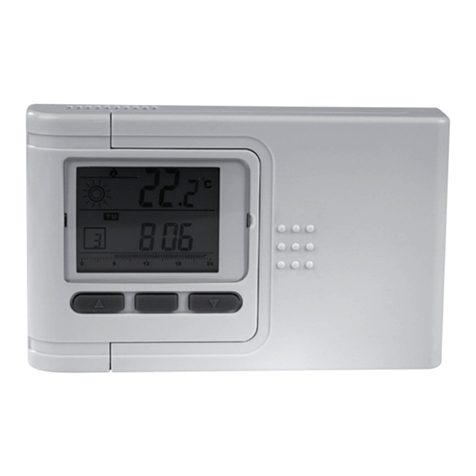
Plug-In Thermostat
Art.no 18-2168 Model TH810T-UK
36-1181 TH810T
Please read theentire instruction manual before use and save it for future reference. Wereserve theright for any errors in text or images and for
making any necessary technical changes to this document. Ifyou should have any questions concerning technical problems please contact our
Customer Services.
Description
The plug-in thermostat is designed to control indoor temperature. Max. power 16 A. TemperatureRange 5–30 °C.
Note
• The meter has an inbuilt temperature margin in order to compensate
for normal variations in temperatures (e.g. when adoor, or window
is opened etc.). Itcan take between 1 to 3 minutes before
thethermostat reacts to atemperature change.
• Press thearrow buttons [▲] and [▼] at thesame time to change
between °C and °F.
• If nothing is shown on thedisplay: Connect it to apower point and
let it recharge for at least 10 hrs.
• “LO” shows on thedisplay when thebattery becomes uncharged.
Connectit to apower point and let it recharge for at least 10 hrs.
Thebattery should be continuously connected to apower point to
give it an optimal working life. Theinbuilt rechargeable battery is
notinterchangeable.
Settings
Activation during rising temperatures
(e.g. for controlling an air-conditioning unit)
• Press [ ] in order to see if thethermostat is in theoff mode.
• Press [ ] and [▲] simultaneously for three seconds (in off mode)
in order to set activation for rising temperatures (the display shows
thesnowflake symbol), or to set activation for both rising (snowflake
symbol) and sinking (flame symbol) temperatures.
• Press [ ] to turn on thethermostat, and use thearrow keys [▲]
and [▼] set theactivation temperature (20 °C is pre-programmed).
• When theset temperature is reached thesnowflake symbol
is displayed, theindicator lamp lights up green and thepower
point is active as long as theactual temperature is above
thesettemperature.
• When theindicator lamp lights up red theactual temperature is
below theset temperature and thepower point is not active.
Activation during sinking temperatures
(e.g. for controlling aheating unit)
• Press [ ] in order to see if thethermostat is in theoff mode.
• Press [ ] and [▲] simultaneously for three seconds to select
activation for sinking temperatures. Thedisplay shows theflame
symbol, off mode (light is off).
• Press [ ] to turn on thethermostat, and use thearrow keys [▲]
and [▼] set theactivation temperature (20 °C is pre-programmed).
• When theset temperature is reached theflame symbol is displayed,
theindicator lamp lights up green and thepower point is active as
long as theactual temperature is below theset temperature.
• When theindicator lamp lights up red theactual temperature is
above theset temperature and thepower point is not active.
Disposal
Follow local ordinances when disposing of this product.
If you are unsure about how to dispose of this product contact
yourmunicipality.
Specifications
Temperature Range 5–30 °C
Accuracy ± 0.5 °C
Voltage 230 V AC
Max. Power 16 A
Other Intended for indoor use,
safety shutters, earthed
RM S E T
88.8 88 C
F
C
F
Display shows actual temperature
with digits (88.8 as shown)
The thermostat is set for activation
during sinking temperatures.
The thermostat is set for activation during
rising temperatures.
Digitally shows theactivation
temperature (88 °C in thepicture)
(20 °C is pre-programmed).
Reset
Reduce activation temperature
Increase activation temperature
Turn on/off thethermostat
Indicator light
Does not light: The thermostat is
turned off.
Lights up red: The temperature has
reached theactivation temperature
and thepower point has no power.
Lights up green: The temperature
has not reached theactivation
temperature and thepower point
has power.