Comelit IPFE071A User manual

1
FISH-EYE IP CAMERAS
EASY SERIES
ART. IPFE071A-IPFE073A
Please read this manual thoroughly before use and keep it for future reference

2
Network Connection
This series of products support the access and management via web browser.
IP camera factory default setup:
IP address: 192.168.1.168.
User name: admin
Password: (none)
Please follow the steps listed below for network connection.
- Make sure the IPC has connected to the network properly.
- The camera IP address and the PC IP address shall be in the same network segment.
- IPC default IP address is 192.168.1.168. If there is a router, please set the
corresponding gateway and subnet mask.
- Use the command ping ***.***.***.***(* IP camera address) to check if the connection
is OK or not.

3
Main Interface Introduction
Login
Open Internet Explorer and enter the camera IP address in the address bar.
For example, if your IP camera address is 192.168.1.168 (the default one) ,then please
enter http:// 192.168.1.168 in the address bar. See picture 2.1
2.1
Then you will turn to the Login page. See picture 2.2
Please input your user name and password.
Default factory name is admin and password is (none).
Note: for security reasons, please modify your password after your first login.
2.2

4
After you logged in, the camera main interface is shown as in picture 2.3
2.3
There are eight sections:
1: Main stream
2: PTZ control
3: n.a.
4: Main stream and the second stream switching
5: Audio On/Off
6: Snapshot
7: Switch from live to setup and vice-versa
8: Choice of language
Main and sub stream
The preview window is shown below. See pictures 2.4 (sub stream) and 2.5 (main stream)
2.4

5
2.5
1: Date/Time
2: Channel Name
3: Esee ID
Stream switch
You can change from main stream to sub stream flow via this module.
See pictures 2.6 and 2.7
2.6

6
2.7
Snapshot
Click this button to get a screenshot.
Language
Click to choose the language. See picture 2.8.
2.8

7
Setup
Media
In this section is possible to setup the Video, the Image, the ISP, the Privacy Mask and the
OSD.
Video setup
Video setup contents:
1: power frequency
2: profile
3: Encode Type
4: Stream
5: Channel Name, Resolution and Bitrate Control Type
6: BPS
7: FPS
power frequency
Choose the frequency from 50HZ or 60HZ. See picture 2.9.
2.9
profile
Choose the profile from main or baseline. See picture 3.0
3.0

8
Encode Type
You can choose the encode type from video or video&audio. See picture 3.1
3.1
Stream
You can choose the Stream from main stream or sub stream. See picture 3.2.
3.2
Channel Name, Resolution and Bitrate Control Type
Set the channel name as you like and set the Bitrate type from Variable or Constant. In the
dropdown menu, you can also choose the resolution You need. See pictures 3.3 and 3.4.
3.3

9
3.4
BPS
Set the BPS as you need. See picture 3.5.
3.5
FPS
Set the FPS as you need. See picture 3.6.
3.6
Note: after change the setup, don’t forget to save!!!
10
Image setup
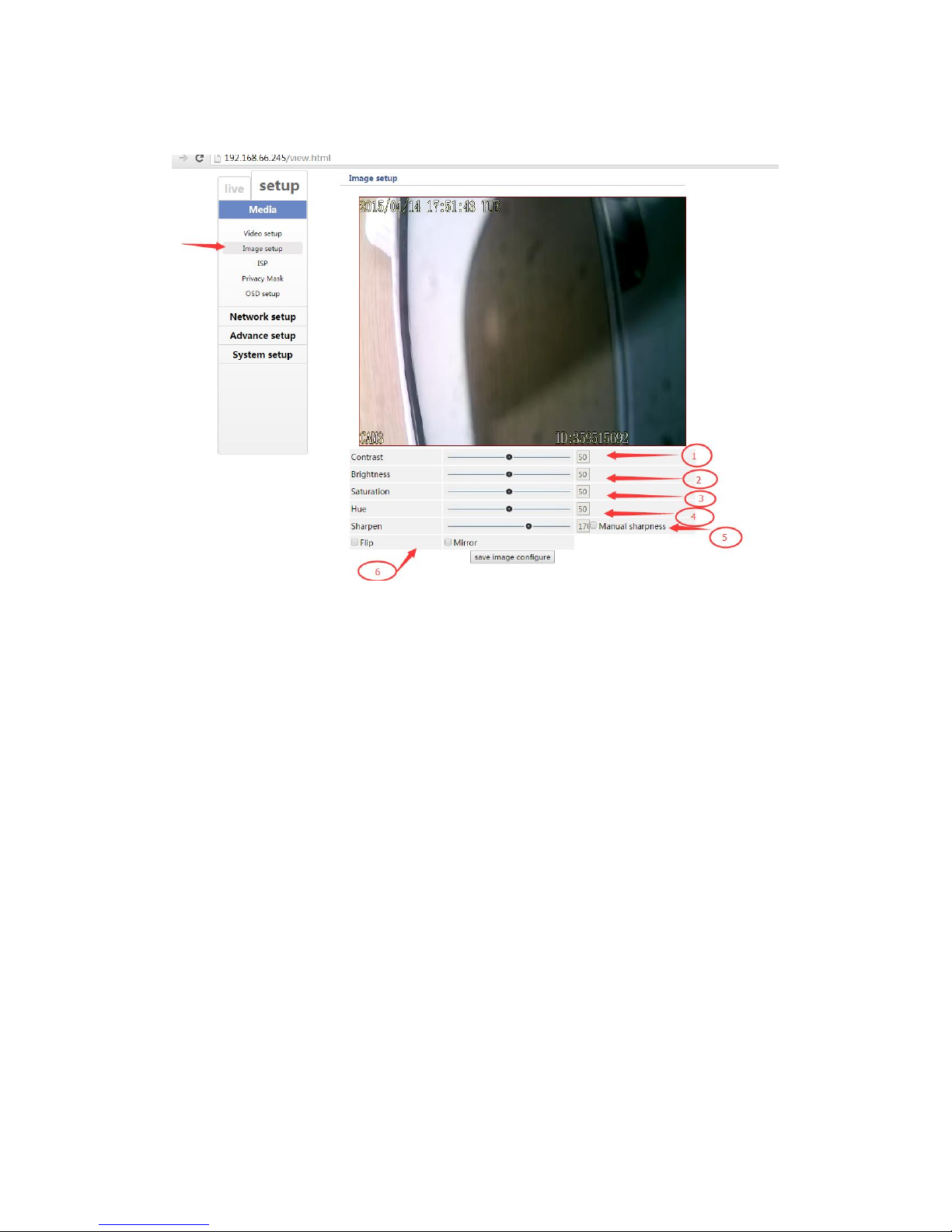
Setup your image in this section. See picture 3.7.
3.7
Image setup contents:
1: Contrast
2: Brightness
3: Saturation
4: Hue
5: Sharpen
6: Flip or Mirror
Note: after change the setup, don’t forget to save!!!
This manual suits for next models
1
Table of contents
Other Comelit IP Camera manuals