9
of any cross-sectional area within the equipment, 2) would block ventilation openings, or 3)
would be in an area of breaker arc venting.
●See the CT datasheets for the maximum input current ratings.
●Be careful to match the CTs with the voltage phases. Make sure the ØA CT is measuring the
current on the same phase as the ØAvoltage input, and the same for phases B and C. Use the
supplied colored labels or colored tape to identify the CT leads.
●To minimize current measurement noise, avoid extending the CT wires, especially in noisy
environments. If it is necessary to extend the wires, use twisted pair wire 22 to 14 AWG, rated
for 300 V or 600 V (not less than the service voltage) and shielded if possible.
●Find the source arrow or label “THIS SIDE TOWARD SOURCE” on the CT and face/point
toward the source of current.
●OPTIONAL: if you see spurious readings on unused phases, jumper the unused CT inputs:
for each unused CT, connect a short wire from the terminal marked with a white dot to the
terminal marked with a black dot.
Install the CTs around the conductor to be measured and connect the CT leads to the meter. Al-
ways turn off power before disconnecting any live conductors.
Split-core CTs can be opened for installation around a conductor. A nylon cable tie may be se-
cured around the CT to prevent inadvertent opening. If using solid-core CTs, put the line conduc-
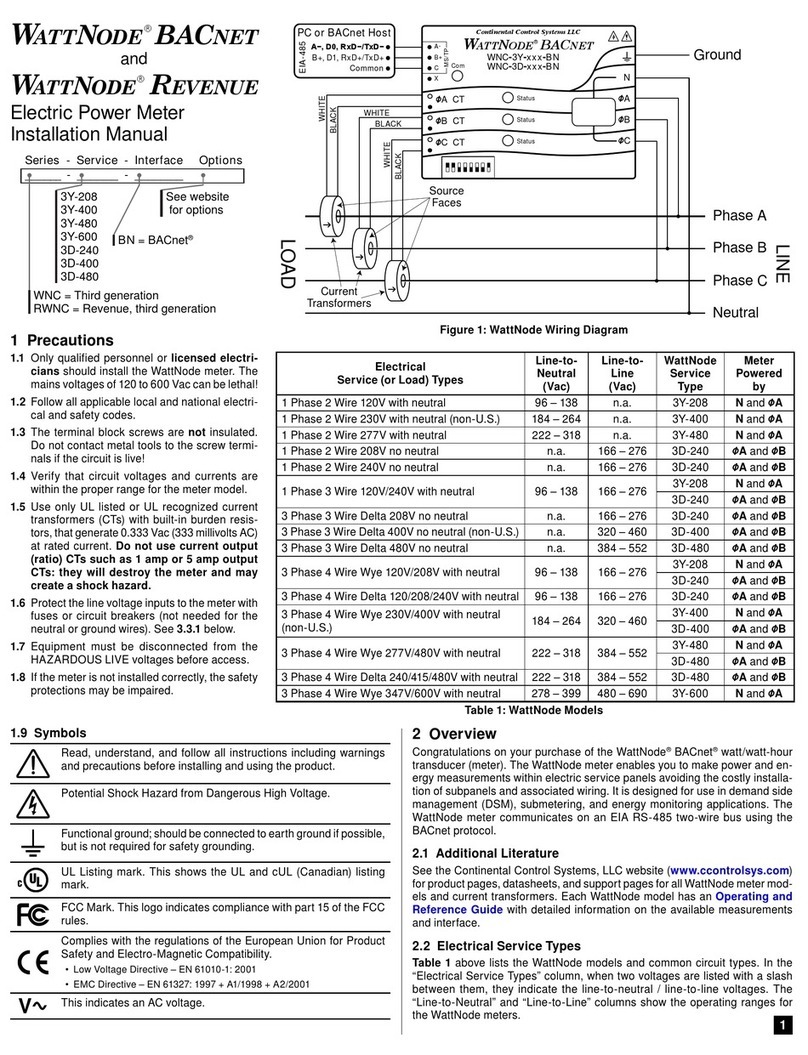
tors through the CTs as shown in Figure 1 above.
CTs are directional. If they are mounted backwards or with their white and black wires swapped the
measured power will be negative. The status LEDs indicate negative measured power by flashing
red.
When installing WattNode Revenue models, be sure to only use IEEE C57.13 class 0.6 current
transformers, such as the Accu-CT; other CTs are less accurate and may not provide revenue ac-
curacy. Contact sales for more information on appropriate CTs.
3.4.2 CT Wiring
The current transformers connect to the six position black screw terminal block. Connect the
white and black CT wires to the meter terminals marked ØA CT, ØB CT , and ØC CT (see Figure 1
above). Excess length may be trimmed from the wires if desired. Connect each CT with the white
wire aligned with the white dot on the label, and the black wire aligned with the black dot. Note
the order in which the phases are connected, as the line voltage phases must match the current
phases for accurate power measurement.
3.5 Connect the Output Signals
●The meter outputs are electrically isolated from dangerous voltages.
●If the output wiring is near line voltage wiring, use wires or cables with a 300 V or 600 V rating
(not less than the service voltage).
●If the output wiring is near bare conductors, it should be double insulated or jacketed.
●You may install two wires into each screw terminal by twisting the wires together, inserting
them into terminal, and securely tightening. Note: a loose wire can disable an entire network
section.
●Use shielded twisted-pair cable to prevent interference. If there is no common conductor, con-
nect the shield to the Cterminal.
3.5.1 BACnet MS/TP
The WattNode BACnet meter can be connected to BACnet monitoring equipment, gateways, and
other BACnet devices.
Use DIP switches 1-6 to select the BACnet MAC address (0 to 63).