Generic informations
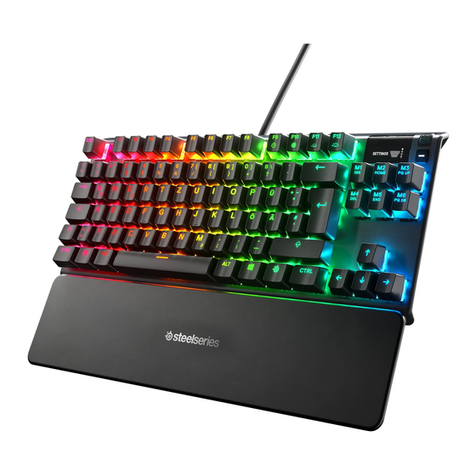
The Gammec XCommand is a Gaming keyboard, with backlight in 7 colors and with
memory for macro recording. The keyboard has ITALIAN layout.
The keyboard uses USB connection and is usable with all the more popular operating
systems. The circuits are optimized to minimize conflicts between the keys even if
pressed simultaneously.
After the process of printing the letters on the keys have been subjected to a UV tratment,
this has made much more difficult to be deleted and simultaneously has meant that they
are less visible with the backlight turned off.
Illumination
The XCommand is equipped with backlight in 7 colors : red, blue, green, purple, light
blue, yellow and white. It is a backlight of the entire base of the keyboard and also the
letters are illuminated being the keys drilled by laser.
To set the various colors of the lighting must simultaneously press the FN key and the
Bl/Sc, this allows to move sequentially from one color to another and also allows you to
completely turn off the light.
The intensity of the light can be adjusted on 3 levels plus a level off by simultaneously
pressing the FN+PgUp and FN+PgDn.
A respiration animation will activate pressing Fn+Pause, press again will come back to the
standard mode.
Macro Programmation
Teh keyboard has 64Kb of internal memory to store up to 5 recording called by pressing
the G1 .. G5 keys.
Recording G1 : press REC, then G1, now begins recording everything that you press : can
be a key, a combination of keys, a phrase, when we once again press REC closes and
saves the recording.
Similar you can proceed the other G keys.
Gaming Functions
The keyboard has gaming functions that can be activated by pressing the FN key and
some other keys :
FN+Q : exchange in hardware WASD with the ARROW keys.
FN+WIN (button on the left of the left ALT key) : locks the Windows keys.
In the package is included a kit with useful keys extractor and 8 orange colored keys taht
can be mounted in place of the WASD keys and ARROWS keys, these keys are designed
for night use of the keyboard and in fact admit light so that it makes the same keys very
visible at night.
Windows e Multimedia Functions
The keyboard is equipped with 8 additional keys for Windows and Multimedia Functions
that are clearly visible on top.
Informazioni generiche
La Gammec XCommand e’ una tastiera Gaming, con retroilluminazione in 7 colori e con
memoria per registrazione macro. La tastiera ha layout ITALIANO.
La tastiera usa la porta USB e funziona con tutti i principali sistemi operativi.
I circuiti sono ottimizzati per ridurre al minimo i conflitti tra i tasti anche se pigiati
contemporaneamente.
Dopo il processo di stampa le lettere sui tasti sono state sottoposte ad un trattamento UV,
questo le ha rese molto piu’ difficili da essere cancellate e contemporaneamente ha fatto si
che le stesse risultino meno visibili con la retroilluminazione spenta.
Illuminazione
La tastiera e’ dotata di retro illuminazione in 7 colori : rosso, blu, verde, viola, celeste,
giallo e bianco . Si tratta di retroilluminazione di tutta la base della tastiera e inoltre le
lettere sono illuminate essendo i tasti perforati al laser.
Per settare i vari colori di illuminazione bisogna premere conemporaneamente il tasto FN
e il tasto Bl/Sc, questo permette appunto di passare in sequenza da un colore all’altro e
inoltre permette di spegnere totalmente l’illuminazione.
L’intensita’ dell’illuminazione puo’ essere regolata su tre livelli + un livelo di spento
premendo contemporaneamente i tasti FN+PagSU e FN+PagGIU.
Un’ animazione di respiration e’ disponibile premendo FN + il tasto Pausa, ripremendo si
torna in modalita’ standard.
Programmazione Macro
La tastiera ha 64Kb di memoria interna per memorizzare fino a 5 registrazioni
richiamabili premendo i tasti da G1 a G5.
Registrazione su G1: premere il tasto REC, poi G1, a questo punto inizia la registrazione
di tutto quello che si preme : puo’ essere un tasto, una combinazione di tasti, una frase,
quando si ripreme REC si chiude e si memorizza la registrazione.
Analogamente si puo’ procedere per gli altri tasti G.
Funzioni Gaming
La tastiera e’ dotata di funzioni gaming attivabili premendo contemporaneamente il tasto
FN e alcuni altri tasti:
FN+Q : scambia a livello hardware i tasti WASD con i tasti CURSORE.
FN+WIN (tasto a sinistra del tasto ALT sinistro) : blocca i tasti Windows.
Nella confezione e’ incluso un kit con un comodo estrattore di tasti e 8 tasti colorati in
arancione che possono essere montati al posto dei tasti WASD e dei CURSORI, questi
tasti sono appositamente studiati per l’uso in notturna della tastiera e infatti lasciano
passare la luce che cosi’ rende gli stessi tasti molto visibili in notturna.
Funzioni Windows e Multimediali
La tastiera e’dotata di 8 tasti aggiuntivi per funzioni Windows e Multimediali ben visibili
sulla parte superiore.