Generic informations
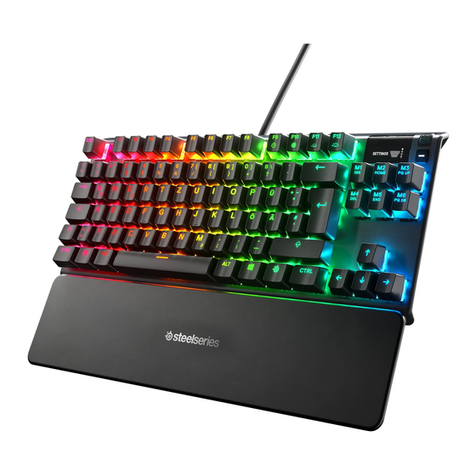
The Gammec XSniper is a keyboard with suspension keys, with backlight in 3 differents
selectables raindow colors and with some gaming functions. The keyboard has ITALIAN
layout.The keyboard uses USB connection and is usable with all the more popular
operating systems. Being the keys suspended the internal components are well protected
against external agent. The circuits are optimized to minimize conflicts between the keys
even if pressed simultaneously (Anti-Ghost).
Illumination
The XSniper is equipped with backlight in 3 differents selectables rainbow colors. It is a
backlight of the entire base of the keyboard and also the letters are illuminated being the
keys drilled by laser.
To set the various colors of the lighting must simultaneously press the FN key and the
Bl/Sc, this allows to move sequentially from one rainbow color to another and also allows
you to completely turn off the light.
The intensity of the light can be adjusted on 3 levels plus a level off by simultaneously
pressing the FN+PgUp and FN+PgDn.
A respiration animation will be activate pressing the FN+Pause, pressing again will be
back to the standard mode.
Gaming Functions
The GK1 is with gaming functions can be activated by pressing the FN key and some
other keys :
FN+Q : you can set two different keys repeat speed.
FN+W : exchange in hardware WASD with the ARROW keys.
FN+WIN (button on the left of the left ALT key) : locks the Windows keys.
Windows e Multimedia Functions
The keyboard is equipped with Windows and Media functions that can be activated by
pressing the FN key and the 12 functions keys F1..F12.
FN+F1..F8 : 8 Audio/Video Functions.
FN+F9 : Internet.
FN+F10 : Mail.
FN+F11 : Computer.
FN+F12 : Lock/Unlock.
Informazioni generiche
La Gammec XSniper e’ una tastiera a tasti sospesi, con retroilluminazione in 3 diversi
arcobaleno a scelta e con funzioni gaming. La tastiera ha layout ITALIANO.
La tastiera usa la porta USB e funziona con tutti i principali sistemi operativi.
Essendo i tasti in sospensione i circuiti interni sono ben protetti contro eventuali agenti
esterni.I circuiti sono ottimizzati per ridurre al minimo i conflitti tra i tasti anche se pigiati
contemporaneamente (Anti-Ghost).
Illuminazione
La tastiera e’ dotata di retro illuminazione in 3 diversi arcobaleno selezionabili.
Si tratta di retroilluminazione di tutta la base della tastiera e inoltre le lettere sono
illuminate essendo i tasti perforati al laser.
Per settare i vari colori di illuminazione bisogna premere conemporaneamente il tasto FN
e il tasto Bl/Sc, questo permette appunto di passare in sequenza da un colore arcobaleno
all’altro e inoltre permette di spegnere totalmente l’illuminazione.
L’intensita’ dell’illuminazione puo’ essere regolata su tre livelli + un livelo di spento
premendo contemporaneamente i tasti FN+PagSU e FN+PagGIU.
Un’ animazione di respiration e’ disponibile premendo FN + il tasto Pausa, ripremendo si
torna in modalita’ standard.
Funzioni Gaming
La tastiera e’ dotata di funzioni gaming attivabili premendo contemporaneamente il tasto
FN e alcuni altri tasti:
FN+Q : e’ possibile settare due diverse velocita’ di ripetizione tasti.
FN+W : scambia a livello hardware i tasti WASD con i tasti CURSORE.
FN+WIN (tasto a sinistra del tasto ALT sinistro) : blocca i tasti Windows.
Funzioni Windows e Multimediali
La tastiera e’dotata di funzioni Windows e Multimediali attivabili premendo
contemporaneamente il tasto FN e i 12 tasti funzione da F1 a F12.
FN+F1..F8 : 8 Funzioni Audio/Video.
FN+F9 : Internet.
FN+F10 : Mail.
FN+F11 : Computer.
FN+F12 : Lock/Unlock.