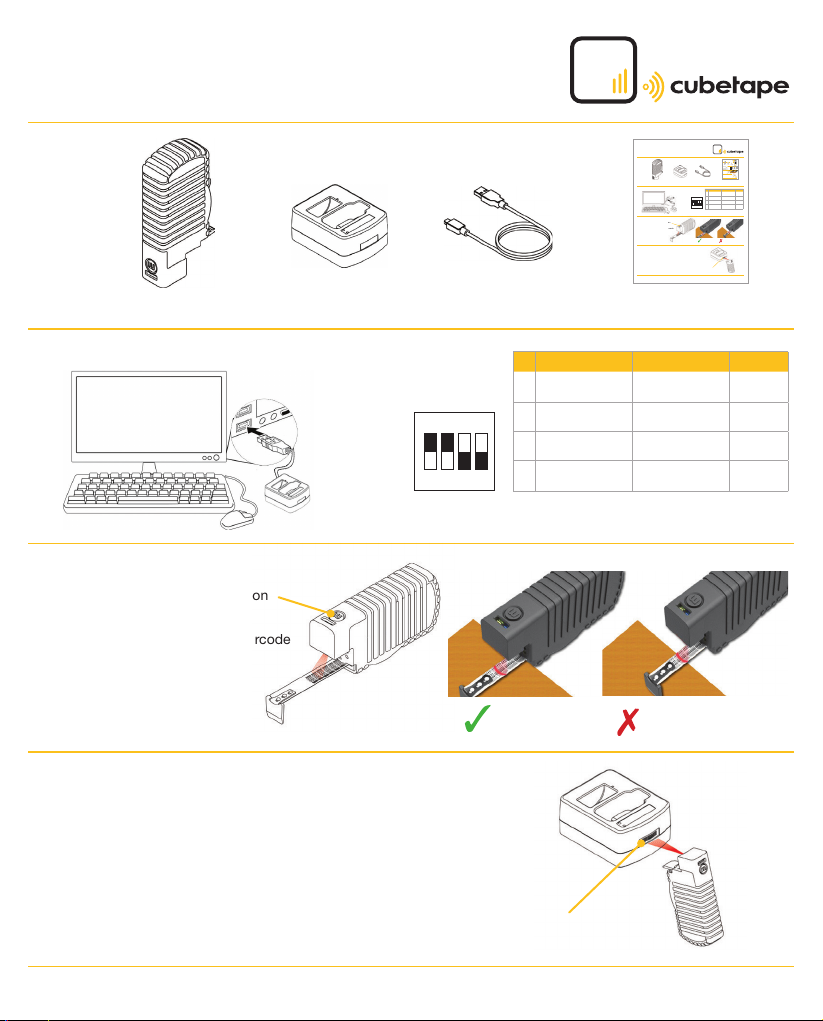
Page 1 - C190POS Quickstart Guide www.cubetape.com/downloads/C190POS Quickstart Guide
Contents
Installation
Operations and Measuring
• To power on hold down ‘m’ button
for 2 seconds
• Press ‘m’ to scan and send a barcode
• Extend the tape and press ‘m’
to scan and send a dimension
Bluetooth Pairing - to pair Cubetape with its cradle
• After cradle installation, power on Cubetape
• Scan the Bluetooth pairing barcode on the front of the cradle
• Cubetape is successfully connected to the cradle, when the
Blue LED indicators on Cubetape and the cradle are permanently ON.
• If the Blue LED indicators continue to flash, re-scan the Bluetooth
pairing barcode on the cradle
C190POS Cubetape C190DSK Cradle C190CRC USB Cable
DIP switches beneath cradle
Correct Incorrect
C190POS Quickstart Guide
USB Cable
PC
Cradle
OFF ON DEFAULT
1BLUETOOTH
MODE MASTER SLAVE ON
2 USB-VCP USB-HID ON
3 RESERVED - OFF
4 RESERVED BT ADDRESS
OUTPUT OFF
Pairing Barcode
1 2 3 4
ON
Page 1 - C190POS Quickstart Guide www.cubetape.com/downloads/C190POSQuickstart Guide
Contents
Installation
Operations and Measuring
• Topower on hold down ‘m’ button
for 2 seconds
• Press ‘m’ to scan and send a barcode
• Extend the tape and press ‘m’
to scan and send a dimension
Bluetooth Pairing - to pair Cubetape with its cradle
• After cradle installation, power on Cubetape
• Scan the Bluetooth pairing barcode on the frontof the cradle
• Cubetape is successfully connected to the cradle, when the
Blue LED indicators on Cubetape and the cradle are permanently ON.
• If the Blue LED indicators continue to flash, re-scan the Bluetooth
pairing barcode on the cradle
C190POS Cubetape C190DSK Cradle C190CRCUSB Cable
DIP switches beneath cradle
Correct Incorrect
C190POS Quickstart Guide
USB Cable
PC
Cradle
OFF ON DEFAULT
1BLUETOOTH
MODEMASTER SLAVE ON
2 USB-VCP USB-HID ON
3 RESERVED - OFF
4 RESERVED BTADDRESS
OUTPUT OFF
Pairing Barcode
1 2 3 4
ON
Page1-C190POSQuickstartGuide www.cubetape.com/downloads/C190POSQuickstartGuide
Contents
Installation
OperationsandMeasuring
•Topoweronholddown ‘m’ button
for2seconds
•Press‘m’toscanand send a barcode
•Extendthetapeandpress ‘m’
toscanandsendadimension
BluetoothPairing-topairCubetape with its cradle
•Aftercradleinstallation,poweron Cubetape
•ScantheBluetoothpairingbarcode on the front of the cradle
•Cubetapeissuccessfullyconnectedto the cradle, when the
BlueLEDindicatorsonCubetapeandthe cradle are permanently ON.
•IftheBlueLEDindicators continue to flash, re-scan the Bluetooth
pairingbarcodeonthecradle
C190POSCubetape C190DSK Cradle C190CRCUSBCable
DIPswitchesbeneathcradle
Correct Incorrect
C190POSQuickstartGuide
USBCable
PC
Cradle
OFF ON DEFAULT
1BLUETOOTH
MODEMASTER SLAVE ON
2 USB-VCP USB-HID ON
3 RESERVED - OFF
4 RESERVED BTADDRESS
OUTPUT OFF
PairingBarcode
123 4
ON
Page1-C190POSQuickstartGuide www.cubetape.com/downloads/C190POS Quickstart Guide
Contents
Installation
OperationsandMeasuring
•Topoweronholddown‘m’button
for2seconds
•Press‘m’toscanandsendabarcode
•Extendthetapeandpress‘m’
toscanandsendadimension
BluetoothPairing-topairCubetapewithitscradle
•Aftercradleinstallation,poweronCubetape
•ScantheBluetoothpairingbarcodeonthefrontofthecradle
•Cubetapeissuccessfullyconnectedtothecradle,whenthe
BlueLEDindicatorsonCubetapeandthecradlearepermanentlyON.
•IftheBlueLEDindicatorscontinuetoflash,re-scantheBluetooth
pairingbarcodeonthecradle
C190POSCubetapeC190DSKCradleC190CRCUSBCable
DIPswitchesbeneathcradle
CorrectIncorrect
C190POSQuickstartGuide
USBCable
PC
Cradle
OFFONDEFAULT
1BLUETOOTH
MODEMASTERSLAVEON
2USB-VCPUSB-HIDON
3RESERVED-OFF
4RESERVEDBTADDRESS
OUTPUTOFF
PairingBarcode
1234
ON
C190POSQuickstartGuide
June2020
C190POSQuickstartGuide
June2020
C190POS Quickstart Guide
June 2020
C190POS Quickstart Guide
June 2020



















