4L6156
CLEANING ATTACHMENTS & TOOLS
•Works well to clean bare floors,
wood flooring, tile, etc.
•Shorter bristles in front, longer
in back--allows larger dirt
particles to be picked up with
forward movement.**
CT-630BLK
Premium Crevice Tool
•13” tool to reach into cracks and crevices
such as tracks of sliding glass doors, corners,
along baseboards, and even in the cracks of
couches and other furniture.
•Notched end and slotted side vents help
maintain air flow and proper suction.
•This tool has a flat side which makes
it great for reaching under refrigerators,
around air conditioner coils, and other
hard to reach places that collect a lot of dust and dirt.
DB-630BLK
Premium Dusting Brush
• Use for dusting furnishings such as bookcases, tables,
desks, and mantles.
• Also great for dusting picture frames, collectibles, tops
of televisions, window sills, and eventhe backs of
computer monitors.
• Molded, soft vinyl construction--less abrasive
on delicate furnishings and prevents wall markings.
• Full, natural bristles for gentle cleaning.
FB-415BLK
12” Floor Brush
**For best results, do not force the front of the brush down when moving
forward. Allow the brush to gently glide across the floor. The front of
the brush should allow particles to enter through the raised bristles.
To Attach Tools for Use: Simply slide the tool onto end of the tele-
scopic ratchet wand or directly onto stub tube of the hose.
*Tools are to be used with telescopic ratchet wand or handle on hose. Do NOT
use with top or lower electric brush wands.
11
WW
WW
Wand Inserand Inser
and Inserand Inser
and Insertion and Rtion and R
tion and Rtion and R
tion and Releaseelease
eleaseelease
elease
TT
TT
To Insero Inser
o Insero Inser
o Insert:t:
t:t:
t:
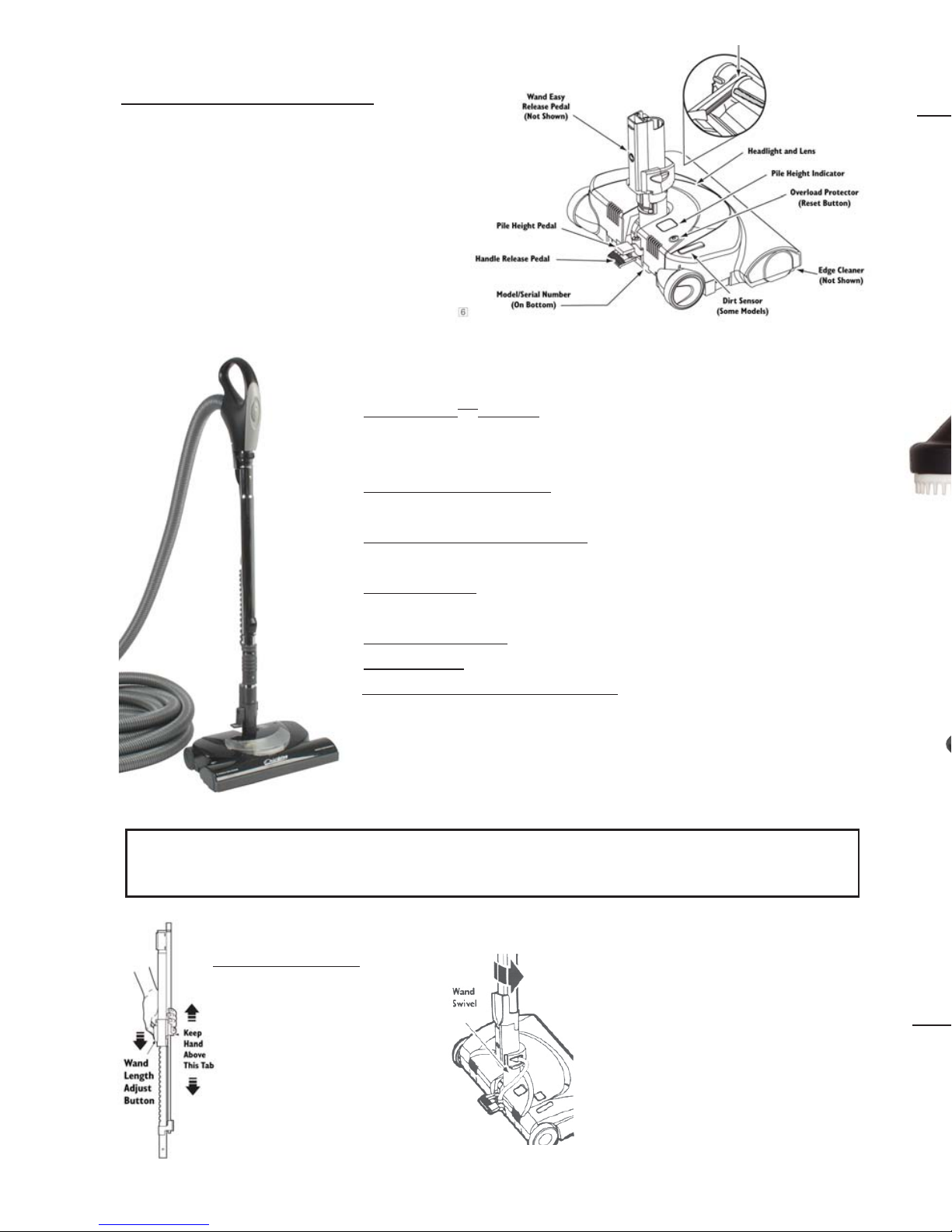
Insert wand into electric brush until the wand
button snaps into place.
1. To lower wand, press on the large pedal marked
“Handle Release”.
2. Start vacuum and electric brush.
Electric BrElectric Br
Electric BrElectric Br
Electric Brushush
ushush
ush AssembAssemb
AssembAssemb
Assembll
ll
ly and Usey and Use
y and Usey and Use
y and Use
TT
TT
To Staro Star
o Staro Star
o Start:t:
t:t:
t:
SugSug
SugSug
Suggg
gg
gested Pile Height Settings:ested Pile Height Settings:
ested Pile Height Settings:ested Pile Height Settings:
ested Pile Height Settings:
For best deep down cleaning, use the XLO
setting. However, you may need to raise the height to make some jobs easier.
As a gAs a g
As a gAs a g
As a generener
enerener
eneral guide:al guide:
al guide:al guide:
al guide: XLO-most carpet heights, LO-short to medium pile,
MED-medium to long pile, HI-long pile.
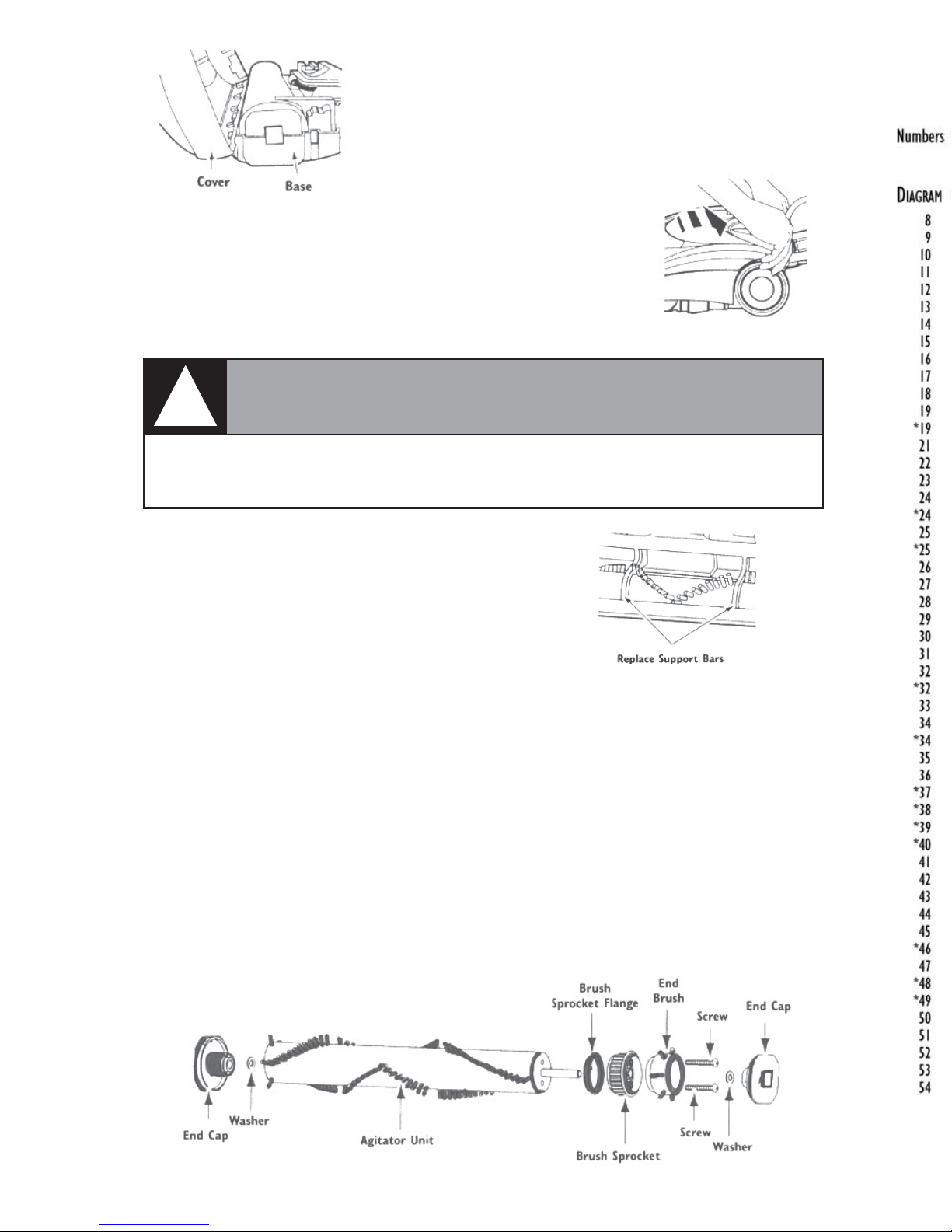
The overload protector protects the motor from brush jam-
ming and belt breakage. If the agitator slows down or stops,
the overload protector shuts the brush off.
TT
TT
To coro cor
o coro cor
o corrr
rr
rect prect pr
ect prect pr
ect probob
obob
oblem:lem:
lem:lem:
lem: Unplug electrical cord. Check
brush area for excessive lint buildup or jamming.
TT
TT
To ro r
o ro r
o reset:eset:
eset:eset:
eset:
Press the reset button on top of the brush. Plug
in and turn on vacuum and brush.
TT
TT
To Coro Cor
o Coro Cor
o Corrr
rr
rect & Rect & R
ect & Rect & R
ect & Reset Oveset Ov
eset Oveset Ov
eset Overer
erer
erload Prload Pr
load Prload Pr
load Protectorotector
otectorotector
otector::
::
:
Select a pile height setting by using the pile height
lever on the electric brush. The pile height setting
is shown on the control. The deeper the pile of
the carpet, the higher the setting.
TT
TT
To Chango Chang
o Chango Chang
o Change Pile Setting:e Pile Setting:
e Pile Setting:e Pile Setting:
e Pile Setting:
WARNING
!DO NOT attach or remove handle or wands while cleaner is ON. This
could cause sparking and damage the electrical contacts.
TT
TT
To Ro R
o Ro R
o Remoemo
emoemo
emovv
vv
vee
ee
e: Lock wands in straight-up position. Then, step on
the “Wand Quick Release” pedal with foot. Now, pull up on wand.