Dynex DX-AD113 User manual

DX-AD113 UHF/VHF/FM Amplier
Features
• Amplies 50-900 MHz signals
• Low signal noise
• Flat frequency response
• Ultra stable circuit
• High sensitivity to ensure picture stability and clarity
• Easy installation, including screw brackets for stable wall mounting
• For indoor use only
Package contents
• UHF/VHF/FM amplier
• Screws (2)
• Quick Setup Guide
Specications
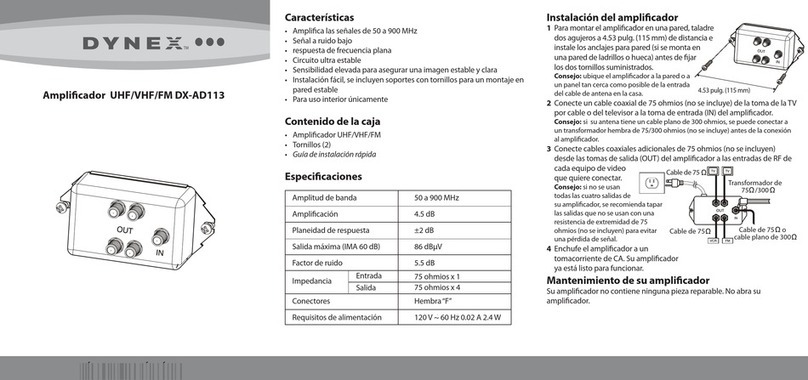
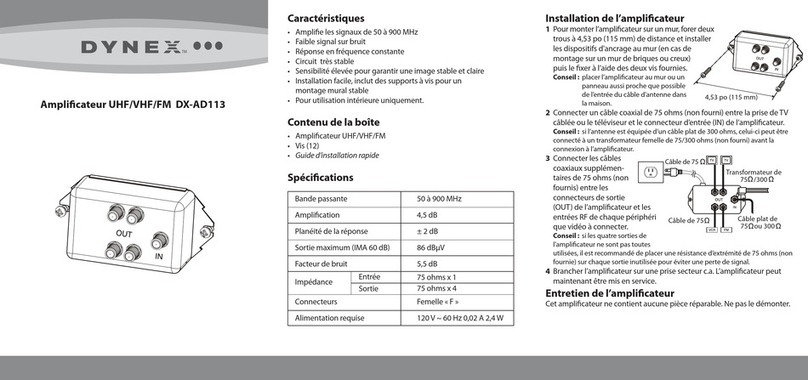
Setting up your amplier
1 To attach the amplier to a wall, drill two pilot
holes 4.53 in. (115 mm) apart and install wall
anchors (if mounting to a brick or hollow wall)
before securing with the two provided
screws.
Tip: Attach the amplier to the wall or
baseboard as close as possible to
where the antenna cable enters the house.
2Attach a 75-ohm coaxial cable (not included) from the cable TV outlet
or TV to the IN connector on the amplier.
Tip: If your antenna is equipped with a 300-ohm at wire, you can attach it to an
female 75/300-ohm
matching transformer
(not included) before
connecting to the
amplier.
3Attach additional
75-ohm coaxial
cables (not included) from the
OUT connectors on the amplier
to the RF inputs of each video
device you want to connect.
Tip: If you are not using all four
outputs on the amplier, we recommend that you cap the unused outputs with a
75-ohm terminating resistor (not included) to prevent signal loss.
4Plug the amplier into an AC power outlet. Your amplier is now in
operation.
Maintaining your amplier
Your amplier contains no serviceable parts. Do not disassemble.
QUICK SETUP GUIDE
Bandwidth
Gain
Response atness
Maximum output (IMA 60 dB)
Noise gure
Impedance
Connectors
Power requirement
Input
Output
50-900 MHz
4.5 dB
±2 dB
86 dBμV
5.5 dB
75 ohm x 1
75 ohm x 4
“F”female
120V ~ 60 Hz 0.02A 2.4W
4.53 in. (115 mm)
75 cable
or
300 at wire
75 cable
75 cable 75 /300
matching transformer

13 To reduce the risk of re or electric shock, do not expose this device to
rain, moisture, dripping, or splashing, and no objects lled with liquids,
such as vases, shall be placed on it.
14 An apparatus with a three-prong, grounding-type plug is a Class I
apparatus, which needs to be grounded to prevent possible electric
shock. Make sure that you connect this Class I device to a grounding-
type, three-prong outlet.
15 The wall plug is the disconnecting device. The plug must remain readily
operable.
FCC Part 15
This device complies with Part 15 of the FCC rules. Operation of this product
is subject to the following two conditions: (1) this device may not cause
harmful interference, and (2) this device must accept any interference
received, including interference that may cause undesired operation.
ICES-003
This Class (B) digital apparatus complies with Canadian ICES-003.
Safety information
1 Read these instructions.
2Keep these instructions.
3Heed all warnings.
4Follow all instructions.
5Do not use this apparatus near water.
6Clean only with a dry cloth.
7Do not block any ventilation openings. Install in accordance with the
manufacturer's instructions.
8Do not install near any heat sources such as radiators, heat registers,
stoves, or other apparatus (including ampliers) that produce heat.
9Do not defeat the safety purpose of the polarized or grounding-type
plug. A polarized plug has two blades with one wider than the other. A
grounding type plug has two blades and a third grounding prong. The
wide blade or the third prong are provided for your safety. If the
provided plug does not t into your outlet, consult an electrician for
replacement of the obsolete outlet.
10 Protect the power cord from being walked on or pinched particularly
at plugs, convenience receptacles, and the point where they exit from
the apparatus.
11 Unplug this apparatus during lightning storms or when unused for
long periods of time.
12 Refer all servicing to qualied service personnel. Servicing is required
when the apparatus has been damaged in any way, such as power-
supply cord or plug is damaged, liquid has been spilled or objects have
fallen into the apparatus, the apparatus has been exposed to rain or
moisture, does not operate normally, or has been dropped.
© 2009 Best Buy Enterprise Services, Inc. ENGLISH 09-0429
Other Dynex Amplifier manuals