manuals.online logo
Brands
  1. Home
  2. •
  3. Brands
  4. •
  5. Educational Insights
  6. •
  7. Digital Pen
  8. •
  9. Educational Insights Hot Dots Jr. User manual

Educational Insights Hot Dots Jr. User manual

Popular Digital Pen manuals by other brands

PENANDFREE PT Pen user manual

PENANDFREE

PENANDFREE PT Pen user manual

I.R.I.S. IRISNOTES EXECUTIVE 1.0 Getting started guide

I.R.I.S.

I.R.I.S. IRISNOTES EXECUTIVE 1.0 Getting started guide

Ctouch 10051955 Product Info

Ctouch

Ctouch 10051955 Product Info

Kogan NBAPCLMGWSA user guide

Kogan

Kogan NBAPCLMGWSA user guide

Trust 21946 user manual

Trust

Trust 21946 user manual

Steren IPEN-100 instruction manual

Steren

Steren IPEN-100 instruction manual

DANE-ELEC ZPEN - quick start guide

DANE-ELEC

DANE-ELEC ZPEN - quick start guide

DANE-ELEC ZPEN - manual

DANE-ELEC

DANE-ELEC ZPEN - manual

STAEDTLER 990 01 user manual

STAEDTLER

STAEDTLER 990 01 user manual

Livescribe Aegir quick start guide

Livescribe

Livescribe Aegir quick start guide

I.R.I.S. IRISNotes Executive 2 quick start guide

I.R.I.S.

I.R.I.S. IRISNotes Executive 2 quick start guide

interactive scape Capore Magnify operating manual

interactive scape

interactive scape Capore Magnify operating manual

Displays2go eMark Pen user manual

Displays2go

Displays2go eMark Pen user manual

Livescribe PULSE user manual

Livescribe

Livescribe PULSE user manual

Finger System I-pen user guide

Finger System

Finger System I-pen user guide

interactive scape Capore Shape operating manual

interactive scape

interactive scape Capore Shape operating manual

Legamaster e-Board Quick user guide

Legamaster

Legamaster e-Board Quick user guide

Delta Electronics POINTRACER user manual

Delta Electronics

Delta Electronics POINTRACER user manual

manuals.online logo
manuals.online logoBrands
  • About & Mission
  • Contact us
  • Privacy Policy
  • Terms and Conditions

Copyright 2025 Manuals.Online. All Rights Reserved.

EI-2348
Caring for Your Hot Dots Jr. Light-Up
Interactive Pencil
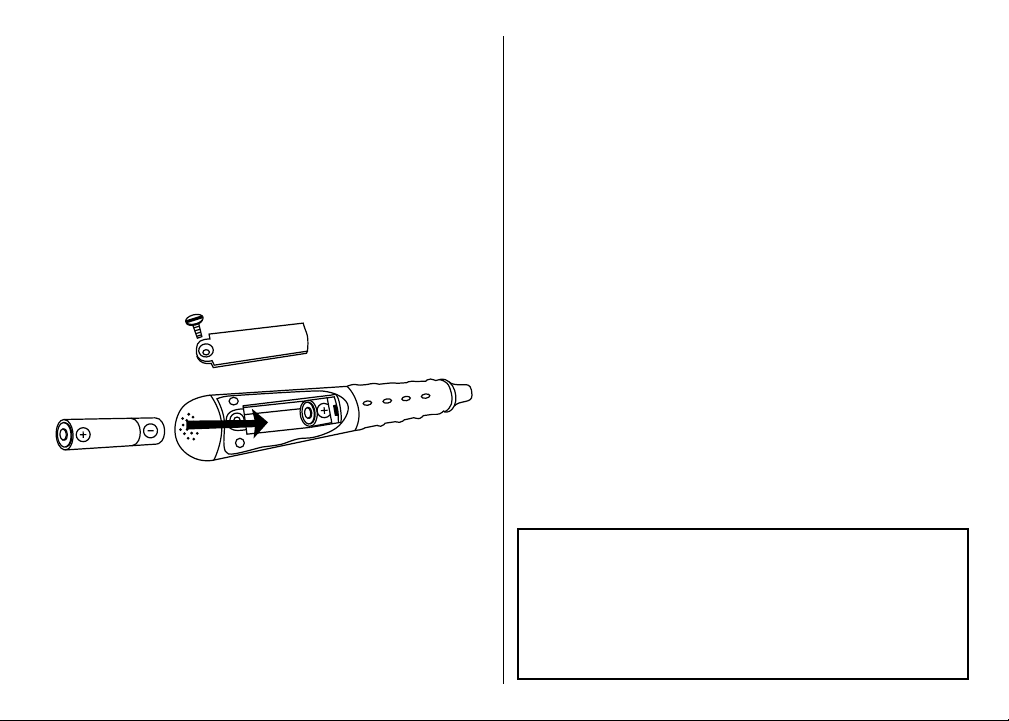
How to Install and Replace the Batteries
The Hot Dots Jr. Pencil requires 2 AAA batteries,
not included. To install the batteries, use a coin to
unscrew the battery door on the back of the pencil.
Turn the coin in a counterclockwise motion until the
door opens. Install 2 fresh AAA batteries as shown
in the diagram. Replace the door. Use the coin to
tighten the door. Turn in a clockwise motion until the
door is secure.
• Do not use rechargeable batteries.
• Do not mix old and new batteries.
• Do not mix different types of batteries: alkaline,
standard (carbon zinc) or rechargeable (nickel-
cadmium) batteries.
• Do not recharge nonrechargeable batteries.
This device complies with Part 15 of the FCC Rules.
Operation is subject to the following two conditions:
(1) this device may not cause harmful interference,
and (2) this device must accept any interference
received, including interference that may cause
undesired operation.
• Remove rechargeable batteries from the toy
before recharging.
• Only charge rechargeable batteries under adult
supervision.
• Only use batteries of the same or equivalent type
as recommended.
• Insert batteries with the correct polarity.
• Remove exhausted batteries from the unit.
• Do not short circuit the supply terminals.
• To prevent corrosion and possible damage to the
product, we recommend removing the batteries
from the unit if it will not be used for more than
two weeks.
Cleaning Instructions
Clean the pencil with a damp or dry cloth. Do not
immerse or spray liquid or water on the pencil.
Developed in Southern California by Educational Insights.
© Educational Insights, Gardena, CA (U.S.A.). All rights reserved.
Learning Resources Ltd., Bergen Way, King’s Lynn, Norfolk,
PE30 2JG, UK. Please retain this information. Made in China.
www.educationalinsights.com
Hecho en China. Conserva el envase para futuras consultas.
Fabriqué en Chine. Veuillez conserver l’emballage.
Hergestellt in China. Bitte Verpackung gut aufbewahren.
Tell us what you THINK!
REVIEW this product at
educationalinsights.com
Troubleshooting
If the Hot Dots Jr. Pencil does not work the first
time you use it:
• Make sure you have installed 2 AAA batteries in the
proper orientation.
If the Hot Dots Jr. Pencil does not work after using
it successfully:
• Take out the batteries and reinsert them, making
sure that they are sitting properly inside the battery
compartment.
• Install fresh batteries.
• Make sure the battery door is tightly secured.
If the Hot Dots Jr. Pencil still does not work:
• Make sure the tip of the Hot Dots Jr. Pencil is held
straight up and down and is touching the center of
the answer dot.
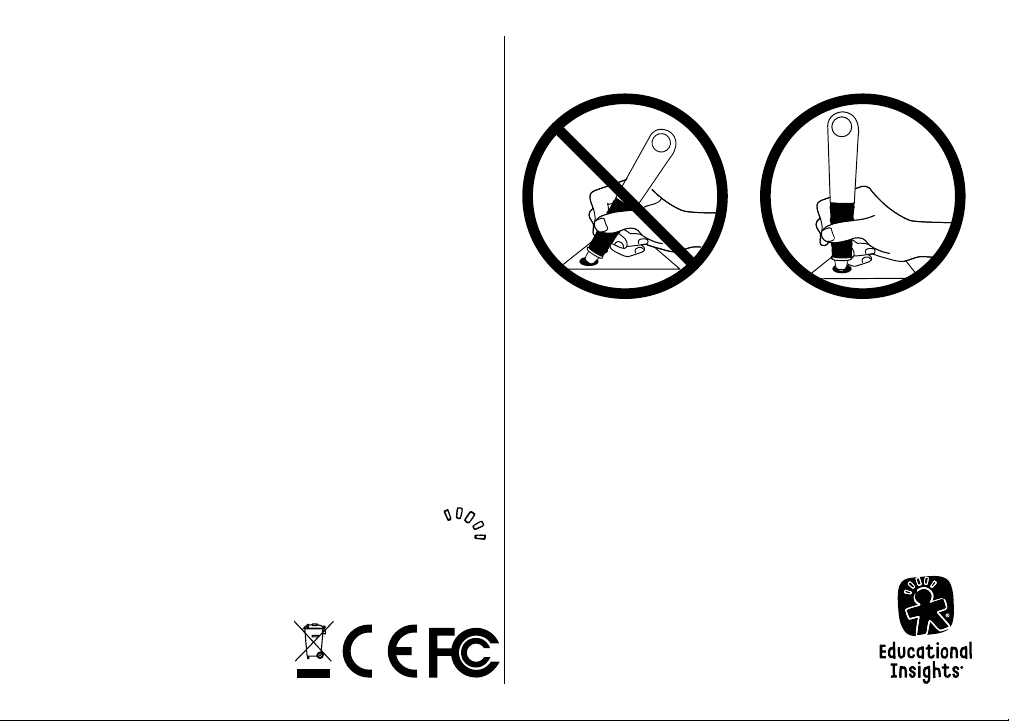
How to Position the Hot Dots® Jr.
Interactive Light-Up Pencil
Make sure the tip of the Hot Dots Jr. Pencil sits flat
on the surface of the answer dot as shown above.
The Hot Dots® Jr. Light-Up Interactive Pencil glows
green for answer reinforcement.
Using the Hot Dots Jr. Pencil
1. Read a question.
2. Position the pencil straight up and down and
touch an answer dot by pressing the end of the
pencil on the center of the dot.
• If correct, the pencil glows green.
• If incorrect, the pencil remains unlit.