EURO PR32C Specification sheet

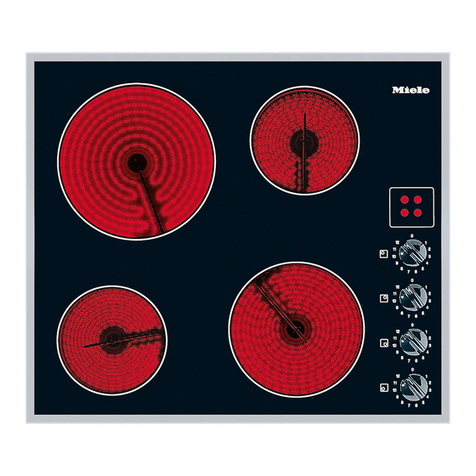
Ceramic Hob
Instruction Manual / Installation Manual
MODEL: PR32C

2
Congratulations on the purchase of your new Ceramic Hob.
We recommend that you spend some time to read this Instruction / Installation
Manual in order to fully understand how to install correctly and operate it.
For installation, please read the installation section.
Read all the safety instructions carefully before use and keep this Instruction /
Installation Manual for future reference.
Product Overview
Top View
Control Panel
1. max. 1800 W zone
2. max. 1200 W zone
3. Glass plate
4. ON / OFF
5. Control panel
1. ON/OFF control
2. Power / Timer regulating controls
3. Heating zone selection controls
4. Timer control
5. keylock control

3
Product Information
The microcomputer ceramic cooker hob can meet different kinds of cuisine
demands because of resistance wire heating, micro-computerized control and
multi-power selection, really the optimal choice for modern families.
The ceramic cooker hob centers on customers and adopts personalized design.
The hob has safe and reliable performances, making your life comfortable and
enabling to fully enjoy the pleasure from life.
Before using your New Ceramic Hob
•Read this guide, taking special note of the ‘Safety Warnings’ section.
•Remove any protective film that may still be on your ceramic hob.
Using the Touch Controls
•The controls respond to touch, so you don’t need to apply any pressure.
•Use the ball of your finger, not its tip.
•You will hear a beep each time a touch is registered.
•Make sure the controls are always clean, dry, and that there is no object (e.g. a
utensil or a cloth) covering them. Even a thin film of water may make the
controls difficult to operate.

4
Choosing the right Cookware
Do not use cookware with jagged edges or a curved base.
Make sure that the base of your pan is smooth, sits flat against the glass, and is
the same size as the cooking zone. Always centre your pan on the cooking zone.
Always lift pans off the ceramic hob –do not slide, or they may scratch the glass.

5
Using your Ceramic Hob
To start cooking
•After power on, the buzzer beeps once, all the indicators light up for 1 second
then go out, indicating that the ceramic hob has entered the state of standby
mode.
1. Touch the ON/OFF control. all the indicators
show “-“
2. Place a suitable pan on the cooking zone that
you wish to use.
•Make sure the bottom of the pan and the surface
Of the cooking zone are clean and dry.
3. Touching the heating zone selection control

6
4. Select a heat setting by touching the “-“or
“+”control.
•If you don’t choose a heat setting within 1
minute, the ceramic hob will automatically
switch off. You will need to start again at
step 1.
•You can modify the heat setting at any time
during cooking.
•By holding down either of these buttons, the
value will adjust up or down.
When you have finished cooking
1. Touching the heating zone selection
control that you wish to switch off
2. Turn the cooking zone off by scrolling down to “0 “or touching “-“and
”+”control together.
3. Turn the whole cooktop off by touching the ON/OFF control.

7
4. Beware of hot surfaces
“H”will show which cooking zone is hot to touch. It will disappear when the
surface has cooled down to a safe temperature. It can also be used as an energy
saving function if you want to heat further pans, use the hotplate that is still hot.
Locking the Controls
•You can lock the controls to prevent unintended use (for example children
accidentally turning the cooking zones on).
•When the controls are locked, all the controls except the ON/OFF control are
disabled.
To lock the controls
Touch the keylock control. The timer indicator will show “ Lo “
To unlock the controls
1. Make sure the ceramic hob is turned on.
2. Touch and hold the keylock control for a while.
3. You can now start using your ceramic hob.
When the hob is in the lock mode,all the controls are disable except theON/OFF,
you can always turn the ceramic hob off with the ON/OFF control in an emergency,
but you shall unlock the hob first in the next operation
Over-Temperature Protection
A temperature sensor equipped can monitor the temperature inside the ceramic
hob. When an excessive temperature is monitored, the ceramic hob will stop
operation automatically.
Residual Heat Warning
When the hob has been operating for some time,there will be some residual
heat.The letter “H ”appears to warn you to keep away from it.

8
Auto Shutdown
Another safety feature of the hob is auto shutdown.This occurs whenever you
forget to switch off a cooking zone.The default shutdown times are shown in
the table below:
Power level
1
2
3
4
5
6
7
8
9
Default working timer (hour)
8
8
8
4
4
4
2
2
2
Using the Timer
You can use the timer in two different ways:
•You can use it as a minute minder. In this case, the timer will not turn any
cooking zone off when the set time is up.
•You can set it to turn one cooking zone off after the set time is up.
•You can set the timer for up to 99 minutes.
Using the Timer as a Minute Minder
If you are not selecting any cooking zone
1. Make sure the cooktop is turned on.
Note: you can use the minute minder even if you’re not selecting any cooking
zones.
2. Touch the timer control,the timer indicator will flash.
3. Adjust the timer setting by touch the “-“or “+”
controls. The minute minder indicator will start
flashing and will show in the timer display.
Hint: Touch the “-“or “+”control of the timer
once to decrease or increase by 1 minute.
Touch and hold the “-“or“+”control of the timer to
decrease or increase by 10 minutes.
If the setting time exceeds 99 minutes, the timer
will automatically return to 0 minute.

9
4. Touching the”-“and “+”together, the timer is cancelled, and the”--“will
show in the minute display.
5. When the time is set, it will begin to count down
immediately. The display will show the remaining
time and the timer indicator will flash for 5 seconds.
6. Buzzer will bips for 30 seconds and the timer indicator
shows “- - “when the setting time finished.
Setting the timer to turn one cooking zone off
1. Touching the heating zone selection control
2. Touch the timer control,the timer indicator
show “10”
3. Set the time by touching the or control of the
timer
Hint: Touch the “-“or “+”control of the timer
once will decrease or increase by 1 minute.

10
Touch and hold the “-“or “+”control of the timer
will decrease or increase by 10 minutes.
If the setting time exceeds 99 minutes, the timer
will automatically return to 0 minute.
4. Touching the “-“and “+”together , the timer is cancelled, and the will
show ”--”in the minute display.
5. When the time is set, it will begin to count
down immediately. The display will show the
remaining time and the timer indicator flash
for 5 seconds.
NOTE: The red dot next to power level indicator
will illuminate indicating that zone is selected.
6. When cooking timer expires, the corresponding
cooking zone will be switch off automatically.
NOTE: If you want to change the time after the
timer is set, you have to start from step 1
Cooking Guidelines
Take care when frying as the oil and fat heat up very quickly, particularly
if you’re using PowerBoost. At extremely high termperatures oil and fat
will ignite spontaneously and this presents a serious fire risk.
Table of contents
Other EURO Hob manuals