logo
Brands
  1. Home
  2. •
  3. Brands
  4. •
  5. First Alert
  6. •
  7. Security Camera
  8. •
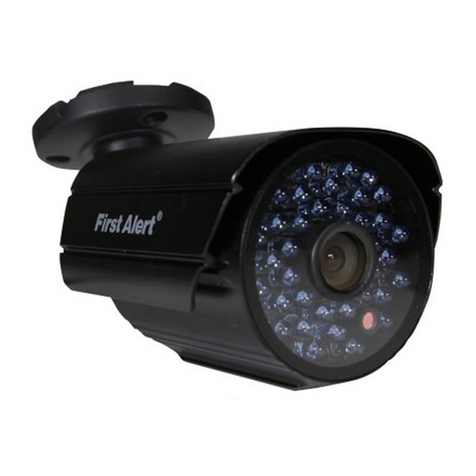
  9. First Alert DC-2 User manual

First Alert DC-2 User manual

Other First Alert Security Camera manuals

First Alert P-500 User manual

First Alert

First Alert P-500 User manual

First Alert P-520 User manual

First Alert

First Alert P-520 User manual

First Alert DWB-700 User manual

First Alert

First Alert DWB-700 User manual

First Alert HS-4705-400 User manual

First Alert

First Alert HS-4705-400 User manual

First Alert Security Camera User manual

First Alert

First Alert Security Camera User manual

First Alert BRK PRO-CMD600 User manual

First Alert

First Alert BRK PRO-CMD600 User manual

First Alert P-500AN User manual

First Alert

First Alert P-500AN User manual

First Alert BRK Series User manual

First Alert

First Alert BRK Series User manual

First Alert CMD420 User manual

First Alert

First Alert CMD420 User manual

First Alert PRO-CM600 User manual

First Alert

First Alert PRO-CM600 User manual

First Alert A-560 User manual

First Alert

First Alert A-560 User manual

First Alert A-575 User manual

First Alert

First Alert A-575 User manual

First Alert PRO-CM520 User manual

First Alert

First Alert PRO-CM520 User manual

First Alert DWH-400 User manual

First Alert

First Alert DWH-400 User manual

First Alert D-520 User manual

First Alert

First Alert D-520 User manual

First Alert PRO-DC2 BRK Series User manual

First Alert

First Alert PRO-DC2 BRK Series User manual

First Alert A-550 User manual

First Alert

First Alert A-550 User manual

First Alert CM480 User manual

First Alert

First Alert CM480 User manual

First Alert P-500 User manual

First Alert

First Alert P-500 User manual

First Alert PRO-CMD520 User manual

First Alert

First Alert PRO-CMD520 User manual

First Alert D-520 User manual

First Alert

First Alert D-520 User manual

First Alert CM480 User manual

First Alert

First Alert CM480 User manual

First Alert CMD420 User manual

First Alert

First Alert CMD420 User manual

First Alert DW-700 User manual

First Alert

First Alert DW-700 User manual

Popular Security Camera manuals by other brands

Okina USA SIR36-870VF650LP user manual

Okina USA

Okina USA SIR36-870VF650LP user manual

Divio NDR155PA user manual

Divio

Divio NDR155PA user manual

Easy Access EasyGuard user manual

Easy Access

Easy Access EasyGuard user manual

Vivotek FD9389-EHV-v2 Quick installation guide

Vivotek

Vivotek FD9389-EHV-v2 Quick installation guide

TUYA COSMO W2 manual

TUYA

TUYA COSMO W2 manual

Eusso UNC7500-IR Advanced installation guide

Eusso

Eusso UNC7500-IR Advanced installation guide

urmet domus 1096/204 user manual

urmet domus

urmet domus 1096/204 user manual

VC VC20 series operating manual

VC

VC VC20 series operating manual

Axis Q1614 installation guide

Axis

Axis Q1614 installation guide

ieGeek DD201 manual

ieGeek

ieGeek DD201 manual

VADDIO ClearVIEW HD-USB PTZ 999-6990-000 Installation and user guide

VADDIO

VADDIO ClearVIEW HD-USB PTZ 999-6990-000 Installation and user guide

Vicon V662-D-1 Installation and operation guide

Vicon

Vicon V662-D-1 Installation and operation guide

Grundig GCH-K0274P owner's manual

Grundig

Grundig GCH-K0274P owner's manual

Lorex VANTAGE LBC7032 quick start guide

Lorex

Lorex VANTAGE LBC7032 quick start guide

4xem WPT Specifications

4xem

4xem WPT Specifications

Samsung SCV-3082 Specifications

Samsung

Samsung SCV-3082 Specifications

Vitek VTC-C544 Specifications

Vitek

Vitek VTC-C544 Specifications

Lumens VC-A50PNW installation guide

Lumens

Lumens VC-A50PNW installation guide

https://manuals.online logo
https://manuals.online logoBrands
  • About & Mission
  • Contact us
  • Privacy Policy
  • Terms and Conditions

Copyright 2025 Manuals.Online. All Rights Reserved.

Indoor/Outdoor Decoy Camera
Model DC-2
Getting to Know Your DC-2
Congratulations on purchasing your First Alert Security
Camera product. First Alert has been helping families and
businesses stay safe for over 50 years. By having a First Alert
Security Camera, you’re taking the first step in protecting your
home or business from damage or theft.
SAFETY PRECAUTIONS
• Do not drop, puncture, or disassemble the
camera body.
• Do not expose the camera to high temperatures.
• Use the device with care. Avoid pressing hard on the
camera body.
CHECK PACKAGE CONTENTS
After unpacking the carton, check the contents for damage.
Contact your supplier or dealer immediately if any part is
missing or damaged. Your Model DC-2 decoy security camera
consists of:
• Indoor/outdoor decoy camera (1)
• Camera stand (1)
• Mounting Screws (3)
• User's manual (1)
Setting Up
GENERAL INSTALLATION GUIDELINES
• Do not attempt to open a camera. There are no user-serviceable
parts inside.
• When using power tools wear safety goggles. Before drilling holes
through a wall or ceiling, check for hidden electricity cables and
water pipes.
INSTALLING THE DC-2 CAMERA
1) Select the position for the camera and install a mounting bracket
Screws and anchors are supplied. Use an appropriate screw type for the mounting surface.
2) Screw the camera onto the bracket. Tighten the lock nut to
secure the camera on the bracket
© 2013 BRK Brands, Inc. All rights reserved. Distributed
by BRK Brands, Inc., Aurora, Illinois 60504. BRK Brands,
Inc. is a subsidiary of Jarden Corporation (NYSE: JAH).
First Alert® is a registered trademark of the First Alert
Trust. Due to continuing product development, the product
inside the packaging may look slightly different than the
one on the package. 1 Year Limited Warranty- see inside
for details.
M08-0470-000
Camera Lock
Screw
Camera Mounting
Bracket
Angle Lock
Screw
3) Adjust camera to the proper viewing angle.
Dimensions:
2.80”(H) 2.27”(W) x 5.50”(D)
Standing mount position,
stand at 90º
Cámara Señuelo Para
Interiores/Exteriores
Modelo DC-2
Conociendo Su DC-2
Felicitaciones por su compra de su Cámara de Seguridad
First Alert. First Alert ha estado ayudando a familias y
negocios a mantenerse seguros por más de 50 años. Al tener
una Cámara de Seguridad First Alert, usted está tomando el
primer paso para proteger su hogar o negocio de daño o robo.
PRECAUCIONES DE SEGURIDAD
• No bote, perfore o desarme la carcasa de la cámara.
• No exponga la cámara a temperaturas altas.
• Use el dispositivo con cuidado. Evite presionar la carcasa de la
cámara.
REVISE EL CONTENIDO DEL PAQUETE
Después de desempacar la caja, revise el contenido por
daños. Póngase en contacto con su proveedor o minorista
inmediatamente si hay alguna parte que hace falta o está
dañada. Su cámara de seguridad señuelo Modelo DC-2
consiste de:
• Cámara señuelo para Interiores/Exteriores (1)
• Soporte de Cámara (1)
• Tornillos de Montaje (3)
• Manual de Usuario (1)
Configuración
DIRECTRICES GENERALES DE INSTALACIÓN
• No intente abrir la cámara. No hay partes reparables por el usuario
en el interior.
• Al usar herramientas eléctricas use protección ocular. Antes de
taladrar agujeros a través de una pared o cielo, revise por cables
eléctricos y tubería de agua ocultos.
INSTALAR LA CÁMARA DC-2
1) Seleccione la posición para la cámara e instale el soporte de
montaje
Los tornillos y las anclas están incluidos. Use un tornillo adecuado al tipo de superficie de
montaje.
2) Enrosque la cámara en el soporte. Apriete la tuerca para asegurar
la cámara al soporte
© 2013 BRK Brands, Inc. Todos los derechos reservados.
Distribuido por BRK Brands, Inc. Aurora, Illinois 60504.
BRK Brands, Inc. es una subsidiaria de Jarden Corporation
(NYSE: JAH). First Alert® es marca registrada de First
Alert Trust. Debido al desarrollo continuo del producto, el
producto dentro del empaque puede lucir levemente
diferente al que está en el empaque. Garantía Limitada de
1 Año – ver adentro para detalles.
Tornillo de
Seguridad de
la Cámara
Soportede
Montaje de
la Cámara
Seguro de Ángulo
3) Ajuste la Cámara al ángulo de vista correcto.
Dimensiones:
2.80”(A) 2.27”(A) x 5.50”(H)
Posición de montaje parada, soporte a 90º
3901 Liberty St. Rd
Aurora IL, 60504
630.851.7330
CMYK
CS6
SOFTWARE
FILE NAME M08-0470-000
DIELINE M08-0470-XXX
2013 JAN FEB MAR APR MAY JUN JUL AUG SEP OCT NOV DEC
Use dieline drawing
for printing specifications
NOTES:
FILE INFORMATION
UPDATES
UPDATED BY DATE
COLOR INFORMATION
FRONT
BACK
PMS PMS PMS
BCA 6-12-13

Indoor/Outdoor Decoy Camera
Model DC-2
Getting to Know Your DC-2
Congratulations on purchasing your First Alert Security
Camera product. First Alert has been helping families and
businesses stay safe for over 50 years. By having a First Alert
Security Camera, you’re taking the first step in protecting your
home or business from damage or theft.
SAFETY PRECAUTIONS
• Do not drop, puncture, or disassemble the
camera body.
• Do not expose the camera to high temperatures.
• Use the device with care. Avoid pressing hard on the
camera body.
CHECK PACKAGE CONTENTS
After unpacking the carton, check the contents for damage.
Contact your supplier or dealer immediately if any part is
missing or damaged. Your Model DC-2 decoy security camera
consists of:
• Indoor/outdoor decoy camera (1)
• Camera stand (1)
• Mounting Screws (3)
• User's manual (1)
Setting Up
GENERAL INSTALLATION GUIDELINES
• Do not attempt to open a camera. There are no user-serviceable
parts inside.
• When using power tools wear safety goggles. Before drilling holes
through a wall or ceiling, check for hidden electricity cables and
water pipes.
INSTALLING THE DC-2 CAMERA
1) Select the position for the camera and install a mounting bracket
Screws and anchors are supplied. Use an appropriate screw type for the mounting surface.
2) Screw the camera onto the bracket. Tighten the lock nut to
secure the camera on the bracket
© 2013 BRK Brands, Inc. All rights reserved. Distributed

by BRK Brands, Inc., Aurora, Illinois 60504. BRK Brands,
Inc. is a subsidiary of Jarden Corporation (NYSE: JAH).
First Alert® is a registered trademark of the First Alert
Trust. Due to continuing product development, the product
inside the packaging may look slightly different than the
one on the package. 1 Year Limited Warranty- see inside
for details.
M08-0470-000
Camera Lock
Screw
Camera Mounting
Bracket
Angle Lock
Screw
3) Adjust camera to the proper viewing angle.
Dimensions:
2.80”(H) 2.27”(W) x 5.50”(D)
Standing mount position,
stand at 90º
Cámara Señuelo Para
Interiores/Exteriores
Modelo DC-2
Conociendo Su DC-2
Felicitaciones por su compra de su Cámara de Seguridad
First Alert. First Alert ha estado ayudando a familias y
negocios a mantenerse seguros por más de 50 años. Al tener
una Cámara de Seguridad First Alert, usted está tomando el
primer paso para proteger su hogar o negocio de daño o robo.
PRECAUCIONES DE SEGURIDAD
• No bote, perfore o desarme la carcasa de la cámara.
• No exponga la cámara a temperaturas altas.
• Use el dispositivo con cuidado. Evite presionar la carcasa de la
cámara.
REVISE EL CONTENIDO DEL PAQUETE
Después de desempacar la caja, revise el contenido por
daños. Póngase en contacto con su proveedor o minorista
inmediatamente si hay alguna parte que hace falta o está
dañada. Su cámara de seguridad señuelo Modelo DC-2
consiste de:
• Cámara señuelo para Interiores/Exteriores (1)
• Soporte de Cámara (1)
• Tornillos de Montaje (3)
• Manual de Usuario (1)
Configuración
DIRECTRICES GENERALES DE INSTALACIÓN
• No intente abrir la cámara. No hay partes reparables por el usuario
en el interior.
• Al usar herramientas eléctricas use protección ocular. Antes de
taladrar agujeros a través de una pared o cielo, revise por cables
eléctricos y tubería de agua ocultos.
INSTALAR LA CÁMARA DC-2
1) Seleccione la posición para la cámara e instale el soporte de
montaje
Los tornillos y las anclas están incluidos. Use un tornillo adecuado al tipo de superficie de
montaje.
2) Enrosque la cámara en el soporte. Apriete la tuerca para asegurar
la cámara al soporte
© 2013 BRK Brands, Inc. Todos los derechos reservados.

Distribuido por BRK Brands, Inc. Aurora, Illinois 60504.
BRK Brands, Inc. es una subsidiaria de Jarden Corporation
(NYSE: JAH). First Alert® es marca registrada de First
Alert Trust. Debido al desarrollo continuo del producto, el
producto dentro del empaque puede lucir levemente
diferente al que está en el empaque. Garantía Limitada de
1 Año – ver adentro para detalles.
Tornillo de
Seguridad de
la Cámara
Soportede
Montaje de
la Cámara
Seguro de Ángulo
3) Ajuste la Cámara al ángulo de vista correcto.
Dimensiones:
2.80”(A) 2.27”(A) x 5.50”(H)
Posición de montaje parada, soporte a 90º
3901 Liberty St. Rd
Aurora IL, 60504
630.851.7330
CMYK
CS6
SOFTWARE
FILE NAME M08-0470-000
DIELINE M08-0470-XXX
2013 JAN FEB MAR APR MAY JUN JUL AUG SEP OCT NOV DEC
Use dieline drawing
for printing specifications
NOTES:
FILE INFORMATION
UPDATES
UPDATED BY DATE
COLOR INFORMATION
FRONT
BACK
PMS PMS PMS
BCA 6-12-13