8
1. General Operation:
When the system is operating, one of the four displays may be shown. Pressing “NEXT” will alternate between
displays. One of the displays is always the current time of day. The second display shows the current capacity
remaining. Capacity remaining is the number of gallons that will be treated before the system goes through a
regeneration cycle. The third display shows the current treated water flow rate through the system in gallons per
minute (gpm). The fourth display shows the total gallons used since the last reset. Press “DOWN” for 3 seconds to
reset to “0”.
The user can scroll between the displays as desired.
The softener has an installed water meter, the word “Softening” flashes on the display when water is being treated
(water is flowing though the system).
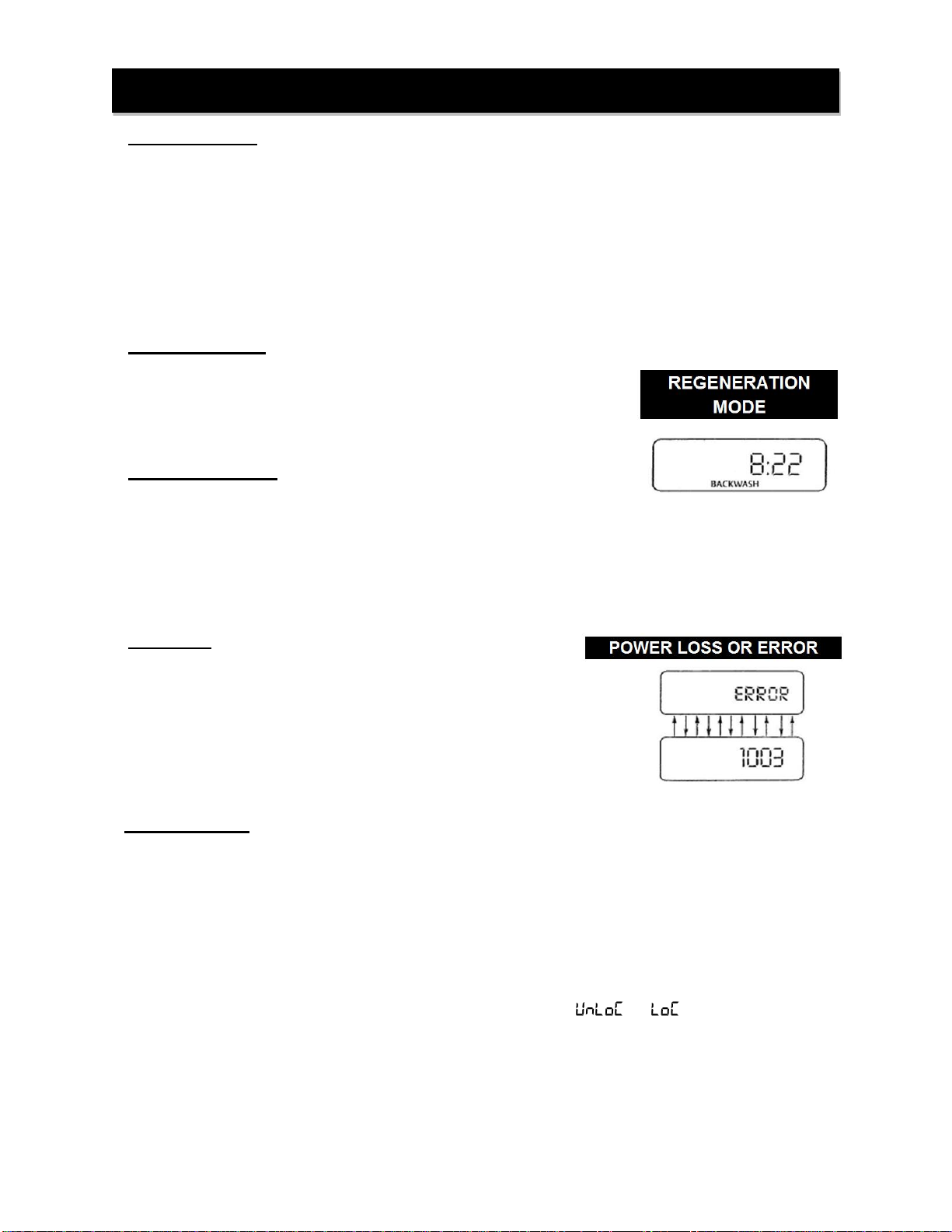
2. Regeneration Mode:
When the system begins to regenerate, the display will change to include
information about the step of the regeneration process and the time
remaining for that step to be completed. The system runs through the steps
automatically and will reset itself when the regeneration has been
completed.
3. Manual Regeneration:
Sometimes there is a need to regenerate before the control valve calls for it.
This may be needed if a period of heavy water use is anticipated or when the system has been operated without
salt.
•To initiate an immediate manualregeneration, press and holdthe regen button for three
seconds. The system will begin to regenerate immediately.
•Regeneration can only be cancelled by pressing and holding “NEXT” and “REGEN” to reset the
system.
4. Power Loss:
If the power goes outfor less than two hours, the system will
automatically reset itself. If an extended power outage occurs, the
time of day will flash on and off which indicatedthe time of day
should be reset. The system will remember all other settings.
Error Message: If the word “ERROR” and a number are alternately
flashing on the display, record the number and contract the dealer
for help. This indicates that the control valve was not able to
function properly.
5. Button Operation:
NEXT –Scrolls to the next display
UP or DOWN –Changes the variable currently displayed on the screen
REGEN –Press & hold (until motor starts) for immediate regeneration. Press briefly during a regeneration cycle to
advance to the next cycle. Press in programming mode to return to a previous screen.
UP & REGEN - Press & hold together (until motor starts) to switch tanks without initiating a regeneration. Capacity
remaining is retained for each tank individually.
NEXT & REGEN –Press & hold together (until screen flashes ormotor starts) to do a control reset.
DOWN, NEXT, UP,REGEN –Press each one briefly in sequence to “ ” or “ ” access to programming.
NEXT & UP - Press & hold together (until screen changes) to set adjusted hardness.
NEXT & DOWN - Press & hold together (until screen changes) to access programming mode.