manuals.online logo
Brands
  1. Home
  2. •
  3. Brands
  4. •
  5. Frigidaire
  6. •
  7. Range
  8. •
  9. Frigidaire 316000642 User manual

Frigidaire 316000642 User manual

Other Frigidaire Range manuals

Frigidaire FES387CH User manual

Frigidaire

Frigidaire FES387CH User manual

Frigidaire FEF368CJSD User manual

Frigidaire

Frigidaire FEF368CJSD User manual

Frigidaire Gallery FGGF3054K User manual

Frigidaire

Frigidaire Gallery FGGF3054K User manual

Frigidaire FGGF3054KWG Owner's manual

Frigidaire

Frigidaire FGGF3054KWG Owner's manual

Frigidaire FGF324WHSD User manual

Frigidaire

Frigidaire FGF324WHSD User manual

Frigidaire PLCF489CCD User manual

Frigidaire

Frigidaire PLCF489CCD User manual

Frigidaire FEF336BCG User manual

Frigidaire

Frigidaire FEF336BCG User manual

Frigidaire FEC32C4ACD Instruction Manual

Frigidaire

Frigidaire FEC32C4ACD Instruction Manual

Frigidaire FEFL63FSB User guide

Frigidaire

Frigidaire FEFL63FSB User guide

Frigidaire CGEF3032MFA User manual

Frigidaire

Frigidaire CGEF3032MFA User manual

Frigidaire GLEMF397DBA User manual

Frigidaire

Frigidaire GLEMF397DBA User manual

Frigidaire CFEF3048LS User manual

Frigidaire

Frigidaire CFEF3048LS User manual

Frigidaire CFEH2411UW User manual

Frigidaire

Frigidaire CFEH2411UW User manual

Frigidaire FGF367BG User manual

Frigidaire

Frigidaire FGF367BG User manual

Frigidaire FCFE3083AS User manual

Frigidaire

Frigidaire FCFE3083AS User manual

Frigidaire FEFS52DSD User guide

Frigidaire

Frigidaire FEFS52DSD User guide

Frigidaire FGF337EB User manual

Frigidaire

Frigidaire FGF337EB User manual

Frigidaire PCFI3668AF User manual

Frigidaire

Frigidaire PCFI3668AF User manual

Frigidaire CGEF3034MFC Owner's manual

Frigidaire

Frigidaire CGEF3034MFC Owner's manual

Frigidaire Gallery GCRG3038AF User manual

Frigidaire

Frigidaire Gallery GCRG3038AF User manual

Frigidaire 316257124 User manual

Frigidaire

Frigidaire 316257124 User manual

Frigidaire FPES3085KF - 30" Slide-In Smoothtop Electric... User manual

Frigidaire

Frigidaire FPES3085KF - 30" Slide-In Smoothtop Electric... User manual

Frigidaire FGF337BCC User manual

Frigidaire

Frigidaire FGF337BCC User manual

Frigidaire FPGF3077QF User manual

Frigidaire

Frigidaire FPGF3077QF User manual

Popular Range manuals by other brands

Maytag MGR5875QDW - 30 Inch Gas Range Use and care guide

Maytag

Maytag MGR5875QDW - 30 Inch Gas Range Use and care guide

Capital Precision Series GCR484W Specifications

Capital

Capital Precision Series GCR484W Specifications

Officine Gullo GGS8P Installation and use instruction

Officine Gullo

Officine Gullo GGS8P Installation and use instruction

LG LSD4913 Series owner's manual

LG

LG LSD4913 Series owner's manual

Kenmore 4101 - Elite 30 in. Slide-In Electric Range installation instructions

Kenmore

Kenmore 4101 - Elite 30 in. Slide-In Electric Range installation instructions

Moffat Blue Seal Evolution G576 Technical data sheet

Moffat

Moffat Blue Seal Evolution G576 Technical data sheet

CornuFé C1NF user guide

CornuFé

CornuFé C1NF user guide

GE JGS650SEFSS Dimensions and installation information

GE

GE JGS650SEFSS Dimensions and installation information

LG LDG3015ST Manual De Propietario

LG

LG LDG3015ST Manual De Propietario

Whirlpool RF350PXP Use and care guide

Whirlpool

Whirlpool RF350PXP Use and care guide

Samsung FCQ321HTUW Service manual

Samsung

Samsung FCQ321HTUW Service manual

Kenmore 790.45712 Use & care guide

Kenmore

Kenmore 790.45712 Use & care guide

Wolf CHR CHSSR owner's manual

Wolf

Wolf CHR CHSSR owner's manual

Smeg Built-in Microwave Oven Instructions for the user

Smeg

Smeg Built-in Microwave Oven Instructions for the user

Zanussi ZCG054G user manual

Zanussi

Zanussi ZCG054G user manual

GE JCSS630 quick start guide

GE

GE JCSS630 quick start guide

Samsung NX58M9960P series installation manual

Samsung

Samsung NX58M9960P series installation manual

Hotpoint RB524R Use and care & installation instructions

Hotpoint

Hotpoint RB524R Use and care & installation instructions

manuals.online logo
manuals.online logoBrands
  • About & Mission
  • Contact us
  • Privacy Policy
  • Terms and Conditions

Copyright 2025 Manuals.Online. All Rights Reserved.

OWNERS GUIDE
READ AND SAVE THESE INSTRUCTIONS
ELECTRIC RANGE
Coil Surface Elements
Electronic Oven Control
Self-Cleaning Oven Interior P/N 316000642 (0003)
2
Thank you for choosing this appliance. The information contained within
this Owner's Guide will instruct you on how to properly operate and care for
your range. Please read through the information contained in your literature
pack to learn more about your new appliance.
Record Your Model and Serial Numbers
Record in the space provided below the model and serial numbers found on the
serial plate located under the lift-up cooktop.
Model Number: _____________________________________________________
Serial Number: ______________________________________________________
Date of Purchase: ___________________________________________________
Register Your Product
The self-addressed PRODUCT
REGISTRATION CARD should be filled
in completely, signed and returned to
Frigidaire Home Products.
© 2000 White Consolidated Industries
All rights reserved
Product Registration
Versión en español
Si desea obtener una copia en
español de este Manual del Usuario,
sírvase escribir a la dirección que se
incluye a continuación. Solicite la P/N
316000642S.
Spanish Owner's Guides
Frigidaire Company
P. O. Box 9061
Dublin, Ohio 43017-0961
This Owner's Guide contains general operating instructions for your range
and feature information for several models. Your range may not have all the
described features.
Note: The instructions appearing in this Owner's Guide are not meant to
cover every possible condition and situation that may occur. Common sense
and caution must be practiced when installing, operating and maintaining
any appliance.
Table of Contents
Product Registration ...................................................................................... 2
Versión en español ........................................................................................ 2
IMPORTANT SAFETY INSTRUCTIONS............................................................ 3-4
Control Pad Functions ................................................................................... 5
Setting the Clock and Minute Timer .............................................................. 6
Setting Surface Controls ................................................................................ 7
Setting Warmer Drawer Controls (if equipped) ............................................. 8
Before Setting Oven Controls ........................................................................ 9
Setting Oven Controls .............................................................................. 9-11
Oven Cleaning ........................................................................................ 12-13
General Cleaning .................................................................................... 14-16
Changing Oven Light ................................................................................... 17
Adjusting Oven Temperature ....................................................................... 17
Avoid Service Checklist ........................................................................... 18-19
Warranty...................................................................................................... 20
3
IMPORTANT SAFETY INSTRUCTIONS
Read all instructions before using this appliance.
Save these instructions for future reference.
This guide contains important safety symbols and instructions. Please pay attention to these symbols and follow all instructions given.
Here is a brief explanation of the use of these symbols.
This symbol will help alert you to situations that may cause serious bodily harm, death or property damage.
This symbol will help alert you to situations that may cause bodily injury or property damage.
Remove all tape and packaging before using the range.
Destroy the carton and plastic bags after unpacking the range.
Never allow children to play with packaging material.
Proper InstallationBe sure your appliance is properly
installedand groundedby aqualified technicianin accordance
with the National Electrical Code ANSI/NFPA No. 70 latest
edition and local electrical code requirements. Install only per
installation instructions provided in the literature package for
this range.
Ask your dealer to recommend a qualified technician and an
authorized repair service. Know how to disconnect the power to
the range at the circuit breaker or fuse box in case of an
emergency.
User servicingDo not repair or replace any part of the
appliance unless specifically recommended in the manuals.
All other servicing should be done only by a qualified technician,
This may reduce the risk of personal injury and damage to the
range.
Never modifyor alter the constructionof a range byremoving
leveling legs, panels, wire covers, anti-tip brackets/screws, or
any other part of the product.
Do not store items of interest to children in the
cabinets above a range or on the backguard of a range.
Children climbing on the range to reach items could be seriously
injured.
Never Use Your Appliance for Warming or
Heating the Room.
Storage in or on ApplianceFlammable materials should not
be stored in an oven, warmer drawer, broiler compartment,
near surface units or in the storage drawer. This includes
paper, plastic and cloth items, such as cookbooks, plasticware
and towels, as well as flammable liquids. Do not store explosives,
such as aerosol cans, on or near the range.
Do Not Leave Children AloneChildren should not be left
alone or unattended in the area where appliance is in use.
They should never be allowed to sit or stand on any part of the
appliance.
DO NOT TOUCH SURFACE UNITS, AREAS NEAR THESE UNITS,
HEATING ELEMENTS OR INTERIOR SURFACES OF THE OVEN.
Both surface units and oven heating elements may be hot even
though they are dark in color. Areas near surface units may
become hot enough to cause burns. During and after use, do not
touch, or let clothing or other flammable materials touch these
areas until they have had sufficient time to cool. Among these
areas are the cooktop, surfaces facing the cooktop, the oven
vent openings and surfaces near these openings, oven door and
window.
Wear Proper ApparelLoose-fitting or hanging garments
should never be worn while using the appliance. Do not let
clothing or other flammable materials contact hot surfaces.
Do Not Use Water or Flour on Grease FiresSmother the fire
with a pan lid, or use baking soda, a dry chemical or foam-
type extinguisher.
When heating fat or grease, watch it closely. Fat or grease
may catch fire if allowed to become too hot.
Use Only Dry PotholdersMoist or damp potholders on hot
surfaces may result in burns from steam. Do not let potholders
touch hot heating elements. Do not use a towel or other bulky
cloth instead of a potholder.
Do NotHeat Unopened FoodContainersBuildup of pressure
may cause container to burst and result in injury.
Remove the oven door from any unused range if it is to be
stored or discarded.
IMPORTANTDo not attempt to operate the range during a
power failure. If the power fails, always turn off the range. If the
range is not turned off and the power resumes, the range will
begin to operate again. Once the power resumes, reset the clock
and oven function.
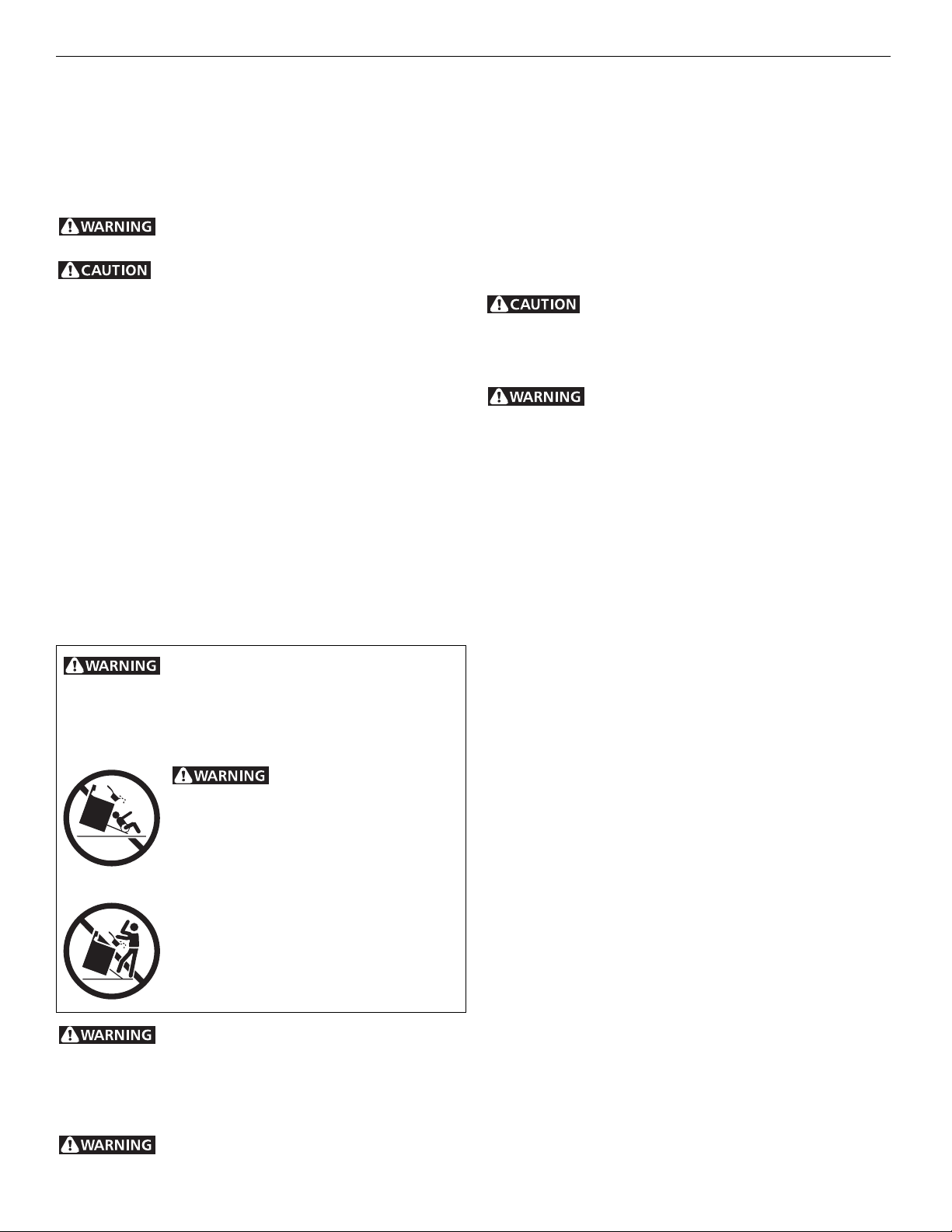
All ranges can tip.
Injury to persons could result.
Install anti-tip device packed with range.
See Installation Instructions.
To reduce the risk of tipping,
the range must be secured by properly installed
anti-tip bracket provide with the range. To
check if the bracket is installed properly, visually
check that rear leveling leg is inserted into and
fully secured by the anti-tip bracket by removing
lower panel or storage drawer. For models
with a warmer drawer, grasp the top rear edge
of the range and carefully attempt to tilt it
forward. Refer to the Installation Instructions
for proper anti-tip bracket installation.
Stepping, leaning or sitting on the doors or
drawers of this range can result in serious injuries and also
cause damage to the range. Do not allow children to climb or
play around the range. The weight of a child on an open door may
cause the range to tip, resulting in serious burns or other injury.
Do not use the oven or warmer drawer for
storage.

4
IMPORTANT INSTRUCTIONS FOR USING YOUR
COOKTOP
Know which knob controls each surface heating unit. Place
a pan of food on the unit before turning it on, and turn the unit
off before removing the pan.
Use Proper Pan SizeThis appliance is equipped with one or
more surface units of different sizes. Select utensils having flat
bottoms large enough to cover the surface unit heating element.
The use of undersized utensils will expose a portion of the
heating element to direct contact and may result in ignition of
clothing. Proper relationship of utensil to element will also
improve efficiency.
Utensil Handles Should Be Turned Inward and Not Extend
Over Adjacent Surface UnitsTo reduce the risk of bums,
ignition of flammable materials, and spillage due to unintentional
contact with the utensil, the handle of the utensil should be
positioned so that it is turned inward, and does not extend over
adjacent surface units.
Never LeaveSurface Units Unattendedat High HeatSettings
Boilovers cause smoking and greasy spillovers that may ignite, or
5
Control Pad Functions READ THE INSTRUCTIONS CAREFULLY BEFORE USING THE OVEN. For
satisfactory use of your oven, become familiar with the various functions of the
oven as described below.
BROIL PAD
Used to select
the variable
broil function.
UP and DOWN ARROW PADS Used along with the
function pads to select oven temperature, cooking
time, stop time (when programming an automatic
stop time), time of day, clean time and minute timer.
BAKE PADUsed to
enter the normal
baking mode
temperature.
STOP TIME PAD
Used to set the
desired stop time
for baking. Can be
used with BAKE
TIME to program a
delayed bake cycle.
BAKE TIME PAD
Used to enter the
length of the
baking time.
CLEAN PAD
Used to select the
self-cleaning
cycle.
OVEN, PREHEAT & LOCK LIGHTS The "OVEN"
light will glow each time the oven unit turns on to
maintain the set oven temperature. The "PREHEAT"
light will glow when the oven is first set to operate,
or if the desired temperature is reset higher than
the actual oven temperature. The "LOCK" light will
flash until the door locks when the self-clean cycle
is in use. It glows constantly after the door locks.
TIMER PAD
Used to set or
cancel the minute
timer. The minute
timer does not
start or stop
cooking.
FEATURE
INDICATOR
LIGHTS These
light to show which
feature is in use.
CLOCK PAD Used
to set the time of
day.
The oven can be programmed to:
 Bake normally
 Time bake
 Broil
 Self-clean
For a silent control panel:
When choosing a function, a beep will be heard each time a pad is pushed. If desired, the controls can be programmed
for silent operation. Push and hold . After 7 seconds, the control will beep once. This will block the controls from
sounding when a pad is pushed. To return the sound, push and hold again for 7 seconds until 1 beep is heard.
Note: The control will return to the audible mode after a power outage.
Temperature conversion:
The electronic oven control is set to operate in °F (Fahrenheit) when shipped from the factory. The oven can be programmed
for any temperature from 170°F to 550°F (65°C to 287°C).
To change the temperature to °C (Celsius) or from °C to °F (control should not be in a Bake or Clean mode):
1. Push . "  " appears in the display.
2. Push and hold the until "HI" appears in the display.
3. Push and hold until °F or °C appears in the display.
4. Push the or to change °F to °C or °C to °F.
5. Push any function pad to return to normal operating mode.
CLEAR PAD Used to
clear any function
previously entered
except the time of day
and minute timer. Push
CLEAR to stop cooking.
6
Setting the Clock and
Minute Timer
To Set the Clock
When the range is first plugged in, or when the power supply to the range has
been interrupted, the display will flash "12:00".
1. Push .
2. Within 5 seconds, push and hold the or until the correct time
of day appears in the display.
Note: The clock cannot be changed during any timed bake or self-clean
cycle.
To Set the Minute Timer
1. Push .
2. Push the to increase the time in one minute increments. Push and
hold the to increase the time in 10 minute increments. The timer can
be set for any amount of time from 1 minute to 11 hours and 59 minutes.
Note: If you push the first, the timer will advance to 11 hours and 59
minutes.
3. The display shows the timer count down in minutes until one minute
remains. Then the display will count down in seconds.
4. When the set time has run out, the timer will beep 3 times. It will then
continue to beep 3 times every 60 seconds until is pushed.
Note: The minute timer does not start or stop cooking. It serves as an extra
timer in the kitchen that will beep when the set time has run out. The minute
timer can be used alone or during any of the other oven functions. When the
minute timer is in use with any other mode, the minute timer will be shown in
the display. To view other functions, push the function pad for that mode.
To Change the Minute Timer while it is in use:
While the timer is active and shows in the display, push and hold the or
to increase or decrease the time.
To Cancel the Minute Timer before the set time has run out:
Push .
Note: The oven function will not work
if the time of day clock is not set.
7
Setting Surface
Controls
To Operate the Surface Element
1. Place cooking utensil on the surface element.
2. Push in and turn the Surface Control knob in either direction to the desired
setting. Start most cooking operations on a higher setting and then turn
to a lower setting to finish cooking. The control knobs do not have to be
set exactly on a particular mark. Use the marks as a guide and adjust the
control knob as needed.
3. When cooking is completed, turn the surface element off before removing
the pan. Note: The surface signal light will glow when one or more
elements are turned on. A quick glance at the signal light(s) when cooking
is finished is an easy check to be sure all control knobs are turned off.
The suggested settings found in the chart below are based on cooking in
medium-weight aluminum pans with lids. Settings may vary when using other
types of pans.
Setting Type of Cooking
HIGH (HI) Start most foods, bring water to a boil, pan broiling
MEDIUM HIGH (7-8) Continue a rapid boil, fry, deep fat fry
MEDIUM (4-6) Maintain a slow boil, thicken sauces and gravies,
steam vegetables
MEDIUM LOW (2-3) Keep foods cooking, poach, stew
SIMMER (1-SIM) Keep warm, melt, simmer
Note: The size and type of utensil used, and the amount and type of food being
cooked will influence the setting needed for best cooking results.
Do not place plastic items such as salt and pepper shakers, spoon
holders or plastic wrappings on top of the range when it is in use. These items
could melt or ignite. Potholders, towels or wooden spoons could catch fire if
placed too close to the element.
Typical Knob
8
Setting Warmer Drawer
Controls (if equipped)
Arranging Warmer Drawer Rack Positions
The rack can be used in 2 ways:
 In the upright position to allow low profile food items to be placed both
under and on top of the rack (for example, rolls or biscuits on top of the
rack and a casserole dish under).
 In the downward position to allow you to place light weight food items
and empty dishware (for example, rolls or pastries and dinner plates).
Set the warmer drawer rack as shown below.
9
Before Setting Oven
Controls
REMOVING & REPLACING OVEN
RACKS
To remove, pull the rack forward until
it stops. Lift up front of rack and slide
out. To replace, fit the rack onto the
guides on the oven walls. Tilt the front
of the rack upward and slide the rack
back into place.
ARRANGING OVEN RACKS WITH 5
RACK POSITIONS
To bake on 1 rack, place the rack on
position 3 or 4. To bake on 2 racks,
place the racks on positions 2 and 4.
10
Setting Oven Controls
(continued)
Use caution when using
the automatic timer. Use the automatic
timer when cooking cured or frozen
meats and most fruits and vegetables.
Foods that can easily spoil such as milk,
eggs, fish, meat or poultry, should be
chilled in the refrigerator first. Even
when chilled, they should not stand in
the oven for more than 1 hour before
cookingbegins, and should beremoved
promptly when cooking is completed.
To Set the Automatic Timer (Timed Bake Feature)
The BAKE TIME and STOP TIME controls operate the Timed Bake feature. The
automatic timer will turn the oven on and off at the times you select in advance.
The oven can be programmed to start immediately and shut off automatically
or to begin baking at a later time with an automatic shutoff.
To Program the Oven to Begin Baking Immediately and To Shut Off
Automatically:
1. Be sure that the clock shows the correct time of day.
2. Place the food in the oven.
3. Push .
4. Within 5 seconds, push the or . The display will show "350°F
(177°C)." By holding the or , the temperature can then be
adjusted in 5°F (1°C) increments.
5. Push . "0:00" will flash in the display.
6. Push the or until the desired amount of baking time appears in
the display.
To Program Oven for a Delayed Start Time and to Shut-Off Automatically
1. Be sure that the clock shows the correct time of day.
2. Place the food in the oven.
3. Push .
4. Within 5 seconds, push the or . The display will show "350°F
(177°C)." By holding the or , the temperature can then be
adjusted in 5°F (1°C) increments.
5. Push . "0:00" will flash in the display.
6. Push the or until the desired amount of baking time appears.
7. Push . The earliest possible stop time will flash in the display.
8. Push the or until the desired stop time appears in the display.
9. Once the controls are set, the control calculates the time when baking will
start in order to finish at the time you have set.
Once the Controls are Set:
a. The oven will come onandbeginheatingtotheselectedbakingtemperature.
b. The oven temperature will show in the display.
When the Set Bake Time Runs Out:
a. "END" will appear in the display window and the oven will shut off
automatically.
b. The control will beep 3 times every 60 seconds until is pushed.
To Change the Oven Temperature or Bake Time after Baking has Started:
1. Push the function pad you want to change.
2. Push the or to adjust the setting.