manuals.online logo
Brands
  1. Home
  2. •
  3. Brands
  4. •
  5. Harman Kardon
  6. •
  7. Stereo Receiver
  8. •
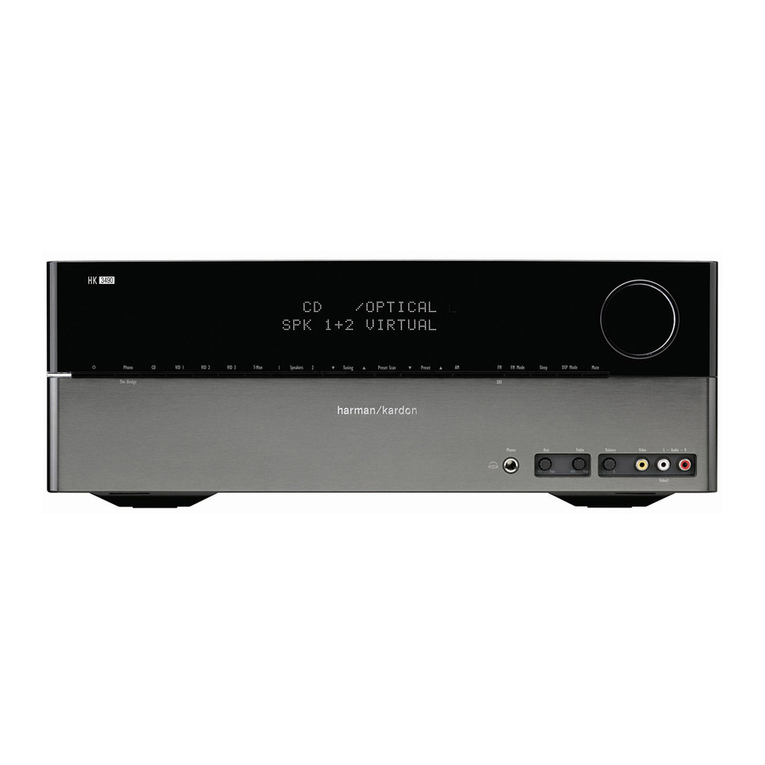
  9. Harman Kardon HK3400 User manual

Harman Kardon HK3400 User manual

Other Harman Kardon Stereo Receiver manuals
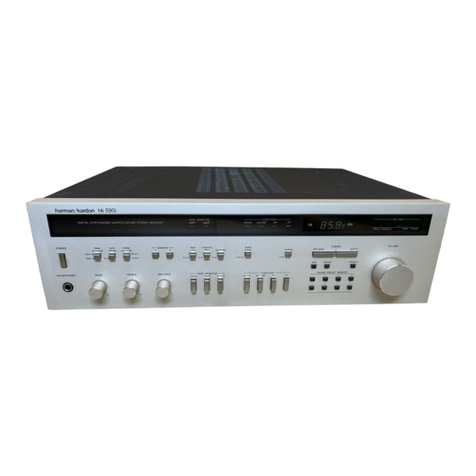
Harman Kardon HK880VXI User manual

Harman Kardon

Harman Kardon HK880VXI User manual

Harman Kardon HK580I User manual

Harman Kardon

Harman Kardon HK580I User manual

Harman Kardon HK3600 User manual

Harman Kardon

Harman Kardon HK3600 User manual

Harman Kardon AVR 135 User manual

Harman Kardon

Harman Kardon AVR 135 User manual

Harman Kardon AVR 155/230 User manual

Harman Kardon

Harman Kardon AVR 155/230 User manual

Harman Kardon 75+ User manual

Harman Kardon

Harman Kardon 75+ User manual

Harman Kardon AVR 430 User manual

Harman Kardon

Harman Kardon AVR 430 User manual

Harman Kardon HK490I User manual

Harman Kardon

Harman Kardon HK490I User manual

Harman Kardon HK550VXI User manual

Harman Kardon

Harman Kardon HK550VXI User manual

Harman Kardon 330c User manual

Harman Kardon

Harman Kardon 330c User manual

Harman Kardon TA260 User manual

Harman Kardon

Harman Kardon TA260 User manual

Harman Kardon HK795I User manual

Harman Kardon

Harman Kardon HK795I User manual

Harman Kardon HK 3370 User manual

Harman Kardon

Harman Kardon HK 3370 User manual
Harman Kardon HK 3370 Configuration guide

Harman Kardon

Harman Kardon HK 3370 Configuration guide

Harman Kardon HK 3485 User manual

Harman Kardon

Harman Kardon HK 3485 User manual

Harman Kardon HK 3470 User manual

Harman Kardon

Harman Kardon HK 3470 User manual

Harman Kardon Harman/kardon HK3490 User manual
Harman Kardon

Harman Kardon Harman/kardon HK3490 User manual

Harman Kardon HK580I User manual

Harman Kardon

Harman Kardon HK580I User manual

Harman Kardon AVR137 User manual

Harman Kardon

Harman Kardon AVR137 User manual

Harman Kardon Slimline PC13 User manual

Harman Kardon

Harman Kardon Slimline PC13 User manual

Harman Kardon HK 3470 User manual

Harman Kardon

Harman Kardon HK 3470 User manual

Harman Kardon AVR 225 User manual

Harman Kardon

Harman Kardon AVR 225 User manual

Harman Kardon HK3270 User manual

Harman Kardon

Harman Kardon HK3270 User manual

Harman Kardon AVR 3650 User manual

Harman Kardon

Harman Kardon AVR 3650 User manual

Popular Stereo Receiver manuals by other brands

Teac AG-680 Service manual

Teac

Teac AG-680 Service manual

Kenwood KR-V888D instruction manual

Kenwood

Kenwood KR-V888D instruction manual

Teac AGV1050 owner's manual

Teac

Teac AGV1050 owner's manual

Sony STR-435 operating instructions

Sony

Sony STR-435 operating instructions

Pioneer Elite SC-68 Service manual

Pioneer

Pioneer Elite SC-68 Service manual

Pioneer SX-1250 operating instructions

Pioneer

Pioneer SX-1250 operating instructions

Marantz CINEMA 70S owner's manual

Marantz

Marantz CINEMA 70S owner's manual

Kenwood KMDX92 instruction manual

Kenwood

Kenwood KMDX92 instruction manual

Yamaha RX-830 owner's manual

Yamaha

Yamaha RX-830 owner's manual

Pioneer AVH-Z7250BT owner's manual

Pioneer

Pioneer AVH-Z7250BT owner's manual

Denon AVR-1311 owner's manual

Denon

Denon AVR-1311 owner's manual

Denon AVR-S760H owner's manual

Denon

Denon AVR-S760H owner's manual

Denon AVR-X7200W Service manual

Denon

Denon AVR-X7200W Service manual

Sony XAV-1500 operating instructions

Sony

Sony XAV-1500 operating instructions

Radio Shack DX-399 owner's manual

Radio Shack

Radio Shack DX-399 owner's manual

Sony STR-DE535 - Fm Stereo/fm-am Receiver operating instructions

Sony

Sony STR-DE535 - Fm Stereo/fm-am Receiver operating instructions

Pioneer SX-1000TA operating instructions
Pioneer

Pioneer SX-1000TA operating instructions

Yamaha MusicCast TSR-5B3D owner's manual
Yamaha

Yamaha MusicCast TSR-5B3D owner's manual

manuals.online logo
manuals.online logoBrands
  • About & Mission
  • Contact us
  • Privacy Policy
  • Terms and Conditions

Copyright 2025 Manuals.Online. All Rights Reserved.

The
Harman
Kardon
Model
HK3400
Manual
1688
STEREO
RECEIVER
yechnicall
IManua
This
manual
is
to
be
applied
to
the
North
America
area
model
with
serial
number
S189-04202
and
above,
and
International
and
Australia
models.
The
following
marks
found
in
the
parts
list
of
this
manual
identify
the
models
as
follows.
:
North
America
area
model
Black
version
:
International
model
:
International
model
Black
version
:
Australia
model
Black
version
CONTENTS
SPECIFICATIONS
ccceesececccccerececeeeceseeteceeeaeesesteneeeseseeeas
2
ALIGNMENT
PROCEDURES
igre
egies
8
CPE
AKAGE
TEST
sssarstetetesiestiad
uw
ara
ea
eeioca
seals
3
GENERAL
UNIT
POWER
CORD
REPLACEMENT
-
vr
rccccecrerercceteeeesessereeeerees
3
(EXPLODED
VIEW.
PARTS
LIS
F)itssseteterne
acess
Siteanct
ena
9
CONTROLS
&
FUNCTIONS
vireccccceeeeeeecteteneeeeee
ee
ten
tes
ee
eens
4
WIRING
DIAGRAM
=
rtsessress
teeeererrseeses
torr
ee
scertinin
scene
12
DISASSEMBLY
PROCEDURES
«-rvvesesesceceeeeeeeseseeteeeeeeeees
5
PC
BOARD
Sites
ieee
caie
eee
eee
eet
14
CIRCUIT
DESCRIPTION
cocccccceceecccererceeeete
ee
eeeee
tee
eeneeeeeees
6
BEECTRICAL
PARTS:
LIS.
setter
seem
cetaicsertenta
hoes
tnertarias
18
BLOCK
DIAGRAM
cocvecccececececrerrece
erence
tenes
eet
ne
neta
nee
ea
nnns
7
IC
BLOCK
DIAGRAM/IC
TERMINAL
FUNCTIONS
-::::-------
25
TIMING
CHART
ceccereesccceceteceeeceseteeeteeecenessseseeaneaeereaaennes
7
SCHEMATIC
DIAGRAM:
6232s
ee
tee
totes
reeset
ren
enietens-
26
harman/kardon
240
Crossways
Park
West,
Woodbury,
N.Y.
11797
1112-3152168B1
P-079106
2000
Printed
in
Japan
SPECIFICATIONS
@FM
SECTION
Nominal
Tuning
Range
87.5
50dB
Quieting
Sensitivity
Mono
15.2dBf
15.2dBf
Stereo
38dBf
38dBf
Usable
Sensitivity
11.2dBf
11.2dBf
Image
Ratio
45dB
IF
Rejection
105dB
Spurious
Response
Rejection
80dB
Capture
Ratio
1.3dB
Alternate
Channel
Selectivity
77dB
AM
Rejection
60dB
Signal
to
Noise
Ratio
Mono
80.5dB
80.5dB
Stereo
73dB
73dB
Total
Harmonic
Distortion
(65dBf
1kHz
Input)
Mono
0.09%
Stereo
0.12%
Stereo
Separation
at
1kHz
55dB
55dB
@AM
SECTION
Tuning
Range
530
531
Usable
Sensitivity
400
«Vm
Selectivity
35dB
Signal
to
Noise
Ratio
52dB
Image
Rejection
39dB
IF
Rejection
63dB
@AUDIO
SECTION
Usable
Sensitivity
Video/CD
(at
35W
Output)
135mV
(at
25W
Output)
115mV
Phono
2.2mV
Signal
to
Noise
Ratio
Video/CD
80dB
Phono
80dB
4
IV
INV
WA
IA IA
HA IA
WA
IV
IN
IA
IV
IN
INV
IV
IV
IN
INV
IN
Y
M
IN
IN
IN
IN
IA
Baese
as
INV
IV
Limit
108.0MHz
19dBf
27dBf
D>
a>
Gp
41dBf
50dBi
>
4
GD
15dBf
17dBt
>
>
GD
40dB
80B
2.0dB
60dB
45dB
76dB
70dBaD
a
GD
68dB
62dB
aD
>
GD
0.3%
0.4%
42dB
35dB
D>
G>
GD
1,710kHz
1,602kHz
>
i>
GD
700
«Vm
25dB
47dB
30dB
50dB
25mV
25mV
QD
Ge
GP
0.2mV
75dB
73dB
Nominal
Limit
Channel
Separation
at
10kHz
Video/CD
63dB
2
45dB
Phono
71.3dB
2
45dB
IM
Distortion
Ratio
0.047%
S&S
0.1%
RMS
Output
Power
80,
1kHz,
THD
0.1%
46.8W
=
35W
46.8W
=
25W
QD
QD
GD
49,
1kHz,
THD
0.3%
48.8W
=
35W
High
Instantaneous
Current
26.4A
=
20A
Capability
(HICC)
Damping
Factor
at
1kHz
84
=
60
Tone
Control
Characteristics
Bass
at
50Hz
Boost
11dB
+
2dB
Cut
—11dB
+
2dB
Treble
at
10kHz
Boost
11dB
+
2dB
Cut
—11dB
+
2dB
Loudness
Control
at
50Hz
10dB
+
2dB
DC
Output
Voltage
L
channel
34mV
+
60mV
R
channel
24mV
+
60mV
RIAA
Equalization
at
Tape
Out
(20Hz/20kHz)
0.1dB+0.5dB/0.2dB+0.5dB
@
DIMENSIONS
(W
x
H
x
D)
17-3/8”
x
5
x
13-3/4”
(443
x
126
x
349
mm)
15.4
Ibs.
(7
kg)
AC120V,
60Hz
AC230V/240V,
50/60Hz
>
QED
GID
@POWER
CONSUMPTION
210W
(240VA)
@
WEIGHT
@POWER
SUPPLY
These
specifications
are
Service
target
specs.
Specifications
and
components
subject
to
change
without
notice.
Overall
performance
will
be
maintained
or
improved.
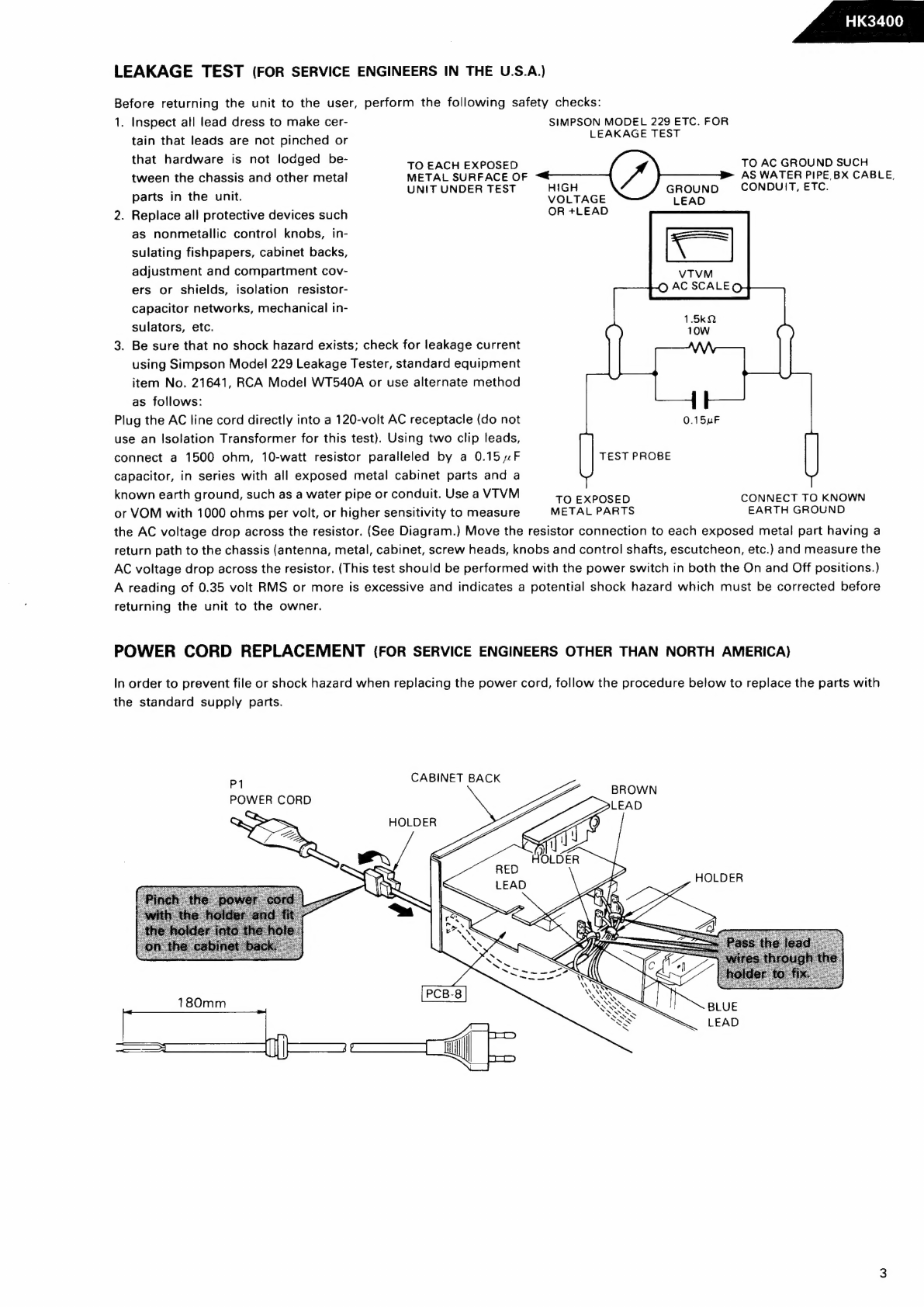
LEAKAGE
TEST
(FOR
SERVICE
ENGINEERS
IN
THE
U.S.A.)
Before
returning
the
unit
to
the
user,
perform
the
following
safety
checks:
1.
Inspect
all
lead
dress
to
make
cer-
SIMPSON
MODEL
229
ETC.
FOR
LEAKAGE
TEST
tain
that
leads
are
not
pinched
or
that
hardware
is
not
lodged
be-
TO
EACH
EXPOSED
TO
AC
GROUND
SUCH
tween
the
chassis
and
other
metal
METAL
SURFACE
OF
aii
Coe
el
eee
CABLE,
.
:
UNIT
UNDER
TEST
H
GROUND
,
parts
in
the
unit.
VOLTAGE
LEAD
2.
Replace
all
protective
devices
such
OR
+LEAD
as
nonmetallic
control
knobs,
in-
sulating
fishpapers,
cabinet
backs,
adjustment
and
compartment
cov-
ers
or
shields,
isolation
resistor-
capacitor
networks,
mechanical
in-
sulators,
etc.
3.
Be
sure
that
no
shock
hazard
exists;
check
for
leakage
current
using
Simpson
Model
229
Leakage
Tester,
standard
equipment
item
No.
21641,
RCA
Model
WT540A
or
use
alternate
method
as
follows:
Plug
the
AC
line
cord
directly
into
a
120-volt
AC
receptacle
(do
not
use
an
Isolation
Transformer
for
this
test).
Using
two
clip
leads,
connect
a
1500
ohm,
10-watt
resistor
paralleled
by
a
0.15
4F
capacitor,
in
series
with
all
exposed
metal
cabinet
parts
and
a
known
earth
ground,
such
as
a
water
pipe
or
conduit.
Use
a
VTVM
TO
EXPOSED
CONNECT
TO
KNOWN
or
VOM
with
1000
ohms
per
volt,
or
higher
sensitivity
to
measure
METAL
PARTS
EARTH
GROUND
the
AC
voltage
drop
across
the
resistor.
(See
Diagram.)
Move
the
resistor
connection
to
each
exposed
metal
part
having
a
return
path
to
the
chassis
(antenna,
metal,
cabinet,
screw
heads,
knobs
and
control
shafts,
escutcheon,
etc.)
and
measure
the
AC
voltage
drop
across
the
resistor.
(This
test
should
be
performed
with
the
power
switch
in
both
the
On
and
Off
positions.)
A
reading
of
0.35
volt
RMS
or
more
is
excessive
and
indicates
a
potential
shock
hazard
which
must
be
corrected
before
returning
the
unit
to
the
owner.
VTVM
OQ
AC
SCALEQ
TEST
PROBE
POWER
CORD
REPLACEMENT
(FOR
SERVICE
ENGINEERS
OTHER
THAN
NORTH
AMERICA)
In
order
to
prevent
file
or
shock
hazard
when
replacing
the
power
cord,
follow
the
procedure
below
to
replace
the
parts
with
the
standard
supply
parts.
PI
CABINET
BACK
POWER
CORD
Sy
HOLDER
CONTROLS
&
FUNCTIONS
Speaker
:
at
@
Speaker
Turn
to
select
either
of
two
sets
of
speakers,
or
both,
or
neither
(headphone
output
only).
@
Bass
Turn
to
increase
or
decrease
the
proportion
of
low
frequency
sound.
®
Treble
Turn
to
increase
or
decrease
the
proportion
of
high
frequency
sound.
©
Balance
Turn
to
adjust
relative
output
level
of
left
and
right
speakers.
©
Function
Selector
Select
desired
input
source
by
pressing
the
correspond-
ing
key.
@
Volume
Turn
to
raise
or
lower
output
volume.
@
Headphone
Jack
Plug
in
headphones
if
desired.
(With
Speaker
switch
in
Off
position,
output
is
supplied
only
to
headphones.)
REMOTE
CONTROL
harman/kardon
RD
ee
tes
ee
oe
@®
Loudness
Press
to
improve
sound
quality
when
listening
to
your
system
at
low
volume.
©
Tuning
Press
4
to
tune
to
stations
with
higher
frequencies;
press
vw
for
lower
frequencies.
@
FM/AM
Press
to
select
FM
or
AM
reception.
@
Seek-Stereo
Press
to
select
Seek
tuning
in
stereo,
or
manual
tuning
in
mono.
@®
Preset
Buttons
Press
to
access
pre-selected
stations.
@®
Shift
A-B
Allows
you
to
access
16
pre-selected
stations
using
the
8
preset
buttons.
@
Memory
Press
to
set
a
new
preset
station
in
memory.
®
Power
Press
to
turn
the
unit
on
and
off.
Independent
Remote
Control
The
keys
on
the
remote
control
unit
function
the
same
as
the
correspond-
ing
buttons
on
the
receiver
itself,
except
for
the
power
switch.
The
power
switch
on
the
receiver
turns
the
unit
On
and
Off.
The
switch
on
the
remote
control
switches
the
receiver
from
On
(green
LED
illuminates
on
receiver
power
switch)
to
Standby
(amber
LED),
as
follows.
When
power
is
On,
pressing
the
power
switch
on
the
remote
control
puts
the
receiver
in
Standby
mode.
From
this
mode,
the
receiver
can
be
turned
back
on
from
the
remote
control.
When
power
is
Off,
the
receiver
can
be
turned
on
only
from
the
unit
itself,
not
from
the
remote
control.
Operating
Conditions
The
control
unit
operates
effectively
within
a
distance
of
7
meters
(23
feet)
t
Boa
SI
Sa
CJ
oa.
and
an
angle
of
30°
from
the
receiver.
Using
the
control
near
fluorescent
remote.
lights
may
shorten
this
range,
as
will
any
dust
or
dirt
that
accumulates
on
the
front
of
the
remote
control,
or
the
“Remote
Sensor”
area
of
the
receiver.
Also
avoid
blocking
the
line
of
sight
between
receiver
and
The
control
unit
is
powered
by
two
AA
batteries,
included
with
your
receiver.
When
you
replace
weak
batteries,
replace
both
at
the
same
time.
When
the
remote
is
to
be
unused
for
an
extended
period,
remove
the
batteries
to
prevent
damage
from
corrosion.
DISASSEMBLY
PROCEDURES
(REFER
TO
PAGES
9
THROUGH
13)
[1]
CABINET
TOP
(127)
REMOVAL
Remove
6
screws
(A)
and
then
remove
the
Cabinet
Top
(127).
[2]
FRONT
PANEL
ASSEMBLY
(AA)
REMOVAL
1.
Remove
the
Cabinet
Top
(127),
referring
to
the
pre-
vious
step
[1].
2.
Disconnect
the
(CW15)
from
(CN15)
on
the
Tuner
P.C.
Board
(PCB-1).
3.
Pull
out
the
Volume
Knob
(139)
with
the
Volume
Indicator
P.C.
Board
(PCB-16).
4.
Disconnect
the
(CW100)
from
(CN100)
on
the
Trans
Terminal
P.C.
Board
(PCB-13).
5.
Disconnect
the
(JL101,
JL804)
from
(CN101A,
CN804B)
on
the
Tuner
P.C.
Board
(PCB-1).
6.
Remove
3
screws
(B)
and
3
screws
(C)
and
then
remove
the
Front
Panel
Assembly
(AA).
[3]
FRONT
P.C.
BOARD
(PCB-14)
REMOVAL
1.
Remove
the
Front
Panel
Assembly
(AA),
referring
to
the
previous
step
[2).
2.
Remove
11
screws
(D)
and
then
remove
the
Front
P.C.
Board
(PCB-14).
(4)
TONE
CONTROL
P.C.
BOARD
(PCB-6)
REMOVAL
1.
Remove
the
Front
Panel
Assembly
(AA),
referring
to
the
previous
step
[2].
2.
Pull
out
the
Bass,
Treble
and
Balance
Knobs
(140).
3.
Remove
the
3
nuts
(E)
and
then
remove
the
Tone
Control
P.C.
Board
(PCB-6).
4.
Disconnect
the
(CW401)
from
(CN401)
on
the
Tone
Control
P.C.
Board
(PCB-6).
5.
If
necessary,
unsolder
the
lead
wires.
[5]
VOLUME
P.C.
BOARD
(PCB-7)
REMOVAL
1.
Remove
the
Front
Panel
Assembly
(AA),
referring
to
the
previous
step
[2].
2.
Disconnect
the
(CW504)
from
(CN504)
on
the
Tuner
P.C.
Board
(PCB-1).
3.
Remove
the
1
nut
(F)
and
then
remove
the
Volume
P.C.
Board
(PCB-7).
4.
If
necessary,
unsolder
the
lead
wires.
[6]
HEADPHONE
P.C.
BOARD
(PCB-10)
REMOVAL
1.
Remove
the
Front
Panel
Assembly
(AA),
referring
to
the
previous
step
[2].
2.
Pull
out
the
Loudness
Button
(151).
3.
Remove
2
screws
(G)
and
then
remove
the
Headphone
P.C.
Board
(PCB-10).
4.
If
necessary,
unsolder
the
lead
wires.
SPEAKER
SWITCH
P.C.
BOARD
(PCB-11)
REMOVAL
1.
Remove
the
Front
Panel
Assembly
(AA),
referring
to
the
previous
step
[2].
2.
Pull
out
the
Speaker
Knob
(140).
3.
Remove
1
nut
(H)
and
then
remove
the
Speaker
Switch
P.C.
Board
(PCB-11).
4.
If
necessary,
unsolder
the
lead
wires.
POWER
SWITCH
P.C.
BOARD
(PCB-15})
REMOVAL
1.
Remove
the
Front
Panel
Assembly
(AA),
referring
to
the
previous
step
[2].
2.
Pull
out
the
Power
Indicator
P.C.
Board
(PCB-17)
with
the
Holder
(187).
3.
Remove
2
screws
(I)
and
then
remove
the
Power
Switch
P.C.
Board
(PCB-15).
4.
Open
the
lid
of
connector
(CN11)
on
the
Power
Switch
P.C.
Board
(PCB-15)
and
then
disconnect
the
lead
wire.
[9]
TUNER
P.C.
BOARD
(PCB-1)
REMOVAL
1.
Remove
the
Cabinet
Top
(127),
referring
to
the
pre-
vious
step
[1].
2.
Disconnect
the
(CW15,
CW102,
CW504)
from
(CN15,
CN102,
CN504)
on
the
Tuner
P.C.
Board
(PCB-1).
3.
Open
the
lid
of
connectors
(CN12,
CN501)
on
the
Tuner
P.C.
Board
(PCB-1)
and
then
disconnect
the
!ead
wire.
4.
Remove
3
screws
(C)
and
8
screws
(J)
and
then
remove
the
Front
Panel
Assembly
and
Chassis.
5.
Remove
10
screws
(K)
and
then
remove
the
Tuner
P.C.
Board
(PCB-1),
Equalizer
P.C.
Board
(PCB-2)
and
Moni-
tor
P.C.
Board
(PCB-3).
6.
If
necessary,
unsolder
the
lead
wires.
.
Pull
out
the
Equalizer
P.C.
Board
(PCB-2).
8.
Pull
out
the
Monitor
P.C.
Board
(PCB-3).
“i
fd
SUB
WOOFER
BOARD
(PCB-4)
REMOVAL
1.
Remove
the
Cabinet
Top
(127),
referring
to
the
pre-
vious
step
[1].
2.
Remove
2
screws
(L)
and
then
remove
the
Sub
Woofer
P.C.
Board
(PCB-4).
3.
Open
the
lid
of
connector
(CN104)
on
the
Sub
Woofer
P.C.
Board
(PCB-4).
4.
If
necessary,
unsolder
the
lead
wires.
i]
SPEAKER
TERMINAL
P.C.
BOARD
(PCB-12)
REMOVAL
1.
Remove
the
Cabinet
Top
(127),
referring
to
the
pre-
vious
step
[1].
2.
Remove
2
screws
(M)
and
then
remove
the
Speaker
Terminal
P.C.
Board
(PCB-12).
ia
MAIN
P.C.
BOARD
(PCB-5)
REMOVAL
1.
Remove
the
Speaker
Terminal
P.C.
Board
(PCB-12)},
referring
to
the
previous
step
f11.
2.
Remove
5
screws
(N)
and
then
remove
the
Main
P.C.
Board
(PCB-5)
with
Metal
Fittings
(167,
168).
3.
If
necessary,
unsolder
the
lead
wires.
i'd
SECONDRY
P.C.
BOARD
(PCB-9)
REMOVAL
1.
Remove
the
Cabinet
Top
(127),
referring
to
the
pre-
vious
step
[1].
2.
Remove
6
screws
(O)
and
then
remove
the
Power
Transformer
(T1)
with
Secondry
P.C.
Board
(PCB-9)
and
Trans
Terminal
P.C.
Board
(PCB-13).
f4
PRIMARY
P.C.
BOARD
(PCB-8)
REMOVAL
1.
Remove
the
Secondry
P.C.
Board
(PCB-9),
referring
to
the
previous
step
f3.
2.
Remove
2
screws
(P)
and
then
remove
the
Primary
P.C.
Board
(PCB-8).
CIRCUIT
DESCRIPTION
@IFM
TUNER
SECTION
The
FM
signal
which
has
entered
through
the
antenna
is
high-frequency
amplified
in
the
front
end.
Then
it
is
mixed
with
the
output
of
the
local
oscillators
and
converted
into
the
10.7MHz
intermediate-frequency.
The
10.7MHz
signal
is
amplified
in
the
intermediate
frequency
amplifying
section
which
consists
of
CF201,
Q201,
CF202,
Q202
and
CF203
and
fed
to
pin
1
of
1C201.
In
1C201,
the
signal
is
sent
through
the
IF
amplifier
and
after
being
detected
in
the
quadrature,
it
is
sent
through
the
post
amplifier
to
pin
12
and
then
input
to
pin
2
of
|C301.
In
IC301,
the
pilot
signal
is
detected
out
of
the
signal
which
has
been
fed
and
38kHz
signal
is
produced.
Then
by
this
signal,
stereo
signal
is
demodulated,
output
from
pin
4
for
the
left
channel
and
from
pin
7
for
the
right
channel
and
transmitted
to
the
input
selector
section.
MAM
TUNER
SECTION
The
AM
signal
which
has
entered
through
the
antenna
passes
through
the
tuning
circuit
consisting
of
CB251
and
is
inputted
to
pin
21
of
1C201.
In
IC201,
it
undergoes
radio-frequency
amplification
and
local
oscillation
and
is
output
from
pin
20,
and
passed
through
the
transformer
(T251)
and
ceramic
filter
(CF252)
and
enters
pin
18
of
IC201.
It
is
then
passed
through
the
IF
amplification
and
detection
and
is
output
from
pin
15.
This
signal
is
fed
to
1C301.
MAUDIO
AMPLIFIER
SECTION
The
signal
which
has
entered
from
each
input
terminal
is
selected
by
the
input
selector,
passes
through
the
balance
circuit,
volume
and
loudness
circuit
and
is
fed
into
the
pre-amplifier.
Then
it
is
fed
into
the
power
amplifier
through
the
tone
control
circuit,
power
is
amplified
and
transmitted
to
the
speaker
terminal.
The
power
amplifier
has
an
over-output
protective
circuit.
if
current
exceeding
the
specification
flows
to
0419,
Q421
(L
ch),
Q420,
Q422
(R
ch),
it
is
detected
at
Q27
(L
ch)
and
Q28
(R
ch)
and
the
protective
circuit
consisting
of
Q22
and
Q24
draws
in
Q23
and
Q29,
and
thus
the
input
signal
is
cut
to
protect
the
circuit.
MMUTING
CIRCUIT
lf
FM
or
AM
is
received
out
of
tuning
or
in
a
very
weak
field
intensity,
pin
31
of
|1C701
becomes
high
level.
This
is
fed
to
the
base
of
0707,
whose
collector
then
becomes
low
level
and
the
collector
of
Q708
high
level.
As
a
result,
Q301
(L
ch)
and
0302
(R
ch)
are
conducted
to
mute
the
output.
IESYNTHESIZER
SECTION
@FM
The
local
oscillation
output
at
the
front
end
is
fed
to
pin
21
of
the
prescaler
IC702
and
after
being
frequency
divided
into
30
or
32,
control
output
signal
if
fed
from
!C701,
compared
with
the
divided
local
oscillation
output
and
output
to
pin
16.
This
voltage
is
level
converted
at
0701
and
Q702,
and
fed
to
the
front
end.
eAM
The
local
oscillation
output
is
fed
from
pin
24
of
IC201
to
pin
19
of
10702.
In
IC702,
control
output
signal
is
fed
from
iIC701,
compared
with
the
local
oscillation
output
and
output
to
pin
16.
This
voltage
is
level
converted
at
Q701
and
Q702,
and
fed
to
the
AM
local
oscillation
section.
HINDICATOR
SECTION
@
Frequency
display
The
indicator
tube
is
turned
ON
by
the
output
decoded
in
IC701.
@
Tuning
When
broadcast
is
received,
Q711
turns
ON
by
the
control
signal
in
1C301
and
“Tuned”
of
the
indicator
tube
is
turned
ON.
When
FM
or
stereo
broadcast
is
received,
pin
9
of
1C301
becomes
low
level,
Q712
turns
ON
and
“Stereo”
of
the
indicator
tube
is
turned
ON.
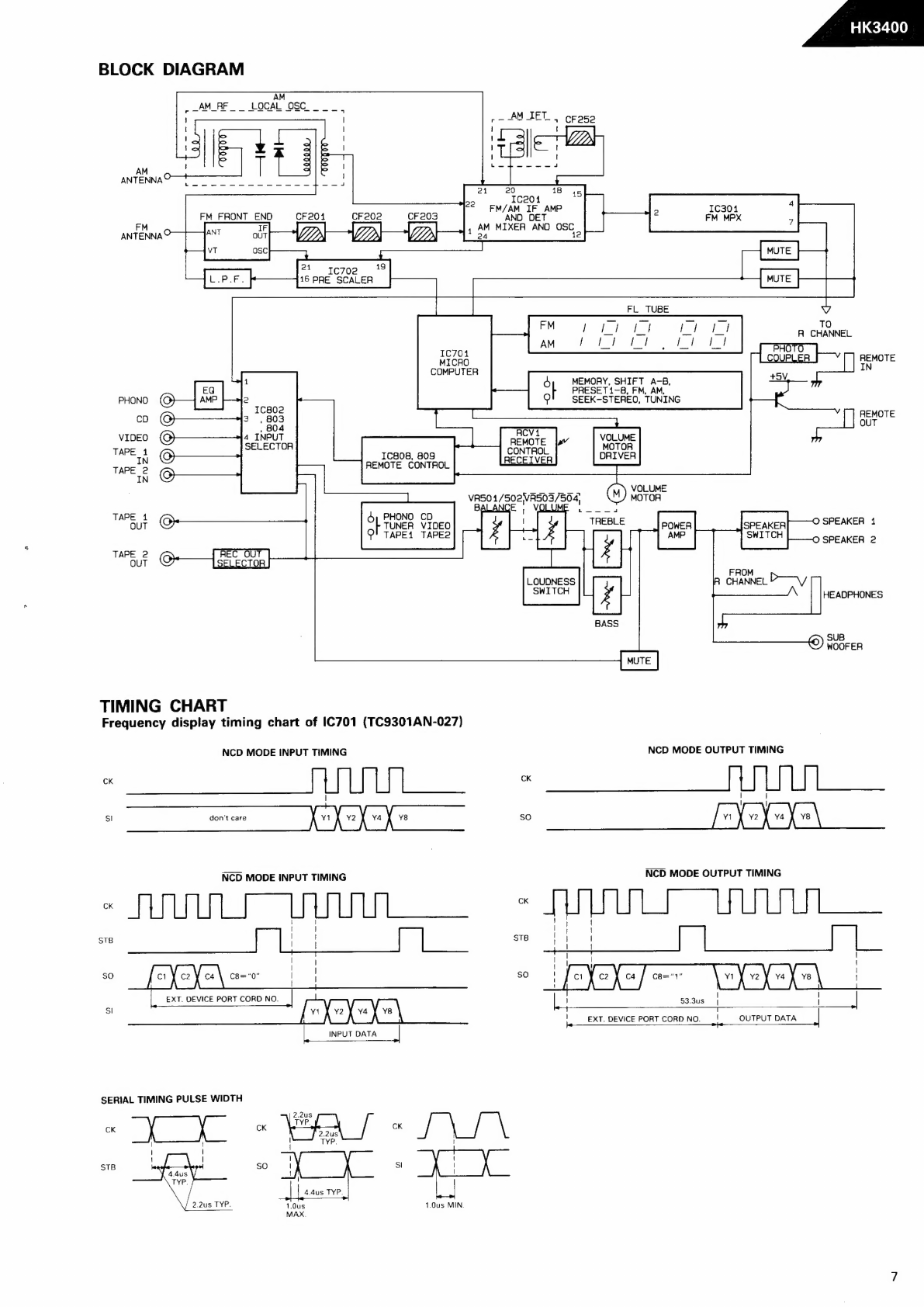
BLOCK
DIAGRAM
20
FM
FRONT
END
CF201
CFe0e
CF20
Ww
19
ae
a
16
PRE
SCALER
IC704
MICRO
COMPUTER
Ice04
FM/AM
IF
AMP
AND DET
AM
MIXER
AND
OSC
ANTENNA®
=
ANT
our
WJ
VD)
UP
1S
VT
OSC
eee
res
18 45
nM
1e
FL
TUBE
V
TO
RA
CHANNEL
Orie}
r
Lcoupuea
|v
remote
IN
+5V,
PRESET
1-8,
FM,
AM,
sl
MEMORY,
SHIFT
A-B,
PHONO
(Q)
SEEK-STEREO,
TUNING
co
@
3.
803
REMOTE
,
4
VIDEO
©
4
INPUT
SE
OTE
VOLUME
+
Sipe
4
SELECTOR
CONTROL
MOTOR
w
©
IC808,
809
RECEIVER
DRIVER
epee
REMOTE
CONTROL
ww
Q
git
rhe
VOLUME
VASO
1/502VAS03/504,
()
MOTOR
ALAIN
I
ed
TAPE
4
PHONO
CD
aut
©
ol
TUNER
VIDEO
POWER
SPEAKER,
SPEAKER
1
O!
TAPE1
TAPE2
AMP
SWITCH
O
SPEAKER
2
52
©-—{Eian
ae
M
LOUDNESS
CHANNEL
P——~/
SPL
TCH
HEADPHONES
TIMING
CHART
Frequency
display
timing
chart
of
IC701
(TC9301AN-027)
CK
Sl
CK
STB
sO
Sl
NCD
MODE
INPUT
TIMING
ee
eee
|
20
2
FL
en
don’t
care
NCD
MODE
INPUT
TIMING
Sages
ee
eS
a
wie
| |
|
|
eyYe\=~
|
i
EXT.
DEVICE
PORT
CORD
NO.
[«wYoYuYr\
INPUT
DATA
SERIAL
TIMING
PULSE
WIDTH
so
4.4us
TYP.
2.2us
TYP.
1.0us
MIN.
1.0us
MAX.
)
SUB
WOOFER
NCD
MODE
OUTPUT
TIMING
|
|
|
|
[vXohuXe\
NCD
MODE
OUTPUT
TIMING
CK
|
|
{
|
!
force}
co
|
ill
\
vi
va
ve
X
ve
|
4
|
|
!
53.3us
|
|
!
EXT.
DEVICE
PORT
CORD
NO.
=!
OUTPUT
DATA
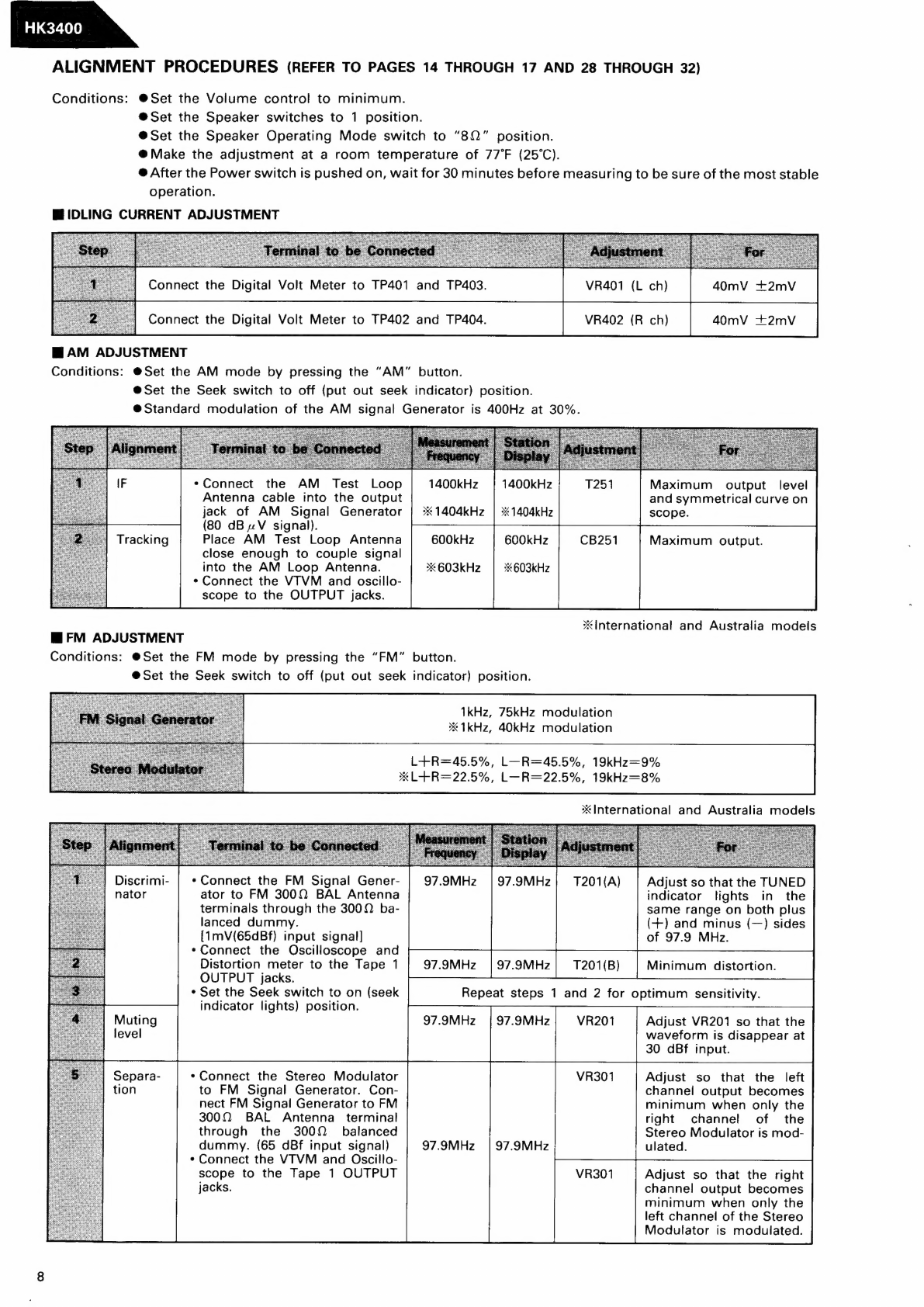
ALIGNMENT
PROCEDURES
(REFER
TO
PAGES
14
THROUGH
17
AND
28
THROUGH
32)
Conditions:
@Set
the
Volume
control
to
minimum.
@Set
the
Speaker
switches
to
1
position.
@Set
the
Speaker
Operating
Mode
switch
to
“80”
position.
@
Make
the
adjustment
at
a
room
temperature
of
77°F
(25°C).
@
After
the
Power
switch
is
pushed
on,
wait
for
30
minutes
before
measuring
to
be
sure
of
the
most
stable
operation.
IDLING
CURRENT
ADJUSTMENT
Connect
the
Digital
Volt
Meter
to
TP401
and
TP403.
VR401
(L
ch)
40mV
+2mV
Connect
the
Digital
Volt
Meter
to
TP402
and
TP404.
VR402
(R
ch)
40mV
+2mvV
BAM
ADJUSTMENT
Conditions:
@Set
the
AM
mode
by
pressing
the
“AM”
button.
@Set
the
Seek
switch
to
off
(put
out
seek
indicator)
position.
@Standard
modulation
of
the
AM
signal
Generator
is
400Hz
at
30%.
*Connect
the
AM
Test
Loop
1400kHz
|
1400kHz
Maximum
output
level
Antenna
cable
into
the
output
and
symmetrical
curve
on
jack
of
AM
Signal
Generator
|
%*1404kHz
|
*1404kHz
scope.
(80
dB
V
signal).
Tracking
Place
AM
Test
Loop
Antenna
600kHz
600kHz
Maximum
output.
close
enough
to
couple
signal
into
the
AM
Loop
Antenna.
*603kHz
|
>603kHz
*
Connect
the
VTVM
and
oscillo-
scope
to
the
OUTPUT
jacks.
international
and
Australia
models
FM
ADJUSTMENT
Conditions:
@Set
the
FM
mode
by
pressing
the
“FM”
button.
@Set
the
Seek
switch
to
off
(put
out
seek
indicator)
position.
1kHz,
75kHz
modulation
*1kHz,
40kHz
modulation
L+R=45.5%,
L—R=45.5%,
19kHz=9%
XL+R=22.5%,
L—R=22.5%,
19kHz=8%
*
International
and
Australia
models
Discrimi-
|
*
Connect
the
FM
Signal
Gener-
|
97.9MHz
|
97.9MHz|
1201(A)
Adjust
so
that
the
TUNED
nator
ator
to
FM
3000
BAL
Antenna
indicator
lights
in
the
terminals
through
the
3000
ba-
same
range
on
both
plus
lanced
dummy.
(+)
and
minus
(—)
sides
{1mV(65dBf)
input
signal]
of
97.9
MHz.
*Connect
the
Oscilloscope
and
Distortion
meter
to
the
Tape
1
97.9MHz
|97.9MHz|
1T201({B)
OUTPUT
jacks.
*
Set
the
Seek
switch
to
on
(seek
Repeat
steps
1
and
2
for
optimum
sensitivity.
indicator
lights)
position.
97.9MHz
|
97.9MHz
VR201
Adjust
VR201
so
that
the
waveform
is
disappear
at
30
dBf
input.
«Connect
the
Stereo
Modulator
Adjust
so
that
the
left
to
FM
Signal
Generator.
Con-
channel
output
becomes
nect
FM
Signal
Generator
to
FM
minimum
when
only
the
3000
BAL
Antenna
terminal
right
channel
of
the
through
the
3000
_
balanced
Stereo
Modulator
is
mod-
dummy.
(65
dBf
input
signal)
97.9MHz
|
97.9MHz
ulated.
*
Connect
the
VTVM
and
Oscillo-
scope
to
the
Tape
1
OUTPUT
Adjust
so
that
the
right
jacks.
channel
output
becomes
minimum
when
only
the
left
channel
of
the
Stereo
Modulator
is
modulated.
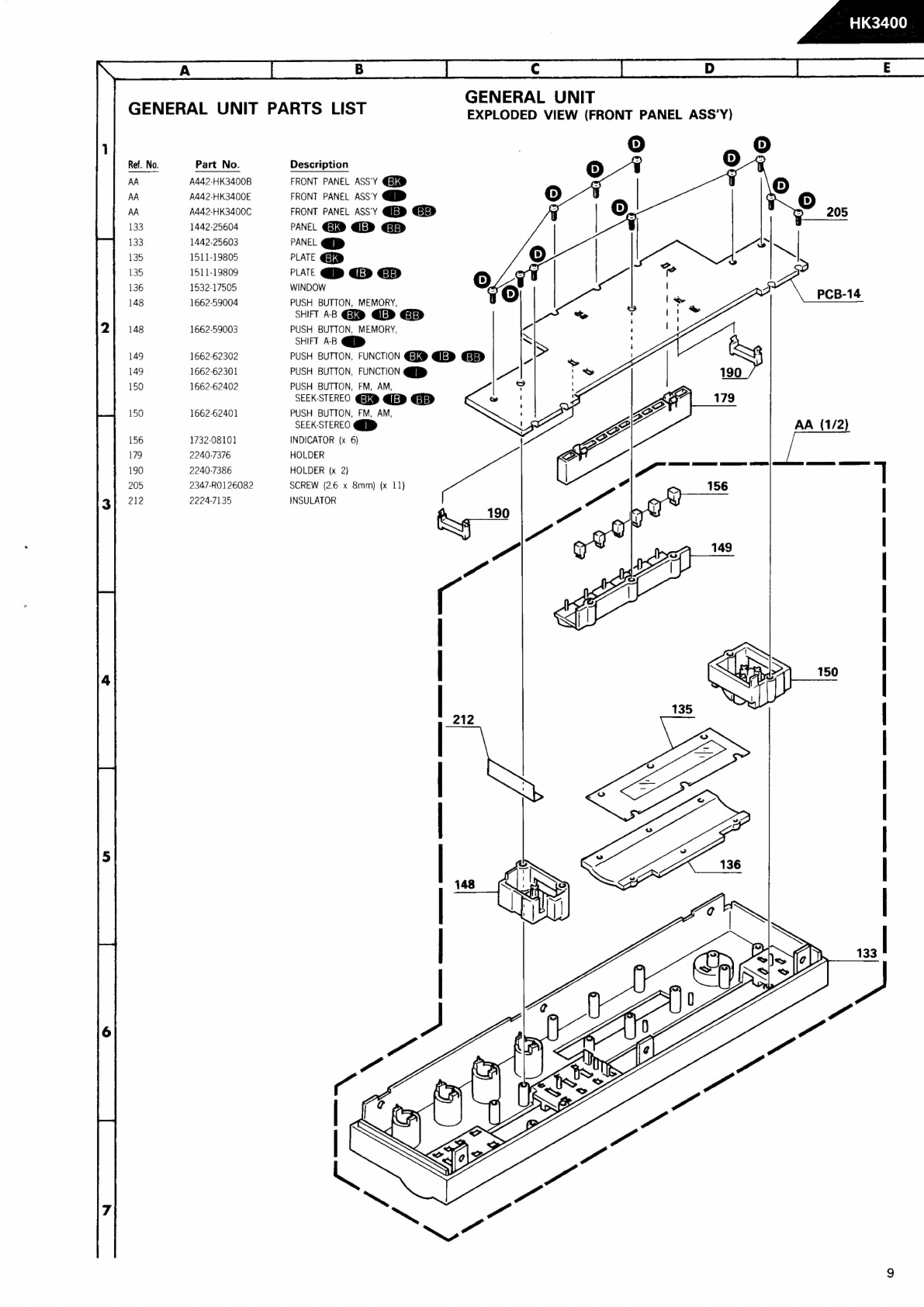
GENERAL
UNIT
GENERAL
UNIT
PARTS
LIST
EXPLODED
VIEW
(FRONT
PANEL
ASS’Y)
Ref.
No.
Part
No.
Description
AA
A442-HK3400B
FRONT
PANEL
ASS'Y
G@®
AA
A442-HK3400E
FRONT
PANEL
ASSY
QD
AA
A442-HK3400C
FRONT
PANEL
ASSY
Qj
@iis>
133
1442-25604
PANEL
G®
QED
>
133
1442-25603
PANEL
D>
135
1511-19805
PLATE
GR
135
1511-19809
PLATE
QD
QED
GED
136
1532-17505
WINDOW
148
1662-59004
PUSH
BUTTON,
MEMORY,
SHIFT
AB
GE® QLD
148
1662-59003
PUSH
BUTTON,
MEMORY,
SHIFT
AB
QD
149
1662-62302
PUSH
BUTTON,
FUNCTION
G®
QED
Ele>
149
1662-62301
PUSH
BUTTON,
FUNCTION
QD
150
1662-62402
PUSH
BUTTON,
FM,
AM,
SEEK-STEREO
G®
QUED
GED
150
1662-62401
PUSH
BUTTON,
FM,
AM,
SEEK-STEREO
QQ
156
1732-08101
INDICATOR
(x
6)
179
2240-7376
HOLDER
190
2240-7386
HOLDER
(x
2)
205
2347-RO126082
SCREW
(2.6
x
8mm)
{x
11)
212
2224-7135
INSULATOR
AA
(1/2)
|
|
—_d
212
_
WwW
Ww
a
ee
M2
\
\
Cc
=a
Ww or
¢
ay
hr
Lo
if
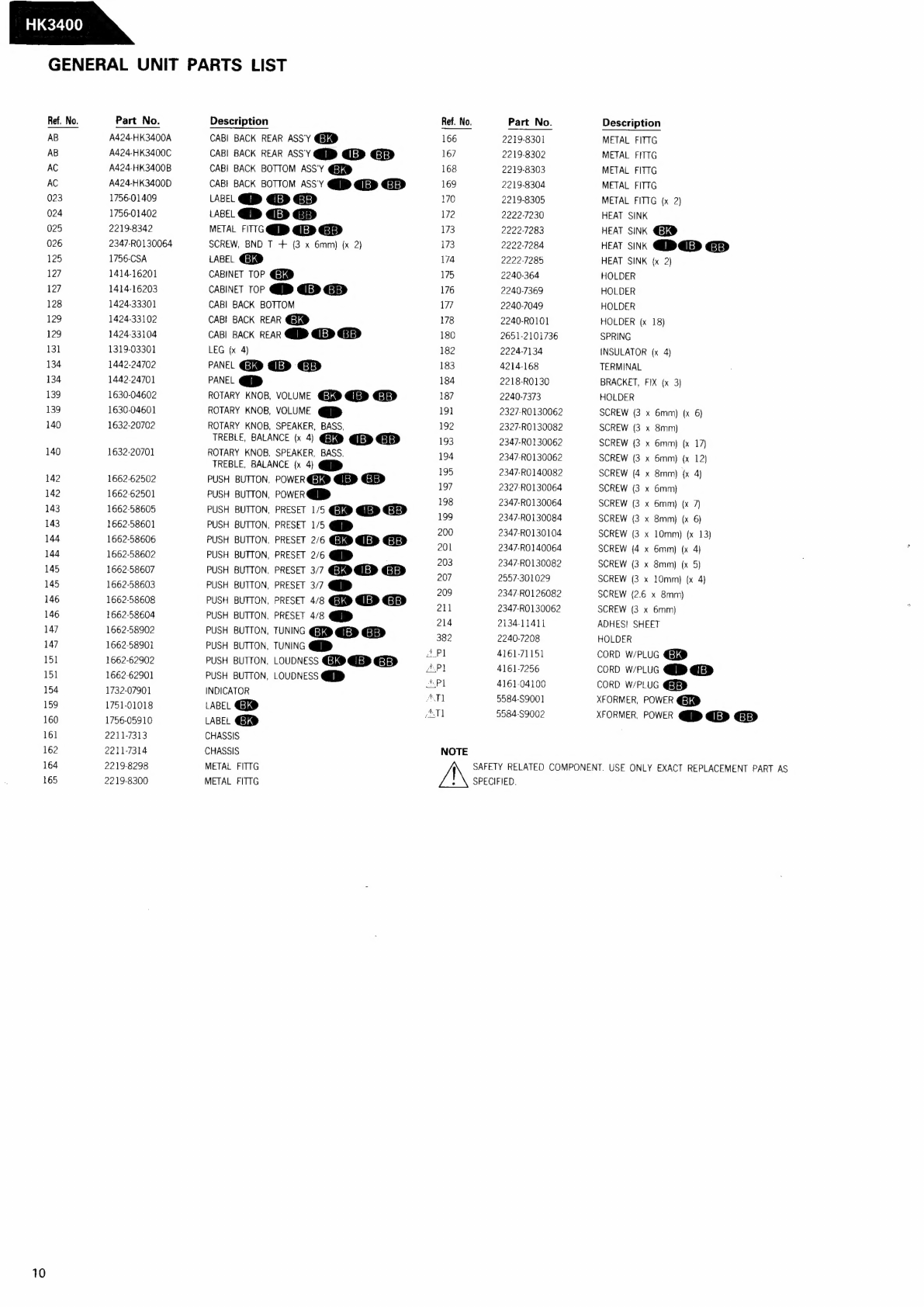
GENERAL
UNIT
PARTS
LIST
Ref.
No.
AB
AB
AC
AC
023
024
025
026
125
127
127
128
129
129
131
134
134
139
139
140
140
142
142
143
143
144
144
145
145
146
146
147
147
151
151
154
159
160
161
162
164
165
10
Part
No.
A424-HK3400A
A424-HK3400C
A424-HK3400B
A424-HK3400D
1756-01409
1756-01402
2219-8342
2347-RO130064
1756-CSA
1414-16201
1414-16203
1424-33301
1424-33102
1424-33104
1319-03301
1442-24702
1442-24701
1630-04602
1630-04601
1632-20702
1632-20701
1662-62502
1662-62501
1662-58605
1662-58601
1662-58606
1662-58602
1662-58607
1662-58603
1662-58608
1662-58604
1662-58902
1662-58901
1662-62902
1662-62901
1732-07901
1751-01018
1756-05910
2211-7313
2211-7314
2219-8298
2219-8300
Description
CABI
BACK
REAR
ASS'Y
@@
CABI
BACK
REAR
ASS'Y
>
QED
CAB]
BACK
BOTTOM
ASS'Y
@@
CABI
BACK
BOTTOM
ASS'Y
Qi
@iep
@Eie>
LABEL
QD
€E>
GD
LABEL
QD
GED
GD
METAL
FITTC
QD
QED
GElED
SCREW,
BND
T
+
(3
x
6mm)
(x
2)
LABEL
G®
CABINET TOP
@®
CABINET
TOP
QD
QED
Gip>
CABI
BACK
BOTTOM
CAB!
BACK
REAR
G®
CABI
BACK
REAR
QD
QED
€EIED
LEG
{x
4)
PANEL
GID
@ED
GBD
PANEL
p>
ROTARY
KNOB,
VOLUME
@@
Qi
ROTARY
KNOB,
VOLUME
QD
ROTARY
KNOB,
SPEAKER,
BASS,
TREBLE,
BALANCE
(x
4)
GE®
QED
Gp
ROTARY
KNOB,
SPEAKER,
BASS.
TREBLE,
BALANCE
(x
4)
D>
PUSH
BUTTON,
POWER
G®
QED
GED
PUSH
BUTTON,
POWER
QD
PUSH
BUTTON,
PRESET
1/5
G@L@
QP
GE>
PUSH
BUTTON,
PRESET
1/5
QD
PUSH
BUTTON,
PRESET
2/6
@x®
QED
@5]s>
PUSH
BUTTON,
PRESET
2/6
QD
PUSH
BUTTON.
PRESET
3/7
G@I@
QED
PUSH
BUTTON,
PRESET
3/7
D>
PUSH
BUTTON,
PRESET
4/8
G&® QED
@ETe>
PUSH
BUTTON,
PRESET
4/8
QD
PUSH
BUTTON,
TUNING
@R®
QED
GED
PUSH
BUTTON,
TUNING
QD
PUSH
BUTTON,
LOUDNESS
@@
QED
GTe>
PUSH
BUTTON,
LOUDNESS
QD
INDICATOR
LABEL
GD
LABEL
G®
CHASSIS
CHASSIS
METAL
FITTG
METAL
FITTG
166
167
168
169
170
172
173
173
174
175
176
177
178
180
182
183
184
187
191
192
193
194
195
197
198
199
200
201
203
207
209
211
214
382
Pl
API
APL
ATI
ANT]
NOTE
AN
Part
No.
2219-8301
2219-8302
2219-8303
2219-8304
Description
2219-8305
2222-7230
2222-7283
2222-7284
2222-7285
2240-364
2240-7369
2240-7049
2240-RO101
2651-2101736
2224-7134
4214-168
2218-RO130
2240-7373
2327-RO130062
2327-RO130082
2347-RO130062
2347-RO130062
2347-RO140082
2327-RO130064
2347-RO130064
2347-RO130084
2347-RO130104
2347-RO140064
2347-RO130082
2957-301029
2347-RO126082
2347-RO130062
2134-11411
2240-7208
4161-71151
4161-7256
4161-04100
5584-59001
5584-S9002
SAFETY
RELATED
COMPONENT.
USE
ONLY
EXACT
REPLACEMENT
PART
AS
SPECIFIED.
METAL
FITTG
METAL
FITTG
METAL
FITTG
METAL
FITTG
METAL
FITTG
{x
2)
HEAT
SINK
HEAT
SINK
@®
HEAT
SINK
QD
QED
GED
HEAT
SINK
{x
2)
HOLDER
HOLDER
HOLDER
HOLDER
(x
18)
SPRING
INSULATOR
(x
4)
TERMINAL
BRACKET,
FIX
(x
3)
HOLDER
SCREW
(3
x
6mm)
{x
6)
SCREW
(3
x
8mm)
SCREW
(3
x
6mm)
(x
17)
SCREW
(3
x
6mm)
(x
12)
SCREW
(4
x
8mm)
{x
4)
SCREW
(3
x
6mm)
SCREW
(3
x
6mm)
(x
7)
SCREW
(3
x
8mm)
(x
6)
SCREW
(3
x
10mm)
(x
13)
SCREW
{4
x
6mm)
(x
4)
SCREW
(3
x
8mm)
(x
5)
SCREW
(3
x
10mm}
{x
4)
SCREW
(2.6
x
8mm)
SCREW
(3
x
6mm)
ADHES!
SHEET
HOLDER
CORD
W/PLUG
GL®
CORD
W/PLUG
QD
QED
CORD
W/PLUG
XFORMER,
POWER
@Q®
XFORMER,
POWER
QD
QED