Hearth & Home Technologies • RC100 Wireless Wall Switch • 2166-391 • 6/09 1
Installation & Operating Instructions
RC100
IntelliFire Plus™ Wireless Wall Switch
Hearth & Home Technologies disclaims any responsibility for,
and the warranty will be voided by, the following actions:
• Installation and use of any damaged system component.
• Modicationofthesystemcomponent.
• Installation other than as instructed by Hearth & Home
Technologies.
• Installation and/or use of any component part not approved
by Hearth & Home Technologies.
Any such action may cause a re hazard.
• Read, understand and follow these instructions for safe
installation and operation.
Introduction
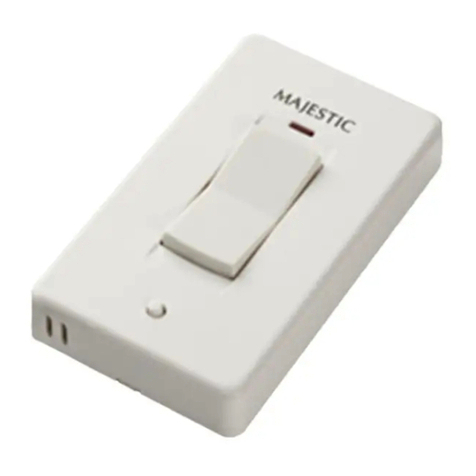
The RC100 wireless wall switch is designed to turn
yourgasreplaceonandoff.TheRC100wirelesswall
switch is only for use with the Hearth & Home Tech-
nologies IntelliFire Plus™ system (IPI).
FCC Requirements
WARNING! Risk of Fire! Changes or modications to
this unit not expressly approved by the party responsible
for compliance could void the user’s authority to operate
the equipment.
Installation of Wireless Wall Switch
CAUTION! Risk of Fire! DO NOT install damaged or
modied components. Warranty will be voided if damaged
or modied components are installed.
Kit components: One wireless wall switch, two #6 screws,
two wall anchors, two CR2032 batteries.
1. Remove wall switch components from packaging.
2.Insert small at screwdriver in the tab located in the
bottom of the wall switch and twist the screwdriver to
disassemble the wall switch. See Figure 1.
Figure 1. Wall Switch Disassembly
Note: This equipment has been tested and found to
comply with the limits for a Class B digital device, pur-
suant to Part 15 of the FCC Rules. These limits are
designed to provide reasonable protection against
harmful interference in a residential installation. This
equipment generates, uses, and can radiate radio
frequency energy and, if not installed and used in ac-
cordance with the instructions, may cause harmful in-
terference to radio communications. However, there is
no guarantee that interference will not occur in a partic-
ular installation. If this equipment does cause harmful
interference to radio or television reception, which can
be determined by turning the equipment off and on, the
user is encouraged to try to correct the interference by
one or more of the following measures:
• Reorient or relocate the receiving antenna.
• Increase the separation between the equipment and
receiver.
• Connect the equipment into an outlet on a circuit dif-
ferent from that to which the receiver is connected.
• Contact the dealer or an experienced radio TV techni-
cian for help.
Installation Precautions
This wall switch is tested and safe when installed in ac-
cordance with this installation manual. Do not install any
components that may be damaged.
Do not modify, disassemble, or substitute any of the com-
ponents included with this kit. Installation of this unit must
bedonebyaqualiedservicetechnician.
Placement of this wall switch may affect performance. An
assessment of the space should be done prior to installa-
tion for optimum performance.
Determine Location
Determine the location for the wireless wall switch. The
selected location should be in the same space as the gas
replacewithvisualsightofreplace.The wireless wall
switchmustbeplacedwithin30feetofthereplacebut
should not be exposed to extreme heat.
The RC100 is approved for interior installation and should
always be placed under weather resistant cover when used
in exterior applications.