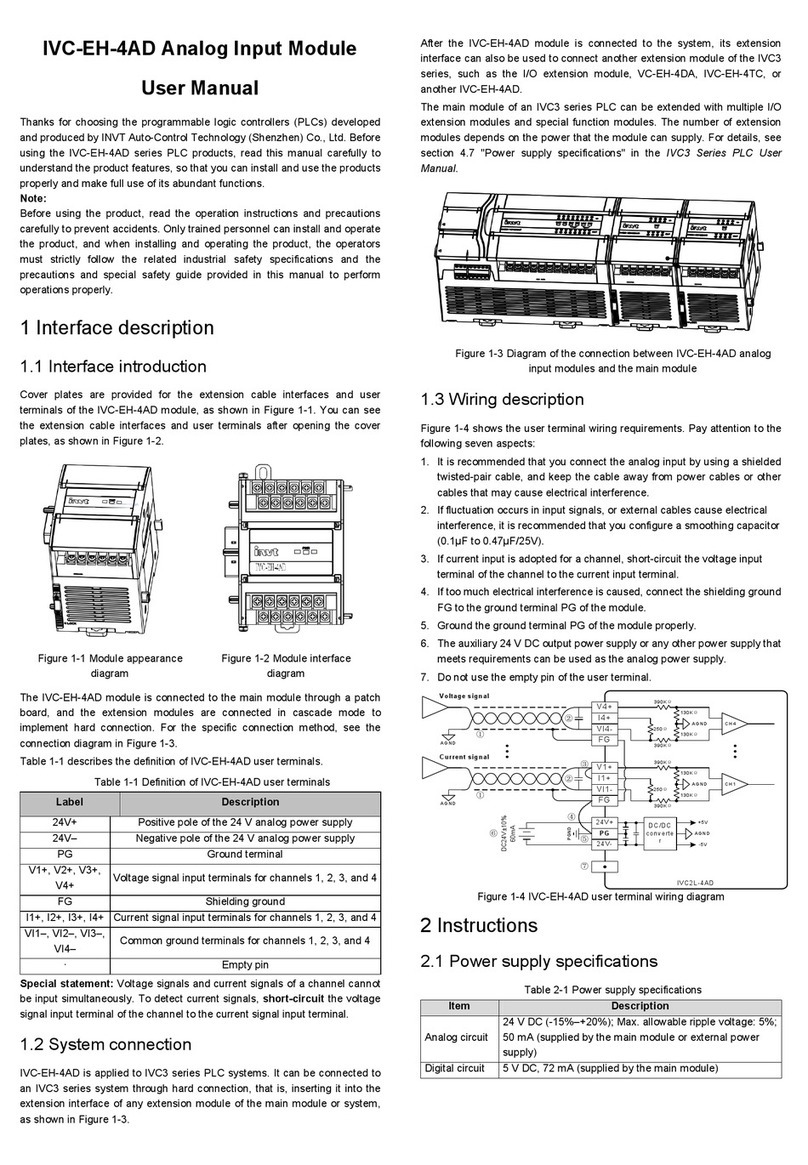
Table 2-4 BFM#700 information table
SN
BFM#700 Corresponding digial value
1 0 Channel disabled
2 1 Pt100 thermistor (-150°C–+600°C), digital unit: 0.1°C
3 2 Pt100 thermistor (-238°F–+1112°F), digital unit:
0.1°F
4 3 Cu100 thermistor (-30°C–+120°C), digital unit: 0.1°C
5 4 Cu100 thermistor (-22°F–+248°F), digital unit: 0.1°F
6 5 Cu50 thermistor (-30°C–+120°C), digital unit: 0.1°C
7 6 Cu50 thermistor (-22°F–+248°F), digital unit: 0.1°F
For example, if "0x0001" is written into the #700 unit, the following
information is set:
Channel mode of channel 1: Pt100 thermistor (-150°C–+600°C), digital
unit: 0.1°C
3. The units BFM#800 to BFM#803 are the setting buffer memory for the
average number of channel sampling times. The value ranges from 1 to
4096, and the default value 8 indicates that the average number of
channel sampling times is 8.
4. The units BFM#900 to BFM#915 are buffers for channel characteristic
settings, and channel characteristics are set in two-point mode. D0 and
D1 indicate the digital output (in the unit of 0.1°C) of the channel, A0 and
A1 indicate the actual input (in the unit of 0.1°C) of the channel, and each
channel uses 4 words. To simplify the setting of users without affecting
the implementation of functions, the values of A0 and A1 are fixed to 0
and the maximum value of the analog in the applied mode. The values
change with the modification of channel mode words (such as BFM#700).
Users cannot modify these two items.
Note: The values of all the characteristic parameters are in the unit of
0.1°C. For values in the unit of °F, convert them into values in °C based
on the following expression before writing them into the characteristic
setting:
Temperature value (°C)=5/9×[Temperature value (°F)-32]
For how the channel characteristics change with the modification of D0,
A0, D1, and A1, see chapter 3 "Characteristic setting".
5. For state information of BFM#300, see Table 2-5.
Table 2-5 State information of BFM#300
Bit state of
BFM#300 ON OFF
b0: Error
If anly of the bit states b1 to b2 is on,
PT conversion of all channels is
stopped.
No error
b1: Channel
error
Exceptions occur in the channel
characteristic data in the BFM or
adjustment errors occur.
The channel
characteristic
data is
normal.
b2: Power supply
fault 24 V DC power supply fault
The power
supply works
properly.
6. When BFM#400 is set to 1, that is, when it is activated, all the settings of
the module are reset to the default values.
7. BFM#500 is used to disable the modification of the I/O characteristic.
After BFM#500 is set to 0, you cannot modify the I/O characteristic until
BFM#500 is set to 1. The setting is saved at power outage.
8. BFM#4094 contains the module software version information. You can
use the FROM instruction to read the information.
9. BFM#4095 contains the module identification code. The identification
code of IVC-EH-4PT is 0X5042. User programs on the PLC can use this
code to identify the special module IVC-EH-4PT before transmitting or
receiving data.
3 Characteristic setting
The input channel characteristic of IVC-EH-4PT is the linear relationship
between the analog input A and digital output D of the channel. You can set
the characteristic. Each channel can be understood as the model shown in
Figure 3-1. Since it is linear, the characteristic of a channel can be
determined by identifying two points, P0 (A0, D0) and P1 (A1, D1). D0
indicates the channel digital output when the analog input is A0, and D1
indicates the channel digital output when the analog input is A1.
Figure 3-1 Channel characteristic of IVC-EH-4PT
Measurement errors are caused by the impedance of connection cables.
Therefore, you can eliminate this type of errors by setting channel
characteristics.
To simplify the setting of users without affecting the implementation of
functions, the values of A0 and A1 are fixed to 0 and 6000 (in the unit of
0.1°C) in the applied mode, that is, in Figure 3-1, A0 is 0.0°C and A1 is
600.0°C. Users cannot modify these two items.
If you do not modify D0 and D1 of each channel and only set the channel
mode (BFM#700), the characteristic of each mode is the default one, as
shown in Figure 3-2.
Note: When the channel mode is set to 2, 4, or 6, that is, the output is in the
unit of 0.1°F, the temperature values read in the output area (BFM#100–#103
and BFM#200–#203) are in the unit of 0.1°F, but the data in the channel
characteristic setting area (BFM#900–#915) is still in the unit of 0.1°C. Keep
this in mind when modifying the values of D0 and D1.
If D0 and D1 of a channel are modified, the characteristic of the channel is
changed. D0 can be set to any value ranging from -1000 to +1000 (in the unit
of 0.1°C), and D1 can be set to that ranging from 5000 to 7000 (in the unit of
0.1°C). If the setting exceeds the range, IVC-EH-4PT does not receive the
setting and keep the original valid setting.
If the value measured by IVC-EH-4PT in practice is 5°C (41°F) higher, you
can eliminate the error by setting the two adjustment points P0 (0, -50) and
P1 (6000,5950), as shown in Figure 3-3.
Figure 3-
characteristic of each mode when D0
and D1 are not modified
Figure 3-3 Characteristic
modification instance
4 Application instance
4.1 Configuring the extension module
through the configuration interface
In the following example, IVC-EH-4PT is connected to the No.0 position of
the extension module. It is connected to a Pt100 thermistor through channel
1 to output temperature values (°C), to a Cu100 thermistor through channel 2
to output temperature values (°C), and to a Cu50 thermistor through channel
3 to output temperature values (°F). Channel 4 is disabled, and the number of
points of channel average value is set to 4. Data registers D1, D3, and D5 are
used to receive the conversion results of the average values. Figure 4-1 to
Figure 4-3 show the setting method. For more details, see the IVC Series
PLC Programming Reference Manual.
You can configure registers directly in the provided extension module
configuration interface instead of using FROM and TO instructions. The
configuration steps are as follows:
1. Double-click the extension module configuration tab in the System block
category on Project Manager.
2. Double-click the module to be configured on the right instruction tree to
add it to the configuration.