manuals.online logo
Brands
  1. Home
  2. •
  3. Brands
  4. •
  5. Iron Ether
  6. •
  7. Music Pedal
  8. •
  9. Iron Ether Xerograph User manual

Iron Ether Xerograph User manual

Other Iron Ether Music Pedal manuals

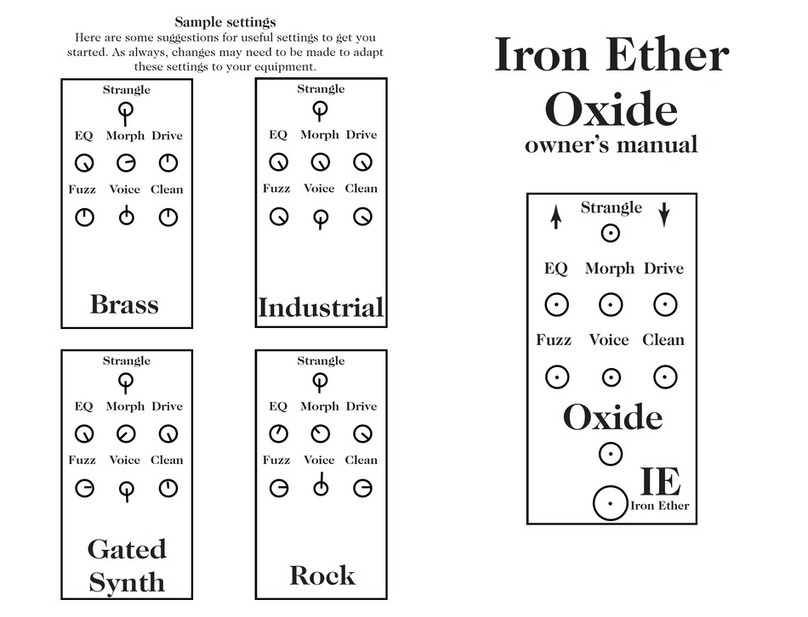
Iron Ether Oxide User manual

Iron Ether

Iron Ether Oxide User manual

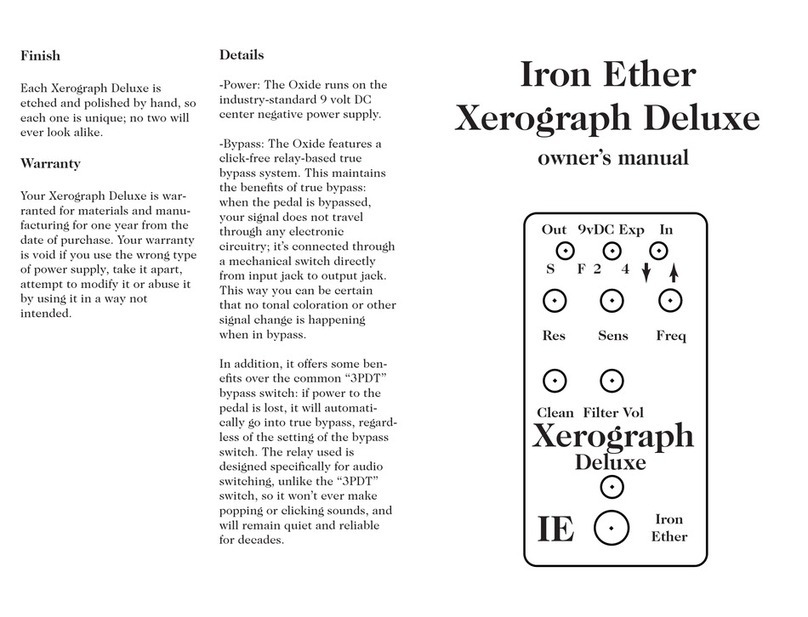
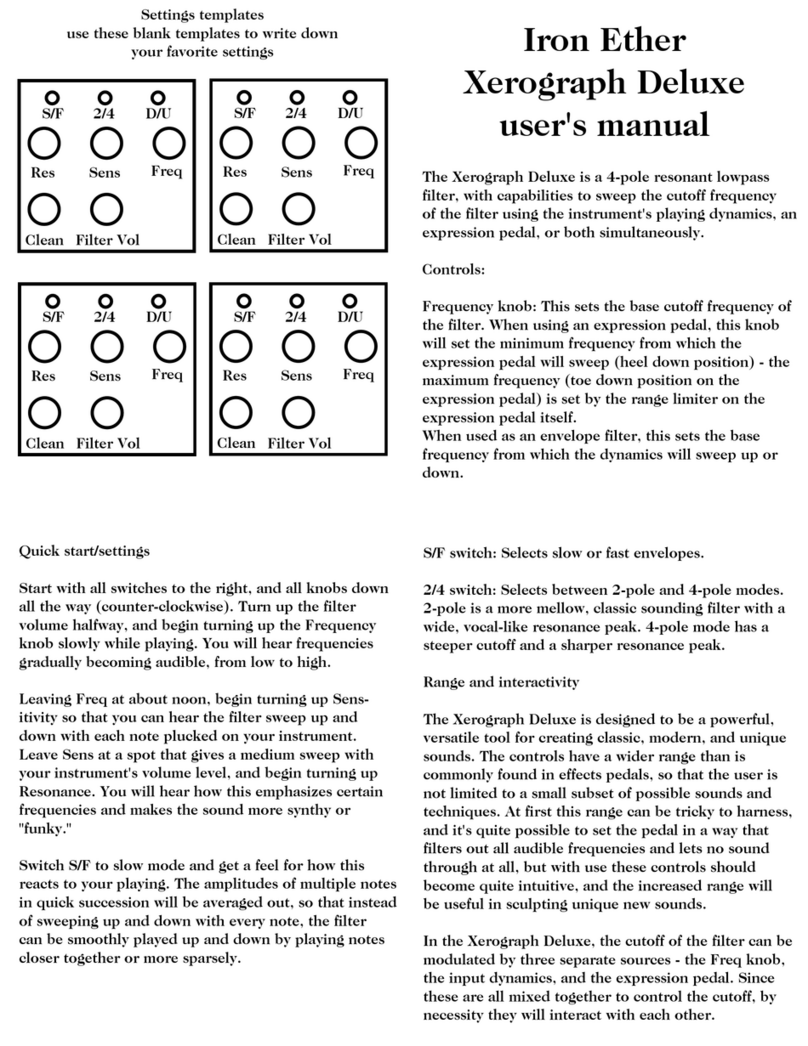
Iron Ether Xerograph Deluxe User manual

Iron Ether

Iron Ether Xerograph Deluxe User manual

Iron Ether Xerograph Deluxe User manual

Iron Ether

Iron Ether Xerograph Deluxe User manual

Iron Ether Xerograph Deluxe User manual

Iron Ether

Iron Ether Xerograph Deluxe User manual

Iron Ether Polytope User manual

Iron Ether

Iron Ether Polytope User manual

Popular Music Pedal manuals by other brands

Walrus Audio ARP-87 instruction manual

Walrus Audio

Walrus Audio ARP-87 instruction manual

Ibanez Phaser Mini owner's manual

Ibanez

Ibanez Phaser Mini owner's manual

Ashdown GEEZER BUTLER PEDAL OF DOOM user guide

Ashdown

Ashdown GEEZER BUTLER PEDAL OF DOOM user guide

TC Electronic G-Natural user manual

TC Electronic

TC Electronic G-Natural user manual

Pro-MIDI G25 user manual

Pro-MIDI

Pro-MIDI G25 user manual

Whirlwind oc-bass quick start guide

Whirlwind

Whirlwind oc-bass quick start guide

Strymon Lex-rotary user manual

Strymon

Strymon Lex-rotary user manual

Behringer PB600 manual

Behringer

Behringer PB600 manual

Lexicon MX200 user guide

Lexicon

Lexicon MX200 user guide

Dunlop Hendrix 68 Shrine Octavio Fuzz Series quick start guide

Dunlop

Dunlop Hendrix 68 Shrine Octavio Fuzz Series quick start guide

Matthews Effects Whaler V2 manual

Matthews Effects

Matthews Effects Whaler V2 manual

Grid 1 Pedal Jeanie user manual

Grid 1

Grid 1 Pedal Jeanie user manual

Amptweaker tightboost user manual

Amptweaker

Amptweaker tightboost user manual

Ibanez TS-808 Tube Screamer Overdrive Pro owner's manual

Ibanez

Ibanez TS-808 Tube Screamer Overdrive Pro owner's manual

DW 7000 owner's manual

DW

DW 7000 owner's manual

FAMC Liquid-Foot Jr. Series user manual

FAMC

FAMC Liquid-Foot Jr. Series user manual

Dimavery EPVP-50 manual

Dimavery

Dimavery EPVP-50 manual

Tefi Vintage Lab GEGÈ operating manual

Tefi Vintage Lab

Tefi Vintage Lab GEGÈ operating manual

manuals.online logo
manuals.online logoBrands
  • About & Mission
  • Contact us
  • Privacy Policy
  • Terms and Conditions

Copyright 2025 Manuals.Online. All Rights Reserved.

Resonance Frequency
2-pole 4-pole
Xerograph
lowpass filter
In
Out
IE
Iron Ether Xerograph
user’s manual
Resonance Frequency
2-pole 4-pole
Xerograph
lowpass filter
In
Out
IE
The Xerograph is a foot-sweepable, resonant
lowpass filter. It can be used for a variety of
sounds, from resonant synth sweeps, to fast funk
sounds, to deep reggae/dub tones.
-2-pole/4-pole switch:
-2-pole mode is a brighter, more
subtle filter with a wide
resonance peak.
-4-pole mode offers a fat, deep, and
synthy filter with a sharp resonance
peak.
-Frequency knob:
When using the filter without an expres-
sion pedal, this control sets the cutoff frequency
of the filter, allowing you to dial in deep, dubby
bass sounds. When using an expression pedal
with the Xerograph, the Frequency knob sets the
low extent of the filter sweep.
Resonance knob:
Boosts frequencies around the cutoff
frequency, which intensifies the effect of the
filter. Set the resonance low for more subtle
tone-shaping, or turn it up to around 3-o’clock
for wet synth sound. Turning it to maximum
sends the filter into self-oscillation.
Volume knob:
The Volume knob allows for the effect volume to
be either louder or quieter than the bypassed
signal, and to correct for volume loss that may
happen as a result of heavy filtering.
Volume
Front view of the Xerograph
in standard configuration
Frequency expression jack:
Connecting a passive expression
pedal to the expression jack allows you to
control the frequency of the filter with your
feet, allowing for slow, resonant sweeps, or
fast, funky squelches.
Recommended expression pedals:
Moog EP-2
Iron Ether modded EBJR volume pedal
Note: standard Xerographs DO NOT accept
control voltages (CV) into the expression
jack. Contact us if you require voltage
control. Never plug a control voltage into the
Xerograph’s expression jack. At best, it won’t
work. At worst, it will kill your Xerograph.
Power jack:
Runs on industry-standard 9 volt DC center
negative power supply. Does not accept
batteries.
9v DC Expression
Rear view of the Xerograph

Q. How do I get a synthy sound?
A. First, you’ll need to feed the
Xerograph a signal with plenty of
harmonics to carve out. Guitars
and basses are lacking in the rich
harmonics of sawtooth or square
wave sounds common in subtrac-
tive synthesis sounds. A fuzz pedal
is a popular choice to generate
these harmonics.
Second, crank up the Resonance
knob, to about 2 o’clock. Set the
expression pedal to the heel
position, and use the Frequency
knob to select the lowest
frequency of the sweep. Next, set
the expression pedal to the toe
down position, and use the knob
built into the expression pedal to
set the highest frequency of the
sweep. Set the pole switch to the
4-pole position.
Q. How about a dub sound?
A. Set the pole switch to 4-pole, then
turn the Frequency knob down while
playing the lowest note on your instru-
ment. Stop when all the harmonics of
your instrument have been filtered out,
and you’re left with only the fundamen-
tals. Turn the resonance up a bit. Cau-
tion is needed here, because the Xero-
graph is capable of putting out ridiculous
amounts of very low frequencies.