2
5. Repeat step 1 to 4 to store other stations.
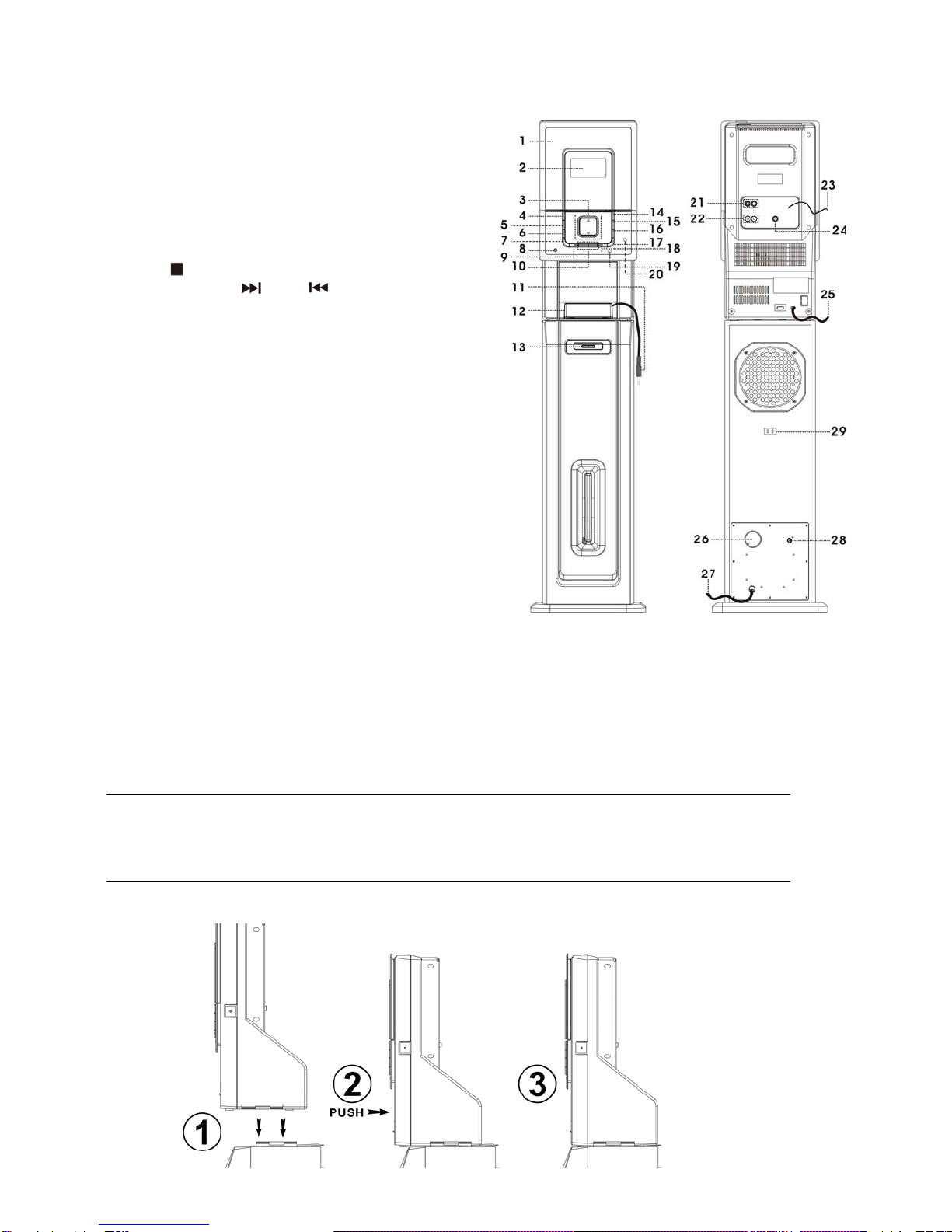
6. Now you can select the presets stations in order by pressing the “Folder/Pre–up ” button (6)
The pre-set memories will be cancelled completely if dis-connecting the main power supply. You are recommended to
switch the system into standby mode for convenience usage.
There are 5 seconds for program state, after 5 sec. This state would resume to normal tuner mode automatically.
You can overwrite a present station by storing another frequency in its place.
FM-stereo reception
Press the “ Stop/Mono ” button (9) repeatedly, the FM programs are receiving in mono and stereo mode repeatedly. In
particular when stereo signals are weak. It is preferable to receive the program in mono.
If stereo signal is being received, the stereo indicator “ ” will appear on LCD display (2) to show FM stereo program
is now receiving.
Hints for best reception:-
- FM : the receiver has a build-in FM wire antenna (23) hanging at the rear cabinet. This wire should be totally unraveled and
extended for the best reception.
-
Playing compact disc
Getting start
1. Press Function button (15) to select “ CD ” mode,
2. Press “ CD door Open/Close ” button (4) to open the CD door.
3. Place a CD with the printed side facing front inside the compartment & then close the CD door by pressing the “ CD door
Open/Close ” button (4) again.
4. Focus search is performing, the LCD display (2) will show the total number of tracks & total playing time. Then, the unit will
start to automatically.
5. Adjust Volume up/down button (3) to the desired volume level.
Play / pause mode
1. To interrupt, press the “ Play/Pause ” button (18) once, and the playing time will be freeze on the LCD display (2). Press
again to resume normal playback.
Stop mode
1. If “ Stop ” button (9) is pressed during play or pause mode, system will go to stop mode.
Skip mode (skip up / skip down )
1. During play or pause mode, if “ Skip up ” button (10) is pressed. It will go to next track and display the track no. and then
remain the play or pause mode.
2. During play or pause mode, if “ Skip down ” button (10) is pressed. It will go to the previous track, original track no. is
display and remain the play or pause mode.
For MP3 disc
1. After focus search is performing, the total number of track and album will be shown on the LCD display (2). The unit will start
to plat directly.
2. Press “ Folder/ Pre-up (17) or Pre-dn ” at remote control to select the folder number.
3. Press “ Skip up or Skip down ” button (10) to select the track number.
ID3 function (on remote control only)
Press the “ ID3 “ button repeatedly, the LCD display (2) show “ file - … "during playback of MP3 file, the song file/album/artist
name is being displayed in sequence . Press the “ ID3 ” button until display show the running time to disable the function.
Remark:-
- In that case of no name or not supportive languages had been assigned for the track, LCD display will blank (2) when press the
ID3 button.
- No title/album name can be recognized if the input format on the disc/mass media is not supporting by the system.
- The system support only English and Arabic number for ID3 function
MP3 track format requirement:-
- Bit rate : 32 kbps~320kbps, sampling rate : 32khz, 44.1khz and 48 kHz decodable
- The performance of playing MP3 disc is various from the quality of recording disc and the method of recording. Furthermore,
the searching lead-time for MP3-CD is longer than normal CD due to difference format.
Repeat/Random mode
Press the “ Play mode ” button (7) during playback to select repeat and random function, a single track, all the tracks repeat or
folder repeat(MP3 only) and random can be played in difference mode as follow:-