manuals.online logo
Brands
  1. Home
  2. •
  3. Brands
  4. •
  5. Johnson Controls
  6. •
  7. Thermostat
  8. •
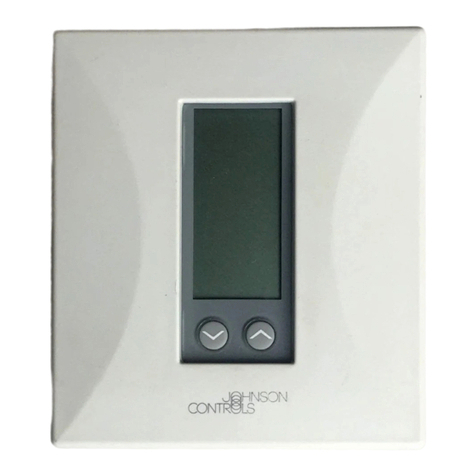
  9. Johnson Controls KONOse User manual

Johnson Controls KONOse User manual

This manual suits for next models

1

Other Johnson Controls Thermostat manuals

Johnson Controls TEC2103-2 User manual

Johnson Controls

Johnson Controls TEC2103-2 User manual

Johnson Controls T701DFP-4 User manual

Johnson Controls

Johnson Controls T701DFP-4 User manual

Johnson Controls FCP-NA-701-L User manual

Johnson Controls

Johnson Controls FCP-NA-701-L User manual

Johnson Controls T60xDFH-4 User manual

Johnson Controls

Johnson Controls T60xDFH-4 User manual

Johnson Controls T6634-TE21 User manual

Johnson Controls

Johnson Controls T6634-TE21 User manual

Johnson Controls York DPC-1 Manual

Johnson Controls

Johnson Controls York DPC-1 Manual

Johnson Controls WT-4002-MCR User manual

Johnson Controls

Johnson Controls WT-4002-MCR User manual

Johnson Controls T600MSP-2 User manual

Johnson Controls

Johnson Controls T600MSP-2 User manual

Johnson Controls T28 Series User manual

Johnson Controls

Johnson Controls T28 Series User manual

Johnson Controls TEC2045-4 User manual

Johnson Controls

Johnson Controls TEC2045-4 User manual

Johnson Controls GLAS User manual

Johnson Controls

Johnson Controls GLAS User manual

Johnson Controls A19A User manual

Johnson Controls

Johnson Controls A19A User manual

Johnson Controls FCP-NA-701 User manual

Johnson Controls

Johnson Controls FCP-NA-701 User manual

Johnson Controls T9200 User manual

Johnson Controls

Johnson Controls T9200 User manual

Johnson Controls TEC2201-2 User manual

Johnson Controls

Johnson Controls TEC2201-2 User manual

Johnson Controls T8200-TB20-9JS0/9JR0 series User manual

Johnson Controls

Johnson Controls T8200-TB20-9JS0/9JR0 series User manual

Johnson Controls T500HCP-1 User manual

Johnson Controls

Johnson Controls T500HCP-1 User manual

Johnson Controls T25 User manual

Johnson Controls

Johnson Controls T25 User manual

Johnson Controls TEC3000 Series User manual

Johnson Controls

Johnson Controls TEC3000 Series User manual

Johnson Controls T-4002 Use and maintenance manual

Johnson Controls

Johnson Controls T-4002 Use and maintenance manual

Johnson Controls T7600 User manual

Johnson Controls

Johnson Controls T7600 User manual

Johnson Controls T26 Series User manual

Johnson Controls

Johnson Controls T26 Series User manual

Johnson Controls TEC3000 Series User manual

Johnson Controls

Johnson Controls TEC3000 Series User manual

Johnson Controls T701DFN-1 User manual

Johnson Controls

Johnson Controls T701DFN-1 User manual

Popular Thermostat manuals by other brands

Full Gauge TIC-17C product manual

Full Gauge

Full Gauge TIC-17C product manual

Imit Chronomix S manual

Imit

Imit Chronomix S manual

ChiliTec ST-35 ana instruction manual

ChiliTec

ChiliTec ST-35 ana instruction manual

Salus VS05 Installer's/user's manual

Salus

Salus VS05 Installer's/user's manual

Azel D-500 user guide

Azel

Azel D-500 user guide

Honeywell Chronotherm III owner's manual

Honeywell

Honeywell Chronotherm III owner's manual

Charmeg MP-R user manual

Charmeg

Charmeg MP-R user manual

dixell WING XW40LS Installing and operating instructions

dixell

dixell WING XW40LS Installing and operating instructions

Network Thermostat NetX X7C-WIFI Installation and programming manual

Network Thermostat

Network Thermostat NetX X7C-WIFI Installation and programming manual

Radio Thermostat CT80 Operation guide

Radio Thermostat

Radio Thermostat CT80 Operation guide

HAI Omnistat RC-120 installation manual

HAI

HAI Omnistat RC-120 installation manual

Lennox iComfort E30 Installation and setup guide

Lennox

Lennox iComfort E30 Installation and setup guide

Lux Products PSD011Ba Installation and operating instructions

Lux Products

Lux Products PSD011Ba Installation and operating instructions

Computherm Q20 operating instructions

Computherm

Computherm Q20 operating instructions

Heatmiser neoStat user manual

Heatmiser

Heatmiser neoStat user manual

Mars HEAT CONTROLLER IR Wireless Thermostat user manual

Mars

Mars HEAT CONTROLLER IR Wireless Thermostat user manual

LUX LP0511D user manual

LUX

LUX LP0511D user manual

Saswell SAS920XWHB-7-S-RF User manual and warranty card

Saswell

Saswell SAS920XWHB-7-S-RF User manual and warranty card

manuals.online logo
manuals.online logoBrands
  • About & Mission
  • Contact us
  • Privacy Policy
  • Terms and Conditions

Copyright 2025 Manuals.Online. All Rights Reserved.

KONOse Quick Start Guide
Parts included
• One KONOse® thermostat
• One Quick Start Guide
• Wall plate
• Mounting hardware
• Wire labels
Materials and tools needed
• Phillips screwdriver
• Wire stripper
• Wire cutter
• Z-Wave® Hub or Gateway to operate with KONOse
Installing
WARNING
Risk of Electric Shock.
Disconnect all electric power sources from the old
thermostat before removing the thermostat cover.
Contact with internal components carrying hazardous
voltage can cause electric shock and may result in
severe personal injury or death.
AVERTISSEMENT
Risque de décharge électrique.
Déconnecter toutes les sources d'alimentation
électrique de l'thermostat avant de déposer le capot
de l'thermostat. Tout contact avec des composants
internes conducteurs de tensions dangereuses risque
d'entraîner une décharge électrique et de provoquer
des blessures graves, voire mortelles.
WARNING
Risk of Electric Shock.
Disconnect the power supply before making electrical
connections. Contact with components carrying
hazardous voltage can cause electric shock and may
result in severe personal injury or death.
AVERTISSEMENT
Risque de décharge électrique.
Débrancher l'alimentation avant de réaliser tout
branchement électrique. Tout contact avec des
composants conducteurs de tensions dangereuses
risque d'entraîner une décharge électrique et de
provoquer des blessures graves, voire mortelles.
Replacing an existing thermostat
1. Turn off the power to the heating and cooling
systems at the circuit breaker.
2. Remove the front of your existing thermostat from
its base.
3. Take a photo of the existing wiring for reference.
4. Release the wires and mounting screws.
5. Remove the base of the existing thermostat from
the wall.
Mounting your KONOse thermostat
1. Separate the KONOse from its base.
2. Pull the wires from the wall through the hole in the
center of the KONOse base.
3. Use the included mounting hardware to secure the
base to the wall.
LIT-12013521
2020-05-27
KN-ZW-SE1-B20
Connecting to a power source
Connect the KONOse to a C-terminal, or use the KONOse
with batteries.
Connecting to a C-terminal
About this task:
Important: Make all wiring connections in
accordance with local, national, and regional
regulations. Do not exceed the electrical ratings of
the KONOse.
1. Turn off the power to the heating and cooling
systems at the circuit breaker.
2. Use the photo of your existing thermostat's wiring
as a guide to wire your KONOse.
3. Reattach the KONOse to the base.
4. Turn the power back on.
Inserting batteries
1. Secure any wires that extend out of the wall so that
the wires cannot make contact with the thermostat.
2. Insert four batteries into the base.
3. Reattach the KONOse to the base.
Setup and adjustments
Device inclusion
About this task:
The thermostat prompts you to pair the device with your
Smart Hub at the initial setup. You can manually pair the
device at any time if you choose to skip this step at the
initial setup.
To manually pair your device, complete the following
steps:
1. From the Home screen, press and hold the knob
for 5 seconds to enter the main menu.
2. Turn the knob to select the Connection icon, then
press the knob to select the Inclusion menu.
Figure 1: Connection icon
3. Turn the knob to select Add, then press the knob to
confirm.
The device displays Scan on the screen while it
prepares to add to the hub.
4. At the hub portal, click Add device.
The device displays Done when the device is added
successfully.
If the device did not add successfully, ER:02
shows on the display. Press and hold the
knob for more than 5 seconds to return to the
Inclusion menu and retry to pair the device.
Result The device automatically returns to the Home
screen after 5 seconds.
Device exclusion
About this task:
To remove the device from your Smart Hub, complete the
following steps:
1. From the Home screen, press and hold the knob
for 5 seconds to enter the main menu.
2. Turn the knob to select the Connection icon, then
press the knob to select the Inclusion menu as
shown in Figure 1.
3. Turn the knob to select RST, then press the knob to
confirm.
The device displays Scan on the screen while it
prepares to remove from the hub.
4. At the hub portal, click Remove device.
The device displays Done when the device is removed
successfully.
If the device did not remove successfully,
ER:02 shows on the display. Press and hold the
knob for more than 5 seconds to return to the
Inclusion menu and retry to remove the device.
Changing the control mode
About this task:
To switch the control mode between Heat, Cool, Auto, or
Off, complete the following steps:
1. From the Home screen, press the knob once to
turn on the backlight, then press the knob again to
enter the Control Mode menu.
2. In the Control Mode menu press the knob to select
the preferred mode.
Do not interact with the thermostat for 5 seconds for
the thermostat to confirm the selection.
Figure 2: Control modes
Adjusting the temperature
• From the Home screen, turn the knob clockwise or
counterclockwise to select the preferred temperature.
Do not interact with the thermostat for 5 seconds for the
thermostat to confirm the selection.
KONOse Quick Start Guide2
Accessing the installer setting menu
1. From the Home screen, press and hold the knob
for 5 seconds to access the main menu.
2. Turn the knob to select the Settings icon, then
press the knob to select the Installer Setting
menu.
Figure 3: Settings icon
3. Turn the knob clockwise to select Yes, then press
the knob to confirm.
4. Navigate the Installer Setting menu and select the
preferred options.
Result
To exit the Installer Setting menu, press and hold the
knob for 5 seconds or do not interact with the thermostat
for 60 seconds.
Disposal instructions
Johnson Controls is committed to responsible
environmental stewardship. Please dispose of this
product in accordance with local laws and regulations in
your area. Contact your local waste disposal authorities or
consult www.e-cyclingcentral.com to find an electronics
recycling center near you.
Warning information
FCC Part 15C
Warning: Changes or modifications to this unit not
expressly approved by the party responsible for
compliance could void the user’s authority to operate
the equipment. NOTE: This equipment has been tested
and found to comply with the limits for a Class B digital
device, pursuant to Part 15 of the FCC Rules. These
limits are designed to provide reasonable protection
against harmful interference in a residential installation.
This equipment generates, uses and can radiate radio
frequency energy and, if not installed and used in
accordance with the instructions, may cause harmful
interference to radio communications.
However, there is no guarantee that interference will
not occur in a particular installation. If this equipment
does cause harmful interference to radio or television
reception, which can be determined by turning the
equipment off and on, the user is encouraged to try to
correct the interference by one or more of the following
measures:
• Reorient or relocate the receiving antenna.
• Increase the separation between the equipment and
receiver.
• Connect the equipment into an outlet on a circuit
different from that to which the receiver is connected.
• Consult the dealer or an experienced radio/TV
technician for help.
This device complies with Part 15 of the FCC Rules.
Operation is subject to the following two conditions:
(1) This device may not cause harmful interference, and
(2) this device must accept any interference received,
including interference that may cause undesired
operation. FCC RF Radiation Exposure Statement
Caution: To maintain compliance with the FCC’s RF
exposure guidelines, place the unit at least 20 cm from
nearby persons.
RSS-247
This device contains licence-exempt transmitter(s)/
receiver(s) that comply with Innovation, Science and
Economic Development Canada’s licence-exempt RSS(s).
Operation is subject to the following two conditions: (1)
this device may not cause interference, and (2) this device
must accept any interference, including interference that
may cause undesired operation of the device.
Le présent appareil est conforme aux CNR d’Industrie
Canada applicables aux appareils radio exempts de licence.
L’exploitation est autorisée aux deux conditions suivantes: (1)
l’appareil ne doit pas produire de brouillage, et (2) l’utilisateur
de l’appareil doit accepter tout brouillage radioélectrique
subi, même si le brouillage est susceptible d’en compromettre
le fonctionnement.
Repair information
If the KONOse fails to operate within its specifications,
replace the unit. For a replacement thermostat controller,
contact the nearest Johnson Controls® representative.
Product warranty
This product is covered by a limited warranty, details
of which can be found at www.johnsoncontrols.com/
buildingswarranty.
Software terms
Use of the software that is in (or constitutes)
this product, or access to the cloud, or hosted
services applicable to this product, if any,
is subject to applicable terms set forth at
www.johnsoncontrols.com/techterms. Your use of this
product constitutes an agreement to such terms.
Patents
Patents: http://jcipat.com
Contact information
Contact your local branch office:
www.johnsoncontrols.com/locations
Contact Johnson Controls: www.johnsoncontrols.com/
contact-us
KONOse Quick Start Guide 3

© 2020 Johnson Controls. All rights reserved. All specifications and other information shown were current as of document revision and
are subject to change without notice.
www.johnsoncontrols.com