manuals.online logo
Brands
  1. Home
  2. •
  3. Brands
  4. •
  5. Kicker
  6. •
  7. Amplifier
  8. •
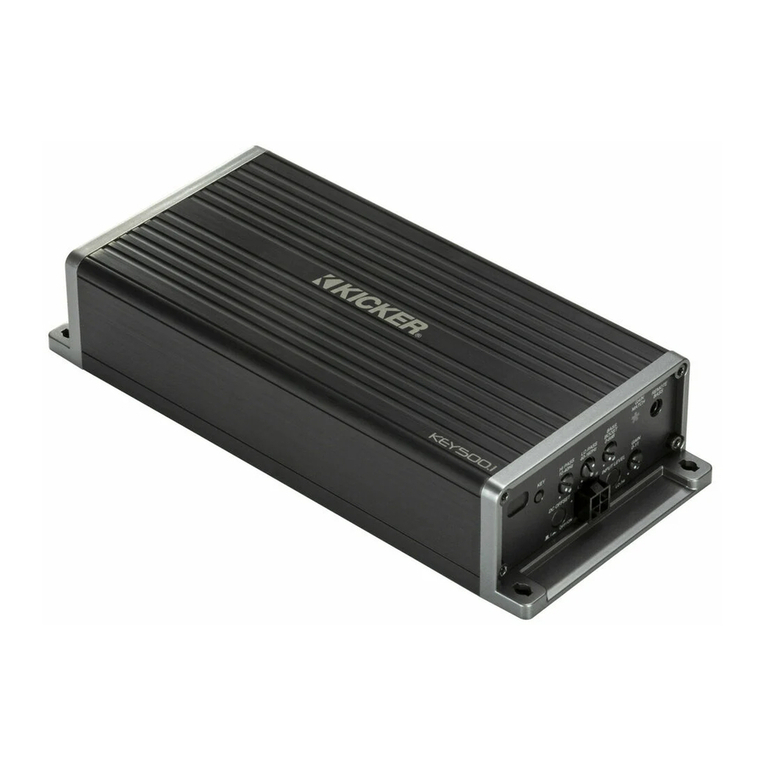
  9. Kicker KEY180.4 User manual

Kicker KEY180.4 User manual

Wiring | Cabelado | Câblage | Verkabelung:
1. ground | tierra | masse
2. battery | batería | batterie
3. fuse | fusible | sicherung
4. remote turn-on
Mise sous tension à distance
encendido a distancia
Ferneinschaltung
5. left front | frontal izquierdo
avant gauche | links vorne
6. right front | frontal derecho
avant droit | rechts vorne
7. left rear | trasero izquierdo
arrière gauche | links hinten
8. right rear | trasero derecho
arrière droit | rechts hinten
12V
KEY180.4 QUICK-START GUIDE | GUÍA DE INICIO RÁPIDO
GUIDE DE DÉMARRAGE RAPIDE | SCHNELLSTARTANLEITUNG
Mounting | Montaje | Montage | Befestigung:
+––––
+++
≤18”
(45cm)
≤24”
(60cm)
speaker outputs
salidas del altavoz
sorties haut-parleur
Lautsprecherausgänge
AMP 1 AMP 2
5. 6. 7. 8.
4.
3.
2.
1.
1.
KEY Auto Setup:
Disconnect any speakers or subwoofers not connected to the KEY
amplifier, factory or aftermarket.
Make sure active noise cancellation and active noise enhancement
are disabled beforehand. You will need to load a source for pink noise
from your head unit, whether CD, MP3, AUX, Bluetooth, USB etc.
Uncompressed audio is recommended for best results, as this will
ensure full amplitude across the frequency spectrum (20Hz–20kHz).
1. Set the KEY amplifier gains (AMP-1 and AMP-2) to the
minimum (fully counter-clockwise).
2. Close the car windows, turn off the engine, turn off the HVAC.
Install the microphone to the top of the driver’s side headrest.
Make sure the microphone faces up, pointing as straight as
possible to the roof.
3. In most cases, the Bi-Amp switch should be OFF.
4. Start the Pink Noise. Set the Pink Noise volume to a level
above conversational (slightly loud) using your audio source
volume control (usually head-unit).
5. Begin the Auto Setup by quick-pressing the KEY Activation
Button. Once initialized, you will hear repeating tones (beeps),
which indicate that you must exit the vehicle and close the door.
You will have 10 seconds until the process begins. Beeps and
noises during the KEY Auto Setup process can be loud. For
your safety, please do not remain inside the vehicle!
6. Once the Auto Setup has completed, you will hear happy music for a successful setup. You may
quick-press the KEY Activation Button to toggle between the original, non-optimized audio or re-apply the KEY
optimized audio. Dial in the GAIN settings and you're done!
KEY Activation Button
botón de activación de KEY
bouton d'activation du clavier
KEY-Aktivierungstaste
run mic wire
cable de micrófono
Mikrofonkabel
câble micro
mic facing up
micrófono hacia arriba
Mikrofon nach oben
microphone vers le haut
headrest
apoyacabezas
Kopfstütze
appui-tête
If needed, cut off the RCA connections to use hi-level input.
De ser necesario, desconecte las conexiones RCA para utilizar la entrada de alto nivel.
Coupez, au besoin, les connexions RCA pour utiliser une entrée haute.
Durchtrennen Sie gegebenenfalls die RCA-Verbindungen, um einen High-Level-Input zu verwenden.
Configuración automática de KEY
Desconecte cualquier altavoz o subwoofer que no esté conectado al amplificador KEY, de fábrica o genérico.
Desactive la cancelación de ruido activo y el aumento de ruido activo. Deberá cargar una fuente para ruido
rosa desde su unidad de control, ya sea CD, MP3, AUX, Bluetooth, USB, etc. Se recomienda un audio
descomprimido para lograr mejores resultados, ya que esto garantizará una total amplitud en el espectro de
frecuencias (20 Hz–20 kHz). Visite www.kicker.com/tech para descargar el perfil de ruido rosa que mejor se
adapte a sus hábitos auditivos.
1. Ajuste las ganancias del amplificador KEY (AMP-1 y AMP-2) al mínimo (completamente hacia la izquierda).
2. Cierre las ventanillas del auto, apague el motor y el sistema de climatización. Instale el micrófono en la parte
superior del apoyacabezas del conductor. Asegúrese de que el micrófono esté hacia arriba, apuntando al techo
lo más recto posible.
3. En muchos casos, el interruptor Bi-Amp debe estar apagado.
4. Inicie el ruido rosa. Ajuste el volumen del ruido rosa a un nivel superior al de una conversación (un poco
ruidoso) utilizando el control de volumen de su fuente de audio (generalmente la unidad de control).
5. Comience la configuración automática al presionar rápidamente el botón de activación de KEY. Una vez
iniciada, escuchará tonos repetitivos (bips) que indican que debe salir del vehículo y cerrar la puerta. Tendrá 10
segundos hasta que comience el proceso. Los bips y los sonidos durante la configuración automática de KEY
pueden ser ruidosos. Por su seguridad, ¡no permanezca dentro del vehículo!
6. Una vez que se ha completado esta configuración, escuchará una música agradable que indica que la
configuración fue exitosa. Puede presionar rápidamente el botón de activación de KEY para alternar entre el audio
original no optimizado o volver a aplicar el audio optimizado de KEY. Una vez completado, ajusta tu ganancia.
Auto-configuration du KEY
Débranchez tous les haut-parleurs ou haut-parleurs de graves qui ne sont pas reliés à l'amplificateur KEY,
d'origine ou ajoutés.
Désactivez l'annulation active du bruit et l'amélioration du bruit avant de commencer. Vous devrez charger
une source de bruit rose à partir de votre unité principale, qu'il s'agisse d'un CD, de MP3, de la voie AUX, de
Bluetooth, d'USB, etc. Un signal audio non compressé est recommandé pour donner les meilleurs résultats, car
cela garantira une pleine amplitude sur tout le spectre des fréquences (20 Hz - 20 kHz). Consultez www.kicker.
com/tech pour télécharger les profils de bruit rose les plus adaptés à votre écoute habituelle !
1. Réglez les gains de l'amplificateur KEY (AMP-1 et AMP-2) au minimum (à fond dans le sens anti-horaire).
2. Fermez les fenêtres de la voiture, arrêtez le moteur, éteignez la climatisation. Installez le microphone au sommet
de l'appui-tête côté conducteur. Veillez à ce que le microphone soit tourné vers le haut, en direction du toit aussi
directement que possible.
3. Dans la plupart des cas, l'interrupteur Bi-Amp doit être en position OFF.
4. Démarrez le bruit rose. Réglez le volume du bruit rose à un niveau supérieur à celui d'une conversation (un peu
élevé) à l'aide du réglage du volume de votre source audio (généralement l'unité principale).
5. Démarrez une auto-configuration en appuyant brièvement le bouton d'activation du KEY. Une fois la procédure
initiée, vous entendrez des sons répétés (des bips) qui indiqueront que vous devez sortir du véhicule et fermer
la porte. Vous aurez 10 secondes avant que la procédure démarre. Le volume des bips et du bruit durant la
procédure d'auto-configuration du KEY peut être fort. Pour votre sécurité, veuillez quitter l'intérieur du véhicule !
6. Une fois l'auto-configuration terminée, vous entendrez une petite musique de fête indiquant la réussite du
processus. Vous pouvez appuyer brièvement sur le bouton d'activation du KEY pour passer à l'audio d'origine,
non optimisé ou revenir au son audio optimisé pour le KEY. Une fois terminé, réglez votre gain.
KEY-Autosetup
Diskonnektieren Sie Lautsprecher oder Subwoofer, die nicht mit dem KEY-Verstärker verbunden sind, ob Fabrik-
oder Aftermarket-Lautsprecher.
Stellen Sie sicher, dass die aktive Geräuschunterdrückung und die aktive Geräuschverstärkung deaktiviert sind,
bevor Sie beginnen. Sie müssen eine Quelle für rosa Rauschen aus Ihrer Haupteinheit laden, wie CD, MP3,
AUX, Bluetooth, USB usw. Für ein optimales Ergebnis wird unkomprimiertes Audio empfohlen, da dies eine volle
Amplitude über das Frequenzspektrum (20 Hz bis 20 kHz) ermöglicht. Besuchen Sie www.kicker.com/tech, um
das Rosa-Rauschen-Profil herunterzuladen, das am besten zu Ihren Hörgewohnheiten passt!
1. Stellen Sie KEY-Verstärkungen (AMP-1 und AMP-2) auf den Minimalwert ein (vollständig gegen den
Uhrzeigersinn).
2. Schließen Sie die Autofenster und schalten Sie den Motor und die Klimaanlage aus. Installieren Sie das
Mikrofen oben auf der seitlichen Kopfstütze des Fahrers. Stellen Sie sicher, dass das Mikrofon nach oben und so
gerade wie möglich auf das Dach zeigt.
3. In den meisten Fällen sollte der Zweifachverstärker-Schalter ausgeschaltet sein.
4. Starten Sie das rosa Rauschen. Stellen Sie die Lautstärke des rosa Rauschens auf ein Niveau oberhalb von
Unterhaltungen (mäßig laut) mithilfe Ihres Audioquellen-Lautstärkereglers ein (in der Regel die Haupteinheit).
5. Beginnen Sie das Autosetup, indem Sie die KEY-Aktivierungstaste schnell drücken. Nach der Initialisierung
hören Sie sich wiederholende Töne (Piepen), was darauf hinweist, dass Sie das Fahrzeug verlassen und die Tür
schließen müssen. Sie haben 10 Sekunden, bevor der Vorgang beginnt. Pieptöne und Geräusche während des
KEY-Autosetup-Vorgangs können sehr laut sein. Bleiben Sie zu Ihrer eigenen Sicherheit bitte nicht im Fahrzeug!
6. Sobald das Autosetup abgeschlossen ist, hören Sie fröhliche Musik, die ein erfolgreiches Setup bedeutet. Sie
können schnell die KEY-Aktivierungstaste drücken, um zum originalen, nicht optimierten Audio zu wechseln oder
wieder zum optimierten KEY-Audio überzugehen. Wenn Sie fertig sind, stellen Sie Ihre Verstärkungen.

Other manuals for KEY180.4

1

Other Kicker Amplifier manuals

Kicker ZXM350.4 User manual

Kicker

Kicker ZXM350.4 User manual

Kicker BX350.1 User manual

Kicker

Kicker BX350.1 User manual

Kicker ZXM450.2 User manual

Kicker

Kicker ZXM450.2 User manual

Kicker KX100.2 User manual

Kicker

Kicker KX100.2 User manual

Kicker Warhorse WX 10000-1 User manual

Kicker

Kicker Warhorse WX 10000-1 User manual

Kicker ZX350.2 User manual

Kicker

Kicker ZX350.2 User manual

Kicker CX300.1 User manual

Kicker

Kicker CX300.1 User manual

Kicker Impulse 354xi User manual

Kicker

Kicker Impulse 354xi User manual

Kicker 500si User manual

Kicker

Kicker 500si User manual

Kicker KXMA400.2 User manual

Kicker

Kicker KXMA400.2 User manual

Kicker ZX1000.1 User manual

Kicker

Kicker ZX1000.1 User manual

Kicker DXA250.4 User manual

Kicker

Kicker DXA250.4 User manual

Kicker IQ500.1 Setup guide

Kicker

Kicker IQ500.1 Setup guide

Kicker KX800.5 User manual

Kicker

Kicker KX800.5 User manual

Kicker ZX700.5 User manual

Kicker

Kicker ZX700.5 User manual

Kicker KX800.5 User manual

Kicker

Kicker KX800.5 User manual

Kicker DX500.1 User manual

Kicker

Kicker DX500.1 User manual

Kicker KX400.1 User manual

Kicker

Kicker KX400.1 User manual

Kicker PX200.1 User manual

Kicker

Kicker PX200.1 User manual

Kicker IX.5-SERIES User manual

Kicker

Kicker IX.5-SERIES User manual

Kicker Warhorse WX 10000-1 User manual

Kicker

Kicker Warhorse WX 10000-1 User manual

Kicker PXIBT100.2 User manual

Kicker

Kicker PXIBT100.2 User manual

Kicker 40ss User manual

Kicker

Kicker 40ss User manual

Kicker ZX400.1 User manual

Kicker

Kicker ZX400.1 User manual

Popular Amplifier manuals by other brands

Onkyo TX-SV535 instruction manual

Onkyo

Onkyo TX-SV535 instruction manual

Avantone Pro CLA-200 manual

Avantone Pro

Avantone Pro CLA-200 manual

Boss Audio Systems AR4000D user manual

Boss Audio Systems

Boss Audio Systems AR4000D user manual

Macro-Tech 24x6 Reference manual

Macro-Tech

Macro-Tech 24x6 Reference manual

Emotiva XPA HC-1 user manual

Emotiva

Emotiva XPA HC-1 user manual

Intelix HDMI-2X8 installation manual

Intelix

Intelix HDMI-2X8 installation manual

MBL 6010 D owner's manual

MBL

MBL 6010 D owner's manual

RCS AUDIO-SYSTEMS VLZ Series operating instructions

RCS AUDIO-SYSTEMS

RCS AUDIO-SYSTEMS VLZ Series operating instructions

GOTTOMIX AMP-S4 owner's manual

GOTTOMIX

GOTTOMIX AMP-S4 owner's manual

Grace LUNATEC V2 owner's manual

Grace

Grace LUNATEC V2 owner's manual

AIYIMA AUDIO A04 user manual

AIYIMA AUDIO

AIYIMA AUDIO A04 user manual

ITC TI-1206S Operation manual

ITC

ITC TI-1206S Operation manual

Key Digital Phantom KD-HD1x4ProK operating instructions

Key Digital

Key Digital Phantom KD-HD1x4ProK operating instructions

Cambridge Audio Integrated Amplifier Azur 740A Technical specifications

Cambridge Audio

Cambridge Audio Integrated Amplifier Azur 740A Technical specifications

Engl Savage 60 operating manual

Engl

Engl Savage 60 operating manual

Amperes Electronics MB2106 instruction manual

Amperes Electronics

Amperes Electronics MB2106 instruction manual

Fractal AXE-FX II Quick reference guide

Fractal

Fractal AXE-FX II Quick reference guide

CARVIN R1000 HEAD operating manual

CARVIN

CARVIN R1000 HEAD operating manual

manuals.online logo
manuals.online logoBrands
  • About & Mission
  • Contact us
  • Privacy Policy
  • Terms and Conditions

Copyright 2025 Manuals.Online. All Rights Reserved.