TROUBLESHOOTING
1.
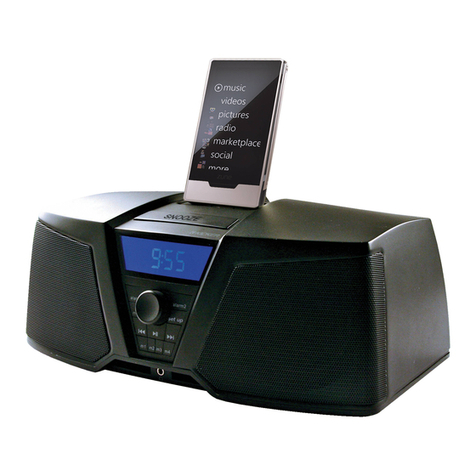
No audio output from the ZK350? Make sure the volume is turned
up
to an audible level on both the ZK350 and the audio
playback device connected to the ZK350. Make sure the system
is
not muted. Check power connections. Make sure the ZK350
is
turned on and functioning properly.
Try
resetting the ZK350 by unplugging the unit, waiting
10
seconds and plugging it back
in
to the
wall. Check Auxiliary Mode
If
you.are trying to playback audio from an auxiliary device, make sure that Aux-In
mode
is
enabled and the
device
is
connected to the 1/8" stereo input on the back of the ZK350.
If
you are trying to playback audio from adocked Zune, make
sure that Aux-In mode
is
disabled.
2. Remote Control isn't worlcing? Check for objects blocking the remote sensor on the bottom left corner of the right speaker
grille. See Figure
2.
Check the remote battery and replace
if
necessary. Open the battery compartment of the remote and replace the
CR2025 3V Lithium battery. Make sure the Zune
is
functioning properly,
if
not, refer to item 3, below.
3. Zune
not
responding? Make sure the Zune
is
not paused
or
in Hold mode. The high bass output of the ZK350 can cause
the Zune to freeze due to acoustic vibrations. Reboot the Zune by pressing and holding the play/pause button for approximately six
seconds. Press any button to turn the Zune back on.
If
this doesn't work, reset the Zune by connecting the Zune to the ZK350
dock
connector. Put the Zune
in
Hold Mode and then slide the Hold switch back to the Off position.
Finally,
simultaneously press and hold
the Center and Menu buttons for approximately six seconds.
To
reset
an
original Zune with a
dock
connector (with four buttons below
the display), simultaneously press and hold the Play/Pause and Menu buttons to reset
an
original Zune,
DETECC/ON
YREPARAC/ON
DE
AVER/AS
1.
EI ZK350 no suena. Tanto
el
volumen del ZK350
como
el
del dispositivo
de
reproduccion de sonido conectado
al
ZK350 deben
estar
10
suficientemente altos
como
para que sean audibles. Asegurese
de
que
el
sistema no este silenciado. Revise las conexiones
de alimentacion.
EI
ZK350 debe estar encendido yfuncionando correctamente. Restablezca
el
ZK350 desenchufando
la
unidad,
esperando
10
segundos yvolviendo aenchufarla. Verifique
la
modalidad auxiliar.
Si
esta intentando reproducir sonido
de
un dispositivo
auxiliar,
la
modalidad de entrada auxiliar debe estar habilitada y
el
dispositivo debe estar conectado a
la
entrada estereofonica
de
1/8
de pig. ubicada en
la
parte
de
atras del ZK350.
Si
esta intentando reproducir
el
sonido
de
un Zune montado en
la
base, la modalidad
de
entrada auxiliar debe estar deshabilitada.
2. EI control remoto no funciona.
Vea
que no haya objetos bloqueando
el
sensor remoto en
la
esquina inferior izquierda de
la
rejilla
del altavoz derecho.
Vea
la Figura
2.
Revise
la
pila del control remoto ycambiela
si
es necesario. Abra
el
compartimiento de
la
pila del
control remoto ycambie
la
pila
de
litio CR2025 de 3
V.
Asegurese
de
que
el
Zune este funcionando correctamente.
De
no ser asi,
consulte
el
apartado 3que aparece acontinuacion.
3.
EI Zune no responde. Asegurese de que
el
Zune no este en pausa 0en modalidad
de
retencion.
La
alta salida
de
bajos del
ZK350 puede hacer que
el
Zune se bloquee debido alas vibraciones acusticas. Instalar la almohadilla
de
aislamiento de vibraciones
adjunta
como
se muestra en
la
Figura 2puede evitar que
el
Zune se bloquee. Reinicie
el
Zune oprimiendo ymanteniendo oprimido
el
boton
de
reproduccion ypausa durante aproximadamente seis segundos. Oprima cualquier boton para volver aencender
el
Zune.
Si
esto no funciona, mrestablezca
el
Zune conectandolo
al
conector de
la
base del ZK350. Ponga
el
Zune en madalidad de retencion y
luego pase
el
selector
de
retencion a
la
posiCion de apagado
(Off).
Par ultimo, oprima ymantenga oprimidos simultaneamente
el
boton
central y
el
boton
de
menu durante aproximadamente seis segundos. Para restablecer un Zune original con un conector
de
base (con
cuatro botones debajo
de
la pantalla); oprima ymantenga oprimidos simultaneamente
el
boton
de
reproduccion ypausa y
el
boton
de
menu.
PROBLEMBEHEBUNG
1.
Kein Sound vom ZK350? Vergewissern Sie sich, dass die Lautstarke sowohl beim ZK350 als auch bei dem daran
angeschlossenen Audiowiedergabegerat auf einen h6rbaren Pegel eingestellt ist,. Vergewissern Sie sich, dass die Stummschaltung
nicht aktiviert ist. mStromanschlusse prufen. Vergewissem Sie sich, dass das ZK350 eingeschaltet ist und richtig funktioniert.
Versuchen Sie, das ZK350 zuruckzusetzen, indem Sie das Gerat vom Netz trennen,
10
Sekunden warten und es dann wieder
an
die Steckdose anschlieBen. AUX-Modus prufen. Wenn Sie versuchen, Audio von einem Zusatzgerat wiederzugeben, mussen
Sie sicherstellen, dass der Aux-In-Modus aktiviert und das Gerat
an
den 1/8-Zoll-Stereoeingang auf der Ruckseite
des
ZK350
angeschlossen ist. Wenn Sie versuchen, Audio von einem Zune
in
der Docking-Station wiederzugeben, mussen Sie sicherstellen, dass
der Aux-In-Modus deaktiviert ist.
2. Fernbedienung funktioniert nicht? Prufen Sie, ob Objekte den Fembedienungssensor unten links
am
Lautsprechergrill
blockieren. Siehe Abbildung
2.
Oberprillen Sie die Batterie der Fembedienung und ersetzen Sie diese ggf. Offnen Sie das Batteriefach
der Fernbedienung und ersetzen Sie die CR2025 3V-Lithiumbatterie. Prufen Sie,
ob
der Zune korrekt funktioniert; ansonsten folgen Sie
bitte dem unten
in
Punkt 3beschriebenen Verfahren.
3.
Zune reagiert nicht? Vergewissern Sie sich, dass derZune sich nicht im Pausen- oder Wartemodus befindet. Der hohe
Basspegel
des
ZK350 kann
zu
akustischen Vibrationen fUhren, die den Zune einfrieren lassen. Verwenden Sie das beiliegende
Vibratlons-Isolierpolster wie
in
Abb. 2gezelgt, um dies zu verhindern. Starten Sie den Zune erneut, indem Sie die Wiedergabe/Pause-
Taste ca. 6Sekunden lang gedruckt halten. Drucken Sie dann eine beliebige Taste, urn den Zune wieder einzuschalten. Wenn das
nicr,t hilft, setzen Sie den Zune zuruck, indem Sie ihn an den ZK350-Docking-Anschluss anschlieBen. Stellen Sie auf dem Zune den
Hold-Modus ein und schieben Sie den Hold-Schaller wieder
in
die Aus-Position. Halten Sie dann die mittlere Taste und die Menu-Taste
ca. 6Sekunden lang gedrUckt. Um den Original-Zune mit einem Docking-Anschluss (mit vier Tasten unter dem Display) zUrUckzusetzen,
halten Sie gleichzeitig die Wiedergabe/Pause-Taste und die Menutaste gedruckt.
DEPANNAGE
1.
Aucun son emis
par
Ie
ZK350?
Verifiez que
Ie
bouton de volume est regie aun niveau audible sur
Ie
ZK350 comme sur
Ie
lecteur audio raccorde
au
ZK350. Verifiez que
Ie
mode sourdine
du
systeme n'est pas active. Verifiez les branchements
de
18 ZK350STEREOSYSTEM
TROUBLESHOOTING
1.
No audio output from the ZK350? Make sure the volume is turned
up
to an audible level on both the ZK350 and the audio
playback device connected to the ZK350. Make sure the system
is
not muted. Check power connections. Make sure the ZK350
is
turned on and functioning properly.
Try
resetting the ZK350 by unplugging the unit, waiting
10
seconds and plugging it back
in
to the
wall. Check Auxiliary Mode
If
you.are trying to playback audio from an auxiliary device, make sure that Aux-In
mode
is
enabled and the
device
is
connected to the 1/8" stereo input on the back of the ZK350.
If
you are trying to playback audio from adocked Zune, make
sure that Aux-In mode
is
disabled.
2. Remote Control isn't worlcing? Check for objects blocking the remote sensor on the bottom left corner of the right speaker
grille. See Figure
2.
Check the remote battery and replace
if
necessary. Open the battery compartment of the remote and replace the
CR2025 3V Lithium battery. Make sure the Zune
is
functioning properly,
if
not, refer to item 3, below.
3. Zune
not
responding? Make sure the Zune
is
not paused
or
in Hold mode. The high bass output of the ZK350 can cause
the Zune to freeze due to acoustic vibrations. Reboot the Zune by pressing and holding the play/pause button for approximately six
seconds. Press any button to turn the Zune back on.
If
this doesn't work, reset the Zune by connecting the Zune to the ZK350
dock
connector. Put the Zune
in
Hold Mode and then slide the Hold switch back to the Off position.
Finally,
simultaneously press and hold
the Center and Menu buttons for approximately six seconds.
To
reset
an
original Zune with a
dock
connector (with four buttons below
the display), simultaneously press and hold the Play/Pause and Menu buttons to reset
an
original Zune,
DETECC/ON
YREPARAC/ON
DE
AVER/AS
1.
EI ZK350 no suena. Tanto
el
volumen del ZK350
como
el
del dispositivo
de
reproduccion de sonido conectado
al
ZK350 deben
estar
10
suficientemente altos
como
para que sean audibles. Asegurese
de
que
el
sistema no este silenciado. Revise las conexiones
de alimentacion.
EI
ZK350 debe estar encendido yfuncionando correctamente. Restablezca
el
ZK350 desenchufando
la
unidad,
esperando
10
segundos yvolviendo aenchufarla. Verifique
la
modalidad auxiliar.
Si
esta intentando reproducir sonido
de
un dispositivo
auxiliar,
la
modalidad de entrada auxiliar debe estar habilitada y
el
dispositivo debe estar conectado a
la
entrada estereofonica
de
1/8
de pig. ubicada en
la
parte
de
atras del ZK350.
Si
esta intentando reproducir
el
sonido
de
un Zune montado en
la
base, la modalidad
de
entrada auxiliar debe estar deshabilitada.
2. EI control remoto no funciona.
Vea
que no haya objetos bloqueando
el
sensor remoto en
la
esquina inferior izquierda de
la
rejilla
del altavoz derecho.
Vea
la Figura
2.
Revise
la
pila del control remoto ycambiela
si
es necesario. Abra
el
compartimiento de
la
pila del
control remoto ycambie
la
pila
de
litio CR2025 de 3
V.
Asegurese
de
que
el
Zune este funcionando correctamente.
De
no ser asi,
consulte
el
apartado 3que aparece acontinuacion.
3.
EI Zune no responde. Asegurese de que
el
Zune no este en pausa 0en modalidad
de
retencion.
La
alta salida
de
bajos del
ZK350 puede hacer que
el
Zune se bloquee debido alas vibraciones acusticas. Instalar la almohadilla
de
aislamiento de vibraciones
adjunta
como
se muestra en
la
Figura 2puede evitar que
el
Zune se bloquee. Reinicie
el
Zune oprimiendo ymanteniendo oprimido
el
boton
de
reproduccion ypausa durante aproximadamente seis segundos. Oprima cualquier boton para volver aencender
el
Zune.
Si
esto no funciona, mrestablezca
el
Zune conectandolo
al
conector de
la
base del ZK350. Ponga
el
Zune en madalidad de retencion y
luego pase
el
selector
de
retencion a
la
posiCion de apagado
(Off).
Par ultimo, oprima ymantenga oprimidos simultaneamente
el
boton
central y
el
boton
de
menu durante aproximadamente seis segundos. Para restablecer un Zune original con un conector
de
base (con
cuatro botones debajo
de
la pantalla); oprima ymantenga oprimidos simultaneamente
el
boton
de
reproduccion ypausa y
el
boton
de
menu.
PROBLEMBEHEBUNG
1.
Kein Sound vom ZK350? Vergewissern Sie sich, dass die Lautstarke sowohl beim ZK350 als auch bei dem daran
angeschlossenen Audiowiedergabegerat auf einen h6rbaren Pegel eingestellt ist,. Vergewissern Sie sich, dass die Stummschaltung
nicht aktiviert ist. mStromanschlusse prufen. Vergewissem Sie sich, dass das ZK350 eingeschaltet ist und richtig funktioniert.
Versuchen Sie, das ZK350 zuruckzusetzen, indem Sie das Gerat vom Netz trennen,
10
Sekunden warten und es dann wieder
an
die Steckdose anschlieBen. AUX-Modus prufen. Wenn Sie versuchen, Audio von einem Zusatzgerat wiederzugeben, mussen
Sie sicherstellen, dass der Aux-In-Modus aktiviert und das Gerat
an
den 1/8-Zoll-Stereoeingang auf der Ruckseite
des
ZK350
angeschlossen ist. Wenn Sie versuchen, Audio von einem Zune
in
der Docking-Station wiederzugeben, mussen Sie sicherstellen, dass
der Aux-In-Modus deaktiviert ist.
2. Fernbedienung funktioniert nicht? Prufen Sie, ob Objekte den Fembedienungssensor unten links
am
Lautsprechergrill
blockieren. Siehe Abbildung
2.
Oberprillen Sie die Batterie der Fembedienung und ersetzen Sie diese ggf. Offnen Sie das Batteriefach
der Fernbedienung und ersetzen Sie die CR2025 3V-Lithiumbatterie. Prufen Sie,
ob
der Zune korrekt funktioniert; ansonsten folgen Sie
bitte dem unten
in
Punkt 3beschriebenen Verfahren.
3.
Zune reagiert nicht? Vergewissern Sie sich, dass derZune sich nicht im Pausen- oder Wartemodus befindet. Der hohe
Basspegel
des
ZK350 kann
zu
akustischen Vibrationen fUhren, die den Zune einfrieren lassen. Verwenden Sie das beiliegende
Vibratlons-Isolierpolster wie
in
Abb. 2gezelgt, um dies zu verhindern. Starten Sie den Zune erneut, indem Sie die Wiedergabe/Pause-
Taste ca. 6Sekunden lang gedruckt halten. Drucken Sie dann eine beliebige Taste, urn den Zune wieder einzuschalten. Wenn das
nicr,t hilft, setzen Sie den Zune zuruck, indem Sie ihn an den ZK350-Docking-Anschluss anschlieBen. Stellen Sie auf dem Zune den
Hold-Modus ein und schieben Sie den Hold-Schaller wieder
in
die Aus-Position. Halten Sie dann die mittlere Taste und die Menu-Taste
ca. 6Sekunden lang gedrUckt. Um den Original-Zune mit einem Docking-Anschluss (mit vier Tasten unter dem Display) zUrUckzusetzen,
halten Sie gleichzeitig die Wiedergabe/Pause-Taste und die Menutaste gedruckt.
DEPANNAGE
1.
Aucun son emis
par
Ie
ZK350?
Verifiez que
Ie
bouton de volume est regie aun niveau audible sur
Ie
ZK350 comme sur
Ie
lecteur audio raccorde
au
ZK350. Verifiez que
Ie
mode sourdine
du
systeme n'est pas active. Verifiez les branchements
de
18 ZK350STEREOSYSTEM