manuals.online logo
Brands
  1. Home
  2. •
  3. Brands
  4. •
  5. KUNTENG
  6. •
  7. Monitor
  8. •
  9. KUNTENG KT-LED890 User manual

KUNTENG KT-LED890 User manual

Other manuals for KT-LED890

1

Other KUNTENG Monitor manuals

KUNTENG KT-LED890 User manual

KUNTENG

KUNTENG KT-LED890 User manual

KUNTENG KT-LCD8S User manual

KUNTENG

KUNTENG KT-LCD8S User manual

Popular Monitor manuals by other brands

Samsung ME32C user manual

Samsung

Samsung ME32C user manual

ViewSonic VA926-LED user guide

ViewSonic

ViewSonic VA926-LED user guide

Furuno Mu 120c Operator's manual

Furuno

Furuno Mu 120c Operator's manual

Asus VB171D - 17" LCD Monitor Service manual

Asus

Asus VB171D - 17" LCD Monitor Service manual

AOC 9GLR Technical specifications

AOC

AOC 9GLR Technical specifications

DMG RAFFAELLO manual

DMG

DMG RAFFAELLO manual

AOC LM720 - 17" Technical specifications

AOC

AOC LM720 - 17" Technical specifications

Sony Trinitron GDM-F500 Service manual

Sony

Sony Trinitron GDM-F500 Service manual

Memorex MT1701 user guide

Memorex

Memorex MT1701 user guide

ViewSonic VE510s-4 Service manual

ViewSonic

ViewSonic VE510s-4 Service manual

Farenheit T-1503CM instruction manual

Farenheit

Farenheit T-1503CM instruction manual

Ditel DINOS DN129/AT Quick installation guide

Ditel

Ditel DINOS DN129/AT Quick installation guide

Sony SDM-S51 Specifications

Sony

Sony SDM-S51 Specifications

Kenwood DMX1025BT quick start guide

Kenwood

Kenwood DMX1025BT quick start guide

Dell S2409WFP user guide

Dell

Dell S2409WFP user guide

EverFocus EN-7517E instruction manual

EverFocus

EverFocus EN-7517E instruction manual

Dell P3222QE user guide

Dell

Dell P3222QE user guide

Panasonic TH152UX1 - 152" PLASMA TV Service manual

Panasonic

Panasonic TH152UX1 - 152" PLASMA TV Service manual

manuals.online logo
manuals.online logoBrands
  • About & Mission
  • Contact us
  • Privacy Policy
  • Terms and Conditions

Copyright 2025 Manuals.Online. All Rights Reserved.

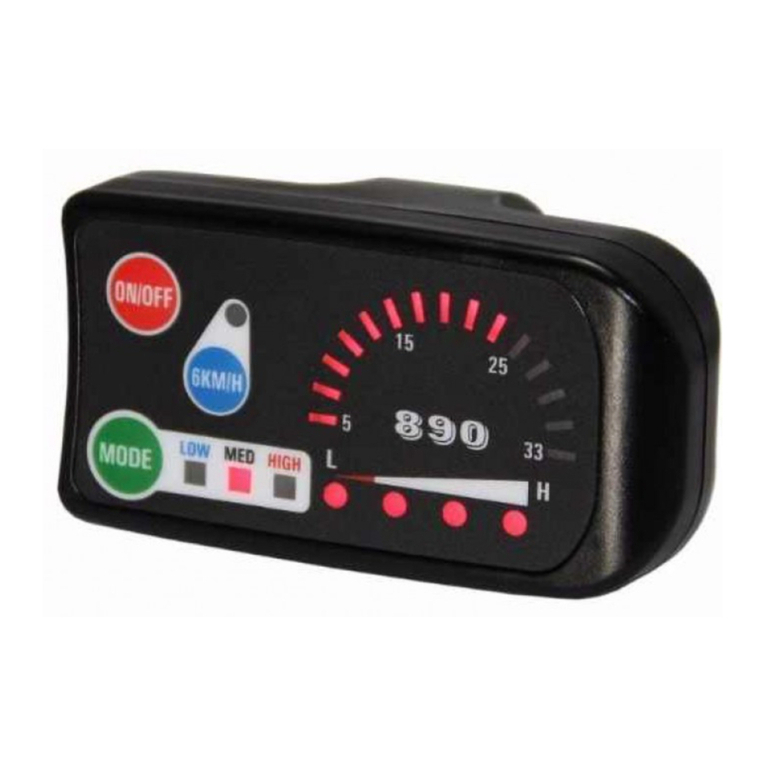
KT-LED890 Display User Manual V2.3
Dear users, please read this guide carefully before you use KT-LED890 instrument. The manual
will guide you use the instrument correctly to achieve a variety of vehicle control and vehicle status
display.
Functions and Display
1
Operation button
ON/OFF button
5
Speed indicator
dial
15 LED indicator
2
MODE button
6
Battery capacity
indicator
4 LED indicator
3
6KM/H button
7
Power ratio gear
Gear3 LED indicator
4
LED indicator
6KM/H boost
function
Operation
1. ON/OFF
Hold ON/OFF button long to startup; hold ON/OFF button long for a second time to turn off
the meter. When the motor stops driving and when the meter is not used for a consecutive 5
minutes, it will automatically shut down and turn off the motor power supply.
2. Boot display interface
Hold ON/OFF button long to startup and enter boot
display interface.
2.1 Assist ratio gear switch
Hold MODE button shortly to switch 1-3 file gear, LOW is
for the minimum power gear, MED is for the middle power gear,
and HIGH is for the highest power gear. Each startup will
automatically restore the gear shutdown last time. Gear 0 (the
indicators of three gears are off) is without power assist
function.
2.2 6KM/H boost function
Hold 6KM/H button and LED indicator flashes, the vehicle
drives at the speed should be no more than 6Km/h. Release
6KM/H button, the function is invalid.
2.3 Speed Display
15 LED speed indicator dial shows real-time display of
current vehicle speed.
2.4 Power Display
When battery power capacity is greater than 80%, all 4
LED indicator are lit. When the battery capacities drop, the
indicators are off in order. When the power capacity is less
than 20%, the last indicator is flashing (L side). When the
controller is under-voltage protection, all 4 LED indicators are
power off, which means that the vehicle is currently shutdown due to low voltage.
2.5 Startup headlights (Optional)
Hold MODE button long to startup the lights (the
controller should have the function of headlight driving output
or built-in meter headlight driving output function), LIGHT
indicator lights. Hold MODE button again to turn off vehicle
headlights, and the LIGHT indicator is turned off.

General Project Setting
1. Maximum trip speed setting
After power on for 5 seconds, hold ON/OFF button
and MODEL button at the same time, LOW indicator and
LED indicator of speed indicator dial at power assist ratio
gear flash. Hold ON/OFF(+) button or MODEL(-) button
shortly to set the maximum trip speed. and hold
6KM/H shortly to enter into the next parameter settings.
2. Wheel diameter setting
After finishing setting the maximum trip speed, enter
the wheel diameter setting interface, and then MED
indicator and LED indicator of speed indicator dial flash at
power assist ratio gear. Hold ON/OFF(+) button or MODEL
(-)button shortly to set the specification of wheel diameter (default 26 inches), and the setting
ranges are 12, 14, 16, 18, 20, 22, 24, 26, 700 c and 28 inches (From left to right, the corresponding
wheel diameter of the speed indicator dial of the first LED indicator is 12inches, and 14inches for
the second LED indicator and so on). Hold 6KM/H button shortly to enter into the next parameter
settings.
3. Exit General Project Setting
In the two general project settings, after each setting is completed, if hold MODE button long,
all can exit the setting environment, meanwhile, the set parameters are saved.
Under each setting interface, if there’s no button operation on the meter for more than 1
minute, then the meter will automatically exit the setting environment, and the set values are
invalid accordingly.
Outlook and Size
1. Meter dimension
2. Wiring schematic
Prepared by SUZHOU KUNTENG ELECTRONICS CO., LTD