
Lava ME 3 User manual

User Manual
一、了解你的 LAVA ME 3
Understanding Your LAVA ME 3
二、激活你的 LAVA ME 3
Activating Your LAVA ME 3
三、快速掌握 LAVA ME 3
Mastering Your LAVA ME 3
四、了解 LAVA ME 3 状态图标含义
Understand the meaning of LAVA ME 3 status icons
五、给你的 LAVA ME 3 电池充电
Charge your LAVA ME 3 battery
六、给你的 LAVA ME 3 换弦和微调
Change strings and fine-tune your LAVA ME 3
七、重要安全性信息
Important Safety Information
八、配置与参数
Configuration and Parameters
九、服务与支持
Services and Support

Hi,
欢迎使用 LAVA ME 3 !
Welcome to LAVA ME 3!

一.了解你的 LAVA ME 3
Understanding Your LAVA ME 3
LAVA ME 3 概览
Overview of LAVA ME 3
尺寸:36 寸936*321.5*116.5mm
琴头logo烫金效果
Peg head logo stamping effect
(烫金效果见工艺文件)
(See the process document for the stamping effect)
上弦枕:黑色
Nut: black
弦准:银色
Tuner:silver
音孔圈:银色
Sound hole ring: silver
下弦枕:黑色
Bone: black
火标:银色
Fire logo: silver
琴身:颜色(见封样版)
Body:color (see the sealed sample)
琴桥:同琴身
Bridge: same as body
尾钉:银色
Tail pin: silver
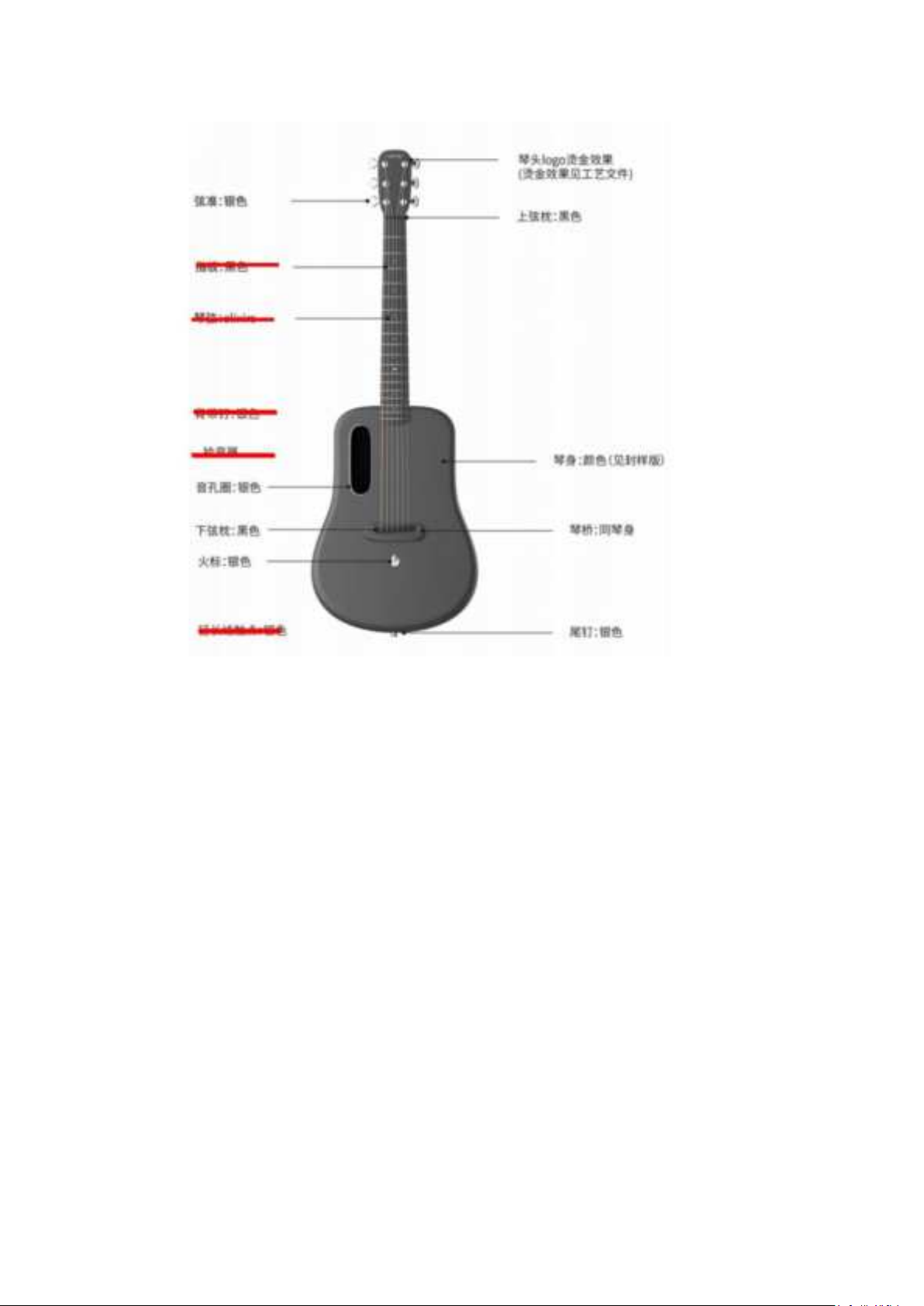
Size: 36 inches 936*321.5*116.5mm
重量:36 寸2080g 琴包 1980g 一共 4060g
Weight: 36 inches 2080g Gig bag 1980g Total 4060g
尺寸:38 寸965.9*357.2*122.7mm
Size: 38 inches 965.9*357.2*122.7mm
重量:38 寸2250g 琴包 1980g 一共 4230g
Weight: 38 inches 2250g Gig bag 1980g Total 4230g
琴头,弦准,琴颈,琴体,音孔,琴桥,肩带固定钉
Peg head, tuner, neck, body, sound hole, bridge, shoulder
strap fastening nail
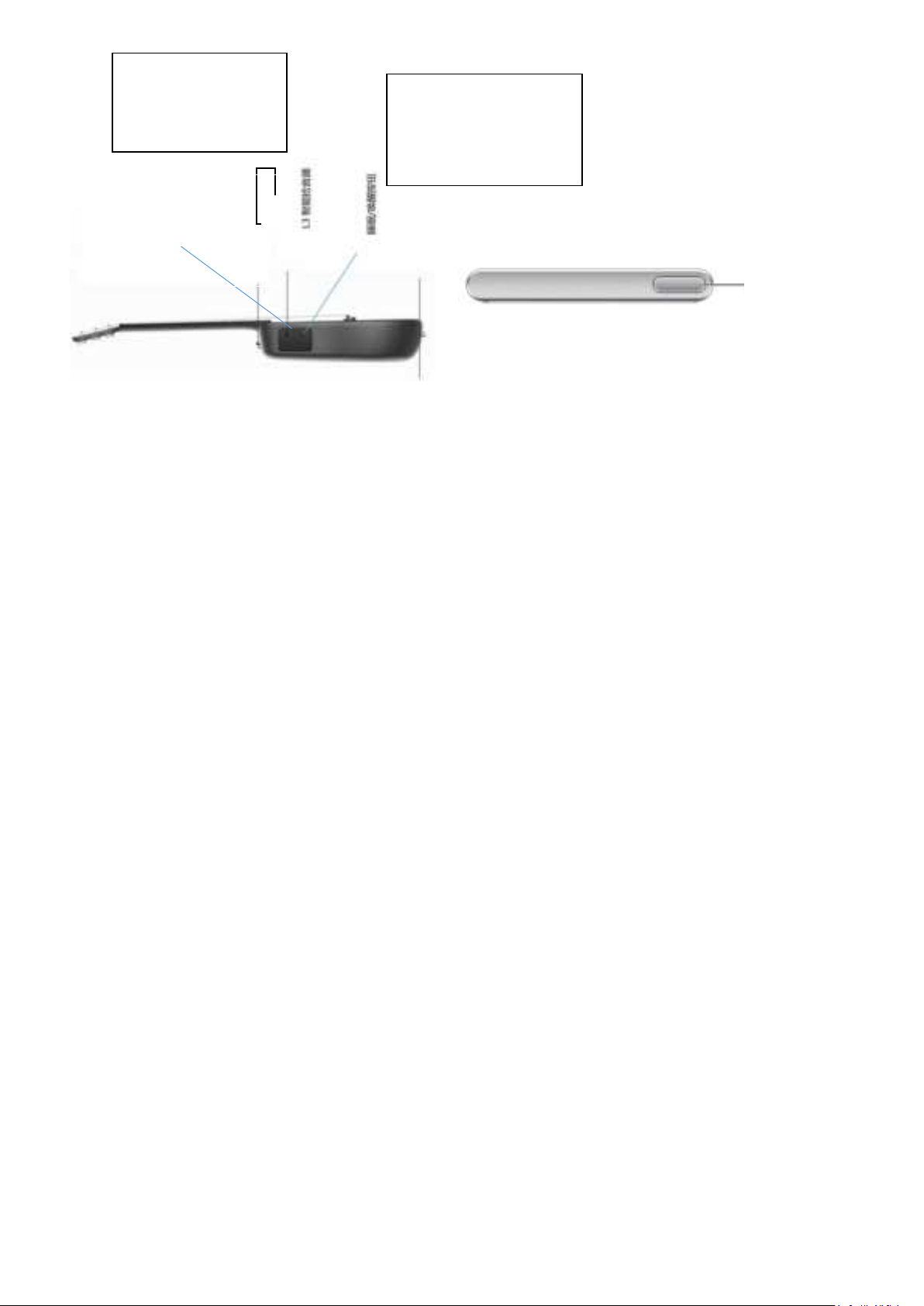
睡眠/唤醒按键
Sleep/wake button
HILAVA 系统
HILAVA system
状态栏、多点触控屏、菜单和应用程序图标
Status bar, multi-touch screen, menu and application icons
睡眠/唤醒按钮
Sleep/wake button
音量控制滚轮
Volume control knob
L3 智能拾音器
L3 smart pickup
睡眠/唤醒
Sleep/wake

二. 激活你的 LAVA ME 3
II. Activating Your LAVA ME 3
设置
Setting
WiFi 为使激活程序顺利进行,请通过无线局域网接入互联网(需要网络名称和密码)
WiFi To make the activation program go smoothly, please connect to the
Internet via wireless LAN (network name and password are required)
激活&注册
Activation & registration
开始使用 HILAVA 系统前,请先在手机端安装官方 App“拿火+”。
Before using the HILAVA system, please install the official App "LAVA+" on
the mobile phone.
手机端注册“LAVA ID”或者使用现有账户。
Register your LAVA ID on your mobile phone or use an existing account.
使用手机端官方 App“拿火+”扫描二维码,激活吉他端的 HILAVA 系统,开始
使用你神奇的 LAVA ME 3 吧。
Scan the QR code by using the official mobile app "LAVA+", activate the
HILAVA system on the guitar side, and start using your magical LAVA ME 3.

三.快速掌握 LAVA ME 3
III.Quickly Mastering Your LAVA ME 3
了解 LAVA ME 3 的硬件操作
Understanding the hardware of your LAVA ME 3
若要
To
请这样操作
Please do this
开机
Boot up
请按住睡眠/唤醒按键几秒钟,直至 LAVA 的标志出现。
Please press and hold the Sleep/Wake button for a few seconds until the
LAVA logo appears.
关机 / 重启
Shutdown/restart
请按住睡眠/唤醒按键几秒钟,当出现关机和重启选项后,通过左右滑动来选择。
Please press and hold the Sleep/Wake button for a few seconds. When the
shutdown and restart tabs appear, slide left and right for selection.
唤醒 / 关闭屏幕
Wake/close
screen
LAVA ME 3 会在您闲置时关闭显示屏以节省电量,当您需要使用时,您可以通过轻
点屏幕来唤醒 HILAVA 系统,也可以通过按压唤醒按键快速唤醒和使用,您也可以
在“设置“(设置 icon)“显示与亮度”中设置自动锁定时长或者关闭此功能。
LAVA ME 3 will turn off the display screen when you are idle to save power.
When needing to use it, you can wake up the HILAVA system by tapping the
screen, or you can quickly wake up and use it by pressing the Wake button.
You can also set the auto lock duration in "Setting” (Setting icon) "Display
and Brightness" or turn off this function.
截屏
creenshot
连续快速按压两次唤醒按键,直到屏幕上的截屏图片呈现。
Press the Wake button twice in rapid succession until the screenshot on the
screen appears.
调整音量
Volume
adjustment
通过拨动音量滚轮,快速调整音量大小,以适应您的演奏需求。
You can quickly adjust the volume to accommodate your performance needs
by turning the volume knob.
强制关机
Forced shutdown
按压唤醒按键 7秒可强制关机,等待 5秒后,再进行开机操作即可。
Press the Wake button for 7 seconds to force a shutdown, wait 5 seconds,
and then power it on.
了解与 LAVA ME 3 交互的基本手势
Understanding the basic gestures for interacting with the LAVA ME 3
您可以参照以下手势更快更准确的与 LAVA ME 3 交互
You can interact with LAVA ME 3 faster and more accurately by reference to the
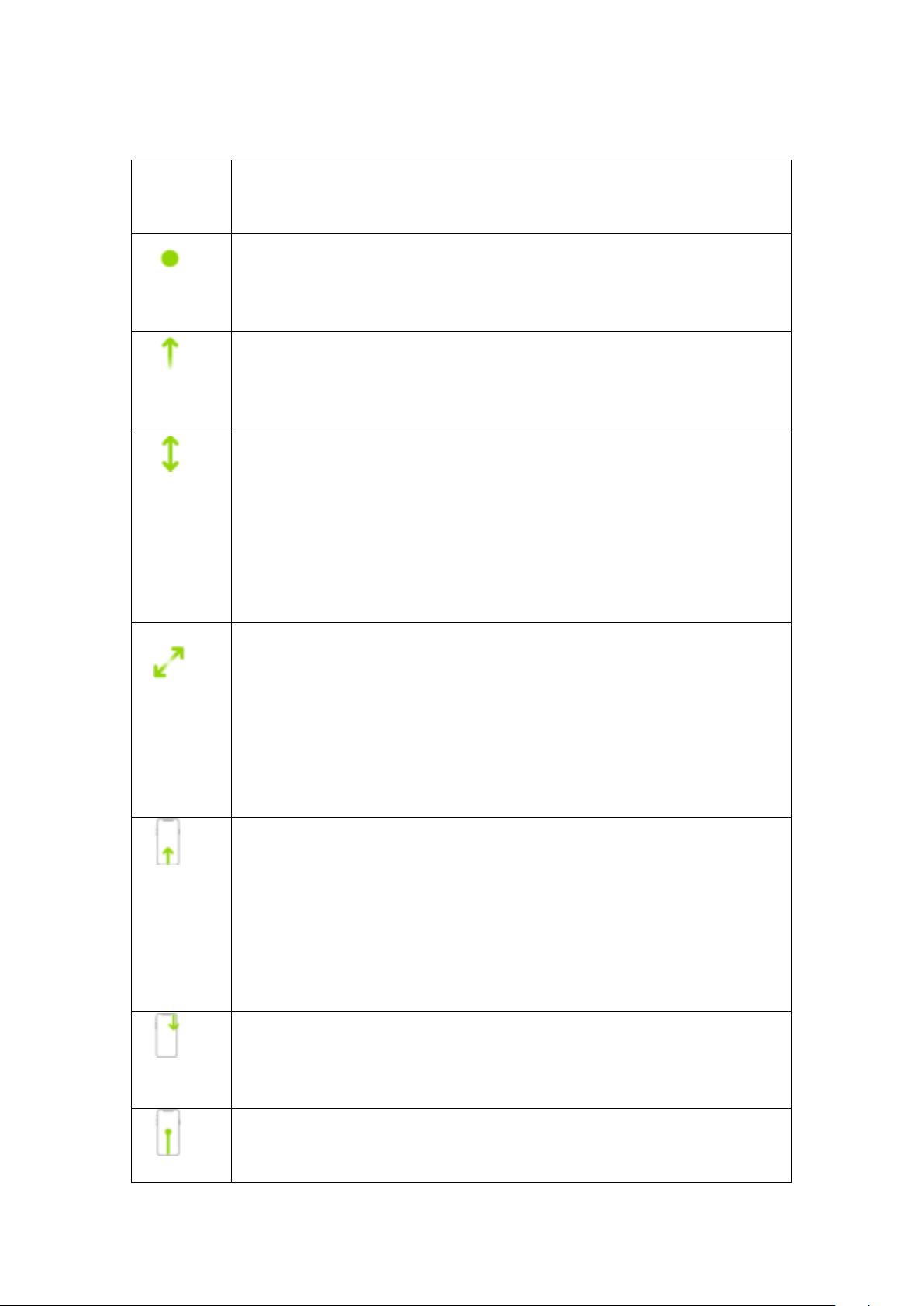
following gestures
手势
Gesture
描述
Description
轻点。
Tap.
用单指轻触屏幕。
Tap the screen with one finger.
轻扫。
Swipe
单指快速移过屏幕。
Move one finger across the screen quickly.
滚动。
Scroll.
单指移过屏幕而不抬起。
Move one finger across the screen without lifting it.
例如,在“ LOOP ”中,您可以上下拖移列表来查看更多内容。
For example, in "LOOP", you can drag the list up and down to view more content.
轻扫即可快速滚动;触碰屏幕即可停止滚动。
Swipe to scroll quickly; touch the screen to stop scrolling.
缩放。
Zoom.
双指靠近放在屏幕上。
Place two fingers close together on the screen.
分开双指即可放大;合拢双指即可缩小。
Move two fingers apart to zoom in; move two fingers together to zoom out.
您也可以轻点两下照片以将其放大,再次轻点两下以缩小。
You can also double-tap the photo to zoom in, and double-tap again to zoom out.
前往主屏幕。
Go to the home screen.
无论何时,从屏幕底部边缘向上轻扫即可返回主屏幕。
At any time, swipe up from the bottom edge of the screen to return to the
home screen.
快速访问控制。
Fast access controls.
从屏幕上方向下轻扫以打开控制中心。
Swipe down from the top of the screen to open the control center.
打开 App 切换器。
Open the App switcher.
从底部边缘向上轻扫并在屏幕中间停顿一下,然后从屏幕上抬起手指。

Swipe up from the bottom edge and pause in the middle of the screen, then lift
your finger from the screen.
若要浏览打开的 App,请向右轻扫,然后轻点要使用的 App。
To browse open App, swipe right, then tap the App you want to use.
四. 了解 LAVA ME 3 状态图标含义
IV.Understand the meaning of LAVA ME 3
status icons
通过了解顶部状态图标来更好的了解你的 LAVA ME 3 工作状态
Gain a better understanding of the working statuses of your LAVA ME 3 by
understanding the status icons at the top
状态图标
Status icon
含义
Meaning
无线局域网 LAVA ME 3 已通过无线局域网接入互联网。
Wireless LAN LAVA ME 3 has been connected to the Internet through wireless
LAN.
蓝牙 LAVA ME 3 已打开了蓝牙连接。
Bluetooth LAVA ME 3 has opened the Bluetooth connection.
接线模式 LAVA ME 3 声音通过连接音频线输出到外接设备。
Wiring mode The sound of LAVA ME 3 is output to the external device by
connecting the audio cable.
录制指示器 显示屏的左上角红色气泡,表示 LAVA ME 3 正在录屏,点击可跳转相
关内容。
Recording indicator The red bubble in the upper left corner of the display
screen indicates that LAVA ME 3 is recording the screen. Click to jump to
related content.
效果指示器 显示屏的左上角图标,表示效果在 LAVA ME 3 运行中,点击可跳转相关
内容。
Effect indicator The icon in the upper left corner of the display screen
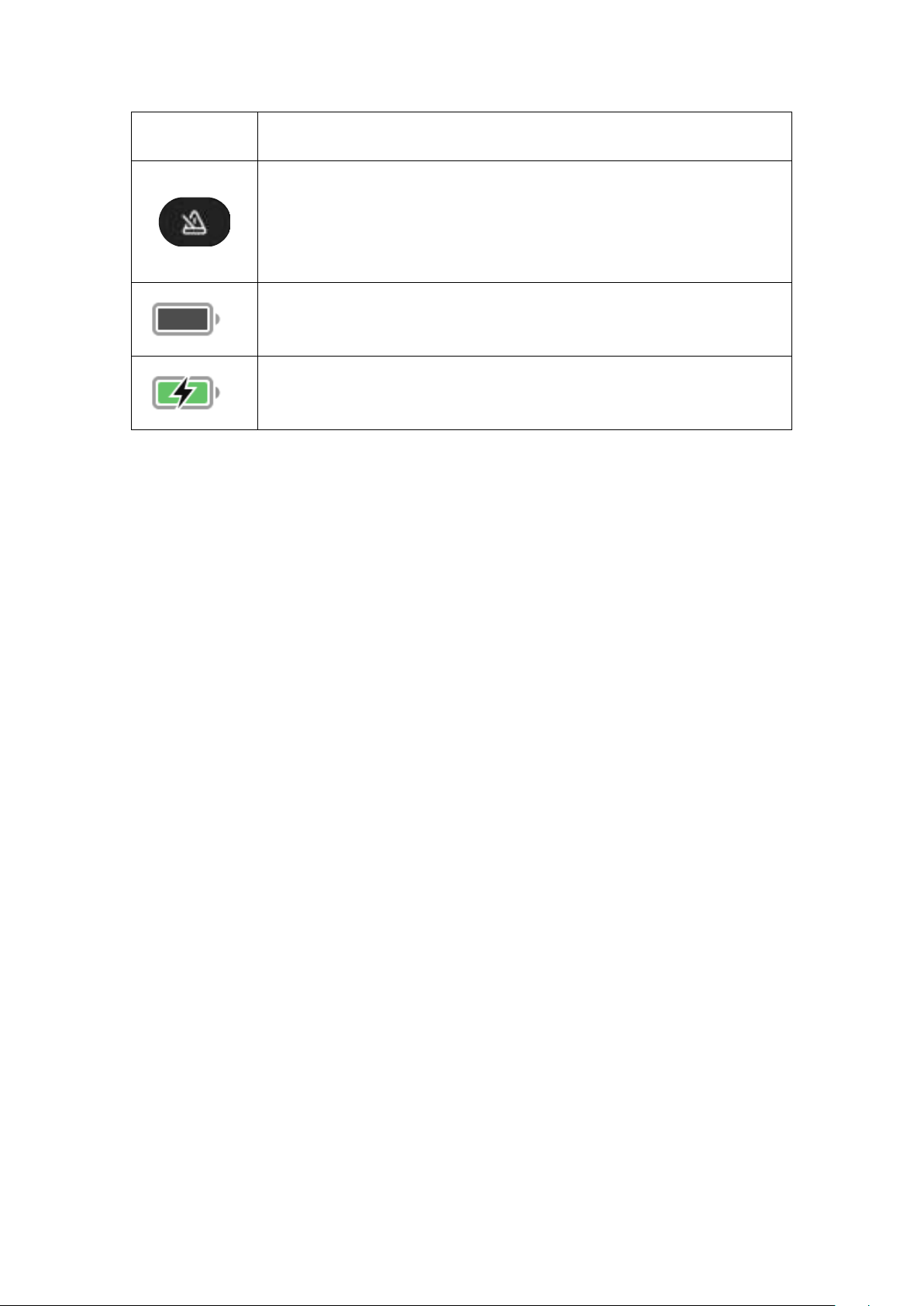
indicates that the effect is running in LAVA ME 3. Click to jump to related
content.
节拍指示器显示屏的左上角图标,表示节拍器在 LAVA ME 3 运行中,点击可跳转相
关内容。
Beat indicator The icon in the upper left corner of the display screen
indicates that the metronome is running in LAVA ME 3. Click to jump to
related content.
电池 显示 LAVA ME 3 的电池电量。
Battery Displays the battery capacity of LAVA ME 3.
电池正在充电 显示 LAVA ME 3 电池正在充电。
Battery is charging Shows that the LAVA ME 3 battery is charging.
Table of contents

















