Sanyo DC-MX41i User manual

INSTRUCTION MANUAL
DC-MX41i
Micro Hi-Fi System for iPod

TABLE OF CONTENTS
SAFETY PRECAUTIONS..........................................................................................................................................1
PUTTING THE BATTERIES INTO THE REMOTE CONTROL UNIT..................................................................................7
ASSEMBLY DRAWING OF UNIT AND SPEAKER......................................................................................................3
FEATURES AND CONTROLS............................................................................................................................................5
LCD DISPLAY WINDOW...........................................................................................................................................6
REMOTE CONTROL................................................................................................................................................7
............................................................................................................................................................7
MEMORY BACK-UP
OPERATING THE UNIT.......................................................................................................................................................8
STANDBY/ON......................................................................................................................................................................8
CLOCK SETTING................................................................................................................................................................8
TIMER SETTING.................................................................................................................................................................8
FUNCTION SELECT............................................................................................................................................................9
RADIO OPERATION...........................................................................................................................................................9
CD/MP3/WMA OPERATION.............................................................................................................................................10
ID3 OPERATION................................................................................................................................................................11
USB/SD CARD OPERATION............................................................................................................................................11
REPEAT PLAY FUNCTION...............................................................................................................................................12
PROGRAM FUNCTION.....................................................................................................................................................12
RANDOM PLAY.................................................................................................................................................................13
INTRO PLAY(on the remote control)..............................................................................................................................13
iPod OPERATION.............................................................................................................................................................13
AUX IN PLAY.....................................................................................................................................................................14
TO SET SLEEP FUNCTION..............................................................................................................................................14
EQ CONTROL...................................................................................................................................................................14
MUTE SETTING................................................................................................................................................................15
LISTEN TO THE MUSIC BY USING HEADPHONE.........................................................................................................15
COMPACT DISC...............................................................................................................................................................15
SPECIFICATION...............................................................................................................................................................16
MAINTENANCE................................................................................................................................................................16
TROUBLESHOOTING......................................................................................................................................................17

1
To achieve the utmost in enjoyment and performance, please read this manual carefully before attempting
to operate the unit in order to become familiar with its features, and assure you years of faithful, trouble
free performance and listening pleasure.
Important Notes
* Read instructions - All the safety and operating instructions should be read before the apparatus is operated
* Retain instructions - The safety and operating instructions should be retained for future reference.
* Cleaning Unplug this product from the wall outlet before cleaning. Do not use liquid cleaners or aerosol
cleaners. Use a damp cloth for cleaning.
* Attachment Do not use attachment not recommended by the product manufacturer as they may cause hazards.
* Power Sources -The apparatus should be connected to a power supply only of the type described in the
operating instructions of as marked on the apparatus.
* “To be completely d the power input, the mains plug of apparatus shall be disconnected
from the mains.” as the disconnect devices is the mains plug of apparatus.
* Power-Cord Protection - Power supply cords should be routed so that they are not likely to be walked on
or pinched by items placed upon or against them, paying particular attention to cords at plugs,
convenience receptacles and the point where they exit from the apparatus
* During lntended Use - The mains plug of apparatus should be easily accessed.
* Nonuse Periods - The power cord of the apparatus should be unplugged from the outlet when left
unused for a long period of time.
* This apparatus shall not be exposed to dripping or splashing water and that no object filled with liquids
such as vases shall be placed on the apparatus.
* The apparatus should be situated so that its location or position does not interfere with its proper
ventilation. The ventilation should not be impeded by covering the ventilation openings with items
such as newspaper, table-cloths, curtains etc.
* Do not install this apparatus in a confined space, such as a book case or built-in cabinet. Minimum
distance (about 100mm) around the apparatus for sufficient ventilation.
* No naked flame sources such as lighted candles should be placed on the apparatus.
* Do not use where there are extremes of temperature (below or exceeding 35 C).
* Sudden changes in the ambient temperature may cause condensation to form on the optical lens inside
the unit. lf this happens, take out the disc, leave the unit for about 1 hour, and then proceed to operate.
* Because of the CD player’s extremely low noise and wide dynamic range, there might be a tendency to
set the volume on the amplifier unnecessarily high.
* Excessive sound pressure from earphones and headphones can cause hearing loss.
* Battery shall not be exposed to excessive heat such as sunshine, fire or the like.
* Attention should be drawn to the environmental aspects of battery disposal.
* The caution marking was located at the back enclosure of the apparatus.
* The nameplate marking was located at the back enclosure of the apparatus.
* The use of apparatus in moderate climates.
isconnected
5°C °
ESD Remark: In case of malfunction due to electrostatic discharge, just reset the product
(reconnect of power source may be required) to resume normal operation.
Should any trouble occur, remove the power source and refer servicing to qualified personnel.
For safety reasons, do not remove any covers or attempt to gain access to the inside of the product.
Refer any servicing to qualified personnel.
Do not attempt to remove any screws, or open the casing of the unit; there are no user serviceable parts
inside, refer all servicing to qualified service personnel.
Note:
- This unit will become warm when used for a long period of time. This is normal and does not indicate a
Problem with the unit.
- The CD player includes micro-processors which may malfunction as a result of external electrical Interference
or noise. If the CD player is not working properly, disconnect the power source and then reconnect it.
- Excessive sound pressure from earphones and headphones can cause hearing loss.
- If an unusual conditions occurs in the display window or key button, switch the unit off, then turn on the unit
again.
WARNING : TO PREVENT FIRE OR SHOCK HAZARD, DO NOT EXPOSE THIS APPLIANCE TO
DRIPPING OR SPLASHING.
SAFETY PRECAUTIONS

This symbol indicates that dangerous
voltage constituting a risk of electric
shock is present within this unit.
This symbol indicates that there are
important operating and maintenance
instructions in the information
accompanying this unit.
CAUTION
CLASS 1 LASER PRODUCT
Operating the unit in a way other than specified herein,or
making adjustments to the unit may result in hazardous
radiation exposure
LASER SAFETY
This unit employs a laser. Only qualified service personnel should attempt to repair.
WARNING: RISK OF INVISIBLE LASER RADIATION WHEN CD LID IS
OPEN OR INTERLOCKS FALL.AVOID DIRECT EXPOSURE TO THE
BEAM.
You can see this
label in the CD
compartment.
DO NOT EXPOSE TO RAIN OR MOISTURE
WARNING: SHOCK HAZARD - DO NOT OPEN
AVIS:RISQUE DE CHOC ELECTRIQUE NE PAS OUVRIR
CAUTION
RISK OF ELECTRIC SHOCK
DO NOT OPEN
CLASS 1 LASER PRODUCT
LASER KLASSE 1
APPAREIL A LASER DE CLASSE 1
LUOKAN 1 LASERLAITE
KLASS 1 LASERAPPARAT
You can see this label on the
back of the main unit.
CAUTION: INVISIBLE LASER RADIATION WHEN OPEN AND
INTERLOCKS DEFEATED. AVOID EXPOSURE TO BEAM.
CUIDADO: PRODUTO LASER DE CLASSE 1 RADIAÇÃO
LASER INVISÍVEL CUANDO ABERTO E SE O DE SEGURANÇA
ESTIVER DEFEITUOSO A EXPOSIÇÃO AOS RAIOS.
ADVARSEL: USYNLIG LASERSTRALING VED ÃBNING NÃR
SIKKERHEDSAFBRYDERE ER UDEAF FUNKTION UNDGA
UDSÆTTELSE FORSTRÃLING,
VARO: AVATESSA JA SUOJALUKITUS OHITETTAESSA OLET
ALTTIINA NÄKYMÄTTÖMÄLLE LASERSÄTEILYLLE
ÄLÄ KATSO SÄTEESEENI
VARNING: OSYNLIG LASERSTRÄLNING NÄR DENNA DEL
ÄR ÖPPNAD OCHSPÄRREN ÄR URKOPPLAD. BETRAKTA
EJSTRÄLENI
This label sticks inside of the unit.
2
POWER CONSUMPTION: 76W
POWER SOURCE: AC ~ 240V 50Hz
BACK UP FOR CLOCK DC 4.5V
(3XR03 “AAA” SIZE BATTERY)
FREQUENCY RANGE: AM 522~1620 KHz
FM 87.5~108.0 MHz
Model No.:DC-MX41i
Micro Hi-Fi System for iPod
MADE IN CHINA AU
SANYO Electric Co.,Ltd.
3
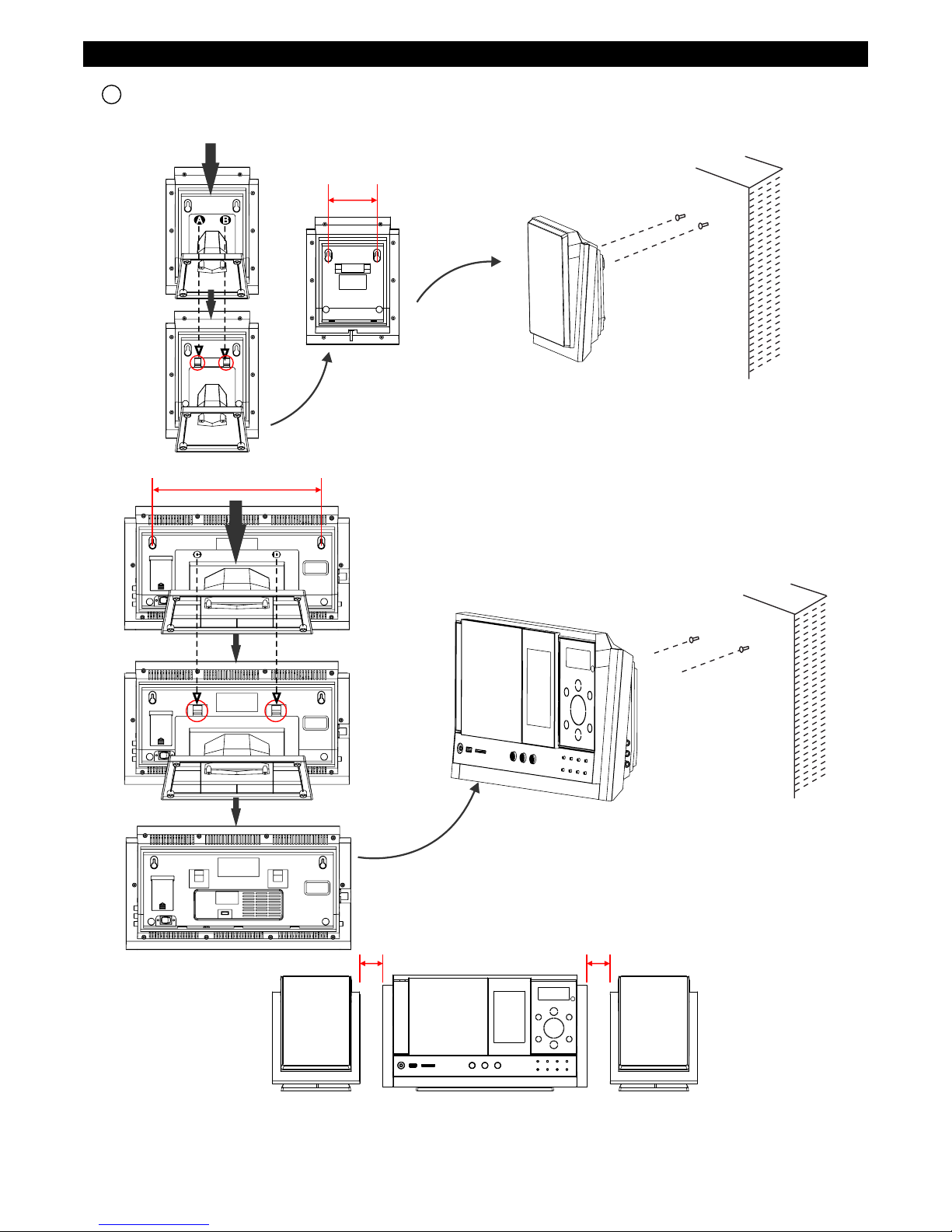
ASSEMBLY DRAWING OF UNIT AND SPEAKER
1 Fixing the whole set of the unit on the wall
Parallel the two nails that fix into the wall, the distance of them should keep
in 300mm.
Note : The size of the nail : 3.5*25BA.
Parallel the two nails that fix into the wall, the distance of them should keep in 84mm.
Note : The size of the nail : 3.5*25BA.
84 mm
300 mm
Press down and push the stand panel of the buckle A and B on the rear of the
each speaker, and then each stand of the speaker will remove from them.
Press down and push the stand panel of the buckle C and D on the rear
of the main unit, and then the stand of the main unit will remove from it.
Note: When wall-mounting the set of product in line, suggest keeping at least 50mm distance from the main unit to
the speakers to achieve better stereo effect and to ensure the slide CD door with prefect movement.
50 mm 50 mm

4
Connector dock
Universal Dock adapter (Using the Dock Adapters to support all type of the iPod players.)
3 Docking bracket and iPod Adjusting pad panel
2 Speakers connection
iPod Adjusting Pad Panel
(Press the iPod Adjusting
pad panel lightly out from the lock holder.)
iPod Adjusting Pad Panel ( Let the
iPod Players easy to insert into the
connector fixedly, and then press
and push them toward the lock
holder until it snaps on.)
1
2
3
Made for iPod mini
(1st generation)4GB, 6GB only
iPod(4th generation)20GB only
U2 Special Edition
iPod with
color display
(4th generation)20GB, 30GB only
U2 Special Edition
iPod with video
(5th generation)60GB,80GB only
iPod classic 160GB
4 Adjust the adjusting pad knob
Made for iPod with
color display
(4th generation)40GB, 60GB only
iPod(4th generation)40GB only
iPod with video
(5th generation)30GB only
iPod classic 80GB
iPod classic 2nd generation 120GB
Adjust the Adjusting pad Knob at the
level 1 to support these iPod
Players as belows:
Made for iPod nano
(1st generation)1GB, 2GB, 4GB only
iPod touch 8GB/16GB/32GB
iPod touch 2nd generation
8GB/16GB/32GB
Adjust the Adjusting pad Knob at the
level 3 to support these iPod
Players as belows:
Adjust the Adjusting pad Knob at the
level 2 to support these iPod
Players as belows:

5
FEATURES AND CONTROLS
1
3
32
38
37
33
40
39
41
42
4
5
6
87 9
15
16
17
18
30
31
33
2
20
21
10
11
12 13 14
22
23
24
25
34
36
19
27 292826
35
43
44
45
6
FEATURES AND CONTROLS
1. SPEAKER
2. SPEAKER STAND
3. STANDBY LED INDICATOR
4. SD/MMC CARD IN SLOT
5. HEADPHONES JACK
6. USB DEVICE IN PORT
7. iPod OPEN/CLOSE BUTTON
8. STANDBY/ON BUTTON
9. CD OPEN/CLOSE BUTTON
10.SLEEP BUTTON
11.ID3/MONO/ST. BUTTON
12.iPod/MEM/CLOCK-ADJ. BUTTON
13.TIMER BUTTON
14.RANDOM BUTTON
15.MUTE BUTTON
16.PRESET/FOLDER DOWN BUTTON
17.PRESET/FOLDER UP BUTTON
18.EQ TOUCH PLATE
19.STOP/MENU TOUCH PLATE
20.VOLUME DOWN TOUCH PLATE
21.SKIP/TUNE SEARCH DOWN TOUCH PLATE
22.VOLUME UP TOUCH PLATE
23.FUNCTION TOUCH PLATE
24. IR SENSOR
25.LCD DISPLAY WINDOW
26.CD DOOR
27.REPEAT TOUCH PLATE
28.BAND TOUCH PLATE
29.PLAY/PAUSE/ENTER TOUCH PLATE
30.FM ANTENNA
31.SPEAKER OUT “L”
32.AM EXTERNAL ANTENNA
33.MAIN UNIT STAND
34.DOCKING BRACKET
35.iPod ADJUSTING PAD KNOB
36.iPod CONNECTOR
37.SPEAKER OUT “R”
38.LINE IN JACK
39.HITCHING HOLE
40.MEMORY BACK-UP BATTERY DOOR
41.AC POWER SWITCH
42.AC POWER CORD
43.iPod PLAYER DOOR
44.SKIP/TUNE SEARCH UP TOUCH PLATE
45.AM EXTERNAL ANTENNA SOCKET
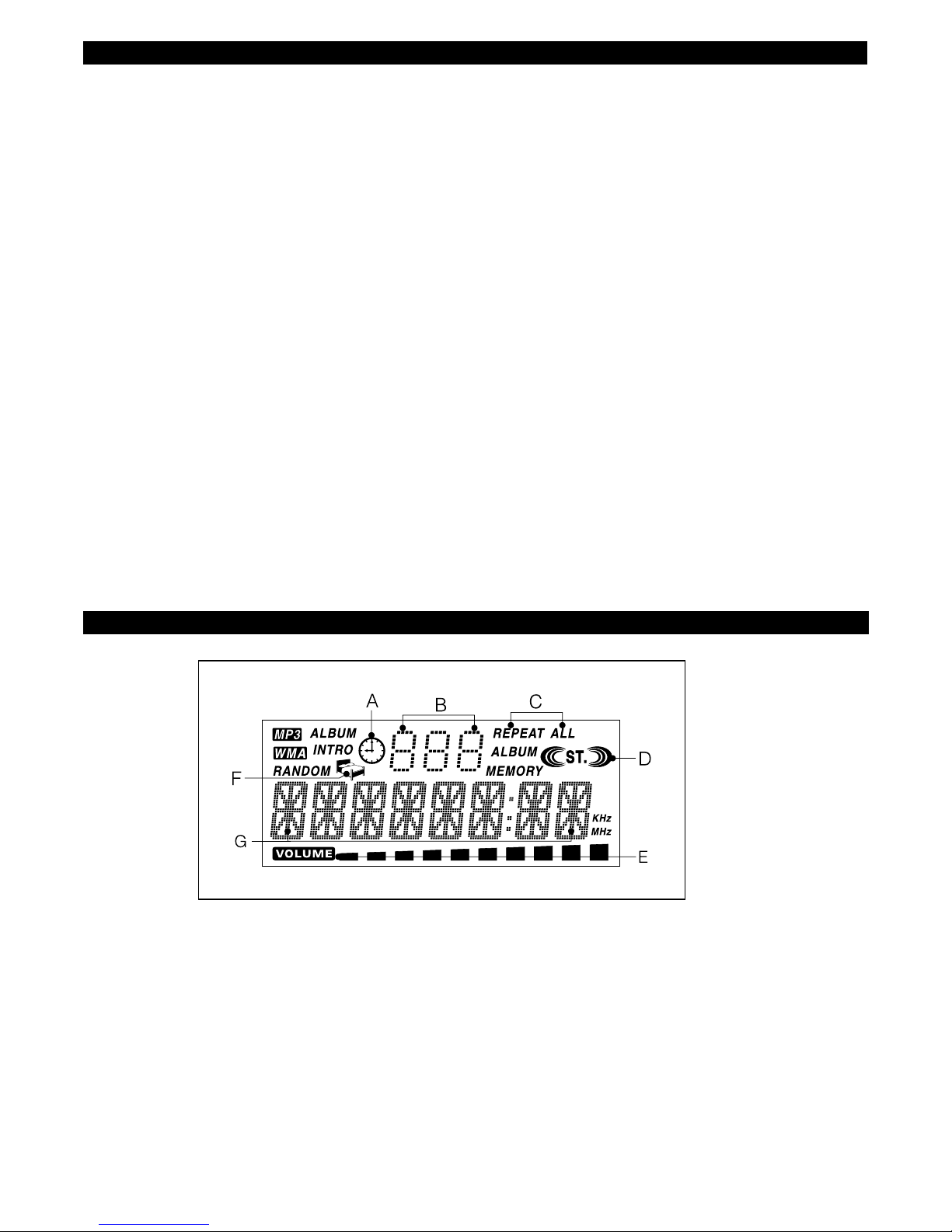
A. TIMER INDICATOR
B. ALBUM/RADIO MEMORY NUMBER INDICATOR
C. REPEAT 1 & ALL INDICATOR
D. STEREO INDICATOR
E. VOLUME HIGH/LOW INDICATOR
F. SLEEP INDICATOR
G. TRACK/NUMBER/TIME INDICATOR
LCD DISPLAY WINDOW

REMOTE CONTROL
1. STANDBY/ON BUTTON
2. MUTE BUTTON
3. PRESET/FOLDER UP BUTTON
4. PRESET/FOLDER DOWN BUTTON
5. SKIP/TUNE SEARCH DOWN BUTTON
6. BAND BUTTON
7. INTRO BUTTON
8. ID3/MONO/ST. BUTTON
9. RANDOM BUTTON
10.VOLUME UP BUTTON
11.FUNCTION BUTTON
12.CD OPEN/CLOSE BUTTON
13.VOLUME DOWN BUTTON
14.iPod OPEN/CLOSE BUTTON
15.PLAY/PAUSE/ENTER BUTTON
16.EQ BUTTON
17.SKIP/TUNE SEARCH UP BUTTON
18.STOP/MENU BUTTON
19.SLEEP BUTTON
20.iPod/MEM/CLOCK-ADJ. BUTTON
21.TIMER BUTTON
22.NUMBER SEARCH BUTTON
23.REPEAT BUTTON
1
2
3
4
5
6
7
8
9
10
11
12
13
14
15
16
17
18
19
20
22
21
23
PUTTING THE BATTERIES INTO THE REMOTE CONTROL UNIT
Press down the compartment cover, and slide the
cover off to open the compartment. Place the two
(UM4), (AAA), (R03) batteries in the remote control
according to the polarity markings ("+" and "-”) inside
the compartment and on the batteries.
Place the cover over the compartment, press down
lightly, and push it upward until it snaps on.
BATTERY PRECAUTIONS
Follow these precautions when using a battery in this device:
1. Warning -Danger of explosion if battery is incorrectly
replaced. Replace only with the same or equivalent type.
2. Use only the size and type of battery specified.
3. Be sure to follow the correct polarity when installing the battery as indicated in the battery compartment.
A reversed battery may cause damage to the device.
4. If the device is not to be used for a long period of time, remove the battery to prevent damage or injury from possible
battery leakage.
5. Do not try to recharge a battery not intended to be recharged; it can overheat and rupture. (Follow battery
manufacturer's directions.)
6. Battery shall not be exposed to excessive heat such as sunshine, fire or the like.
**BATTERIES NOT INCLUDED**
MEMORY BACK-UP
To insert 1.5V x 3, UM-4, R03 AAA or equivalent batteries in the battery compartment of the unit. It is used to
back-up the memory of the main CPU.
7
8
OPERATING THE UNIT
Before operating the unit for the first time, make sure the AC power cord is properly connected to a 240V 50Hz
AC outlet, then press the power ON switch on the rear of the unit, the unit will be in standby mode, the backlight of
standby is red. You can now press the STANDBY/ON button on the unit or press the STANDBY/ON button on remote
control to switch the unit ON. The backlight of the standby will be off and multi function touch plate will light on blue.
Pull the AC plug out of the wall socket if you want to switch off completely.
STANDBY/ON
1. Press the STANDBY/ON button on the unit or remote control to switch the unit on.
2. Select the sound source (CD, USB, CARD, iPod, AUX or TUNER) by touching the FUNC on the unit or press the
FUNCTION button on remote control. The corresponding display will light up.
3. Adjust the volume with the VOL or VOL on the unit or remote control.
4. Press the STANDBY/ON button on the unit or remote control again to turn off the unit.
Note: 1. During in standby mode, press any button/key can make the display light for 10 seconds.
2. Please turn the main switch off to save energy, when you do not use the unit.
During in the STANDBY mode.
1. Press and hold the iPod/MEM/C-ADJ. button until the time displays will change to 24-hour format and flash.
2. Touch or on the unit or press or button on the remote control to select 12-hour or 24-hour.
3. Press the iPod/MEM/C-ADJ. button again, the HOUR digit will flash on the display, touch or to adjust
HOUR.
4. Press the iPod/MEM/C-ADJ. button once more, the MINUTE digit will flash on the display, touch or
to adjust minute.
5. Press the iPod/MEM/C-ADJ. button again to confirm the time.
6. Each enable state as shown above will be cleared if the key is not pushed in10 seconds.
CLOCK SETTING
TIMER SETTING
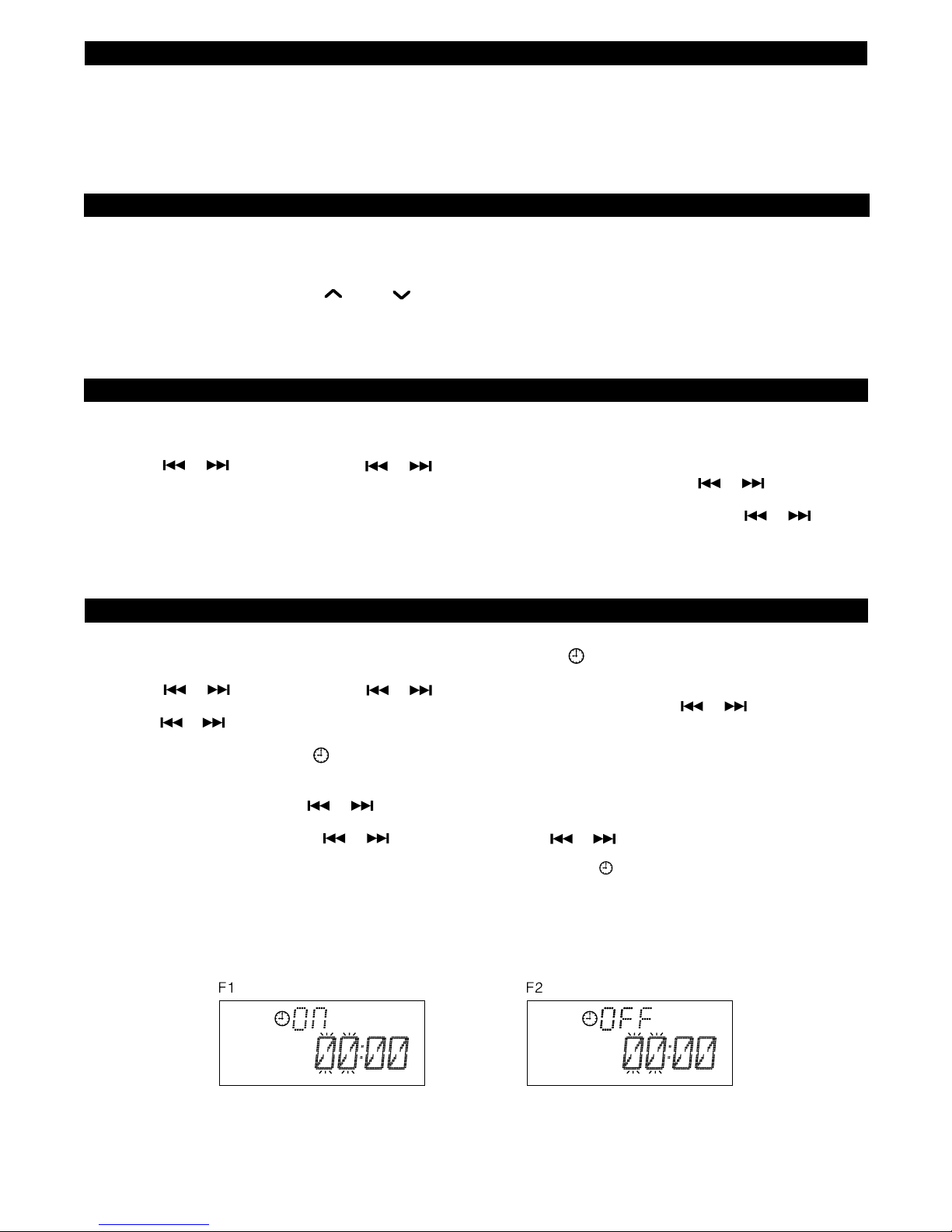
1. After adjusting the clock, press the TIMER button for a few seconds, " ON" and "00:00" appear on the display and
the HOUR digit flashes.(F1)
2. Touch or on the unit or press or button on the remote control to adjust it.
3. Press the TIMER button again, the MINUTE digit will start flashing, adjust it by touching or on the unit or
press or button on the remote control.
4. Press the TIMER button once more to confirm and order TIMER ON time.
5. After adjusting "TIMER ON", " OFF" appears on the display and the HOUR digit flashes.(F2)
6. Repeat the above steps 2 to 3, and then press the TIMER button once more to confirm and order TIMER OFF time.
7. Now the "TUNER" appears on the display with flashing, and then select the alarm mode of the “TUNER, CD, USB,
CARD or IPOD" by touching or on the unit.
8. Press the TIMER button again, the timer "VOL" indicator appears on the display and flashes, adjust the timer
volume high or low by touching or on the unit or press the or button on the remote control.
9. Each enable state as shown above will be cleared if the button is not pushed in 10 seconds.
10.After adjusting "TIMER ON" and "TIMER OFF", press the TIMER button, " “ appears on the display.
11.The main unit will be switched on automatically at "TIMER ON" order and start playing, the main unit will be
switched off automatically at "TIMER OFF" order.
Note: If the display shows "ERROR" while you set the “TIMER ON”, it means both “TIMER ON” and “TIMER OFF” is
the same. In this case, please go to “TIMER OFF” to set the off time first. To switch TIMER function ON or OFF,
press TIMER button.
Table of contents
Other Sanyo Stereo System manuals
Sanyo
Sanyo DC-D40 User manual
Sanyo
Sanyo AWM-2600 User manual
Sanyo
Sanyo DC-AX20 User manual
Sanyo
Sanyo DC-SLIM1600 User manual
Sanyo
Sanyo CWM-470 User manual
Sanyo
Sanyo DC-D27 User manual
Sanyo
Sanyo DC-DA1160 User manual
Sanyo
Sanyo DC-D5 User manual
Sanyo
Sanyo DC-MM5000 (XE) User manual
Sanyo
Sanyo MAJ-R70/AU User manual
Sanyo
Sanyo DC-LD5 User manual
Sanyo
Sanyo DC-S800 User manual
Sanyo
Sanyo MCD-UB575M User manual
Sanyo
Sanyo DC-MP4500(BK)/XE User manual
Sanyo
Sanyo DC User manual
Sanyo
Sanyo DC-MX42i User manual

Sanyo
Sanyo DC-F170 User manual
Sanyo
Sanyo DC-DA2000 User manual

Sanyo
Sanyo DC-DA170 User manual
Sanyo
Sanyo DC-UB1470 User manual