manuals.online logo
Brands
  1. Home
  2. •
  3. Brands
  4. •
  5. Lexus
  6. •
  7. Car Receiver
  8. •
  9. Lexus LS430 2005 User manual

Lexus LS430 2005 User manual

Other Lexus Car Receiver manuals

Lexus RX450h User manual

Lexus

Lexus RX450h User manual

Lexus LS 460 User manual

Lexus

Lexus LS 460 User manual

Lexus rx350 2016 User manual

Lexus

Lexus rx350 2016 User manual

Lexus RX450hL User manual

Lexus

Lexus RX450hL User manual

Lexus BLUETOOTH SWC User manual

Lexus

Lexus BLUETOOTH SWC User manual

Popular Car Receiver manuals by other brands

Linear Series LS5050 Operation and installation manual

Linear Series

Linear Series LS5050 Operation and installation manual

Kenwood KRC-160 instruction manual

Kenwood

Kenwood KRC-160 instruction manual

Sony XR-CA430X Service manual

Sony

Sony XR-CA430X Service manual

T+A Elektroakustik K1 CD-RECEIVER operating instructions

T+A Elektroakustik

T+A Elektroakustik K1 CD-RECEIVER operating instructions

SoundMax SM-CDM1052 instruction manual

SoundMax

SoundMax SM-CDM1052 instruction manual

Xtrons HD107HD user manual

Xtrons

Xtrons HD107HD user manual

Mopar RB3 manual

Mopar

Mopar RB3 manual

Clarion ADDZEST DMZ615 owner's manual

Clarion

Clarion ADDZEST DMZ615 owner's manual

Sony XAV-601BT Specifications

Sony

Sony XAV-601BT Specifications

PIE GM12-POD/S Operation manual

PIE

PIE GM12-POD/S Operation manual

Hyundai H-910H instruction manual

Hyundai

Hyundai H-910H instruction manual

Sony XR-C6100 Service manual

Sony

Sony XR-C6100 Service manual

Sony CDX-L600X - Fm/am Compact Disc Player Installation/connections

Sony

Sony CDX-L600X - Fm/am Compact Disc Player Installation/connections

Motorola VWA63 Service manual

Motorola

Motorola VWA63 Service manual

Sound Storm STM93R user manual

Sound Storm

Sound Storm STM93R user manual

Nextar D3201 instruction manual

Nextar

Nextar D3201 instruction manual

Alpine CDE-163BT owner's manual

Alpine

Alpine CDE-163BT owner's manual

Kenwood KDC-X303 quick start guide

Kenwood

Kenwood KDC-X303 quick start guide

manuals.online logo
manuals.online logoBrands
  • About & Mission
  • Contact us
  • Privacy Policy
  • Terms and Conditions

Copyright 2025 Manuals.Online. All Rights Reserved.

APPROVAL INITIAL DATE
Originator:
Proofreader:
n
n
Check Legal
Mac Artist:
n
n
Spell check
Traffic/Prod:
Graphics Mg:
E-mail to Originator:
n
n
PDF
n
n
PDF cropped
n
n
jpeg
FTP for Originator:
(list details)
05-3013
Toyota Radio Manual PDF
LS430
Trim: 11" x 8.5"
Line Screen: 72 dpi
4C/0
GRAPHICS GROUP
1221 Avenue of the Americas, NY, NY 10020
212-901-6536 or 212-584-5117
Originator is responsible for final proofreading, specs, sizes, brand and legal approvals.
RELEASE INFORMATION
Quantity:
Stock:
Shipping
Location:
Due Date:
In hand
FULFILLMENT INFORMATION
Originator:
Department:
Threshold:
Enter Online: NO
Online Code:
OKAY to Release
Org Trf GRP M

‘05 Lexus LS430
SIRIUS Satellite Radio
Operation Instructions
Radio (SIRIUS Satellite Radio broadcast)
To listen to a satellite radio broadcast in your vehicle, an additional
genuine Lexus satellite receiver and antenna (or equivalents)
must be purchased and installed. A subscription to SIRIUS
Satellite Radio is also necessary.
(a) How to subscribe to SIRIUS Satellite Radio
A SIRIUS Satellite Radio is a tuner designed exclusively to
receive broadcasts provided under a separate subscription.
Availability is limited to the 48 contiguous states.
You must enter into a separate service agreement with SIRIUS
Satellite Radio in order to receive satellite broadcast program-
ming in the vehicle. Additional activation and service subscription
fees apply that are not included in the purchase price of the
vehicle and optional digital satellite tuner. For complete informa-
tion on subscription rates and terms, or to subscribe to
SIRIUS Satellite Radio, call SIRIUS’ Customer Care at
1-888-539-SIRIUS (7474). SIRIUS Satellite Radio is solely
responsible for the quality, availability and content of the satellite
radio services provided, which are subject to SIRIUS’ standard
Terms and Conditions.
(b) How to activate:
To activate SIRIUS, find your 12-digit SIRIUS ID (SID) by
selecting the SAT button and tuning to channel 255. Make sure
your vehicle is outdoors under the open sky. The SID number is
displayed as two separate 8-digit and 4-digit numbers. Pressing
the TEXT button on your radio can access these. Call SIRIUS at
1-888-539-SIRIUS (7474). The SIRIUS representative will ask
you for your SID and major credit card or debit card
information.
All fees and programming are the responsibility of SIRIUS
Satellite Radio and are subject to change.
1
APPROVAL INITIAL DATE
Originator:
Proofreader:
n
n
Check Legal
Mac Artist:
n
n
Spell check
Traffic/Prod:
Graphics Mg:
E-mail to Originator:
n
n
PDF
n
n
PDF cropped
n
n
jpeg
FTP for Originator:
(list details)
05-3013
Toyota Radio Manual PDF
LS430
Trim: 11" x 8.5"
Line Screen: 72 dpi
4C/0
GRAPHICS GROUP
1221 Avenue of the Americas, NY, NY 10020
212-901-6536 or 212-584-5117
Originator is responsible for final proofreading, specs, sizes, brand and legal approvals.
RELEASE INFORMATION
Quantity:
Stock:
Shipping
Location:
Due Date:
In hand
FULFILLMENT INFORMATION
Originator:
Department:
Threshold:
Enter Online: NO
Online Code:
OKAY to Release
Org Trf GRP M
(c) Listening to the satellite radio
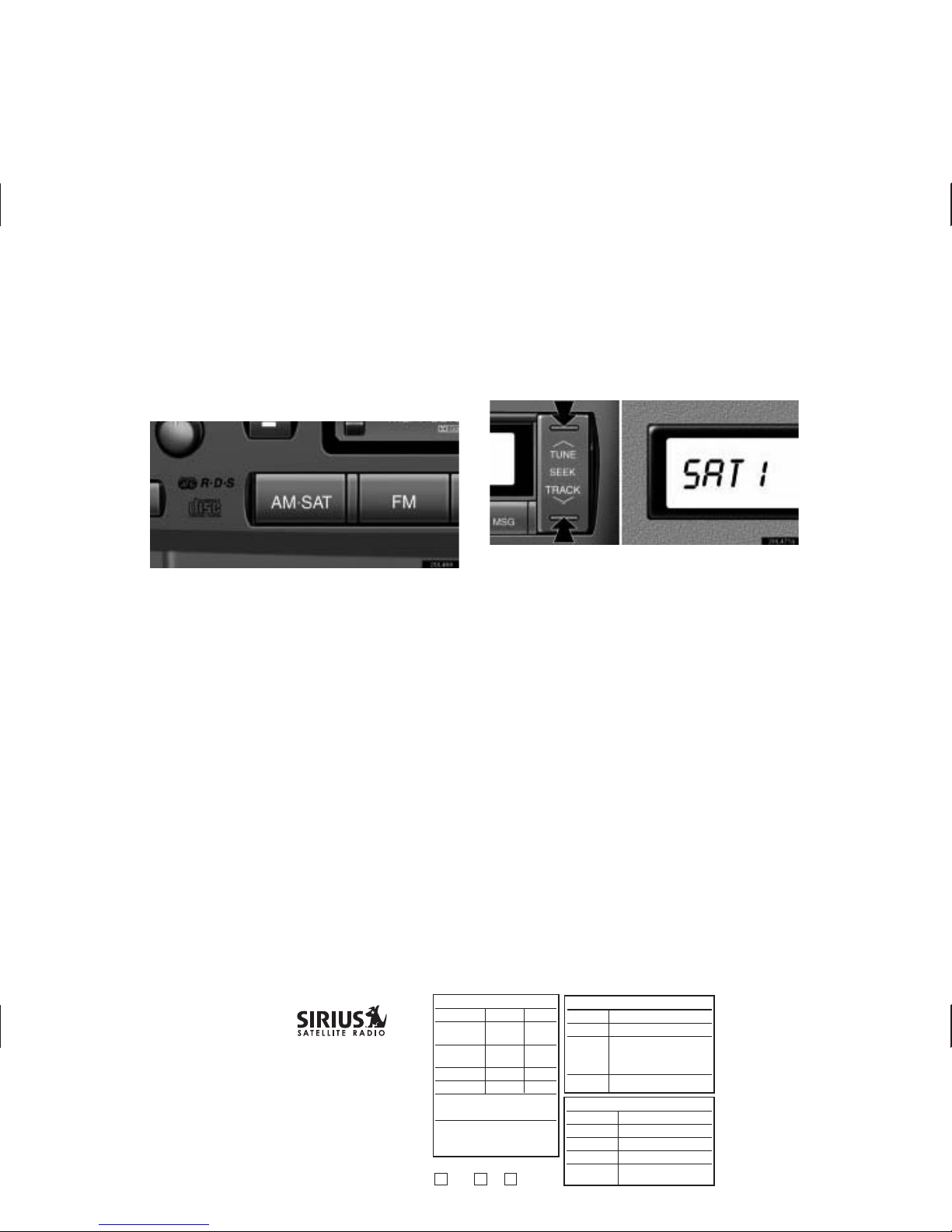
Push the “AM·SAT” button to choose a SAT station.
Besides “AM”, “SAT1”, “SAT2” or “SAT3” appears on the display.
Push this button to select the next or previous channel.
If you push and hold the button, you can rapidly scroll forward or
down through the channels. When displaying the channel
category by the “TYPE” button, pushing the “TUNE SEEK” button
lets you select the next or previous channel within the currently
selected type.
2
APPROVAL INITIAL DATE
Originator:
Proofreader:
n
n
Check Legal
Mac Artist:
n
n
Spell check
Traffic/Prod:
Graphics Mg:
E-mail to Originator:
n
n
PDF
n
n
PDF cropped
n
n
jpeg
FTP for Originator:
(list details)
05-3013
Toyota Radio Manual PDF
LS430
Trim: 11" x 8.5"
Line Screen: 72 dpi
4C/0
GRAPHICS GROUP
1221 Avenue of the Americas, NY, NY 10020
212-901-6536 or 212-584-5117
Originator is responsible for final proofreading, specs, sizes, brand and legal approvals.
RELEASE INFORMATION
Quantity:
Stock:
Shipping
Location:
Due Date:
In hand
FULFILLMENT INFORMATION
Originator:
Department:
Threshold:
Enter Online: NO
Online Code:
OKAY to Release
Org Trf GRP M

(d) Presetting a channel
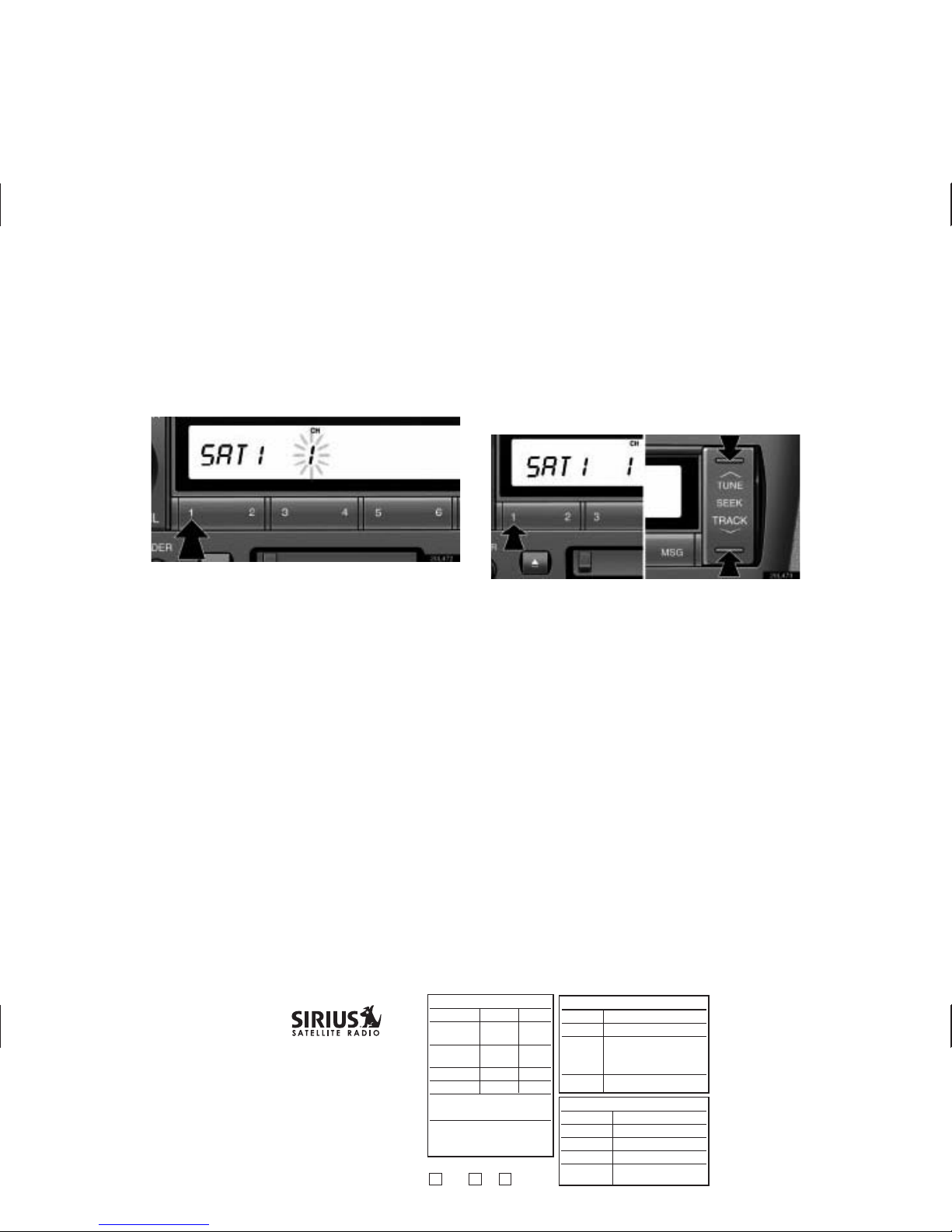
1. Tune in the desired channel.
2. Push one of the channel selector buttons ( 1–6 ) and hold
it until a beep is heard. This sets the channel to the
button and the button number ( 1–6 ) appears on the
display.
Each button can store three SAT channels. To change the
preset channel to a different one, follow the same procedure.
The preset channel memory is cancelled when the power source
is interrupted by battery disconnection or a blown fuse.
(e) Selecting a channel
Tune in the desired channel using one of the following methods.
Preset tuning: Push the button ( 1–6 ) for the channel you want.
The button number ( 1–6 ) and channel number appear on the
display.
3
APPROVAL INITIAL DATE
Originator:
Proofreader:
n
n
Check Legal
Mac Artist:
n
n
Spell check
Traffic/Prod:
Graphics Mg:
E-mail to Originator:
n
n
PDF
n
n
PDF cropped
n
n
jpeg
FTP for Originator:
(list details)
05-3013
Toyota Radio Manual PDF
LS430
Trim: 11" x 8.5"
Line Screen: 72 dpi
4C/0
GRAPHICS GROUP
1221 Avenue of the Americas, NY, NY 10020
212-901-6536 or 212-584-5117
Originator is responsible for final proofreading, specs, sizes, brand and legal approvals.
RELEASE INFORMATION
Quantity:
Stock:
Shipping
Location:
Due Date:
In hand
FULFILLMENT INFORMATION
Originator:
Department:
Threshold:
Enter Online: NO
Online Code:
OKAY to Release
Org Trf GRP M
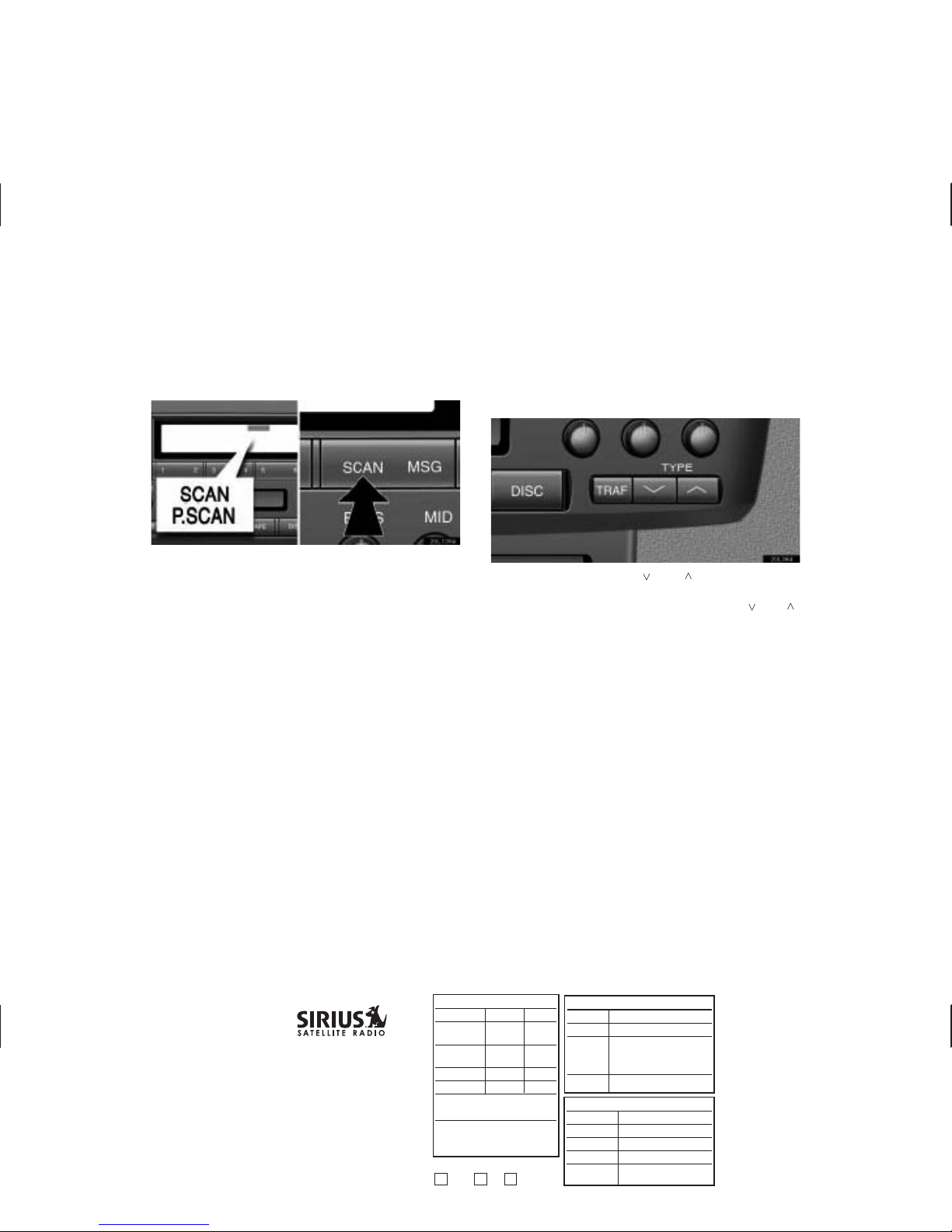
To scan the currently selected channel category: Push the
“SCAN” button briefly. “SCAN” appears on the display. The radio
will find the next channel in the same channel category up the
band, stay there for a few seconds, and then scan again. To
select a channel, push the “SCAN” button a second time.
To scan the preset channels: Push the “SCAN” button and hold
it until you hear a beep. “P.SCAN” appears on the display. The
radio will tune in the next preset channel, stay there for a few
seconds, and then move to the next preset channel. To select a
channel, push the “SCAN” button a second time.
(f) Channel category
When you push the TYPE “ ” or “ ” button, the current
channel category appears on the display.
When the channel category appears, push either “ ” or “ ”
button to switch to the next or previous category.
4
APPROVAL INITIAL DATE
Originator:
Proofreader:
n
n
Check Legal
Mac Artist:
n
n
Spell check
Traffic/Prod:
Graphics Mg:
E-mail to Originator:
n
n
PDF
n
n
PDF cropped
n
n
jpeg
FTP for Originator:
(list details)
05-3013
Toyota Radio Manual PDF
LS430
Trim: 11" x 8.5"
Line Screen: 72 dpi
4C/0
GRAPHICS GROUP
1221 Avenue of the Americas, NY, NY 10020
212-901-6536 or 212-584-5117
Originator is responsible for final proofreading, specs, sizes, brand and legal approvals.
RELEASE INFORMATION
Quantity:
Stock:
Shipping
Location:
Due Date:
In hand
FULFILLMENT INFORMATION
Originator:
Department:
Threshold:
Enter Online: NO
Online Code:
OKAY to Release
Org Trf GRP M
(g) Displaying the title and name
When you push the “MSG” button, the display changes as
follows:
CH NAME
→
TITLE (SONG/PROGRAM TITLE)
→
NAME
(ARTIST NAME/FEATURE)
→
CH NUMBER
→
CH NAME
Up to 10 alphanumeric characters can be displayed. (Some
information will not be fully displayed.)
5
APPROVAL INITIAL DATE
Originator:
Proofreader:
n
n
Check Legal
Mac Artist:
n
n
Spell check
Traffic/Prod:
Graphics Mg:
E-mail to Originator:
n
n
PDF
n
n
PDF cropped
n
n
jpeg
FTP for Originator:
(list details)
05-3013
Toyota Radio Manual PDF
LS430
Trim: 11" x 8.5"
Line Screen: 72 dpi
4C/0
GRAPHICS GROUP
1221 Avenue of the Americas, NY, NY 10020
212-901-6536 or 212-584-5117
Originator is responsible for final proofreading, specs, sizes, brand and legal approvals.
RELEASE INFORMATION
Quantity:
Stock:
Shipping
Location:
Due Date:
In hand
FULFILLMENT INFORMATION
Originator:
Department:
Threshold:
Enter Online: NO
Online Code:
OKAY to Release
Org Trf GRP M
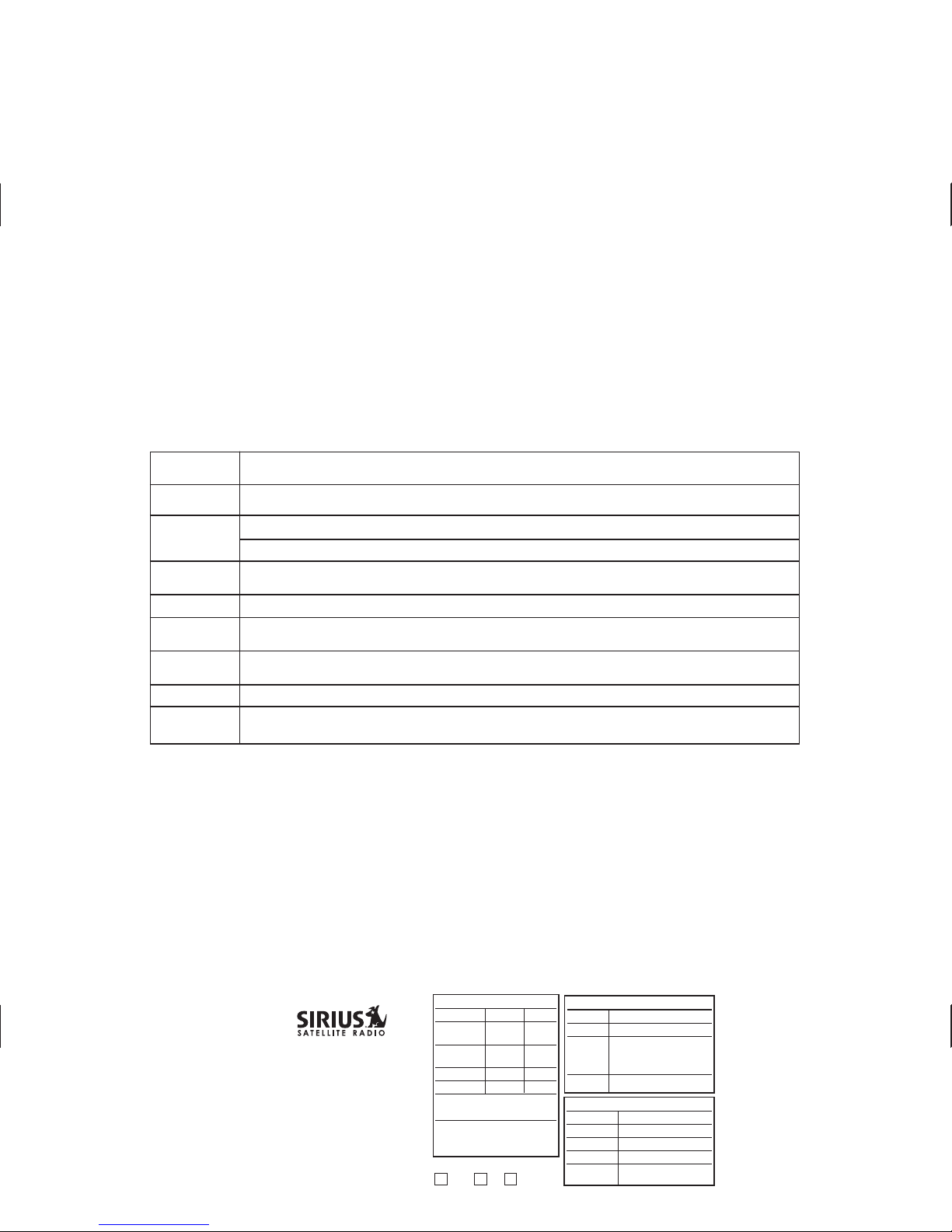
(h) If the satellite radio tuner malfunctions
When problems occur with the SIRIUS tuner, a message will appear on the display. Referring to the table below to identify the problem,
take the suggested corrective action.
Notice: • If a channel becomes invalid due to a subscription or channel lineup change, the SIRIUS call message will show on
that channel. If that invalid channel is accessed via a preset, the preset will then revert to The Preview Channel // 184.
• All presets will default to The Preview Channel // 184 in case of battery disconnect/reconnect.
SIRIUS Customer Care is available 24/7 at 1-888-539-SIRIUS (7474).
6
APPROVAL INITIAL DATE
Originator:
Proofreader:
n
n
Check Legal
Mac Artist:
n
n
Spell check
Traffic/Prod:
Graphics Mg:
E-mail to Originator:
n
n
PDF
n
n
PDF cropped
n
n
jpeg
FTP for Originator:
(list details)
05-3013
Toyota Radio Manual PDF
LS430
Trim: 11" x 8.5"
Line Screen: 72 dpi
4C/0
GRAPHICS GROUP
1221 Avenue of the Americas, NY, NY 10020
212-901-6536 or 212-584-5117
Originator is responsible for final proofreading, specs, sizes, brand and legal approvals.
RELEASE INFORMATION
Quantity:
Stock:
Shipping
Location:
Due Date:
In hand
FULFILLMENT INFORMATION
Originator:
Department:
Threshold:
Enter Online: NO
Online Code:
OKAY to Release
Org Trf GRP M
UPDATING
UPDATED
ANTENNA
NO SIGNAL
DEACTVTD
GOTO 255
SIRIUSID
____
__
This will show whenever a new channel lineup or subscription change is received from a SIRIUS broadcast.
Audio will mute during this update period.
The unit has just acquired new channel or subscription information from SIRIUS. “Updated” will flash for
10 seconds and clear. A tune up or down, will allow audio to be heard once again.
The SIRIUS antenna is not connected. Check whether the SIRIUS antenna cable is attached securely.
A short-circuit occurs in the antenna or the surrounding antenna cable. See a Lexus certified dealer.
The SIRIUS signal is too weak at the current location. Wait until your vehicle reaches a location with a stronger
signal.
This will show when the receiver has been deactivated in place of the channel name.
This message will show in place of category type whenever tuned to channel 0. The user should tune to channel 255
to show the 12-character SIRIUS ID (SID) number, also known as the Electronic Serial Number (ESN) or Radio ID.
This text will show in place of channel name and also category name whenever tuned to channel 255. Channel 255
shows the Electronic Serial Number (ESN). 8 ESN characters are shown in the title field and 4 in the name field.
There is no song/program title or artist name/feature associated with the channel at that time. No action needed.
The channel you selected is no longer available. Wait for about two seconds until the radio returns to the previous
channel or The Preview Channel // 184. If it does not change automatically, select another channel.