1. TO SWITCH ON / OFF
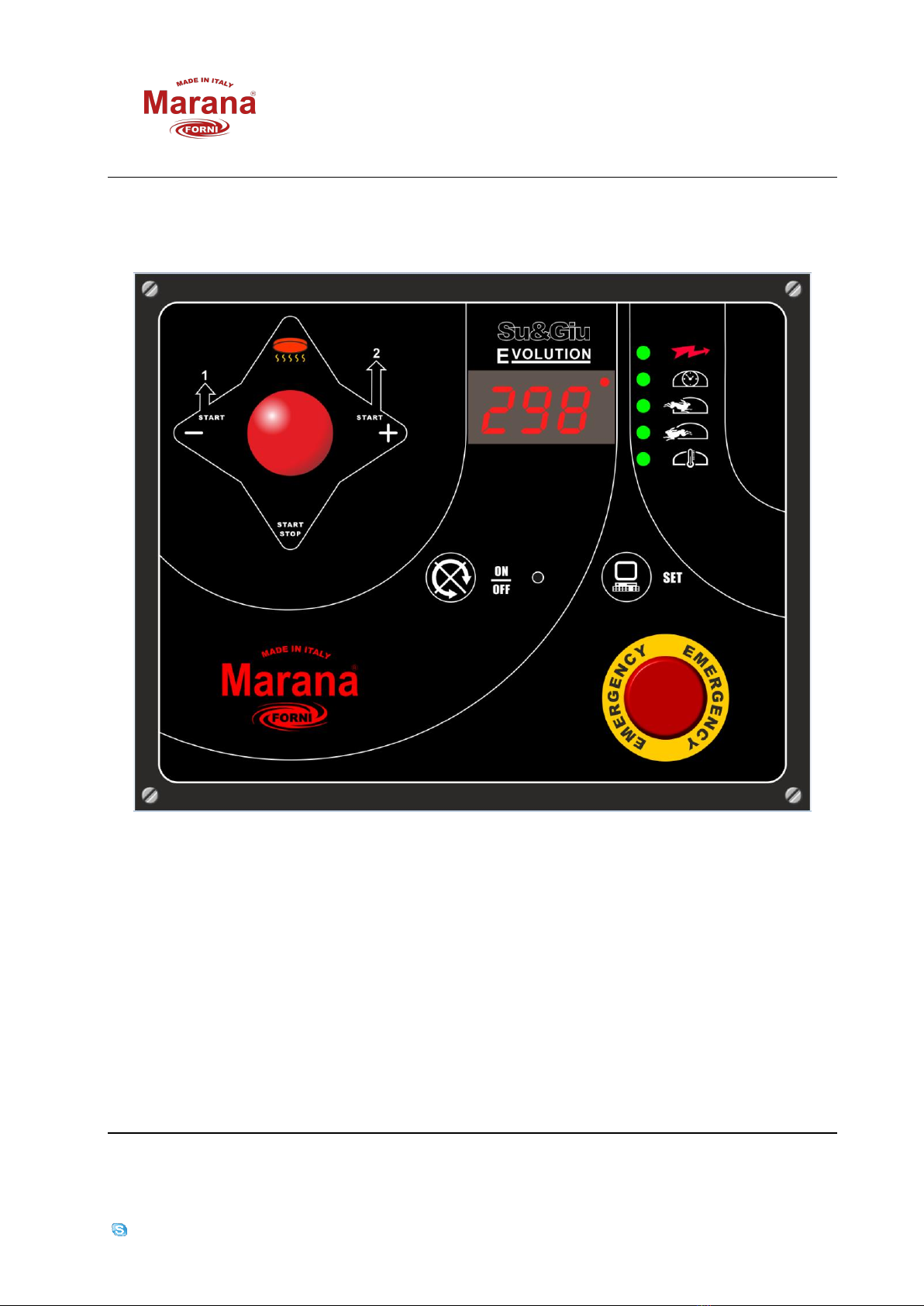
With the green light indicating that the electricity supply is connected (lightning), press the
ON/OFF button for a moment; the display will light up indicating, after about ten seconds, the
temperature reading inside the oven (red light above the thermometer will be on); the
rotation speed of the plate will be that of “oven standby”.
To switch off the console, press the ON/OFF button for a few seconds until it switches off.
Use the “EMERGENCY” button only in case of necessity.
2. BASE LEVEL COOKING
Move the joystick down for a moment (towards the lit dot above the “clock” symbol); the
rotation speed of the plate will change to the optimal speed for cooking; the display will
show the cooking time remaining, with time being counted down; ten seconds before
cooking is finished, there will be a short warning sound indicating “cooking almost finished”
and at the end there will be three short sounds.
3. COOKING WITH THE PLATE AT THE 1ST LEVEL
Move the joystick lever to the left for a moment; the plate will rise to the first level and
cooking will take place as for the “BASE LEVEL COOKING”. When cooking is finished, the plate
will descend to the base level. For safety, the command will be refused if the temperature
registered inside the oven is less than 150°C.
4. COOKING WITH THE PLATE AT THE 2ND LEVEL
Move the joystick lever to the right for a moment. Everything will function as for cooking at
the 1st level, but obviously at a higher level. When cooking is finished, the plate will descend
to the base level. For safety, the command will be refused if the temperature registered
inside the oven is less than 150°C.
5. TO PRE-HEAT THE PLATE
Move the joystick lever upwards for a moment; the plate will rise to the maximum height, and
rotation speed will be that during cooking, and for a pre-set time, at the end of which the
plate will descent to the base level.
For safety, the command will be refused in the temperature registered inside the oven is less
than 150°C.
6. TO IMMEDIATELY HALT COOKING IN PROGRESS
For all cooking methods or pre-heating the plate, keep the joystick pressed downwards for a
couple of seconds. Cooking or pre-heating will stop immediately, and the plate will descend
to the base (function RESET).
7. TO STOP ROTATION OF THE PLATE
Press the ON/OFF button for a moment; the plate will slow down and then stop. Pressing the
button again in the same way will cause the rotation to return to the normal speed again.
8. TO VARY THE COOKING TIME
During the “standby” phase, press the “SET” button for a moment; the green light near the
clock symbol will flash; duration of the cooking time will be shown on the display. The time
can be increased or decreased as desired by pushing the joystick (to the right or left); keep
the SET button pressed to confirm or wait for the automatic “exit”.