9- VALVE SLOT There are 4 VALVE SLOTS on the front panel, with an attractive perforated mesh
below each slot arrangement. Above image shows the valve, with a subtle red LED glow around it.
10- XFADE SWITCH Below each CUE button is an XFADE toggle switch. This switch assigns the
crossfader to the desired channel. If the XFADE toggle switch is set to X the channel mix is sent
via the crossfader and sound will be heard if the crossfader is set to X. When the OFF toggle is
selected sound bypasses the crossfader, and when the toggle switch is set to Y no sound will be
heard in the mix if the crossfader is set to X.
11- LED METER Each of the 4 channels features a 10-bar LED meter. This visually shows the amount
of input signal being processed through each channel, ranging from -25dB to PK (PEAK SIGNAL). The
normal operating range should be -6dB to +6dB with an average of 0dB.
12- CH1-CH4 ROTARY FADER Each channel has a large ROTARY FADER for precision control of its level
when mixing. The rotary ranges from fully off when anti-clockwise to unity gain (0dB) when
clockwise. For best performance operate these controls near to their fully clockwise position for
normal music level.
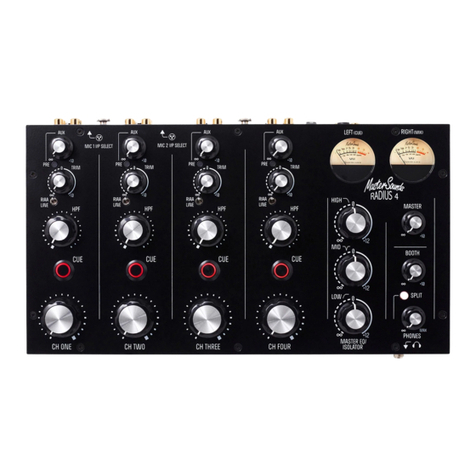
13- VU METERS FOUR VALVE MK2 features two high-quality analogue VU (Volume Unit) meters, which
accurately measure the left and right audio signals. The meters show the post-EQ sound level. An
added feature of the VU Meters is that when driven over +6VU the meter will illuminate RED to warn
against clipping. In SPLIT MODE the LEFT VU Meter indicates the cue signal level, and the RIGHT VU
Meter indicates the MIX level, (see SPLIT below).
14- MASTER EQ/ISOLATOR The MASTER EQ/ISOLATOR functions as a normal isolator using 12dB/octave
filters, with crossover frequencies at 350Hz and 3.5kHz making for a very musical isolator.
15- MASTER The MASTER rotary pot adjusts the signal level sent to the Main Output XLRs (House
Mix) ranging from off to +10dBu of gain. Set the control to approximately 1 o’clock for unity gain.
16- BOOTH The BOOTH rotary pot adjusts the signal level sent to the Booth Output TRS Jacks
(Monitor Mix) ranging from off to +10dBu of gain. Set the control to approximately 1 o’clock for
unity gain.
17- SPLIT The SPLIT CUE button illuminates RED when activated and links to the CUE buttons and VU
Meters. When the SPLIT CUE is active and a channel CUE is pressed, the mix buss level will be
shown on the right meter, and the channel pre-fade signal (CUE) will be shown on the left meter,
enabling you to balance the two levels. The Split button also sends the cued source to the Left
headphone and the mix source to the Right headphone. SPLIT CUE is automatically disabled when the
Channel CUEs are off, and the Meters and Headphones revert to monitoring the stereo master signal.
18- PHONES Please take care when monitoring with headphones as excessive sound volumes can cause
premature deafness. The ¼ jack headphone input is located on the front of the mixer as shown on the
headphone graphic.
19- X FADE CONTOUR When the pot is turned fully anti-clockwise, the crossfader slope is very
mild, great for blending tracks. Rotate the pot clockwise and you will hear the crossfader slope
sharpen up. Fully rotate the pot clockwise for ultra-sharp cuts when scratching.
20- ADD MIX The add mix knob controls the amount of stereo house mix sent to your cued track in
the headphones. When the knob is rotated fully anti-clockwise only the cued track will be heard.
Turning the knob clockwise increases the amount of house mix that can be heard in the headphones.
21- CROSSFADER The crossfader enables you to mix between signals assigned to X or Y as indicated
in the screen-printed text. The crossfader enables a variety of DJ styles to be performed, from a
basic fade, to smooth beat matching and complex scratch maneuvers. Use the crossfader with the
XFADE SWITCH (SEE ABOVE) to select which channels to assign to the X or Y position.
FRONT PANEL CONTROLS FRONT PANEL CONTROLS
1- MIC I/P SELECT FOUR VALVE MK2 features two Microphone inputs on CH1 & CH2, which are located
on the rear panel, (see the MIC ON paragraph in the rear panel control section).
2- AUX The AUX send level pot adjusts the amount of channel signal level sent to the aux mix buss
(and onto an external FX unit). Fully clockwise the signal level is boosted by +10dBu, allowing for
precise adjustment of FX signals.
3- PRE The PRE button switches the AUX to send a feed from post-fader to pre-fader (i.e. set to
pre-fader it will still send to the aux mix buss with the rotary fader down).
4- TRIM The TRIM pot adjusts the input signal level from OFF up to a maximum of +10dBu, enabling
accurate level matching between different musical sources.
5- LINE/RIAA This button selects either the RIAA (Phono) level input in its top position, or the
LINE input in the bottom position as indicated with screen-printed text.
6- 3 BAND EQ FOUR VALVE MK2 features a traditional HIGH MID LOW equalisation system, each pot
gives -20dB of cut and +6dB of boost per band, with channel frequency at 150Hz, 1kHz, 2kHz.
7- VARIABLEQ HPF The new Variable-Q filter provides a natural roll-off at low frequencies, lending
perfectly to mixing with filters alone, but as the knob is rotated the Q automatically rises to
provide that classic analogue swept filter sound, with a high-pass filter frequency range of 18Hz –
1.8kHz.
8- CUE Each CUE button routes the channel signal to the headphones. Pressing the CUE button
illuminates the red LED. When CUE buttons are activated you can hear the selected CUE channels
playing. When no CUE button is active the headphone signal is automatically routed to the master
mix buss.
1
2
3
4
5
6
7
10
9
13
14
16
17
20
21
18
19
8
11
12
15