2
4. Connection: Connect your Bluetooth-enabled device to the Bluetooth speaker after pairing is successful.
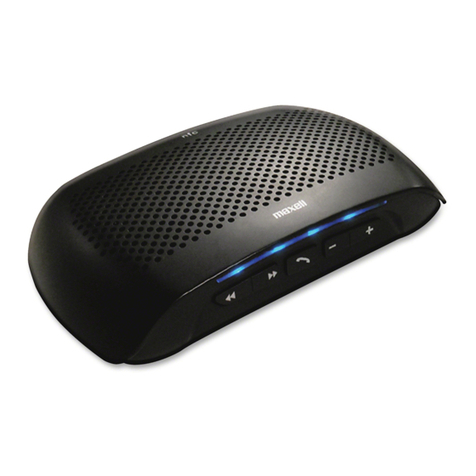
5. Answer a call: When there is an incoming call, your ring-tone will sound from the speaker. Short press the
multifunctional button to answer the call.
6. End a call: if you want to end the call, short press the multifunction button to hang up, you will hear an
indication tone to confirm the call has been ended successfully.
7. Reject a call: Hold the multifunction button for 3 seconds to reject a call; you will hear an indication tone to
confirm the call has been rejected successfully.
8. Adjust the volume: when answering, dialling or during a call, short press “+” button to increase volume one
increment, and you will hear an indication tone when increase to maximum volume. Similarly, short press “-”
button to decrease the volume an increment, and also an indication tone when decreased to minimum
volume.
9. Redial the last number called: In the standby mode, pressing the multifunction button twice will redial the last
outgoing number.
10. Voice dial: In the standby mode, hold the multifunction button for 3 seconds. This feature requires the support
of your mobile phones’ Bluetooth.
11. Call transfer from speaker to phone: During a call , hold the multifunction button for 3 seconds until hear a
tone, then the call has been transferred from the Bluetooth speaker to your phone , the same operation can
transfer the call from your phone to the Bluetooth speaker
12. Microphone mute: During the call, long press the “-” button can switch to open and close the mute function, a
tone will sound to indicate the operation is completed.
13. Pause/play: While music is playing, short press the multifunction button to play/pause music.
14. Previous/Next song: During playing music, hold the VOL+ button for over 1-2 seconds to play the previous
song and hold the VOL- button to play the next song.
Pairing MXSP-BT03 with Bluetooth devices
Form a wireless connection between Bluetooth-enabled devices through a simple operation.
For example, when use mobile phone with Bluetooth speaker, it is necessary to operate the mobile phone
Bluetooth to search Bluetooth devices, select and then connect wirelessly by PIN
The MXSP-BT03 speaker pairing steps are as follows:
1. Ensure the speaker is ON.
2. Hold the multifunction button for about 8 seconds until the LEDs are on and red and blue LEDs flash
alternately.
3. Refer to the User manual of your phone to turn on your phone Bluetooth function and search for Bluetooth
speaker. Typically, the steps involved include entering the settings, connection, or Bluetooth menu on the
mobile phone, then selecting the found Bluetooth device option.
4. The phone will find the “MAXELL MXSP-BT03” Bluetooth speaker, and ask if you are ready for pairing. Press
the OK or CONFIRM to pair the devices.
5. Enter password or PIN No.: “0000”, and press YES or CONFIRM.
(Remarks:After successful connection, the blue LED of your MXSP-BT03 will flash and later flash once every 5
seconds. If the pairing has failed, LEDs are still flashing alternately, the device needs re-pairing)