Mimo Monitors
Sales: 1-855-YES-MIMO (937-6466)
1
7N-RK User Manual
Content
Declaration........................................................................................................................... 0
Product Instruction.............................................................................................................. 1
Power on the Product ........................................................................................................ 2
Insert SD Card .................................................................................................................... 2
Insert USB Devices ............................................................................................................ 2
Home Screen ...................................................................................................................... 3
Combined System Bar....................................................................................................... 5
Brightness............................................................................................................................ 8
Use Apps.............................................................................................................................. 8
Language ............................................................................................................................. 9
Date & Time....................................................................................................................... 10
Volume.................................................................................................................................11
Wi-Fi.....................................................................................................................................11
Ethernet.............................................................................................................................. 12
Virtual Keyboard ............................................................................................................... 13
Switch Input Methods....................................................................................................... 13
Surf Online......................................................................................................................... 14
Browse Files ...................................................................................................................... 15
Play Media ......................................................................................................................... 17
Reset to Factory Default.................................................................................................. 17
Declaration
Please read the instructions carefully before equipment installation and
Do not put the product in high temperature, humid or dusty environment.
Do not drop, crash or break down this product.
Do not power off the device when it’s formatting or upgrading, otherwise it
will cause operation system error.
This product is not waterproof.
Use only approved add-on enhancements.
Product Instruction
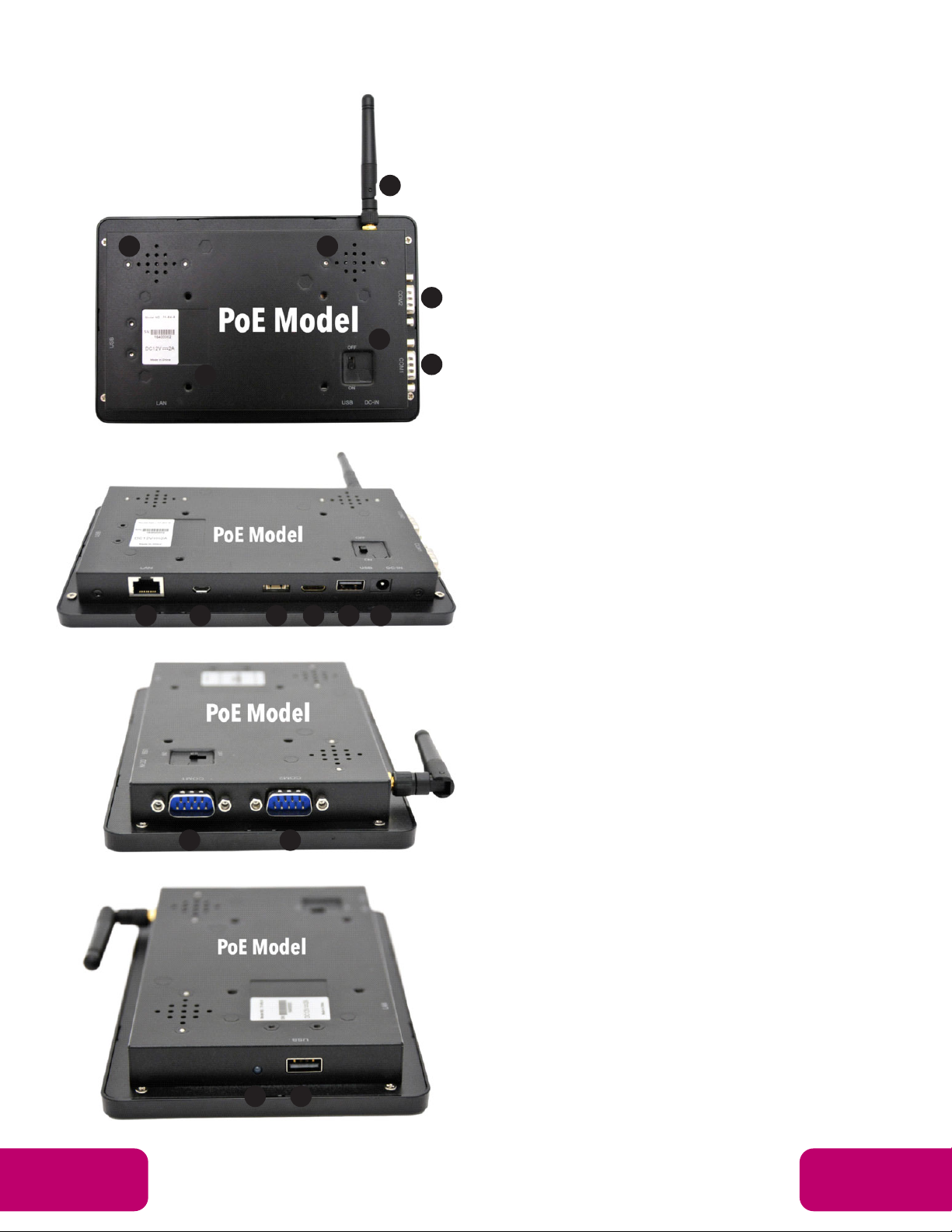
1. Camera (optional): 2M pixel camera
2. LED Indicator:
System is working properly.
3. SD Card Slot / Cover: support external SD card
4. Escape Button: return to the previous page
5. Function Keys (Up / Down): select the up/down item
6. Function Keys (Vol+ / Vol-): adjust the system volume
7. Speaker: audio output
8. VESA Mount Holes: for installing the bracket
9. DC In Jack: powered by 12V/2A DC input
10. Ethernet RJ45 Port: support Ethernet connection (10/100Mbps LAN)
11. USB Port: support USB 2.0 high speed 480Mbps
12. Micro-USB Port: support USB 2.0 high speed 480Mbps
1
using the device.
Do not put the product in high temperature, humid or dusty environment.
Do not drop, crash or break down this product.
Do not power off the device when it’s formatting or upgrading, otherwise it
will cause operation system error.
This product is not waterproof.
Use only approved add-on enhancements.
Product Instruction
1. Camera (optional): 2M pixel camera
2. LED Indicator:
Red System is booting.
Green System is working properly.
Light Off Power supply is off.
3. SD Card Slot / Cover: support external SD card
4. Escape Button: return to the previous page
5. Function Keys (Up / Down): select the up/down item
6. Function Keys (Vol+ / Vol-): adjust the system volume
7. Speaker: audio output
8. VESA Mount Holes: for installing the bracket
9. DC In Jack: powered by 12V/2A DC input
10. Ethernet RJ45 Port: support Ethernet connection (10/100Mbps LAN)
11. USB Port: support USB 2.0 high speed 480Mbps
12. Micro-USB Port: support USB 2.0 high speed 480Mbps
13. Power Switch: switch power ON/OFF
14. Add-on module slot: to put optional add-on module
15. Headset + Microphone Jack
16. WIFI: 802.11b/g/n/ac 2.4G
17. Temperature:
Operation: 0℃~ 40℃( 32F ~104F)
Storage: -10°C ~ 55°C (14°F ~ 131°F)
Power on the Product
Step1 Power on the power adapter that connected to this product.
Step2 Switch the power switch (#13in Product Instruction) on the back of
this product to ON.
Insert SD Card
This product supports external SD card. Please insert your SD card into the
SD Card Slot (#3 in Product Instruction) on the top of this product.
Insert USB Devices
This product supports USB and Micro-USB to deal with your files.
USB
Plug your USB memory into the USB port (#11in Product Instruction) on
the bottom of this product, and then you can do the file operations via the File
Browser. (See the details in Browse Files).
Micro-USB
Connect the Micro-USB port (#12 in Product Instruction) on the bottom of
this product and the USB port on your computer with a Micro-USB-to-USB
cable.
Click the “Turn on USB storage” button in the “USB mass storage” window
that pops up automatically to make the device memory visible in your
computer.
1
using the device.
Do not put the product in high temperature, humid or dusty environment.
Do not drop, crash or break down this product.
Do not power off the device when it’s formatting or upgrading, otherwise it
will cause operation system error.
This product is not waterproof.
Use only approved add-on enhancements.
Product Instruction
1. Camera (optional): 2M pixel camera
2. LED Indicator:
System is working properly.
3. SD Card Slot / Cover: support external SD card
4. Escape Button: return to the previous page
5. Function Keys (Up / Down): select the up/down item
6. Function Keys (Vol+ / Vol-): adjust the system volume
7. Speaker: audio output
8. VESA Mount Holes: for installing the bracket
9. DC In Jack: powered by 12V/2A DC input
10. Ethernet RJ45 Port: support Ethernet connection (10/100Mbps LAN)
11. USB Port: support USB 2.0 high speed 480Mbps
12. Micro-USB Port: support USB 2.0 high speed 480Mbps