manuals.online logo
Brands
  1. Home
  2. •
  3. Brands
  4. •
  5. montpellier
  6. •
  7. Refrigerator
  8. •
  9. montpellier MAB345C User manual

montpellier MAB345C User manual

This manual suits for next models

2

Other montpellier Refrigerator manuals

montpellier MIFF5151F User manual

montpellier

montpellier MIFF5151F User manual

montpellier MRF54W User manual

montpellier

montpellier MRF54W User manual

montpellier MAB340C User manual

montpellier

montpellier MAB340C User manual

montpellier MIFF5051F User manual

montpellier

montpellier MIFF5051F User manual

montpellier MAB55 User manual

montpellier

montpellier MAB55 User manual

montpellier MFF152W User manual

montpellier

montpellier MFF152W User manual

montpellier MBUL101 User manual

montpellier

montpellier MBUL101 User manual

montpellier MRF48W-1/BK User manual

montpellier

montpellier MRF48W-1/BK User manual

montpellier MS166W User manual

montpellier

montpellier MS166W User manual

montpellier MAB2055C User manual

montpellier

montpellier MAB2055C User manual

montpellier MITL325 User manual

montpellier

montpellier MITL325 User manual

montpellier MITR125 User manual

montpellier

montpellier MITR125 User manual

montpellier MITL100 User manual

montpellier

montpellier MITL100 User manual

montpellier MBUR115E User manual

montpellier

montpellier MBUR115E User manual

montpellier M605W User manual

montpellier

montpellier M605W User manual

montpellier MBUR201 User manual

montpellier

montpellier MBUR201 User manual

montpellier M520WDX User manual

montpellier

montpellier M520WDX User manual

montpellier MAB341K User manual

montpellier

montpellier MAB341K User manual

montpellier MS310-2W User manual

montpellier

montpellier MS310-2W User manual

montpellier MIFF7300F Manual

montpellier

montpellier MIFF7300F Manual

montpellier MLM308BG User manual

montpellier

montpellier MLM308BG User manual

montpellier MXD83X User manual

montpellier

montpellier MXD83X User manual

montpellier MAB386 User manual

montpellier

montpellier MAB386 User manual

montpellier MIFF500 Manual

montpellier

montpellier MIFF500 Manual

Popular Refrigerator manuals by other brands

Frigidaire FRS26TS7DW2 Use & care manual

Frigidaire

Frigidaire FRS26TS7DW2 Use & care manual

Fisher Scientific 10ECEEFSA manual

Fisher Scientific

Fisher Scientific 10ECEEFSA manual

Summit FF22BDRSS user manual

Summit

Summit FF22BDRSS user manual

Frigidaire FFRU17B2QWE use & care

Frigidaire

Frigidaire FFRU17B2QWE use & care

Hotpoint ENBGH 19xxx FW operating instructions

Hotpoint

Hotpoint ENBGH 19xxx FW operating instructions

Hitachi R-SG28KPH instruction manual

Hitachi

Hitachi R-SG28KPH instruction manual

Dometic RMH 7390 L operating instructions

Dometic

Dometic RMH 7390 L operating instructions

AEG S71700TSW0 user manual

AEG

AEG S71700TSW0 user manual

Electrolux ENB3669 Instruction book

Electrolux

Electrolux ENB3669 Instruction book

Electrolux ERN 2930 Instruction book

Electrolux

Electrolux ERN 2930 Instruction book

Beko GNE 60520 X user manual

Beko

Beko GNE 60520 X user manual

Jenn-Air JUR248LBES00 Use & care guide

Jenn-Air

Jenn-Air JUR248LBES00 Use & care guide

Dometic RGE 4000 Installation and operating manual

Dometic

Dometic RGE 4000 Installation and operating manual

Dometic L-0191B Brochure & specs

Dometic

Dometic L-0191B Brochure & specs

LG LRBP1031W - 10 Cu. Ft. Cabinet Depth Bottom Freezer... owner's guide

LG

LG LRBP1031W - 10 Cu. Ft. Cabinet Depth Bottom Freezer... owner's guide

Daewoo RN-33 Series user manual

Daewoo

Daewoo RN-33 Series user manual

Haier RF-8888-174 Service manual

Haier

Haier RF-8888-174 Service manual

Blaupunkt 5CK2 Series user manual

Blaupunkt

Blaupunkt 5CK2 Series user manual

manuals.online logo
manuals.online logoBrands
  • About & Mission
  • Contact us
  • Privacy Policy
  • Terms and Conditions

Copyright 2025 Manuals.Online. All Rights Reserved.

THE PERFECT BALANCE OF FUNCTION, STYLE AND RELIABILITY
LAUNDRY - DISHWASHING - COOKING - COOLING
Freestanding Double Door Fridge Freezer
MAB345C,K,R
Cream, Black & Red
Please read these instructions carefully before attempting to install or use this appliance.
It is advisable to keep these instructions in a safe place for future reference.
Installation and Operating Manual
Description Of
The Appliance
1
This diagram is only for informative purposes about
parts of the appliance. Parts may vary according to
the appliance mode.
A. Freezer Compartment
B. Refrigerator Compartment
1. Freezer Shelf
2. Thermostat Box
3. Refrigerator Shelf
4. Magic Shelf
5. Salad Crisper Cover
6. Salad Crisper
7. Levelling Feet
8. Bottle Shelf
9. Butter/Cheese Shelf
10. Egg Holder
11. Lamp Switch
12. Ice Tray
13. Plastic Scraper
A
B
12
13
10
9
8
6
5
7
4
3
1
2
11
2
Introduction and
2 Year Guarantee
Thank you for choosing this Montpellier appliance.
It has been designed to give years of trouble-free
use provided it is installed and maintained correctly.
Please read these instructions carefully before
installing or using your appliance. It is advisable to
keep your purchase and installation receipts with
these instructions in a safe place for future reference.
Included is some important safety information in addition
to guidelines and recommendations that will enable you
to take full advantage of all the functions available.
This quality appliance has been tested and
certied to meet all applicable UK electrical
and safety standards.
This appliance must be installed and connected
in accordance with current regulations by a
qualied electrician.
After unpacking the appliance ensure that there is
no visible damage. If the appliance has been
damaged during transit, do not use it, contact
your retailer immediately.
THE 2 YEAR MANUFACTURERS GUARANTEE
DOES NOT AFFECT YOUR STATUTORY RIGHTS.
Your new Montpellier appliance carries a free
guarantee which protects you against the cost
of repairs during the rst 24 months from date
of purchase provided that:
Any claim is accompanied by evidence of the model
reference, model serial number and proof of purchase,
such as a Sales Receipt, showing that the appliance
was purchased within the 24 months prior to the
date of claim.
What is not covered under the Guarantee:
• Any appliance not correctly installed and operated in
accordance with the manufacturer’s instructions.
• Any appliance that is used for anything other than
domestic purposes.
• Any defect caused by accident, misuse, unauthorized
modication or inexpert repair.
• Cost of Call-out where a fault cannot be found with
the appliance.
• Cost of Call-out for work covering routine maintenance,
such as, but not exclusively, cleaning of lters
or defrosting.
• Cost of Call-out for work required to correct the
alignment of doors following door reversal procedures
carried out by you.
• Use of the appliance by anyone other than the
Householder.
•Use in any commercial environment.
• Consumable items, such as, but not exclusively, fuses
in plugs, bulbs and breakable items which require
routine replacement.
• Repair costs incurred that have not been authorised
by Warranty Solutions.
• Repairs carried out by a non-approved Warranty
Solutions engineer.
YOUR GUARANTEE IS VALID ONLY IN THE UK & ROI.
To Register your Appliance
Simply complete the card in your appliance pack and
return it with a stamp axed or Alternatively you can
Register online (please see link below).
Service Helpline
Should your appliance develop a fault, please call
Montpellier Service on: 03333 234 474
Please remember to have all your product details
available, including the serial number, before
registering a fault.
Your service call cannot progress without
this information.
Register your product online
www.montpellier-appliances.com/support/register-your-product
Contents
3
Section 1 : Safety Advice
Section 2: Installation
Section 3: Operating The Appliance
Section 4: Maintenance
4
5
6 - 8
9 - 10
4
Section 1: Safety Advice
• Please read this booklet thoroughly before installing
and switching on the appliance. The manufacturer
accepts no responsibility for incorrect installation
and usage.
• If this appliance is to replace an old appliance with a
lock, as a safety measure break or remove the lock
and/or door before disposal.
• Your old appliances contain insulation gases and
refrigerant that must be disposed of correctly.
Please ensure that the refrigerant circuit is not
damaged before the appliance is taken away for
correct disposal in line with current legislation.
If there is any doubt contact your Local Authority
for instructions.
• This appliance may contain the refrigerant isobutene
(R600a). This is a natural gas with a high level of
environmental compatibility; however, caution is
required as isobutene is a ammable gas. It is
essential to ensure that refrigerant tubes are not
damaged during transportation and the installation
of the appliance. In the event that the refrigerant
circuit is damaged, avoid naked ames or sources
of ignition and ventilate the room in which the
appliance is situated.
•Do not damage the refrigerant circuit.
• Do not allow children to play with plastic bags – tear
the bag(s) immediately and ensure that they are
placed in a dust-bin out of reach.
• The appliance is not intended for use by persons
(including children) with reduced physical, sensory
or mental capabilities, or lack of experience and
knowledge, unless they have been given supervision
or instruction concerning the use of the appliance
by a person responsible for their safety. Children
should be supervised to ensure that they do not play
with the appliance.
• If using an adaptor, this must be used in accordance
with the manufacturers instructions and ensure that
the electrical circuit is not overloaded as this could
cause overheating.
• Do not twist or bend the cables, and keep them
away from hot surfaces.
•Do not plug ın or unplug this appliance with wet
hands.
• Following installation make sure that the power cable
is not trapped underneath the appliance.
• If the power supply cord is damaged, it must be
replaced by the manufacturer, its service agent or
similarly qualied persons in order to avoid a hazard.
• Do not use mechanical/electrical devices or other
means to acceleratethe defrosting process.
• Do not store explosive substances such as aerosol
cans with a ammable propellant in this appliance.
• Do not place glass bottles/cans in the freezer
compartment, as they may explode.
5
Section 2: Installation
IMPORTANT! This appliance must be left to stand in
an upright position for at least 4 hours before being
switched on for the rst time.
• Remove all packaging and securing tape from
the appliance.
• Wash the interior of the appliance with lukewarm
water containing a small amount of bicarbonate
soda (5ml to 0.5 litres of water).
• Your appliance should never be used outdoors.
• Position the appliance in a dry atmosphere and out
of direct sunlight.
• Do not position next to a cooker or other sources of
heat, i.e. radiator.
• If positioned next to another fridge or freezer, leave
a minimum gap of 2cm between the appliances in
order to avoid condensation.
• A clearance of 150mm should be left above the
appliance. If this cannot be achieved you should
ensure a clearance of 25mm is maintained on each
side of the appliance.
• Please ensure that there is a small ‘air-gap’ between
the condenser on the rear of the appliance and the
rear wall.
• Do not place or store heavy items on the top of
this appliance.
• Ensure that the appliance is positioned on a rm
at oor.
• This appliance must be level. Adjust the level by
screwing the adjustable feet up or down (use your
ngers or a suitable spanner).
• Ensure that the appliance is upright and both feet
are in rm contact with the oor so that the cabinet
is stable.
• Connect the plug to an adjacent 13amp socket
outlet and ensure that the appliance is not standing
on the supply cable.
• Your fridge may give o an odour when it is operated
for the rst time. This odour will fade away as your
fridge starts to cool.
6
Section 3: Operating
The Appliance
3.1. Switching on the Appliance
•Allow the appliance to stand for a minimum of
4 hours after installation, before switching on.
•Plug in the appliance and switch on at the
mains supply.
•Set the thermostat control to the required setting as
detailed in the Temperature Control section (3.2.).
•Leave the appliance for approximately 4 hours for
the correct temperature to be reached, before
putting in food.
3.2. Temperature Control
The thermostat automatically regulates the inside
temperature of the refrigerator and icebox sections.
By rotating the knob from position 1 to 5, colder
temperatures can be obtained. “ ” position shows that
the thermostat is o and the fridge is not operating.
For short term storage of food in the icebox compart-
ment you can set the knob between 1 and 3 position.
For long term storage you can set the knob between 3-4
position.
Important!
During high ambient temperatures e.g. on hot summer
days, it may be necessary to set the thermostat to the
coldest setting (position 5).
This may cause the compressor to run continuously in
order to maintain a low temperature in the cabinet.
Should a layer of frost develop on the rear wall of the
cabinet, turn the temperature regulator back to a
warmer setting (e.g. position 1 or 2), as this will cause
the compressor to switch o and allow automatic
defrosting to take place as normal.
Important note: Do not try and rotate the knob
beyond position 1, it will switch o your appliance.
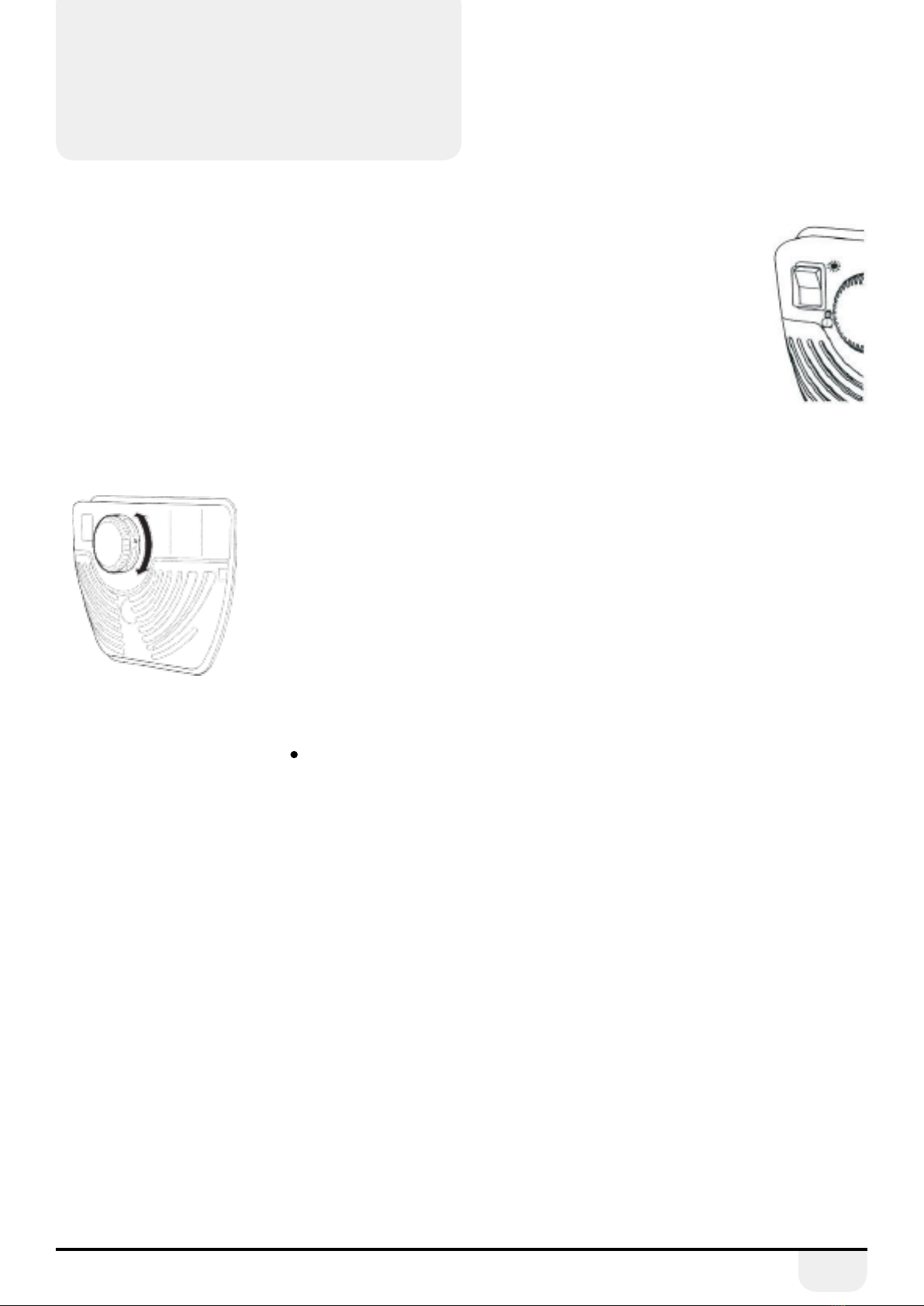
Super switch
Normally this switch should be set to
position (see Diagram Opposite), except
when the ambient temperature is low
as in winter, (ie. below 16°C) or when
the freezer temperature needs to be
maintained lower. In that case, set the
switch to position ON.
When the freezer compartment is cooled
down to a sucient temperature, or the
weather gets hot, turn the super switch o to
save electrical consumption.
3.3. Normal Operating Sounds
You may hear faint gurgling or bubbling sounds when the
refrigerant is pumped to the cooling system and through
the coils or tubing at the rear of the appliance. When the
compressor is in operation you may hear a slight whirring
sound or pulsating noise. The thermostat controls the
operation of the compressor, and you may hear a slight
click as it cycles in and out.
3.4. Energy Saving Advice
• Do not install the appliance close to sources of heat,
such as a cooker, dishwasher or radiator.
•Locate the appliance in a cool well-ventilated room
and make sure that the air vents are clear.
•Try to avoid keeping the door open for long periods
as warm air will enter the cabinet and may cause a
buildup of ice and aect the energy consumption.
Ensure there are no obstructions preventing the
door from closing properly.
•Ensure that the door seal is clean and there are
no tears or splits.
•Keep the most perishable foods, (those with a short
shelf-life, such as cooked meats), in the coldest part
of the fridge. The Salad Crisper Box is the warmest
part of your fridge and should be used for
vegetables, salads and fruits etc. (see Description
of Appliance on Page 1).
• Do not overload the fridge: the cooling air that
circulates to keep the fridge cold gets blocked
and pockets of warm air form.
• Do not put hot food into the fridge – let it cool
down rst.
7
Section 3: Operating
The Appliance
3.5. In the Event of a Power Failure
If there is a power failure, keep the door closed. When
the power has been restored the appliance will start
to operate but it may take some time to achieve the
pre-set operating temperature. Check the condition
of your stored food items and liquids.
Warnings for Temperature Settings
• The ambient temperature, the temperature of
the freshly stored food and how often the door is
opened, aects the temperature in the refrigerator
compartment. If required, change the temperature
setting to suit the situation.
Accessories:
Plastic Scraper
After a period of time, frost will build up in certain areas in
the freezer compartment. The frost accumulated in the
freezer should be removed periodically. Use the plastic
scraper provided if necessary. Do not use sharp metal
objects for this operation, they could puncture the
refrigeration circuit and cause irreparable damage to
the unit. In such case your guarantee becomes invalid.
Ice Tray
Fill the ice tray with water and place in freezer
compartment. After the water has completely
turned to ice, you can twist the tray as shown
below to remove the ice cubes.
Bottle Holder
In order to prevent bottles slipping or falling over in
your appliance use the bottle holder. It should also
prevent noise when opening and closing the appliance
door. Do not put oversize bottles into the holders as this
will cause damage.
Magic Shelf
The magic shelf is located above the crisper cover and
was designed to provide more space and exibility in
placing items in your appliance. The shelf is mobile so
you are able to arrange long or large containers on the
crisper cover.
Crisper Ventilation
If the crisper becomes full you can open the ventilation
panel (located in front of the crisper). This will increase
the air ow and the humidity in the crisper will
be reduced.
If condensation appears on the glass shelf, you must
open the ventilation panel.
Note: All written and visual descriptions in the
accessories may vary according to the appliance model.
Section 3: Operating
The Appliance
Arranging food in the appliance
Refrigerator Section
•To reduce the humidity and consequentially
decrease the amount of frost, never place liquids
in unsealed containers in the refrigerator. Frost
tends to concentrate on the coldest parts of the
evaporator and over time will require more
frequent defrosting.
• Never place warm food in the refrigerator. Warm
food should be allowed to cool until room
temperature and then be placed in the fridge
ensuring there is adequate air circulation.
•Try to avoid keeping the door open for long periods.
• Nothing should touch the back wall as it will cause
frost and the packages can stick to the back wall.
•Keep the most perishable foods, (those with a short
shelf-life, such as cooked meats), in the coldest part
of the fridge.
•The Salad Crisper Box should be used for
vegetables, salads and fruits etc. (see Description
of Appliance on Page 1).
Freezer Section
•The use of the freezer is storing deep-frozen or
frozen foods for long periods of time and making
ice cubes.
•To freeze fresh food, ensure that as much of the
surface of the food is in contact with the cooling
surface.
• Do not put fresh food with frozen food side by side
as it can thaw the frozen food.
•Once the unit has been defrosted, replace the food
and remember to consume it in a short period
of time.
• Never place warm food in the freezer compartment.
•For storing frozen foods; the instructions shown on
packages should always be carefully followed and
if no information is provided, food should not be
stored for more than 3 months from the
purchase date.
•When buying frozen foods ensure that the packing
is intact.
•Frozen foods should be transported in appropriate
containers to maintain the quality of the food and
should be returned to the freezing surfaces of the
unit in the shortest possible time.
•If a package of frozen food shows any sign of
humidity and abnormal swelling it is likely that it has
been previously stored at an unsuitable temperature
and that the contents have deteriorated.
•The storage life of frozen foods depends on the
room temperature, thermostat setting, how often the
door is opened, the type of food and the length of
time required to transport the product from the shop
to your home.
8
9
Section 4: Maintenance
Before any maintenance or cleaning work is
carried out, DISCONNECT the appliance from
the ELECTRICITY supply.
4.1 Internal Cleaning
Clean the interior and accessories with warm water and
bicarbonate of soda (5ml to 0.5 litre of water). Rinse and
dry thoroughly. Do not use detergents, abrasive pow-
ders, highly perfumed cleaning products, wax polishes or
cleaning products containing bleach or alcohol.
Ensure that the defrost water channel and outlet are
clean and free of debris (see Defrosting).
4.2 External Cleaning
Wash the outer cabinet with warm soapy water. Do NOT
use abrasive products. There may be sharp edges on the
underside of the product, so care should be taken when
cleaning. Once or twice a year dust the rear of the appli-
ance and the compressor at the back of the appliance,
with a brush or vacuum cleaner, as an accumulation of
dust will aect the performance of the appliance and
cause increased energy consumption.
4.3 Defrosting
Refrigerator
• Defrosting occurs automatically during operation,
the defrost water is collected by the evaporating tray
and evaporates automatically.
•The evaporating tray and the defrost water drain
hole should be cleaned periodically to prevent the
water from collecting on the bottom of the
refrigerator instead of owing out.
•You can also pour a glass of water in the drain hole
to clean inside.
Freezer Compartment
• The frost accumulated in the freezer
compartment should be removed periodically.
The freezer compartment should be cleaned in
the same way as the refrigerator compartment,
with the defrosting operation done at least
twice a year.
•The day before you defrost you should set the
thermostat dial to 5 to freeze the food completely.
• During defrosting, frozen food should be wrapped
in several layers of paper and kept in a cool place.
The inevitable rise in temperature will shorten their
storage life.
•Remember to use this food within a relatively
short period of time.
•Set the thermostat to position “ . “ or unplug the
unit, leave the door open until completely defrosted.
•To accelerate the defrosting process one or
more basins of warm water can be placed in the
freezer compartment.
• Dry the inside of the unit carefully and set the
thermostat knob to max position.
4.4. When the appliance is not in use
•When the appliance is not in use for long periods,
remove the contents, disconnect from the electricity
supply and clean the appliance, leaving the door ajar
until you wish to use the appliance again. Failure to
do so will cause the fridge to smell.
4.5. Changing the Interior Light Bulb
•Switch o the power supply to the appliance
•Press the hooks on the sides of the light cover
top, and remove the light cover.
•Change the present light bulb with a new one
of not more than 15W.
•Replace the light cover and after waiting 5 minutes
turn the power supply back on.
4.6. Changing the Door Handle
1. Remove the handle cover.
2. Unscrew the xing screws and remove
the handle body.