manuals.online logo
Brands
  1. Home
  2. •
  3. Brands
  4. •
  5. moska
  6. •
  7. Indoor Furnishing
  8. •
  9. moska Kirra Entertainment Unit User manual

moska Kirra Entertainment Unit User manual

Other moska Indoor Furnishing manuals

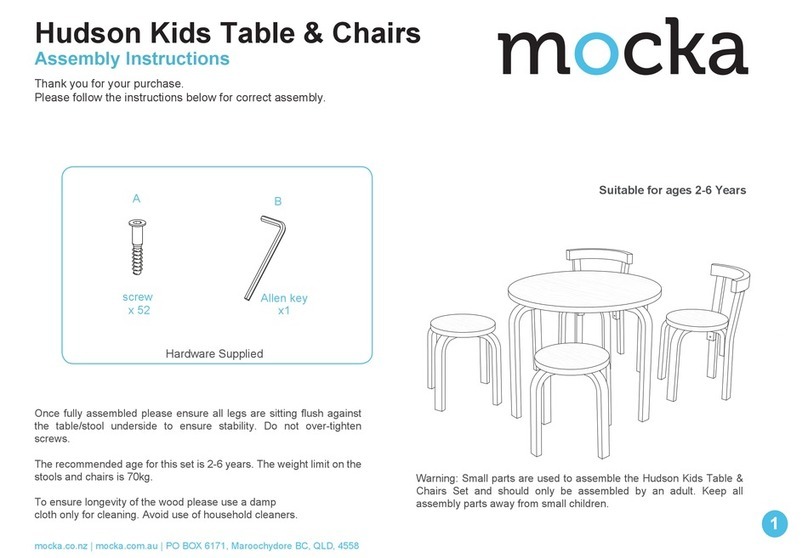
moska Hudson User manual

moska

moska Hudson User manual

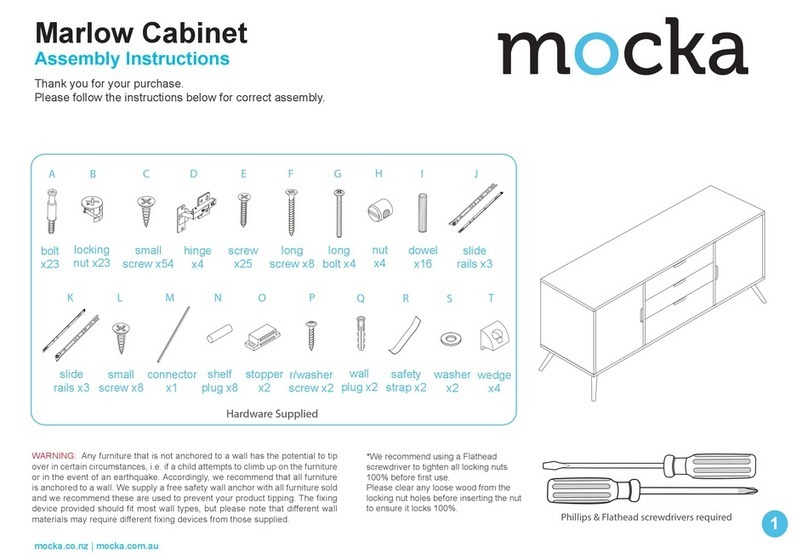
moska Marlow Cabinet User manual

moska

moska Marlow Cabinet User manual

Popular Indoor Furnishing manuals by other brands

Regency LWMS3015 Assembly instructions

Regency

Regency LWMS3015 Assembly instructions

Furniture of America CM7751C Assembly instructions

Furniture of America

Furniture of America CM7751C Assembly instructions

Safavieh Furniture Estella CNS5731 manual

Safavieh Furniture

Safavieh Furniture Estella CNS5731 manual

PLACES OF STYLE Ovalfuss Assembly instruction

PLACES OF STYLE

PLACES OF STYLE Ovalfuss Assembly instruction

Trasman 1138 Bo1 Assembly manual

Trasman

Trasman 1138 Bo1 Assembly manual

Costway JV10856 manual

Costway

Costway JV10856 manual

moss DESIGN Caisson Credenza Assembly instructions

moss DESIGN

moss DESIGN Caisson Credenza Assembly instructions

Aquaglide FULL DECK 15.0 owner's manual

Aquaglide

Aquaglide FULL DECK 15.0 owner's manual

AREBOS AR-HE-SW30 user manual

AREBOS

AREBOS AR-HE-SW30 user manual

Till-Hilft Fulda 87005.330 Assembly instructions

Till-Hilft

Till-Hilft Fulda 87005.330 Assembly instructions

Twoey Outside 2010 quick start guide

Twoey Outside

Twoey Outside 2010 quick start guide

Hettich Easys 200 operating instructions

Hettich

Hettich Easys 200 operating instructions

The bedboss RELAX 404 Series owner's manual

The bedboss

The bedboss RELAX 404 Series owner's manual

Oeseder Möbelindustrie Bern 991 720 Assembly instructions

Oeseder Möbelindustrie

Oeseder Möbelindustrie Bern 991 720 Assembly instructions

Costway HW68469 user manual

Costway

Costway HW68469 user manual

Next ALIX A27743 Assembly instructions

Next

Next ALIX A27743 Assembly instructions

BROSA Hans Assembly guide

BROSA

BROSA Hans Assembly guide

Prodigg MINIKA PBA015T-FUR installation manual

Prodigg

Prodigg MINIKA PBA015T-FUR installation manual

manuals.online logo
manuals.online logoBrands
  • About & Mission
  • Contact us
  • Privacy Policy
  • Terms and Conditions

Copyright 2025 Manuals.Online. All Rights Reserved.

Kirra Entertainment Unit
Assembly Instructions
Thank you for your purchase.
Please follow the instructions below for correct assembly.
mocka.co.nz | mocka.com.au | PO BOX 6171, Maroochydore, QLD, 4558
1
Wall Strap
x2
washer
Z
Y
wall
anchor
x1
X
safety
strap x1
WV
screw
x1
wall
screw
x1
WARNING: Any furniture that is not anchored to a wall has the potential to tip over in certain
circumstances, i.e. if a child attempts to climb up on the furniture or in the event of an earthquake.
Accordingly, we recommend that all furniture is anchored to a wall. We supply a free safety wall anchor
with all furniture sold and we recommend these are used to prevent your product tipping. The fixing device
provided should fit most wall types, but please note that different wall materials may require different fixing
devices from those supplied.
Phillips & Flathead screwdrivers required.
For quicker assembly, we recommend the
use of a power drill on a low-speed setting.
bolt
x6
wedge
x4
long
screw
x6
A B C D E F G H
JKLM N
I
O
Hardware Supplied
P
dowel
x14
screw
x32
slide
rail x2
slide
rail x2
slide
rail x2
slide
rail x2
locking
nut x6
screw
x12
x2 x2
wheel wheel
screw
x20
screw
x4
Q
bolt
x10
locking
nut x10
small small

Kirra Entertainment Unit
Assembly Instructions
mocka.co.nz | mocka.com.au | PO BOX 6171, Maroochydore, QLD, 4558
2
12
3
4
E
E
E
E
F
F
F
CL
E
E
E
E
E
G
G
G
CR
E
C
A
C
A
C
A
C
A
C
A
C
A
1
Attach 2x slide rails (F) to panel [3] and secure with 4x small screws (E).
Attach 2x slide rails (G) to panel [4] and secure with 4x small screws (E).
Tighten with a screwdriver.
Insert 6x dowels (A) to panel [1]. Insert 6x bolts (C) into panel [1].
Tighten with a screwdriver.
Kirra Entertainment Unit
Assembly Instructions
mocka.co.nz | mocka.com.au | PO BOX 6171, Maroochydore, QLD, 4558
3
3 4
Attach panels [2] , [3] and [4] to panel [1] and secure with 6x locking
nuts (D). Tighten with a screwdriver.
Slide panel [6] between the grooves of panels [3] and [4]. Slide panel [16]
between the grooves of panels [2] and [4]. To form the back of the unit, as
shown.
1
2
3
4
4
D
D
D
D
3
6
16
2
Kirra Entertainment Unit
Assembly Instructions
mocka.co.nz | mocka.com.au | PO BOX 6171, Maroochydore, QLD, 4558
4
65
4
1
3
16
6
M
M
M
M
M
M
A
A
A
A
5
J
J
J
J
J
J
J
J
J
J
Insert 6x dowels (A) into the ends of panels [2] , [3] and [4]. Attach panel
[5] to the unit and secure with 6x screws (M). Tighten with a screwdriver.
Attach the legs [8] and [9] to panel [5] as shown using 20x screw (J) .
Tighten with a screwdriver.
2
8
9
8
8
8
5
Kirra Entertainment Unit
Assembly Instructions
mocka.co.nz | mocka.com.au | PO BOX 6171, Maroochydore, QLD, 4558
5
7 8
10
PP
P
P
P
10
11
12
15
x 2
A
Q
Q
Q
Q
x 2
Q
Insert 5x small bolts (P) and 1x dowel (A).to panel [10].Tighten with a
screwdriver.
Attach panels [11] ,[12]and [15] to panel [10] and secure
with 5x small locking nuts (Q). Tighten with a screwdriver.
Kirra Entertainment Unit
Assembly Instructions
mocka.co.nz | mocka.com.au | PO BOX 6171, Maroochydore, QLD, 4558
6
910
10
11
12
13
x 2
11
12
14
x 2
BBBB
B
B
Slide panel [13] down along the grooves of panels [11] and [12]. Attach panel [11], [12] and [14] as shown using 6x screws (B).
Tighten with a screwdriver.
Kirra Entertainment Unit
Assembly Instructions
mocka.co.nz | mocka.com.au | PO BOX 6171, Maroochydore, QLD, 4558
7
1211
x 2
11
12
E
E
E
E
H
I
1
10
10
Attach slide rails (I) and slide rails (H) to the underside of the side panels
as shown. Secure with 4x screws (E) and tighten with a screwdriver.
Insert the assembled drawers into the corresponding compartments
as shown. Ensure the drawers slide easily along the rails.
Kirra Entertainment Unit
Assembly Instructions
mocka.co.nz | mocka.com.au | PO BOX 6171, Maroochydore, QLD, 4558
8
13 14
Attach 2x wheels (O) and (N) to panel [7] as shown, and secure with
16x screws (E). Tighten with a screwdriver.
Attach door panel [7] as shown, starting with the back door first and then the
front door. Press the clip down on the back of the door to assemble the door.
Push the clip back up to lock into place.
7
E
N
N
O
O
EE
EEE
EEE
EEE
7
Note: If the door is not sliding smoothly or
sitting straight, there is a screw in the
middle of the wheel on the bottom of each
door that can be tightened/loosened until
the door is sitting properly.
back
OK
Kirra Entertainment Unit
Assembly Instructions
mocka.co.nz | mocka.com.au | PO BOX 6171, Maroochydore, QLD, 4558
9
15 16
6
16
V
Z
W
X
Y
Z
L
K
L
K
L
K
L
K
Attach 4x wedges (K) into the corners of the back of the unit and secure
with 4x screws (L). Tighten with a screwdriver.Attach 1x safety strap (V)
to the top of the back side of the unit as shown using 1x washer (Z) and
1x screw (W). Tighten with a screwdriver.
Once assembled lift furniture into place, do not drag. Use a drill to create
a small hole lining up with the top of the safety strap (V). Fasten to wall
using 1x washer (Z), 1x wall plug (X) and 1x screw (Y). Ensure unit is
balanced and steady before use. You’re done, enjoy!