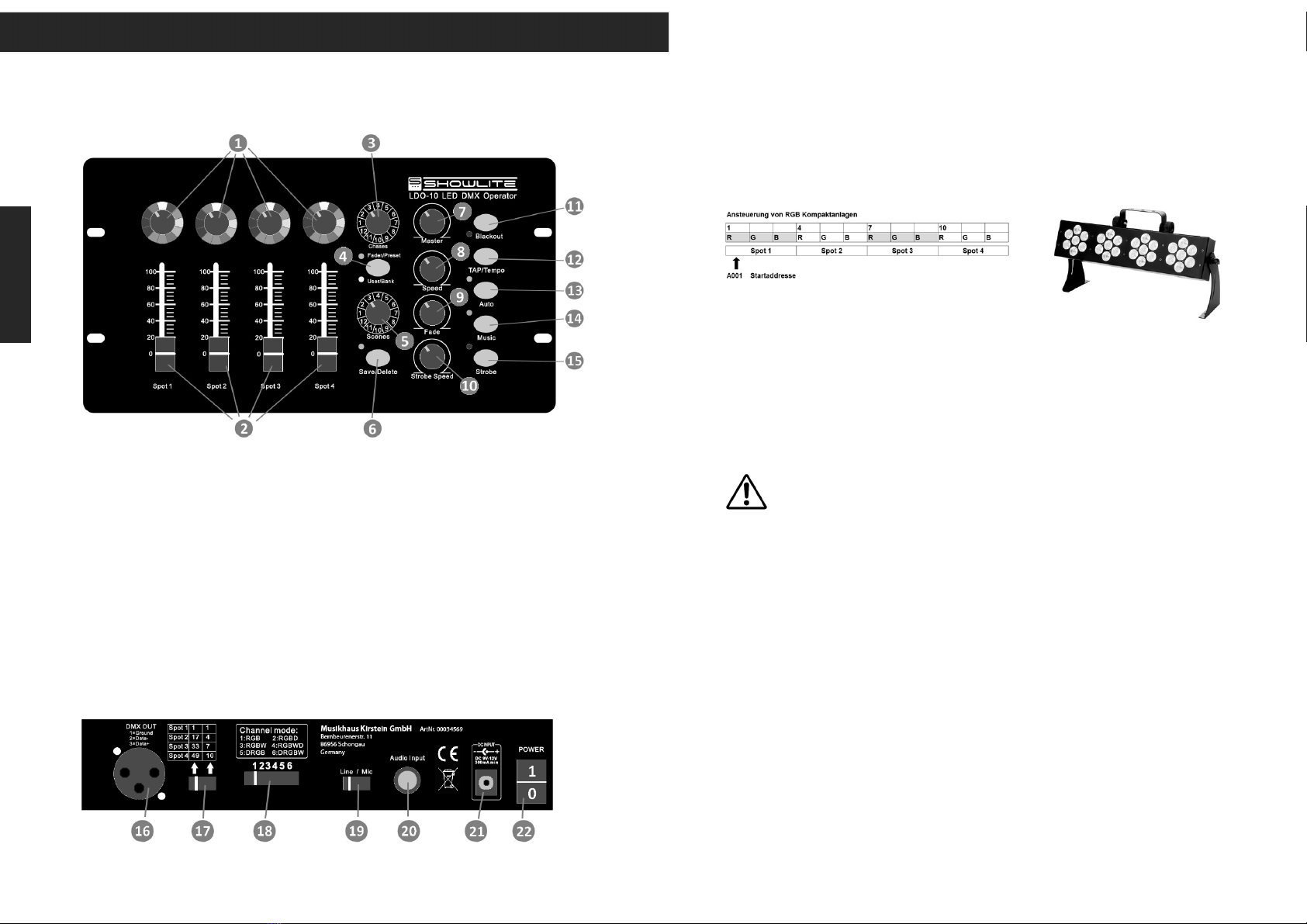
Abspeichern Ihrer Einstellung als Szene: Sie haben 12 Speicherplätze in 12 Chases
(Chaserbänke) zum Abspeichern Ihrer Szene zur Verfügung. Drücken Sie die Taste (4) auf
Fader/Preset, die grüne LED leuchtet. Wählen Sie mit dem Schalter (5) eine
Szenennummer aus. Wählen Sie mit Wahlschalter (3) eine Chaserbank aus und drücken
Sie die Save/Delete Taste (6) kurz, die grüne LED leuchtet kurz auf und die Szene ist
abgespeichert.
Aufrufen / Editieren / Löschen einer Szene: Drücken Sie die Taste (4) auf User/Bank, die
gelbe LED leuchtet auf. Wählen Sie mit dem Schalter (5) eine Szenennummer und mit
Wahlschalter (3) eine Chaserbank aus. Sie sehen die aktuelle Szene. Sie können nun
Änderungen in den Einstellungen durchführen und diese wie oben beschrieben
abspeichern. Wenn Sie die Szene löschen wollen drücken Sie die Save/Delete Taste (4) ca.
2sec lang, alle LEDs leuchten kurz auf, die Szene ist gelöscht.
3.2 Betriebsart Automatik
Die Betriebsart Automatik dient dazu Szenen zeitgesteuert hintereinander als Chase
(Lauflicht) abzuspielen. Der Controller hat fest voreingestellte Preset-Chases (mit Szenen)
und Ihre eigenen editierten User-Chases.
Preset Chases: Durch Drücken von Taste (13) stellen Sie den Controller auf Betriebsart
Automatik (grüne LED leuchtet). Drücken Sie Taste (4) bis LED Fader/Preset grün leuchtet.
Wählen Sie mit Wahlschalter (3) eine Chaserbank aus. Der Chase (Lauflicht) wird
zeitgesteuert abgespielt, nach Szene 12 wird mit Szene 1 neu gestartet. Mit Regler (7)
stellen Sie die Masterhelligkeit ein, Regler (8) steuert die Ablaufgeschwindigkeit und
Faderegler (9) steuert die Überblendzeit.
User Chases: Gehen sie wie bei den Preset-Chases vor, nur wählen Sie vorab über die
Taste (4) die User/Bank aus. Der Controller spielt Ihre gespeicherten Szenen ab. Haben Sie
eine Szene in einem Chase nicht belegt oder nicht alle 12 möglichen abgespeichert, werden
diese einfach übersprungen. Funktionen der Regler (7) bis (9) siehe oben.
Sonderfunktion Tap/Tempo: die Ablaufgeschwindigkeit, normal durch Regler (8), kann
durch kurzes zweimaliges Tippen auf die Tap/Tempo Taste (12) definiert werden.
3.3 Musiksteuerung
In der Betriebsart Musiksteuerung werden die Szenen gesteuert durch Musikimpulse
hintereinander als Chase (Lauflicht) abgespielt. Auswahl des Chases wie oben. Die Musik
wird über ein eingebautes Mikrophon oder ein externes Audiosignal an der rückseitigen
6.35mm Klinkenbuchse (20) zugespielt. Wählen Sie hierzu über Schiebeschalter (19) die
Quelle aus. Um die Empfindlichkeit des internen Mikrofons auf die Musik abzugleichen
halten Sie die Taste Musiksteuerung gedrückt und stellen mit Regler Fade (9) die
Empfindlichkeit von 0 bis 100% ein, diese wird abgespeichert.
4. Sonderfunktion Strobe
Durch Drücken der Taste (15) aktivieren Sie die Strobe Funktion (LED leuchtet rot). Diese
ist allen Betriebsarten überlagert und erwirkt einen Stroboskopeffekt (blinken der
Scheinwerfer). Die Strobegeschwindigkeit stellen Sie mit Regler (10) ein.
Please read carefully before proceeding
Always follow the basic precautions listed below to avoid the possibility of serious injury or
even death from electrical shock, short-circuiting, damages, fire or other hazards. These
precautions include, but are not limited to, the following:
Power supply / power cord (devices with power cords/power supplies):
• Only use the voltage specified as correct for the device. The required voltage is printed on the type plate of the device.
Check the power cable from time to time regarding dirt, damage or other influence.
• Use only the included power cord / power supply or adaptor. Do not place the power chord near heat sources such as
heaters or radiators, and do not excessively bend or otherwise damage the cord, place heavy objects on it, or place it in
a position where anyone could walk on, trip over, or roll anything over it.
• Remove the electric plug from the outlet when the device is not to be used for extended periods of time, or during
electrical storms. When removing the electric plug from the device or an outlet, always hold the plug itself and not
the cord. Pulling by the cord can damage it.
• To avoid generating unwanted noise, make sure there is adequate distance (50 cm or more) between the AC power
adaptor and the device. Do not cover or wrap the AC power adaptor with a cloth or blanket.
Location:
• When setting up the device, make sure that the AC outlet you are using is easily accessible. If some trouble or
malfunction occurs, immediately turn off the power switch and disconnect the plug from the outlet. Even when the power
switch is turned off, electricity is still flowing to the product all the minimum level. When you are not using the product
for a long time, make sure to unplug the power cord from the wall AC outlet.
• Inadequate ventilation can result in overheating, possibly causing damage to the device(s), or even fire.
• Do not expose the device to excessive dust or vibrations, or extreme cold or heat (such as in direct sunlight, near a
heater, or in a car during the day) to prevent the possibility of panel disfiguration or damage to the internal components.
• Do not place the device in an unstable position where it might accidentally fall over.
• Do not block the vents. This device has ventilation holes at the bottom/rear to prevent the internal temperature
from becoming too high. In particular, do not place the device on its side or upside down. Inadequate ventilation
can result in overheating, possibly causing damage to the device(s), or even fire.
• Do not use the device in the vicinity of a TV, radio, stereo equipment, mobile phone, or other electric devices.
Doing so may result in noise, both in the device itself and in the TV or radio next to it.
Connections and handling:
• Before connecting the device to other devices, turn off the power for all devices. Before turning the power on or off
for all devices, set all volume levels to minimum. • Do not use the device or headphones for a long period of time at
a high or uncomfortable volume level, since this can cause permanent hearing loss. If you experience any hearing loss
or ringing in the ears, consult a physician.
• Do not rest your weight on the device or place heavy objects on it, and avoid use excessive force on the buttons,
switches or connectors
Do not open:
• Do not open the device or attempt to disassemble the internal parts or modify them in any way. The device contains no
user-serviceable parts. If it should appear to be malfunctioning, discontinue use immediately and have it inspected by
qualified service personnel.
Water warning:
• Do not expose the instrument to rain, use it near water or in damp or wet conditions on it containing liquids which might
spill into any openings. Never insert or remove an electric plug with wet hands.
If you notice any abnormality:
• If the power cord or plug becomes frayed or damaged, or if there is a sudden loss of sound during use of the device, or if
any unusual smells or smoke should appear to be caused by it, immediately turn off the power switch, disconnect the
electric plug from the outlet, and have the device inspected by qualified service personnel.
Noise:
• Listening to loud music for longer periods may lead to hearing damage
Precautions
N
G
L
I
S
H