manuals.online logo
Brands
  1. Home
  2. •
  3. Brands
  4. •
  5. Nebula
  6. •
  7. Dj Equipment
  8. •
  9. Nebula D2341 User manual

Nebula D2341 User manual

This manual suits for next models

1

Other Nebula Dj Equipment manuals

Nebula Cosmos Max User manual

Nebula

Nebula Cosmos Max User manual

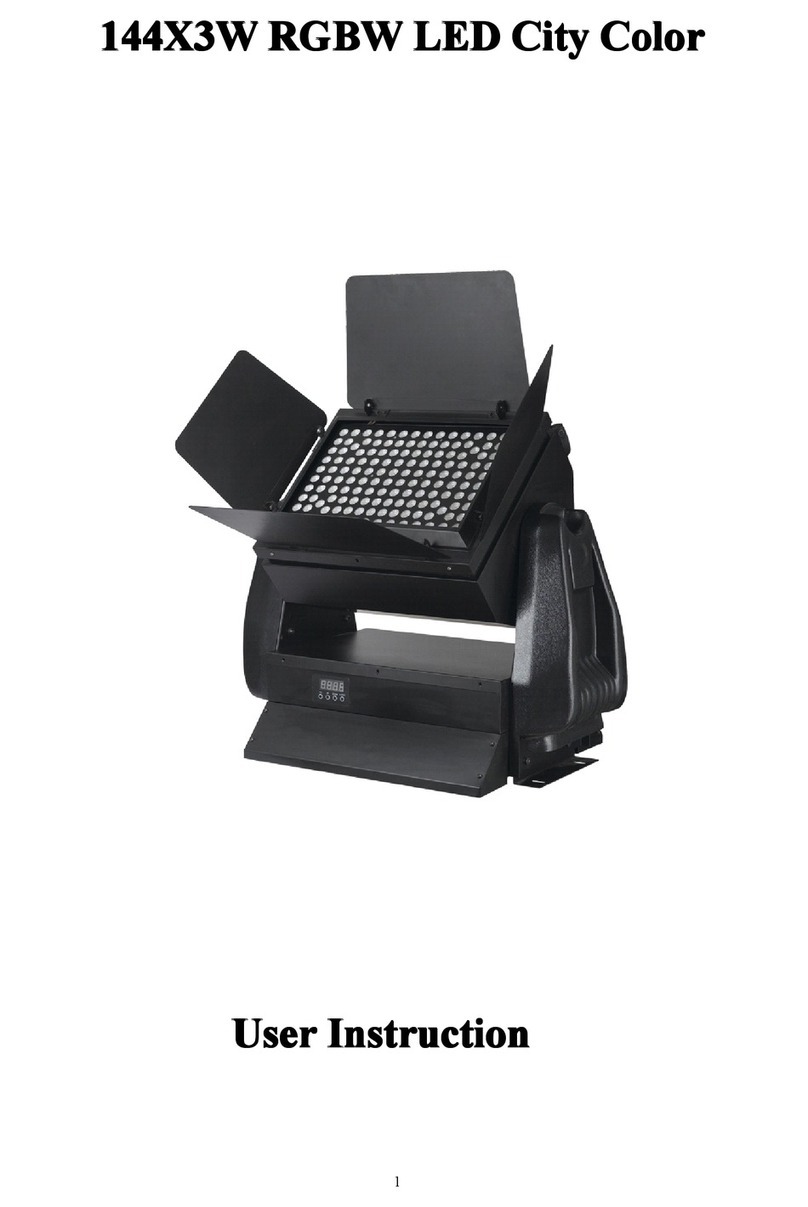
Nebula 144X3W RGBW LED City Color Installation instructions

Nebula

Nebula 144X3W RGBW LED City Color Installation instructions

Nebula NE-SPARK User manual

Nebula

Nebula NE-SPARK User manual

Nebula NB75 User manual

Nebula

Nebula NB75 User manual

Nebula Alkaid Spot 20.0 User manual

Nebula

Nebula Alkaid Spot 20.0 User manual

Nebula Cosmos Max User manual

Nebula

Nebula Cosmos Max User manual

Popular Dj Equipment manuals by other brands

MAGMATIC Prisma Wash 25 user manual

MAGMATIC

MAGMATIC Prisma Wash 25 user manual

HERA PROCOLOR 60 RGBW SERIES User manual & installation guide

HERA

HERA PROCOLOR 60 RGBW SERIES User manual & installation guide

EuroLite LED TSL-600 SCAN COB user manual

EuroLite

EuroLite LED TSL-600 SCAN COB user manual

Ledj Slimline 12HEX12 user manual

Ledj

Ledj Slimline 12HEX12 user manual

Laserworld Garden GS-50RG Xmas manual

Laserworld

Laserworld Garden GS-50RG Xmas manual

Chauvet OVATION E-930VW Quick reference guide

Chauvet

Chauvet OVATION E-930VW Quick reference guide

Snow Masters Zig Oscillator user manual

Snow Masters

Snow Masters Zig Oscillator user manual

EuroLite 50530554 user manual

EuroLite

EuroLite 50530554 user manual

Beamz BUV243 user manual

Beamz

Beamz BUV243 user manual

Eagletone 6 Eyes Flower user manual

Eagletone

Eagletone 6 Eyes Flower user manual

EuroLite FLD-1508 user manual

EuroLite

EuroLite FLD-1508 user manual

Technical Pro LG8xSEA user manual

Technical Pro

Technical Pro LG8xSEA user manual

JB Systems Lounge Laser DMX Operation manual

JB Systems

JB Systems Lounge Laser DMX Operation manual

Elation FUZE WASH Z350 user manual

Elation

Elation FUZE WASH Z350 user manual

Maverick MK3 WASH Quick reference guide

Maverick

Maverick MK3 WASH Quick reference guide

Infinity TF-260C7 Fresnel manual

Infinity

Infinity TF-260C7 Fresnel manual

Chauvet EVE E-50Z Quick reference guide

Chauvet

Chauvet EVE E-50Z Quick reference guide

Eliminator Lighting E 138 manual

Eliminator Lighting

Eliminator Lighting E 138 manual

manuals.online logo
manuals.online logoBrands
  • About & Mission
  • Contact us
  • Privacy Policy
  • Terms and Conditions

Copyright 2025 Manuals.Online. All Rights Reserved.

D2341D2350_NebulaCosmosLaser_Nebula
CosmosLaser4K_QSG
PRD:
https://docs.google.com/spreadsheets/d/192bW5Wc53AWRVuDszZ6G0-W9fMIfIxBnHTyZnI3a3E
k/edit#gid=186242410
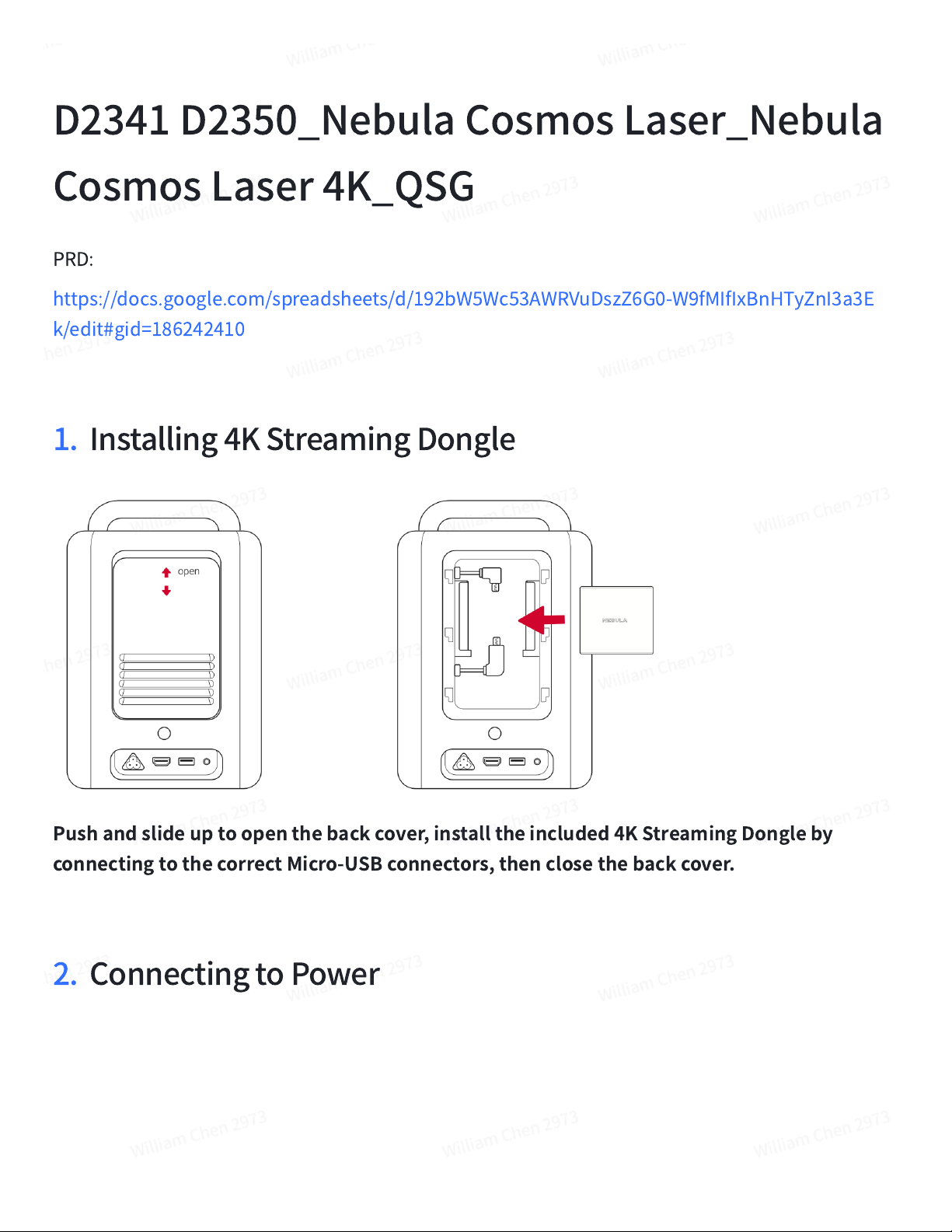
Installing4KStreamingDongle1.
Pushandslideuptoopenthebackcover,installtheincluded4KStreamingDongleby
connectingtothecorrectMicro-USBconnectors,thenclosethebackcover.

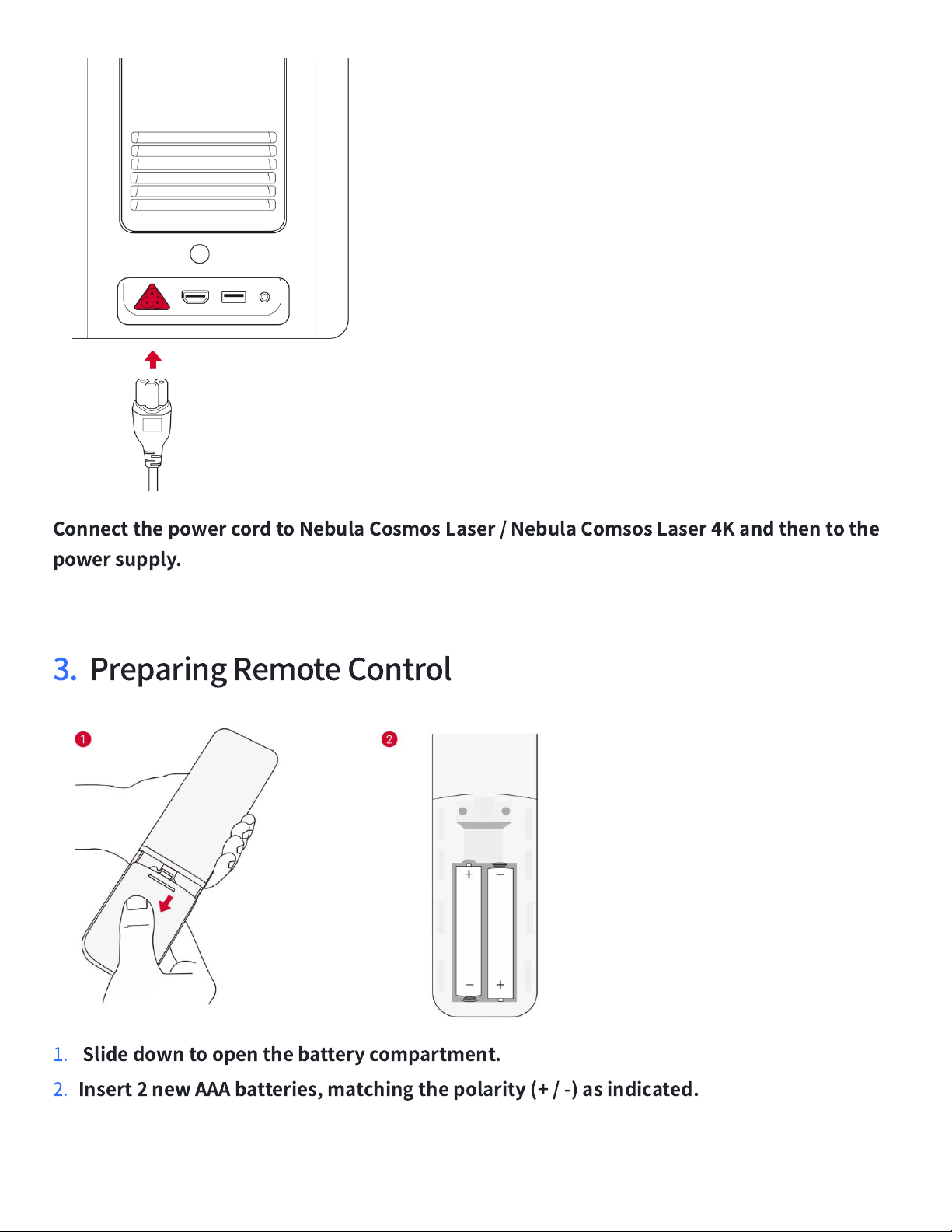
ConnectingtoPower2.
ConnectthepowercordtoNebulaCosmosLaser/NebulaComsosLaser4Kandthentothe
powersupply.

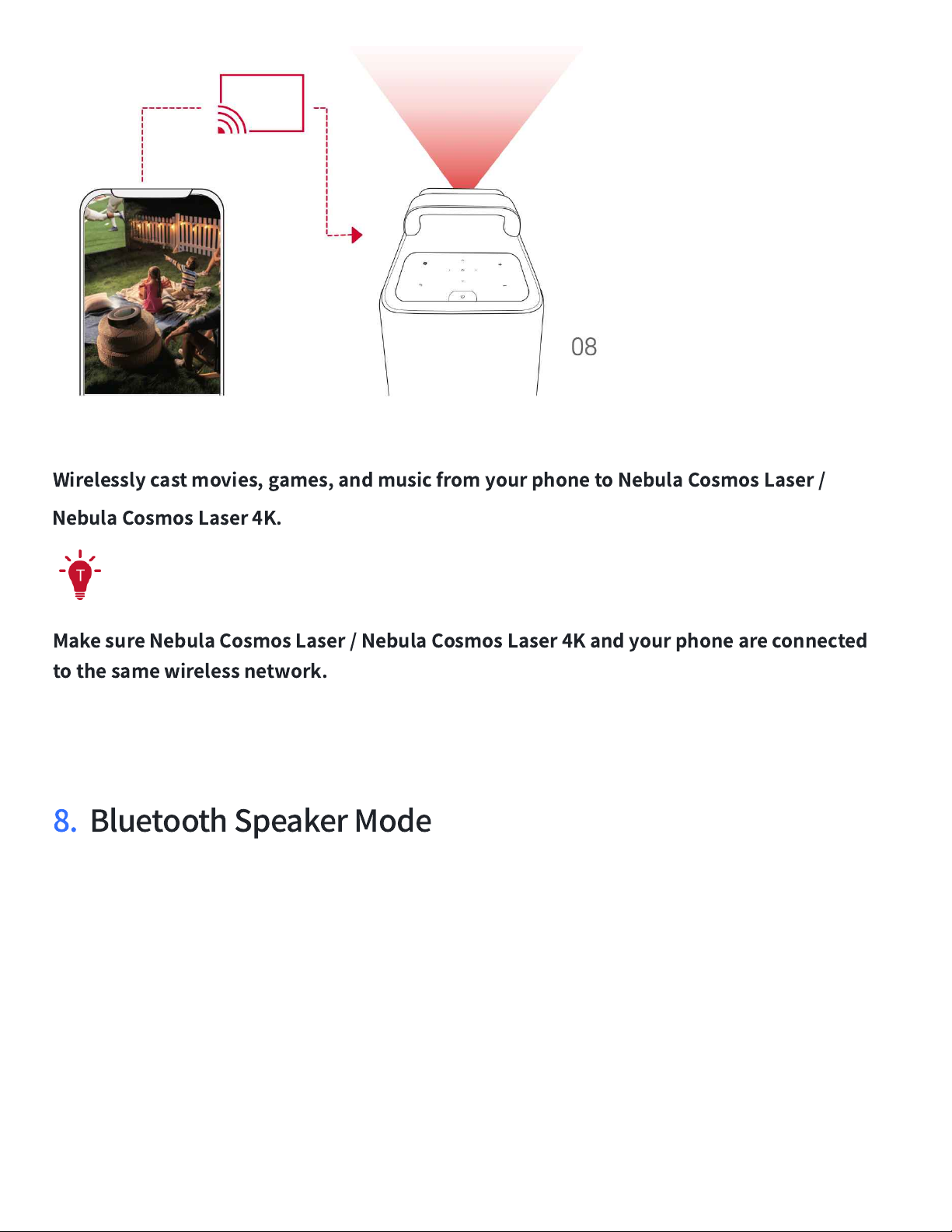
PreparingRemoteControl3.
Slidedowntoopenthebatterycompartment.

1.
Insert2newAAAbatteries,matchingthepolarity(+/-)asindicated.

2.
PoweringOn/Off4.
Pressthepowerbuttontopoweron.

Pressandholdthepowerbuttonfor3secondstopoweroff.

Controlling
5.
MainUnit
RemoteControl
AfterBluetoothconnected,controltheDonglebyusingtheremotecontrol.
NebulaConnectAPP
6.
WirelessScreenMirroring
7.
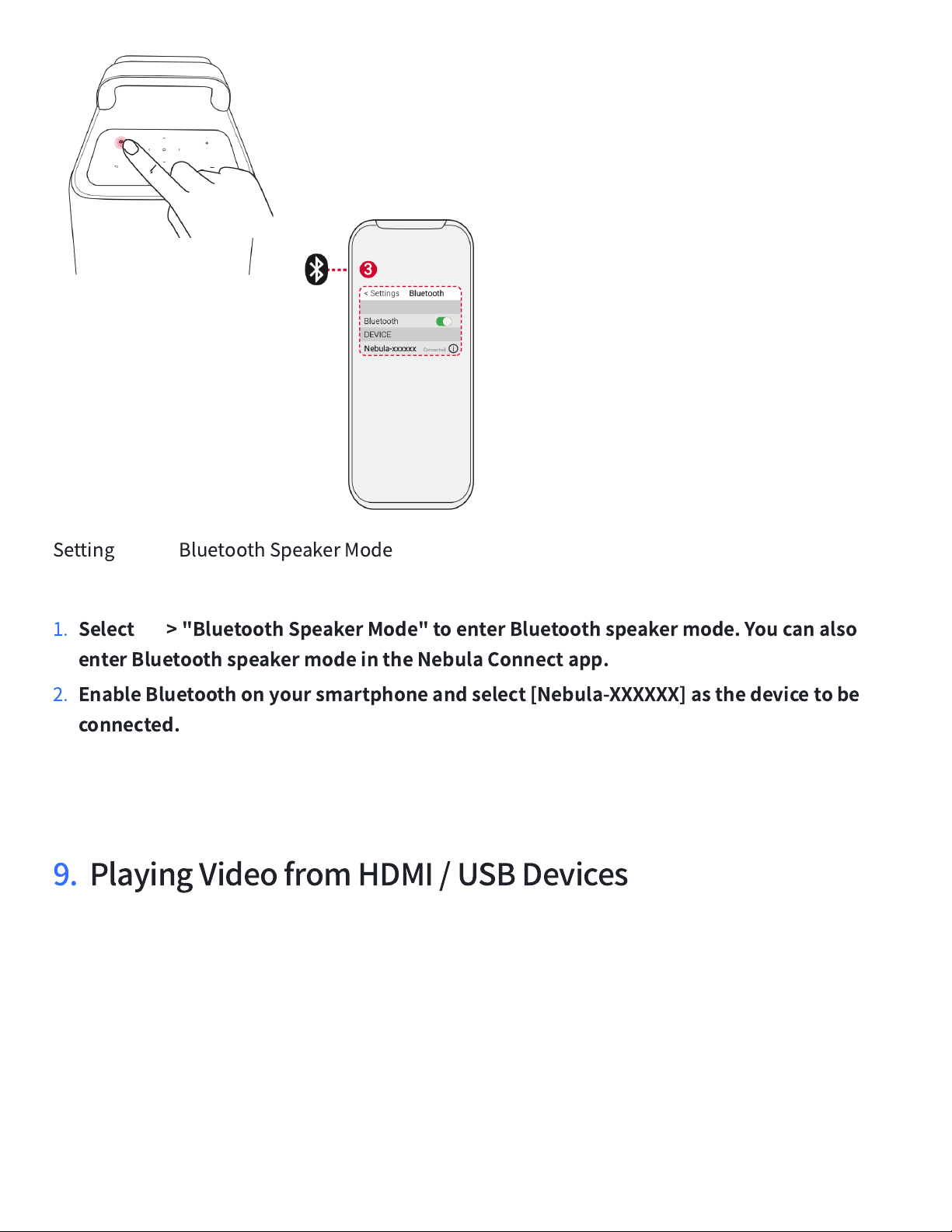
Wirelesslycastmovies,games,andmusicfromyourphonetoNebulaCosmosLaser/
NebulaCosmosLaser4K.

MakesureNebulaCosmosLaser/NebulaCosmosLaser4Kandyourphoneareconnected
tothesamewirelessnetwork.

BluetoothSpeakerMode
8.
Setting BluetoothSpeakerMode
Select
>"BluetoothSpeakerMode"toenterBluetoothspeakermode.Youcanalso
enterBluetoothspeakermodeintheNebulaConnectapp.

1.
EnableBluetoothonyoursmartphoneandselect[Nebula-XXXXXX]asthedevicetobe
connected.

2.
PlayingVideofromHDMI/USBDevices9.
TheHDMIportandUSBportcannotbeusedforvideooraudiostreamingsimultaneously.

ImportantSafetyInstructions
Duetotheenclosurematerial,theproductmustonlybeconnectedtoaUSB2.0orhigher.
•
Thepowercordshallconnecttosocket-outletwithearthingconnection.
•
Thepowersupplyshouldbeinstalledneartheequipmentandforpluggableequipment,the
socket-outletmustbeeasilyaccessible.
•
Onlyusethepowercordprovidedbythemanufacturer.Usingunauthorizedpowercordmay
causedangerandviolatetheauthorizationoftheprojectoraswellastheguarantee.
•
Plugofthepowercordisconsideredasthedisconnectdevice.Onceunplugged,themain
unitisconsideredasdisconnectedfromthepowersource.
•
Donotusethedeviceinanenvironmentwherethetemperatureistoohighortoolow.Never
exposethedevicetostrongsunshineorwetenvironments.
•
Thesuitabletemperaturerangeforthisproductanditsaccessoriesis32°F-104°F/0°C-40°C.It
isrecommendedtosupplythedeviceinanenvironmentwithatemperaturethatrangesfrom
41°F-77°F/5
℃
~25
℃
.
•
Whensupplying,placethedeviceinanenvironmentthathasanormalroomtemperature
andgoodventilation.
•
Possiblyhazardousopticalradiationemittedfromthisproduct,donotstareatoperating
beam.Maybeharmfultotheeyes.
•
CAUTION:RISKOFEXPLOSIONIFBATTERYISREPLACEDBYANINCORRECTTYPE.DISPOSEOF
USEDBATTERIESACCORDINGTOTHEINSTRUCTIONS.
•
Notice
ThisproductcomplieswiththeradiointerferencerequirementsoftheEuropeanCommunity.
DeclarationofConformity

Hereby,AnkerInnovationsLimited.declaresthatthisdeviceisincompliancewiththeessential
requirementsandotherrelevantprovisionsofDirective2014/53/EU.FortheDeclarationof
Conformity,visittheWebsitehttps://uk.seenebula.com/
RFexposureinformation:
TheMaximumPermissibleExposure(MPE)levelhasbeencalculated
basedonadistanceofd=20cmbetweenthedeviceandthehumanbody.Tomaintain
compliancewithRFexposurerequirement,useproductthatmaintaina20cmdistancebetween
thedeviceandhumanbody.
Thefollowingimporteristheresponsibleparty(contactforEUandUKmatters)
AnkerInnovationsDeutschlandGmbH|Georg-Muche-Strasse3,80807Munich,Germany
AnkerTechnology(UK)Ltd.|SuiteB,FairgateHouse,205KingsRoad,Birmingham,B112AA,
UnitedKingdom
Yourproductisdesignedandmanufacturedwithhighqualitymaterialsandcomponents,which
canberecycledandreused.
Thissymbolmeanstheproductmustnotbediscardedashouseholdwaste,andshouldbe
deliveredtoanappropriatecollectionfacilityforrecycling.Properdisposalandrecyclinghelps
protectnaturalresources,humanhealthandtheenvironment.Formoreinformationon
disposalandrecyclingofthisproduct,contactyourlocalmunicipality,disposalservice,orthe
shopwhereyouboughtthisproduct.
ThisproductcomplieswiththeradiointerferencerequirementsoftheUnitedKingdom.
DeclarationofConformity

Hereby,AnkerInnovationsLimiteddeclaresthatthisdeviceisincompliancewithRadio
EquipmentRegulation2017.ThefulltextoftheUKdeclarationofconformityisavailableatthe