
Nikon Nikon View Quick start guide

Windows XP Home Edition /Windows XP Professional
COOLPIX990/880
This manual is for those users of the COOLPIX 990/880 who
are running Nikon View 4 (Version4.3.1) under Windows XP
Home Edition / Professional.
UsingNikonView4withWindowsXPHomeEdition/WindowsXPProfessional(COOLPIX990/880) xp-1
Installing Nikon View 4
Follow the installer instructions to install NikonView 4 .
Device Registration
The camera must be registered as a hardware device when it is connected
to the computer for the first time.
Step1
UsingNikonView4withWindowsXPHomeEdition/WindowsXPProfessional
Step2
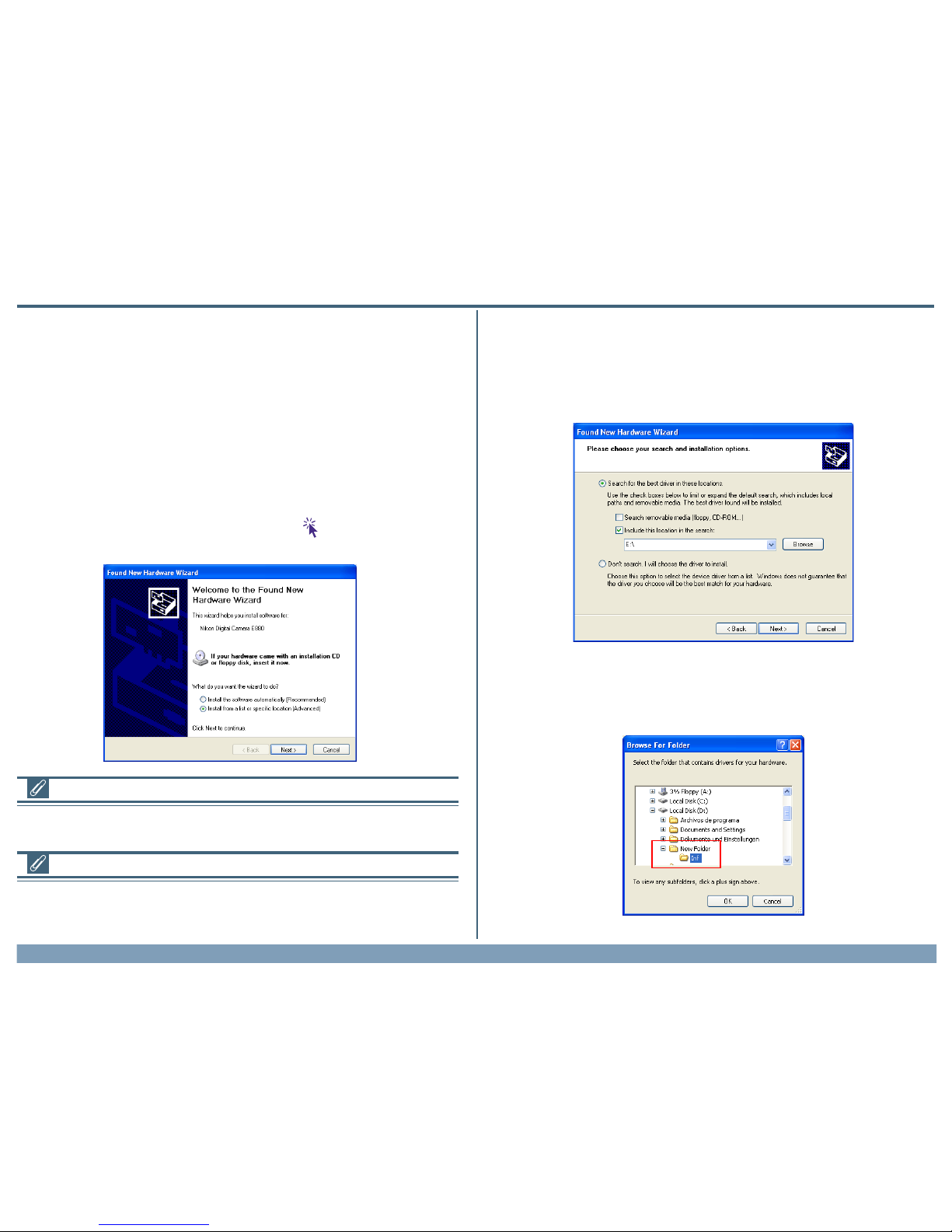
The dialog shown below will be displayed. Select “Search for the best
driver in these locations” then click “Including this location in the seach”.
If the downloaded folder is labelled ”New Folder”, click the Browse
button,and select “C:\New Folder\Inf”.
Log On
You will need to log on as the“ComputerAdministrator”when installing,uninstalling
andusing NikonView4.
COOLPIX 990/880
When your Nikon digital camera is turned on and connected to the com-
puter, the “Found New HardwareWizard” dialog will appear. Select “Install
from a list or specific location”, and click Next. If the “Found New Hard-
wareWizard” dialog does not appear, click here to refer to Reinstalling
the Device Drivers (page xp-5)
ExistingVersions of NikonView
If an older version of NikonView 4 is already installed on your computer, it will be
automaticallyoverwrittenwhenthenewver-sionisinstalled.IfaversionofNikonViewVer.3
is installed on your computer,it must be uninstalled before installing NikonView 4.

UsingNikonView4withWindowsXPHomeEdition/WindowsXPProfessional(COOLPIX990/880) xp-2
After completing device registration refer to follow the steps below to
confirm that the camera is correctly registered with Windows.
Step3
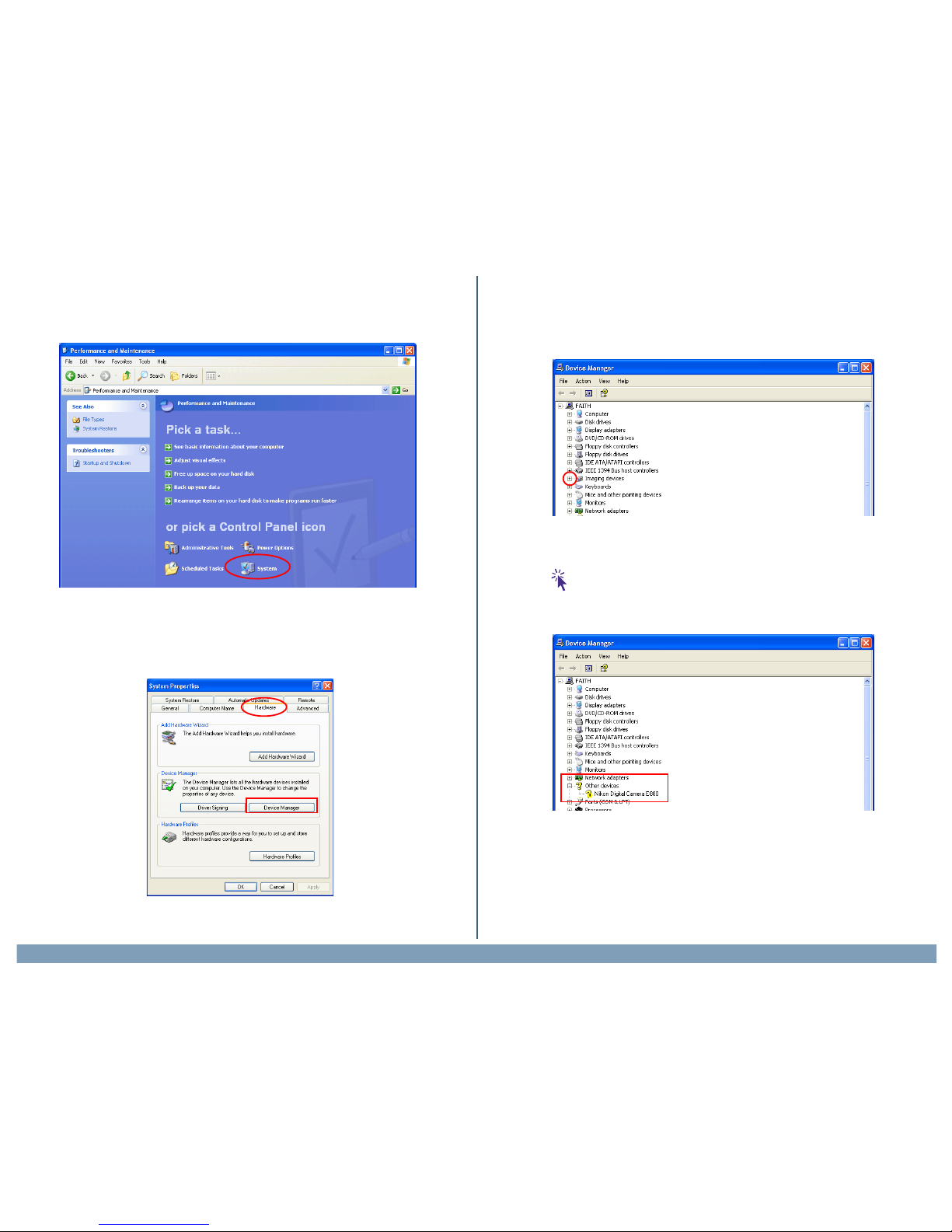
Select Control Panel from the Start menu to display the window shown
below. Click Performance and Maintenance.
Click OK; the dialog shown below will be displayed.
When the driver installation has been completed, the dialog shown below
will be displayed; click Finish to close the wizard.
If the dialog shown at right appears during the driver installation, click
Continue Anyway, and carry on with the installation.
UsingNikonView4withWindowsXPHomeEdition/WindowsXPProfessional(COOLPIX990/880) xp-3
Step6
The Device Manager will be displayed. After confirming that “Imaging De-
vice” is listed in the Device Manager, click the “+” sign to its left
If “Nikon Digital Camera E990 (E880)” is listed under “Other Devices”,
click here to refer to Reinstalling the Device Drivers (page xp-5)
If “Imaging Device” is not listed in the Device Manager and “Nikon Digital
Camera E990 (E880)” is not listed under Other Devices,re-start your com-
puter and return to Step 1.
Step4
Click System to open the System Properties window.
Step5
Select the Hardware tab and click the Device Manager button.

UsingNikonView4withWindowsXPHomeEdition/WindowsXPProfessional(COOLPIX990/880) xp-4
Step7
After confirming that “Nikon Digital Camera E990 (E880)” is listed under
“Imaging device,” double-click the listing to open the Properties window.
Step8
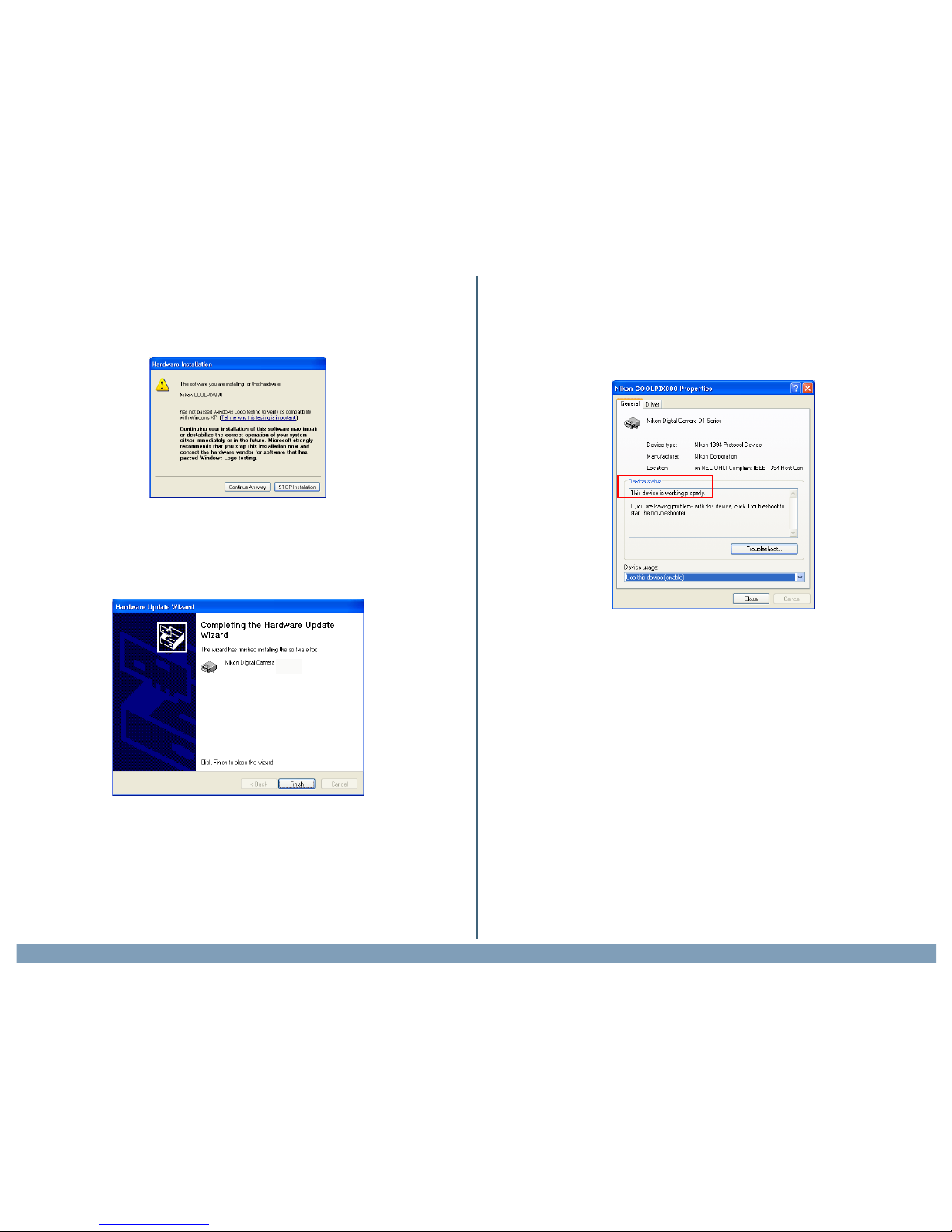
In the Properties window, click the General tab and confirm that “This
device is working properly” appears under “Device status.” Click OK.
Close the Device Manager, then click OK to close the System Properties
window. Device registration is now complete.
UsingNikonView4withWindowsXPHomeEdition/WindowsXPProfessional(COOLPIX990/880) xp-5
Reinstalling the Device Drivers
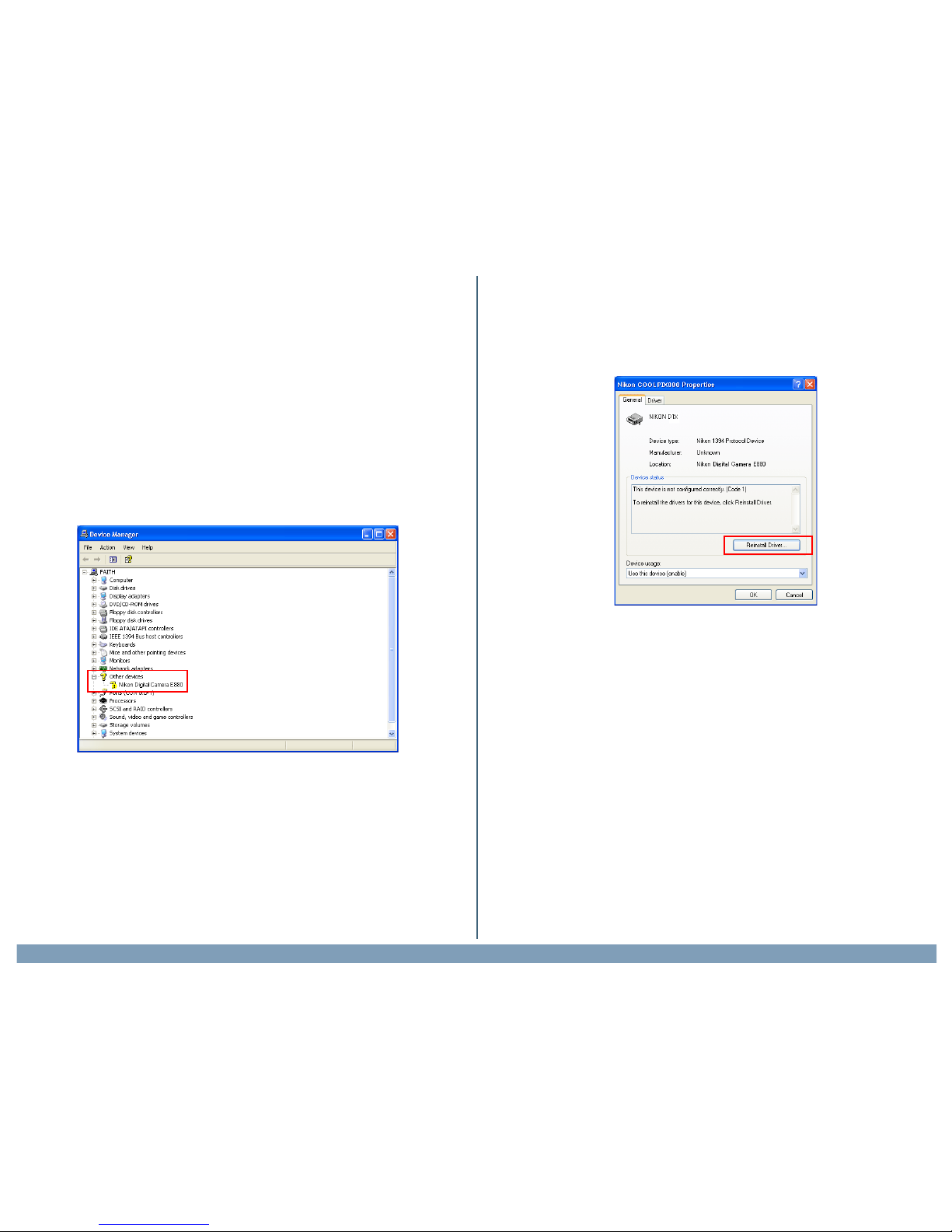
If “Nikon Digital Camera E990 (E880)” is listed under “Other Devices”, or
if the“Found New HardwareWizard” failed to appear when you connected
the camera to the computer, follow the steps below to reinstall the cam-
era drivers.
Step1
Open the Device Manager (as explained in Steps 3-6) and double-click the
listing for the “Nikon Digital Camera E990 (E880)” that appears under
“Other devices” or “Miscellaneous Devices.”
Step2
The Properties window will be displayed. Open the General tab and click
Reinstall Driver.

UsingNikonView4withWindowsXPHomeEdition/WindowsXPProfessional(COOLPIX990/880) xp-6
Step4
The dialog shown below will be displayed. Select “Search for the best
driver in these locations” then click “Include the locationin the seach” and
click Next.
If the downloaded folder is labelled ”New Folder”, click the Browse
button,and select “C:\New Folder\Inf”.
Step3
The Windows update device driver wizard will be displayed. Confirm that
“Install from a list or specific location” is selected and click Next.
ClickOK;thedialogshownbelowwillbedisplayed.
UsingNikonView4withWindowsXPHomeEdition/WindowsXPProfessional(COOLPIX990/880) xp-7
Step5 Step6
Return to the Properties window (which was opened in Step1-2) and
click the General tab to confirm that “This device is working properly”
appears under “Device status.” Click Close.
If the dialog shown at right appears during the driver installation, click
Continue Anyway, and carry on with the installation.
When the driver installation has been completed, the dialog shown below
will be displayed; click Finish to close the wizard.

UsingNikonView4withWindowsXPHomeEdition/WindowsXPProfessional(COOLPIX990/880) xp-8
To start NikonView 4, select Copy pictures to a folder on my com-
puter using Nikon View 4 from the options listed in the Removable
Disk window and click OK. If Copy pictures to a folder on my com-
puter using Nikon View 4 is not visible, drag the scroll bar until the
Nikon View 4 option is displayed.
Starting Nikon View 4
UsingaCOOLPIX990/880
NikonView will start automatically when a COOLPIX990/880 is connected
to the computer via a USB cable, and turned on.
Usingacardreader/cardslot
The Removable Disk (AutoPlay) window will be displayed when a memory
card from a Nikon digital camera is inserted in a card reader or PC card slot.
Movie Files
The Removable Disk (AutoPlay) window will not be displayed if the memory card
contains only movie files.
Scroll bar
Select this option
Click OK to start Nikon View 4

UsingNikonView4withWindowsXPHomeEdition/WindowsXPProfessional(COOLPIX990/880) xp-9
Starting Nikon View 4 Without AutoPlay
To prevent the AutoPlay window from opening every time the camera is
connected and turn on, select Copy pictures to a folder on my com-
puter using Nikon View 4 and then check Always do the selected
action before clicking OK.
The Preferences Auto launchTab
IfAlwaysdotheselectedactionischeckedwhenCopypicturestoafolderon
mycomputerusingNikonView4isselected,NikonView4willstartautomatically
whenamemorycardfromaNikondigitalcameraisinsertedinacardreaderorPCcard
slot,evenifDisableAutolaunchisselectedintheAuto StarttaboftheNikonView4
Preferences dialog.
Memory Cards from Other Makes of Camera
IftheAutoPlaywindowisdisplayedwhenyouinsertamemorycardfromanon-Nikon
camera in acard reader,do not checkAlwaysdotheselectedaction.
…and
check
this box
Select this option…
The next time the camera is connected and turned on, the AutoPlay win-
dow will not be displayed; instead, NikonView 4 will start automatically.
Other manuals for Nikon View
1
Table of contents
Other Nikon Software manuals
Nikon
Nikon Nikon View Instruction Manual
Nikon
Nikon Fun >Touch 4 User manual
Nikon
Nikon 25366 - Camera Control Pro User manual
Nikon
Nikon Capture 3 User manual
Nikon
Nikon Digital Cameras User manual
Nikon
Nikon 25338 User manual
Nikon
Nikon DI series Instruction sheet
Nikon
Nikon View DX User manual
Nikon
Nikon 9235 - Coolscan III User manual
Nikon
Nikon CAPTURE NX2 User manual

















