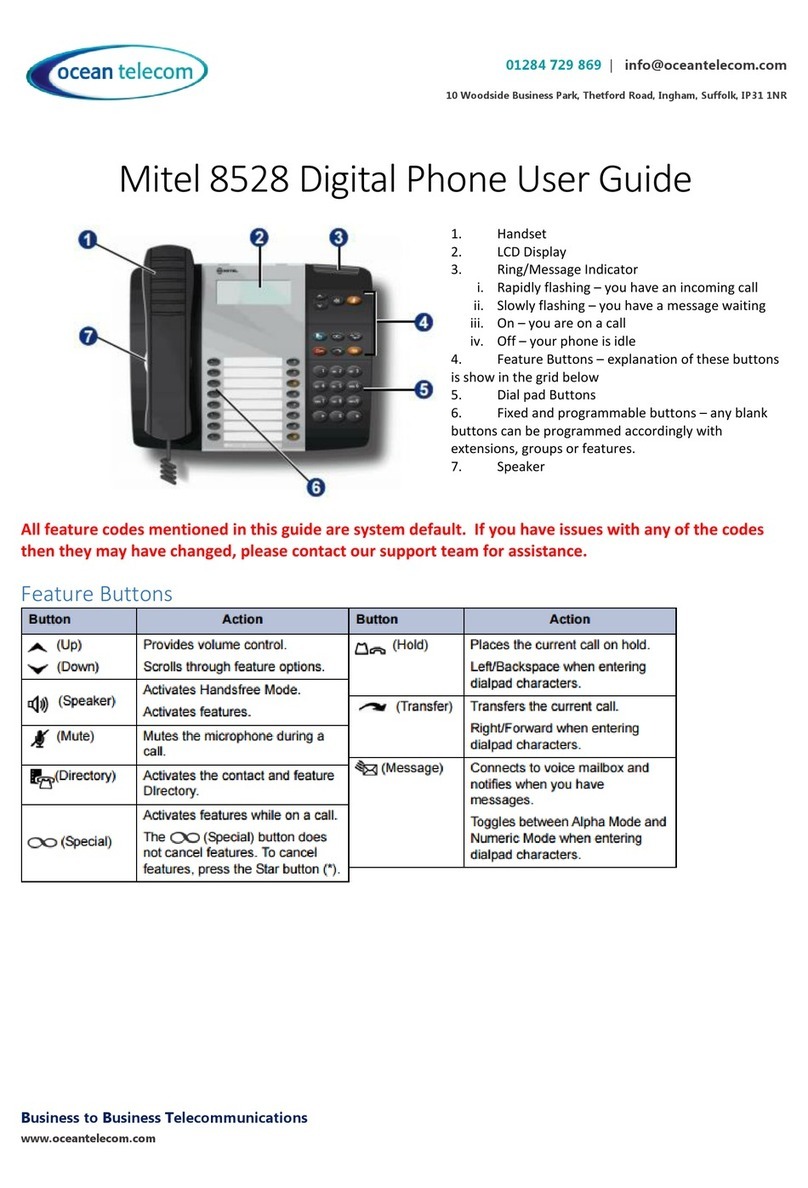
Features
Do Not Disturb
•Press the DND/FWD button or dial 553 to enable or disable
Directory
•To access the system directory press the Speed/Conf button twice
•Press 1 for Internal, 3 for System Speed Dials (External)
•To scroll through the entries press the volume up and down buttons or use the details below to search by name
•Press Hold/Save to dial the number currently shown on the display
Enter the name using the following example : Jenny 5-1 (J being on button 5 and 1 being the 1st letter on the 5 button), 3-2 (for
E) followed by Hold/Save
Use * to space and *1 to delete and Hold/Save
Call Logs
•Press the button programmed as ‘Call Logs’
•Select 1 for Received, 2 for Dialled, 3 for Missed
•To scroll through the list of calls you can press the volume up and down buttons
•Press Hold/Save to dial the number currently shown on the display
Conferencing
•With a caller on the line press the button labelled Speed/Conf
•Call the next party in usual way for either an internal or external number.
•When that call is answered press the Speed/Conf button twice which will connect all parties to the call.
•Repeat the process for any additional parties
Headset
•To enable headset mode press Trans/PGM 1 9 1 then Hold/Save
•To disable headset mode press Trans/PGM 1 9 0 then Hold/Save
Configuring your Phone
Change Ring Tone or Volume
•To change the internal ring tone Press TRANS/PGM 11 then dial the two digit ring tone 01 –15 then press HOLD/SAVE
•To change the external ring tone Press TRANS/PGM 12 then dial the two digit ring tone 01 –15 then press HOLD/SAVE
•To change the ringing volume press the volume up or down buttons whilst the phone is ringing
Programming Buttons
•To change your programmable buttons leave the handset down and press TRANS/PGM.
•Press the button you wish to program.
•Enter the extension number or group number. To store a speed dial number press Speed then enter the speed dial
number. Then press Hold/Save.
To store a feature under a key press Trans/PGM then press the button you wish to program then Trans/Pgm again followed by
one of the codes below then Hold/Save:
o57 –Call Logs