Olympus CAMEDIA Master 4.3/Pro User manual

Functions for Online Printing
and Photo Sharing
CAMEDIA Master 4.3/Pro
Plugin Functions
Operating Instructions

2
Table of Contents
Introduction.................................................................................... 3
Note ............................................................................................................ 3
Trademarks................................................................................................. 3
How to Use This Manual............................................................................. 4
Terminology...................................................................................... 4
Help information................................................................................ 4
Overview......................................................................................... 5
Features...................................................................................................... 5
Online printing function ..................................................................... 5
Photo sharing function ...................................................................... 5
System Requirements................................................................................. 6
Main Menu ........................................................................................ 7
Online Printing............................................................................... 8
Online Print Window ................................................................................... 8
Using Online Printing ................................................................................ 10
Selecting other services.................................................................. 12
Photo Sharing.............................................................................. 13
Photo Share Window ................................................................................ 13
Using Photo Sharing ................................................................................. 15
Registering your user ID ................................................................. 18
Overview of access limitations........................................................ 19
Appendixes .................................................................................. 20
Technical Support..................................................................................... 20
File Formats.............................................................................................. 21
Functions Supported................................................................................. 21

3
Introduction
Thank you for purchasing this Olympus product.
Please read these instructions carefully in order to get the best results.
Note
The contents of this software and manual may not be reproduced in whole or in
part except for personal use. It may not be transferred without permission.
Olympus can accept absolutely no responsibility in respect of losses suffered
by the customer or a third party as a result of use of this software.
While every care has been taken in the preparation of this manual, if you find
any points which are unclear, errors, or omissions, please contact an
authorized Olympus service center.
This software is only guaranteed to operate in the specified operating
environment.
The software specifications and the content of this manual are subject to change
without notice. For the latest information, visit the Olympus web site at:
http://www.olympus.com
© 2004 OLYMPUS CORPORATION
Trademarks
• Windows is a registered trademark of Microsoft Corporation in the USA and
other countries.
• Adobe and Acrobat are registered trademarks, and Acrobat Reader is a
trademark of Adobe Systems Incorporated.
• OFOTO, Ofoto and all graphics, logos and service names are trademarks of
Ofoto or its parent company, Eastman Kodak Company.
• Other company and product names appearing in this manual are trademarks
or registered trademarks of their respective owners.

4
How to Use This Manual
This manual describes how to use the online printing and photo sharing plugin
functions of CAMEDIA Master 4.3/Pro, however, certain explanations need to
be complemented by referring to the operating instructions of CAMEDIA
Master/Pro (4.2SE or later) installed in your computer.
This manual is organized with a section for each function. You can read these
independently for a thorough understanding of particular functions. Once you
are familiar with the functions, you can use the help information for extra
explanations while using the functions.
Terminology
The following terms appear throughout this manual.
File
A file is the unit in which data is handled on a computer or digital camera. The
following type of files are used with these plugin functions.
• Image files
Thumbnail
This refers to the reduced images used as an index.
Help information
To access the help information, use any of the following methods:
• In the main menu, click the [Help] button .
• In any window, click the [Help] tool button and select [Index].
• In any dialog box, click the help button .
5
Overview
Features
Online printing function
This function connects CAMEDIA Master/Pro (4.2SE or later) to the online
print services of a photo service dealer through an Internet connection and
provides easy and seamless online print ordering processes through the
window. The online print service selected will send your photos to the address
you specify in the order.
Photo sharing function
This function is for making personal online albums of digital photo collections.
These are stored on the Olympus Digital Print Service (powered by Ofoto)
server. Your photos can be enjoyed online with friends and family. You may
have more than one online photo album. As with physical photo albums, you
can title, rearrange, and view them any time you want.
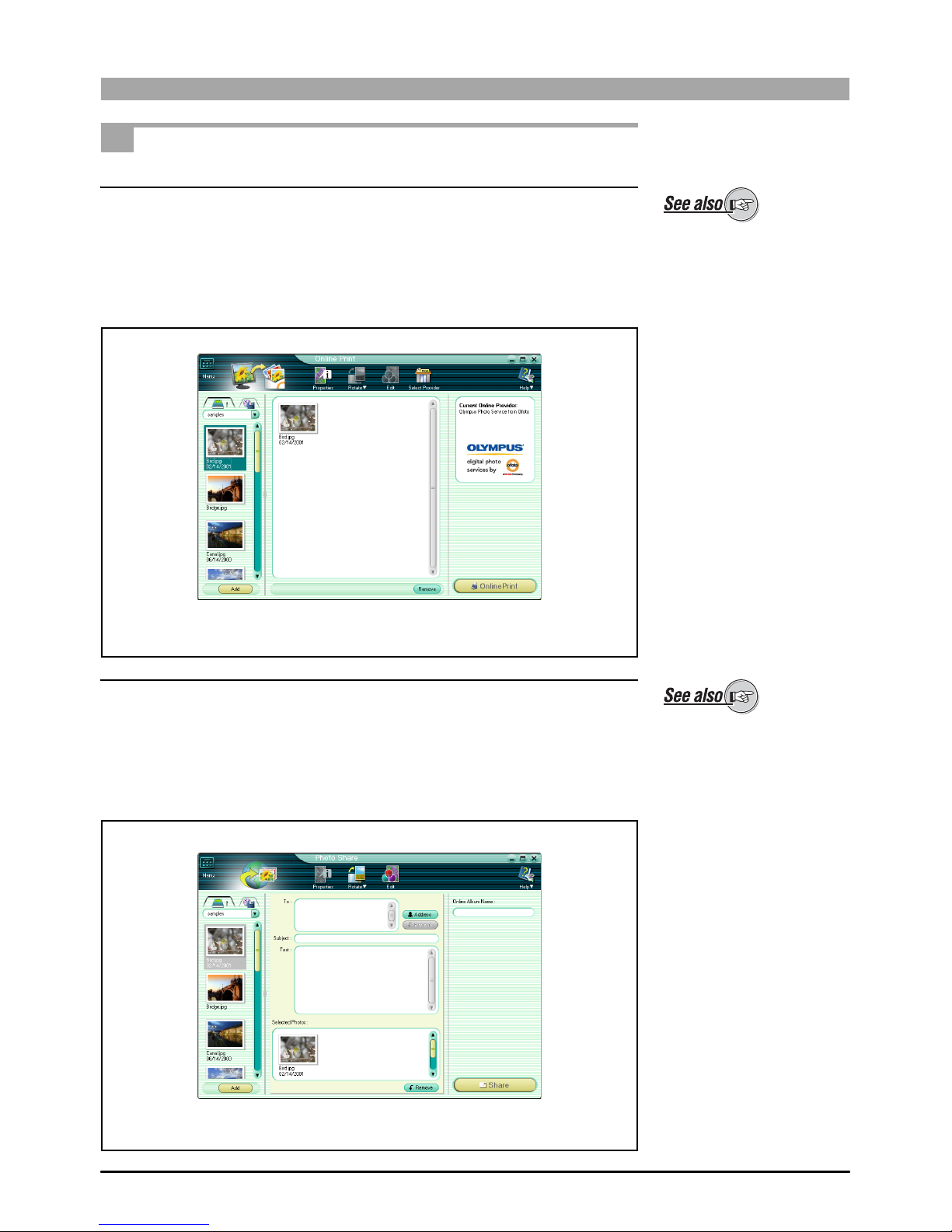
About the online printing
function, see also “Online
Printing” (page 8).
Online Print window
About the photo sharing
function, see also “Photo
Sharing” (page 13).
Photo Share window

6
System Requirements
This software only operates on a computer with a preinstalled Windows
operating system (Not available for Macintosh).
This software is designed to run in the following systems.
Windows version
* This software is compatible with 2000 Professional only.
** This software is compatible with Windows XP Professional and Home
Edition.
• For information on support for the latest versions of operating systems, visit
the Olympus web site (http://www.olympus.com).
This software only operates
on a computer with
preinstalled CAMEDIA Master
4.2SE (or later).
To use this function, your
computer must already be set
up with an Internet
connection. For more details,
refer to the operating
instructions provided with
your computer or Internet
service provider.
OS Windows 98/98SE/Me/2000 Professional*/XP**
Browser Internet Explorer 5.0 or later
CPU Pentium II or later (Pentium III or later recommended)
RAM 128 MB or more (256 MB or more recommended)
Monitor Minimum 800 × 600 pixel resolution
Minimum 65,536 colors
To access the online help, a
web browser is required.

7
Main Menu
The online printing and photo sharing functions are displayed as easily
recognizable icons on the main menu. Click the icons to start the respective
functions as illustrated below.
1Online Print button
This displays the Online Print window (page 8).
2Photo Share button
This displays the Photo Share window (page 13).
1Online Print button 2Photo Share button

8
Online Printing
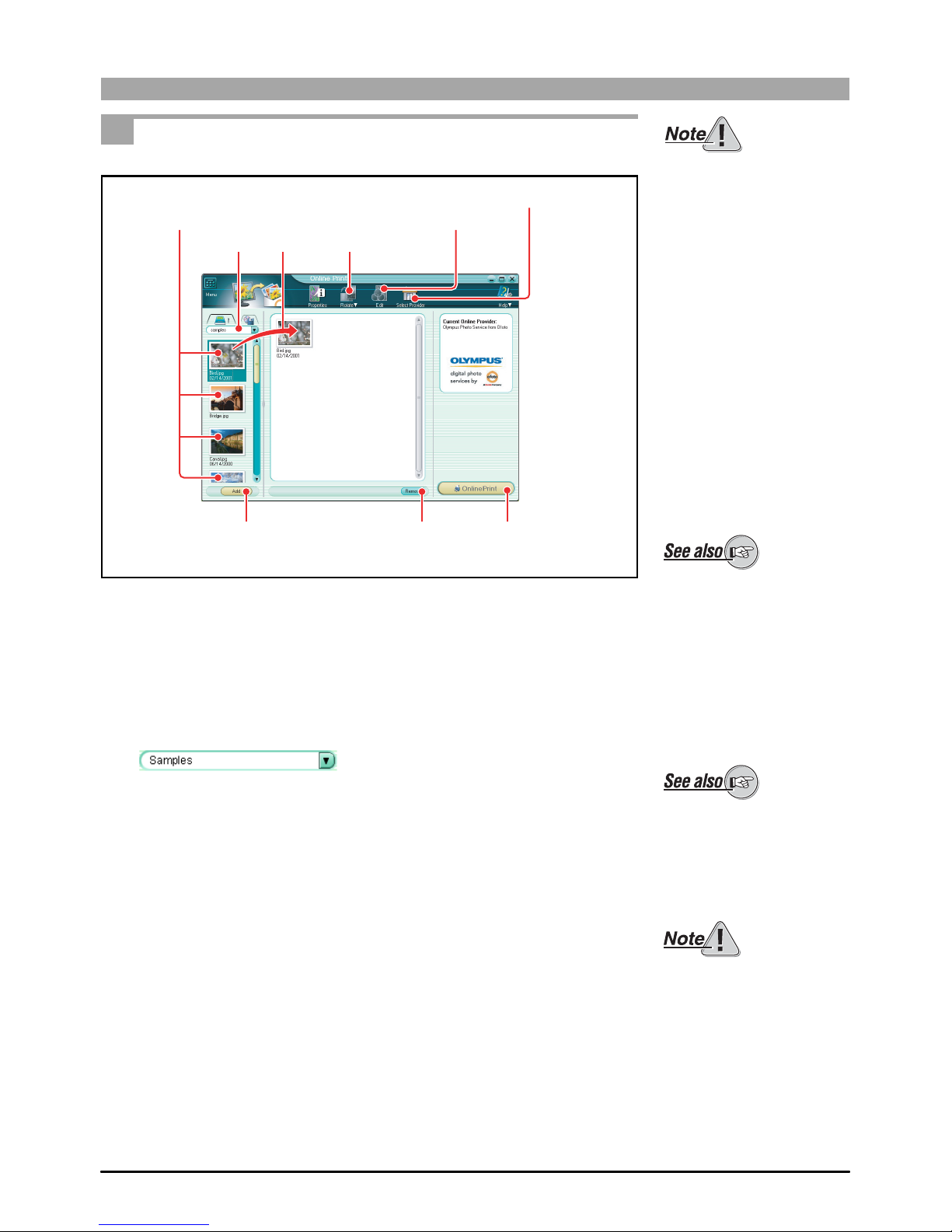
Online Print Window
To open the Online Print window, do one of the following.
• In the main menu, click the [Online Print] button.
• In the album window, click the [Print] tool button and select [Online Print].
1Image display area
This shows thumbnails of the images in the selected album or folder.
2Display source selection tab
This switches between the album display and the folder tree display.
For details on the album
window, see also “Browsing
Images” in the CAMEDIA
Master/Pro (4.2SE or later)
operating instructions.
1Image display area
2Display source selection tab
3Tool buttons
4Online service information area
5Add button
6Preview display area
7Remove button
8Online Print button
For details on source
selection, see also “Album
display and folder tree
display” in the CAMEDIA
Master/Pro (4.2SE or later)
operating instructions.

9
3Tool buttons
The following tool buttons are provided.
•Menu/Back
Returns to the main menu or album window.
•Properties
Displays the properties information for the image file selected in the
image display area.
•Rotate
Rotates the image selected in the preview display area.
•Edit
Displays an image editing window for editing the image selected in
the preview display area.
•Select Provider
Displays the print service selection window.
•Help
Displays Help information for the Online Print window.
4Online service information area
This shows the online print service information (e.g. the name of the
service, Logo) being selected.
5Add button
This adds the images selected in the image display area into the preview
display area.
6Preview display area
Drag the image you want to print online to the window. When the connection
is established, the online print service’s print order window is displayed.
7Remove button
This removes the selected image from the preview display area.
8Online Print button
This uploads the images you selected and the print order window appears.
Menu/Back
Properties
Rotate
Edit
Select Provider Help
For details on the image
editing window, see also
“Image Editing Window” in the
CAMEDIA Master/Pro (4.2SE
or later) operating
instructions.
10
Using Online Printing
1To open the Online Print window, do one of the following.
• In the main menu, click the [Online Print] button.
• In the album window, click the [Print] tool button and select [Online
Print].
The Online Print window appears.
2Select the album or folder containing the images you want to print.
A thumbnail display appears in the image display area.
To use this function, your
computer must already be set
up with an Internet
connection. For more details,
refer to the operating
instructions provided with
your computer or Internet
service provider.
For details on the album
window, see also “Browsing
Images” in the CAMEDIA
Master/Pro (4.2SE or later)
operating instructions.
If you access the Online Print
window from the album
window, the images selected
in the album window appear
in the preview display area.
For details on source
selection, see also “Album
display and folder tree
display” in the CAMEDIA
Master/Pro (4.2SE or later)
operating instructions.
Only images in a format
supported by CAMEDIA
Master/Pro (4.2SE or later)
can be displayed in the
thumbnail display. Sound files
(“sound link” function) and
movie files are not displayed.
Thumbnails
23
Rotate button
Edit button
Remove button
34
Select Provider button
Table of contents
Other Olympus Software manuals
Olympus
Olympus Auto-Connect Instruction Manual
Olympus
Olympus Master 1.1 Plus User manual
Olympus
Olympus Master User manual

Olympus
Olympus CAMEDIA Master Firmware update
Olympus
Olympus Master 4.1 User manual
Olympus
Olympus DM-1 User manual
Olympus
Olympus Studio 1.3 User manual
Olympus
Olympus DS-3000 User manual

Olympus
Olympus DM-1 User manual

Olympus
Olympus E-20 - Dual Monaural Earphones Firmware update