Pacific Digital DrumXtreme User manual

TABLE OF CONTENTS
1. INTRODUCTION 1
2. FEATURES 1
3. MINIMUM PC SYSTEM REQUIREMENTS 2
4. GETTING STARTED 3
4.1 Unpacking your DrumXtreme™ 3
4.2 Registration & Your Product Serial Number 5
4.3 Assembly of DrumXtreme™ 5
4.4 Adjusting Pad Positions on your DrumXtreme™ 11
5. INSTALLING USB DRIVERS FOR WINDOWS® 12
6. INSTALLING DIGITAL DRUM PC SOFTWARE 18
7. USING THE DIGITAL DRUM SOFTWARE & GAME 20
7.1 Before Starting the DrumXtreme Software Program 20
7.2 Starting the DrumXtreme Software Program 21
7.3 Main Menu 23
7.4 Digital Drum Operation Menu 24
7.5 Sound Bank Timbre Editing Panel 30
7.6 Music Game Menu 34

Copyright© 2003 Pacific Digital Corporation Page ii
8. WARNINGS 38
9. EXPANDING YOUR DRUMXTREME 39
10. TROUBLESHOOTING / FAQ 40
11. DRUMXTREME LIMITED WARRANTY 50
12. CONTACTING TECHNICAL SUPPORT 52

1. Introduction
Welcome to DrumXtremeTM, the next generation in digital music playing
and recording instruments. With the DrumXtreme you will be able to
play the backbeat to your favorite music, or create, play, and record your
own music. DrumXtreme is easy to install and use, providing a full size
professional drum ensemble consisting of 5 pads and a foot pedal. Each
of the pads emulate the drum elements including hi-hat, snare, crash,
tom, base, t-tom, and ride.
The DrumXtreme is easy to install and use, and comes complete with
tutorial software that is ideal for the beginner, and also the experienced
drummer to sharpen skills, with plenty of drills and exercises.
2. Features
Complete 'drum rack' easily configures to optimum personal playing
positions
Easy to assemble, store, and transport
Requires smaller total area to use than an acoustic drum set
7.5" pads with sensitivity adjustment for true drum feeling and
response
5 pads included, up to 6 pads supported
1 foot pedal included, up to 3 pedals supported
Advanced sampling technology for high quality audio
Easy USB installation. USB connection provides power (no wall
outlets required).
PC-based software provides easy to follow video tutorials
The drum tutorial system uses identifiable colors on the pads and on
your computer monitor to guide you through lessons. Ideal for quick
learning and skill development
Pads have 'choke' capability while playing crash or ride
Seamless operation with your PC audio system
Includes PC drumming 'game' with three levels of difficulty
Includes 110 sound combinations from 10 varying sound collections
- user configurable

Copyright© 2003 Pacific Digital Corporation Page 2
The following items are included in the DrumXtreme kit:
Five (5) Percussion pads with sensitivity adjustment
Seven (7) cables to connect the percussion pads, foot pedal, and
choke control to the controller
One (1) Easy to assemble drum stand
One (1) Foot Pedal
One (1) Master controller
One (1) Set of drumsticks
One (1) Manual with complete instructions and documentation
One (1) USB cable
One (1) Software CD: Digital Drum control software & Music
Game (also includes tutorial and documentation)
One (1) Music CD: practice music for learning exercises
3. Minimum PC System Requirements
The DrumXtreme has the following minimum system requirements:
IBM compatible PC
Pentium II 300MHz or higher with at least 128 MB of memory
Microsoft Windows® XP, Windows® 2000, Windows® 98SE,
or Windows® ME
CD-ROM: 8X speed or faster
Keyboard & Mouse
USB port (either USB 1.1 or USB 2.0)
VGA compatible display (or higher)
Direct X video/graphics & sound-card drivers
100MB of free hard-disk space for software installation
Sound Card
Speakers or Earphones

Copyright© 2003 Pacific Digital Corporation Page 3
4. Getting Started
This section provides step-by-step instructions on setting up your
DrumXtremeTM for the first time.
4.1 Unpacking your DrumXtreme™
In the retail box, the unit is cushioned in a cardboard shock-
absorbent holder. You may wish to save the box so you can pack or
store the unit in the future.
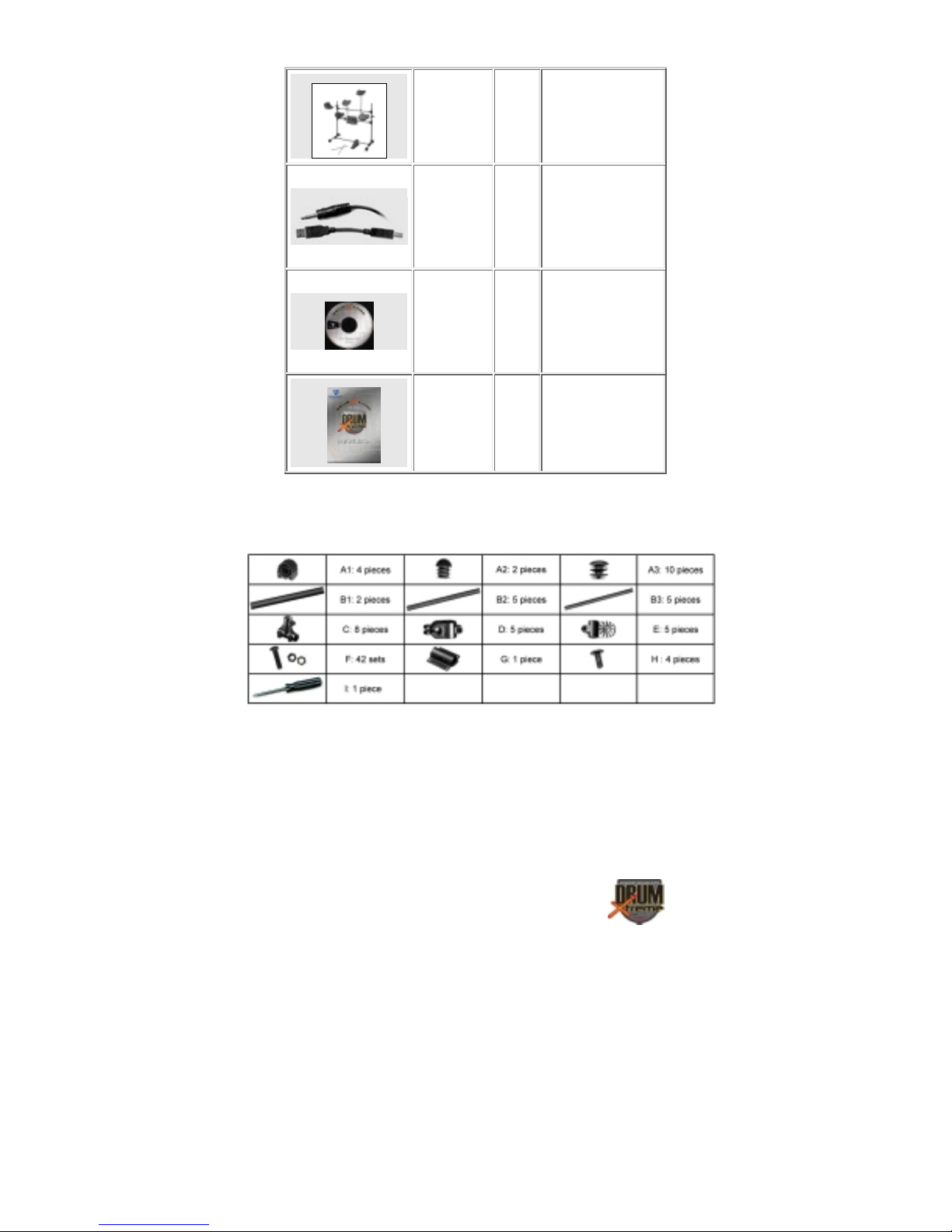
The tables below show the Parts List:
Figure Item Qty. Comments
Drum DX-8 One
piece
Special Purple pad
for Cymbal &
Choke (Tone
Mute).
The back of this
pad has two plugs
and a manual
button/switch for
choke control
(Tone Mute).
Drum DX-5 Four
pieces Standard drum and
cymbal pads.
Foot Drum
pedal One
piece This pedal is used
for Bass Drum.
Master box
SV-BOX One
piece
Master Controller.
Your drum’s
Model# and
Serial# are printed
on the back.
Drum sticks One
pair Professional wood
drum sticks.
Copyright© 2003 Pacific Digital Corporation Page 4
Drum stand One
group
The detailed parts
list for the stand is
shown in the
following table.
Cables Eight
pieces
1. Seven audio
source cables.
(Please use the
special mono cable
line.)
2. One USB cable.
CD Discs Two
pieces
1. Data CD
(Installation
program, teaching
disc, and game
grogram)
2. Music CD
.
Manual One This Manual
(includes warranty
information)
Table 1 – Major Parts List
Table 2 – Detailed List of Stand Parts
Make sure all of these parts are included before continuing. If something
is missing from the above tables, contact customer service at: 1-888-999-
0732.
Copyright© 2003 Pacific Digital Corporation Page 5
4.2 Registration & Your Product Serial Number
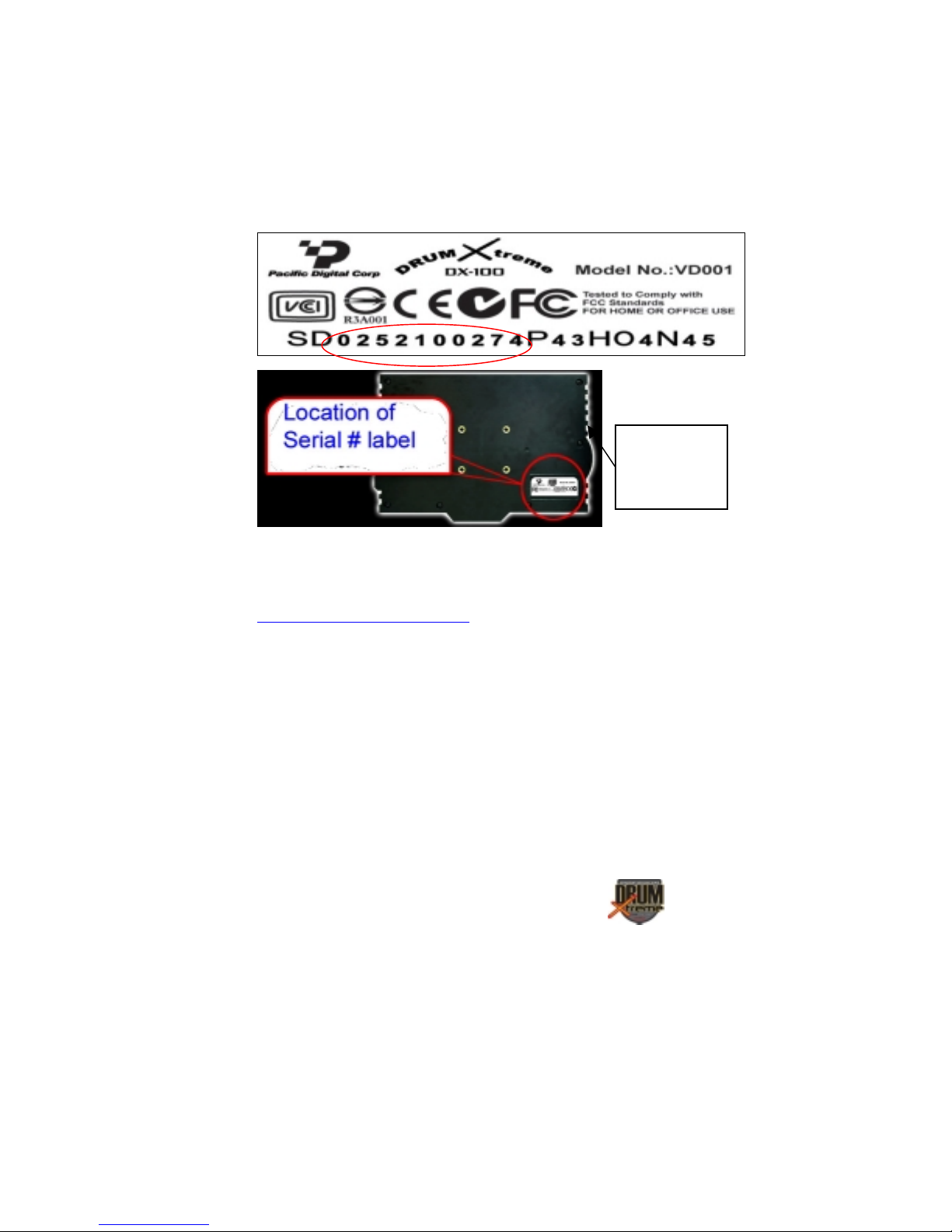
Please record the model and serial number to keep for reference. These
are required for Product Registration and the web-Update function. Also
record the Product ID number from the bar-coded label on the back of
your manual (this Product ID number is required for Technical Support).
This information is printed on a label on the rear of the Master Controller
(SV-BOX). The serial number is circled in the label shown in Figure 1.
Figure 1 – Product Serial Number Label
In order to receive technical support, you should register online at:
http://www.PacificDigital.com soon after your purchase date.
4.3 Assembly of DrumXtreme™
This section provides step-by-step instructions on assembling your
DrumXtreme. Installation starts at the bottom of the stand and works
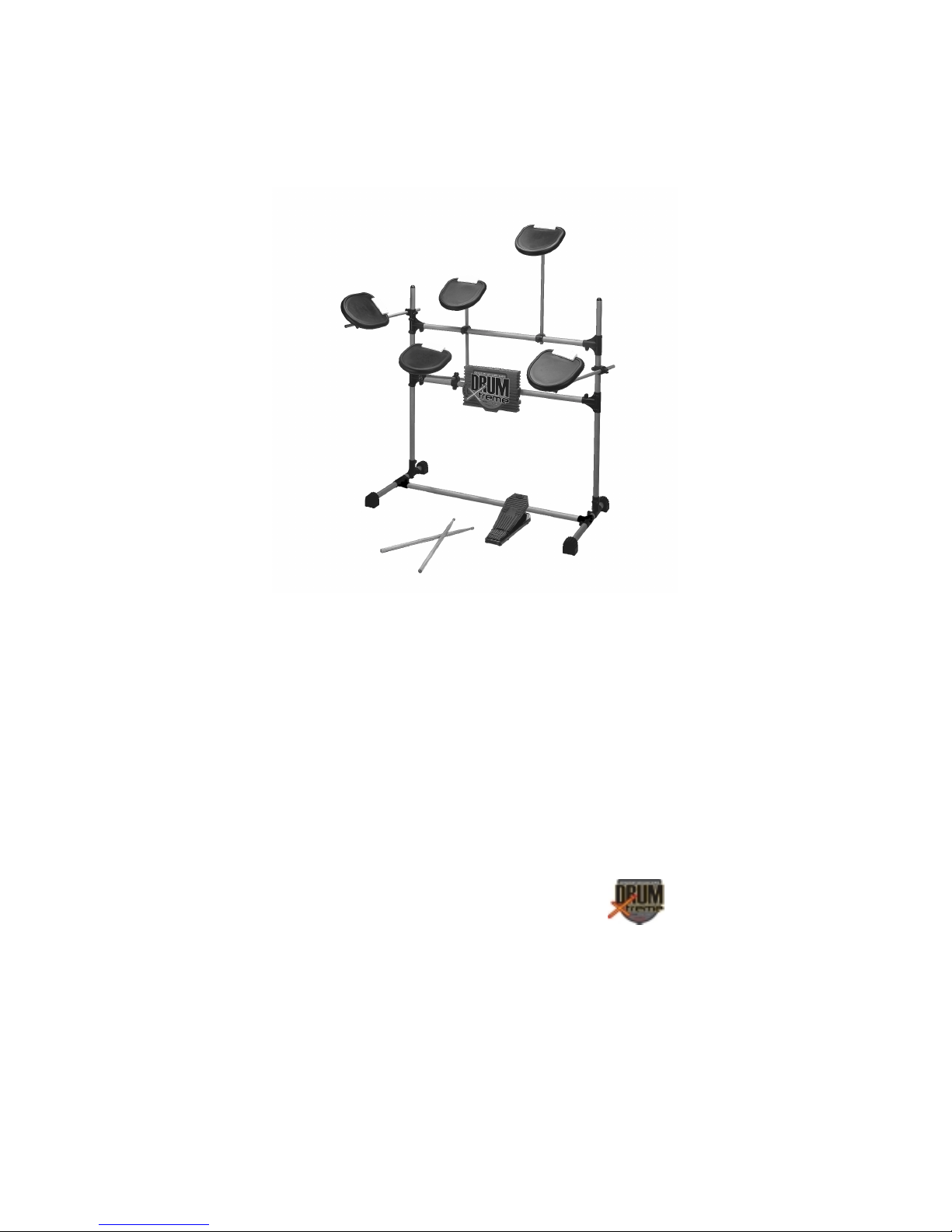
upward towards the top. Figure 2 below shows a fully assembled drum
set.
Master
Controller
Box
Copyright© 2003 Pacific Digital Corporation Page 6
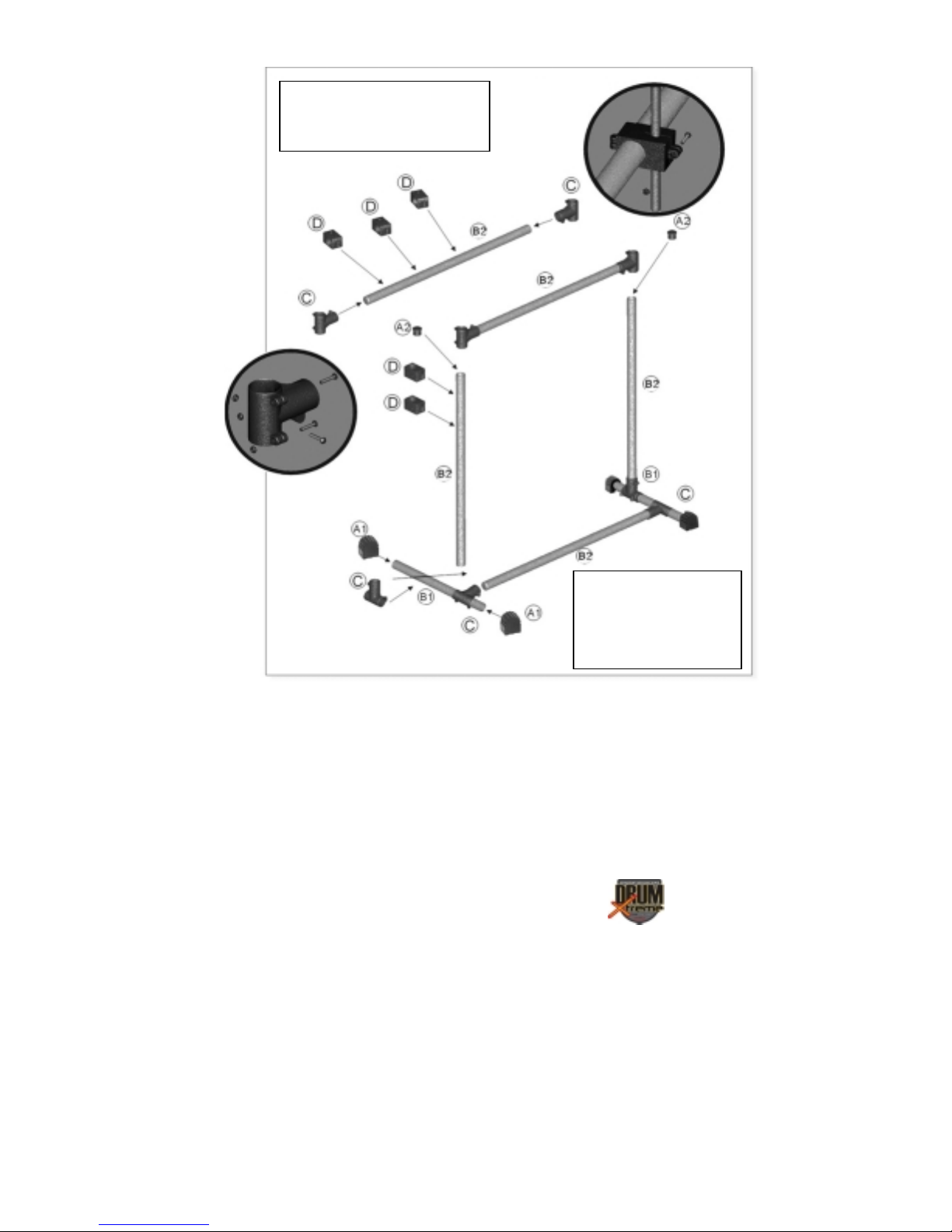
Keep Figure 2 in mind while following Steps 1 through 10 to assemble
your DrumXtreme. Figure 3 shows detailed assembly connections which
are referenced in assembly instruction steps 1 through 10
Figure 2 – Example of Assembled Stand
.
Copyright© 2003 Pacific Digital Corporation Page 7
Figure 3 – Stand Assembly Connections
** Note: Do not over tighten screws! **
Step 1: Using Table 2 entitled “Detailed List of Stand Parts”, organize
parts A to H into separate areas/piles so you can easily find the part being
called for in steps 2 through 10.
N
ote: Do not attach the
5 “D” parts until Step 4
Connect and
tighten every joint
with a screwdriver
This manual suits for next models
1
Table of contents