manuals.online logo
Brands
  1. Home
  2. •
  3. Brands
  4. •
  5. Philips
  6. •
  7. Speakers
  8. •
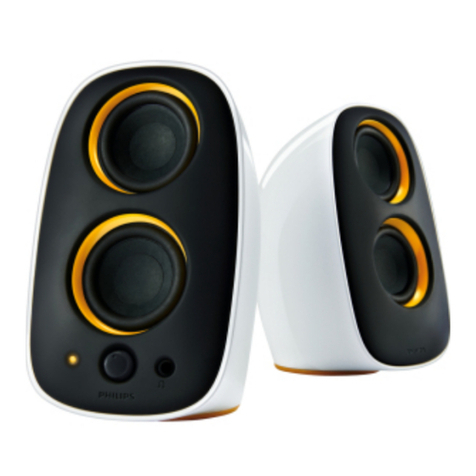
  9. Philips SPA7210R/10 User manual

Philips SPA7210R/10 User manual

This manual suits for next models

1

Other Philips Speakers manuals

Philips SPA7355/77 User manual

Philips

Philips SPA7355/77 User manual

Philips SoundStage HTL4110B/51 User manual

Philips

Philips SoundStage HTL4110B/51 User manual

Philips SBCBC700/00 User manual

Philips

Philips SBCBC700/00 User manual

Philips MMS121 User manual

Philips

Philips MMS121 User manual

Philips SPA8210 User manual

Philips

Philips SPA8210 User manual

Philips HTB5150K User manual

Philips

Philips HTB5150K User manual

Philips AD7000W/93 User manual

Philips

Philips AD7000W/93 User manual

Philips SPA5200 User manual

Philips

Philips SPA5200 User manual

Philips FB651 User manual

Philips

Philips FB651 User manual

Philips PS1 User manual

Philips

Philips PS1 User manual

Philips CSS2113B User manual

Philips

Philips CSS2113B User manual

Philips Soundmachine AZ3067 User manual

Philips

Philips Soundmachine AZ3067 User manual

Philips TAS4405N User manual

Philips

Philips TAS4405N User manual

Philips AD7050W/37 User manual

Philips

Philips AD7050W/37 User manual

Philips AW5000 User manual

Philips

Philips AW5000 User manual

Philips SPA5162B User manual

Philips

Philips SPA5162B User manual

Philips SPA2200 User manual

Philips

Philips SPA2200 User manual

Philips HTL2163B User manual

Philips

Philips HTL2163B User manual

Philips SPA1300/05 User manual

Philips

Philips SPA1300/05 User manual

Philips CSP620 User manual

Philips

Philips CSP620 User manual

Philips SBCBC8310 User manual

Philips

Philips SBCBC8310 User manual

Philips 3000 series User manual

Philips

Philips 3000 series User manual

Philips HTL2153B User manual

Philips

Philips HTL2153B User manual

Philips BT50A User manual

Philips

Philips BT50A User manual

Popular Speakers manuals by other brands

Electro-Voice LR4S engineering data

Electro-Voice

Electro-Voice LR4S engineering data

Definitive Technology Sound Cylinder user guide

Definitive Technology

Definitive Technology Sound Cylinder user guide

AudioSource LS545 user manual

AudioSource

AudioSource LS545 user manual

Paso C402-T Instructions for use

Paso

Paso C402-T Instructions for use

Altec Lansing 416-8C LF SPEAKER manual

Altec Lansing

Altec Lansing 416-8C LF SPEAKER manual

Kenwood KFC-1072 Servise manual

Kenwood

Kenwood KFC-1072 Servise manual

Peavey ProSys 112 user guide

Peavey

Peavey ProSys 112 user guide

JBL Control Contractor 60 Series installation instructions

JBL

JBL Control Contractor 60 Series installation instructions

Aura STORM-8 owner's manual

Aura

Aura STORM-8 owner's manual

Oontz ANGLE 3 PLUS quick start guide

Oontz

Oontz ANGLE 3 PLUS quick start guide

Electro-Voice LR4A engineering data

Electro-Voice

Electro-Voice LR4A engineering data

Rave RK-650-ICA-B owner's manual

Rave

Rave RK-650-ICA-B owner's manual

Flux Reference Series installation manual

Flux

Flux Reference Series installation manual

Lanzar AQAWBS64BK installation manual

Lanzar

Lanzar AQAWBS64BK installation manual

DAPAudio DCS-6230 manual

DAPAudio

DAPAudio DCS-6230 manual

Aluratek ABS03F quick start guide

Aluratek

Aluratek ABS03F quick start guide

Kenwood KES-5A instruction manual

Kenwood

Kenwood KES-5A instruction manual

Sonance ORIGINAL SERIES instruction manual

Sonance

Sonance ORIGINAL SERIES instruction manual

manuals.online logo
manuals.online logoBrands
  • About & Mission
  • Contact us
  • Privacy Policy
  • Terms and Conditions

Copyright 2025 Manuals.Online. All Rights Reserved.

Multimedia Speakers
Register your product and get support at
www.philips.com/welcome
EN User manual
SPA7210R
1
2
MP3
(L) (R)
AUX IN
AUX IN
3
4
5
7 6
AUX IN
EN
Multimedia Speakers
Warning: 1.The product shall not be exposed to dripping or splashing
and that no objects filled with liquids, such as vases, shall be placed on
the product. 2.To completely disconnect the power input, the mains
plug of the product shall be disconnected from the mains. 3.The mains
plug of the product should not be obstructed OR should be easily
accessed during intended use. 4. No naked flame sources, such as
lighted candles, should be placed on the products.
Note: 1. Ensure that the multimedia speaker is installed properly before
using. 2.The maximum output voltage of headphone jack is equal or less
than 150mV. 3.The USB socket is for charging 5V devices only.
Installation:
1 Connect the audio cable to the audio output of your computer (Fig.
1).
2 Adjust the length of speaker cable by the cable winder at the bottom
of the left speaker (Fig. 2).
3 Connect the power cable to the power adaptor (Fig. 3).
4 Connect the power adaptor cable to the 12V DC socket at the back
of the right speaker and a AC power socket (Fig. 4).
5 Turn the volume knob clockwise to switch on the Multimedia
Speakers (Fig. 5).
The indicator on the right speaker lights up.»
6 Adjust the volume either by the volume knob or by the computer
application or multimedia application software (Fig. 6).
To listen through a headphone, connect it to the
• socket on the
right speaker.
To play sound from a MP3, connect it to the• AUX IN socket on
the right speaker.
The USB socket on the right speaker can be used to recharge a• USB rechargeable device (e.g. MP3, mobile phone, ect.) (Fig. 7).
7 After use, exit the multimedia application software and switch off the
speakers.
Your product is designed and manufactured with high
quality materials and components, which can be recycled
and reused. Please inform yourself about the local
separate collection system for electrical and electronic
products, including those marked by the crossed-out
wheely bin symbol. Please act according to your local
rules and do not dispose of your old products with your normal
household waste.
FCC - Notice of compliance
FCC - Remarques sur la conformité
© Royal Philips Electronics N.V. 2011
All rights reserved.
Specifications are subject to change
without notice.Trademarks are the
property of Koninklijke Philips Electronics
N.V. or their respective owners.
SPA7210R_QSG_V1.0