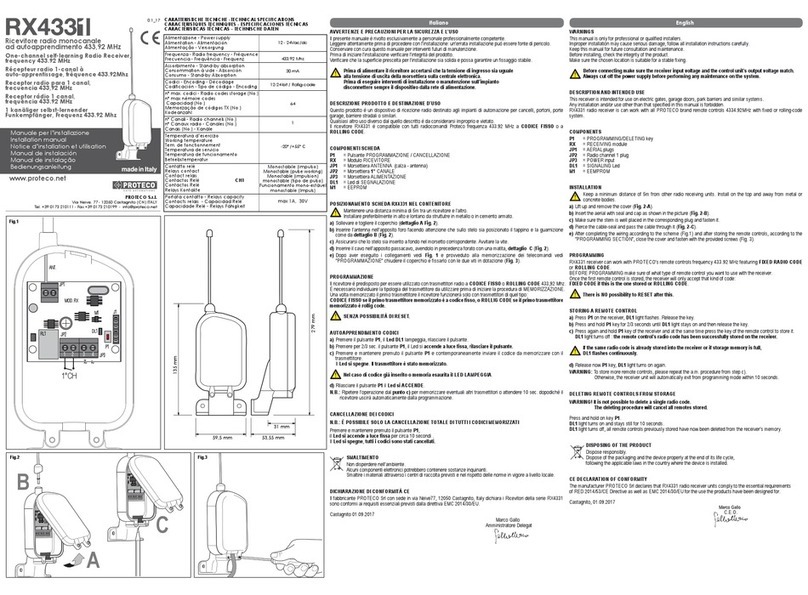
INSTALLAZIONE CANCELLAZIONE DEI CODICI
Posizionare il ricevitore in verticale nel punto più alto possibile e in posizione libera a) E' necessario identificare qual'è il codice che si desidera cancellare.
da ostacoli. Per fare ciò è necessario avere a disposizione il trasmettitore che si desidera
E' necessario non installare più ricevitori a distanze inferiori ai 4-5 metri uno cancellare e premere il relativo tasto.
dall'altro, poiché ciò potrebbe causare anomalie nel funzionamento. b) Il LED 1 segnalerà con 1 lampeggio se il codice è in posizione 1. Segnalerà
con 2 lampeggi se il codice è in posizione 2, e così via, fino a 9 lampeggi, se il
PROGRAMMAZIONE codice è in posizione 9.
PRIMA DI ESEGUIRE LA PROGRAMMAZIONE DELLA RICEVENTE RADIO, c) Premere il tasto P1 del ricevitore per iniziare la ricerca del codice da
PROCEDERE ALLA CANCELLAZIONE DI TUTTI I CODICI IN MEMORIA. cancellare.
(Inseriti in fase di collaudo vedi paragrafo “CANCELLAZIONE DEI CODICI”) d) Il LED 1 lampeggerà una volta per ogni codice memorizzato e due volte veloci
per un codice libero (questa operazione verrà ripetuta per ognuno dei 9
AUTOAPPRENDIMENTO DEI CODICI codici).
a) Creare un codice personalizzato sui telecomandi a Dip-Switch, evitando di e) Se il codice da cancellare e in posizione 4, appena il LED 1ha segnalato la
mettere i dip-switch tutti in posizione OFF o in posizione ON. quarta posizione premere il tasto P1 e tenere premuto fino a quando il LED 1
Nei telecomandi a codice RANDOM non è necessario inserire il codice perché lampeggia 3 volte.
è già inserito in fase di collaudo in maniera casuale. (16.000.000 di Il codice è cancellato.
combinazioni)
b) Trasmettere un segnale premendo uno dei tasti sul telecomando. È possibile cancellare i codici solamente uno alla volta.
Il LED 1 del ricevitore lampeggia. Ripetere l’operazione per ogni codice da cancellare.
c) Premere il tasto P1 del ricevitore entro 4 secondi per memorizzare il codice. Se premendo il tasto P1, il LED 1 lampeggia velocemente 3 volte significa che
d) Il codice 1 è stato memorizzato, il LED 1 si spegne, il ricevitore è pronto a non vi sono codici in memoria.
ricevere il secondo codice partendo dal punto (b).
e) Ripetere la stessa procedura per memorizzare il 2°/3°/ 4°/ 5° ....9° codice. Per i motivi di cui sopra, vi suggeriamo di annotare a parte i codici memorizzati al
relativo utente, così non sarà necessario avere a disposizione il trasmettitore per
In seguito alla ricezione di un codice già presente in memoria viene attivato il relè procedere alla cancellazione, ma si inizierà direttamente la procedura dal punto c).
di uscita e si accende il LED 1.
INSTALLATION EFFACEMENT DES CODES
Il est préférable de placer le récepteur le plus haut possible si votre site le permet, a) Il faut identifier le code que vous souhaitez effacer . A ce titre munissez vous
essayer de le placer sans obstacle immédiat et ne pas placer plusieurs récepteurs de la télécommande concernée et appuyez sur la touche enregistrée.
(même de matériel différent) trop proches les uns des autres. Il faut garder une b) La LED 1 va signaler par une suite de clignotement la position du canal
distance minime de 4-5 mètres afin d'assurer un bon fonctionnement. occupé. (exemple : 1 clignotement pour le premier canal, 2 clignotement pour
le 2emme canal etc.…)
PROGRAMMATION c) Appuyez sur la touche P1 du récepteur pour commencer la recherche du code
IL FAUT EFFACER TOUS LES CODES MÉMORISÉS AVANT à effacer.
LA PROGRAMMATION DU RÉCEPTEUR RADIO. d) La LED 1 clignote une fois à chaque canal mémorisé ou 2 fois rapidement pour
(Voir « EFFACEMENT DES CODES ») un canal libre.
e) Si le code à effacer est en 4éme position (la LED1 clignote 4 fois), a cet
AUTO-APPRENTISSAGE DES CODES instant maintenez le bouton P1 en appui jusqu'à ce que la LED1 clignote 3
a) Pour la programmation des télécommandes à dip-switch (micro-interrupteurs), fois. Le code est effacé
choisissez un codage.
Ne pas placer les dip-switch tous en ON ou tous en OFF. Les codes peuvent être effacés qu'une fois.
Pour les télécommandes vous n'avez pas besoin de faire cette manipulation Répétez l'opération pour chaque code a effacer. Si en appuyant la touche P1 la
les codes sont déjà inclus de manière aléatoire (16.000.000 de LED1 clignote 3 fois rapidement, il n'y a pas de canaux mémorisés.
combinaisons).
b) Placez vous de manière à ce que la télécommande soit au minimum à 1 mètre C'est souhaitable noter de côté les codes mémorisés pour chaque usager, de cette
du récepteur et envoyez une impulsion avec le bouton de la télécommande manière il ne faudra pas disposer de la télécommande pour effacer, mais on
que vous avez choisi, la LED 1 du récepteur va clignoter. commencera de suite la procédure au paragraphe c).
c) Vous avez 4 secondes pour appuyer sur le bouton P1, cela va mémoriser le
code. Le code 1 est mémorisé.
ème
d) Répétez la même procédure pour mémoriser le code 2, 3 , ect…9 code.
Suite à la réception d'un code déjà mémorisé, le relé de sortie se met en fonction
et la LED 1 s'allume.
INSTALLATION DELETING CODES
Fix the receiver vertically and as high as possible, with no obstacles around. a) Push the button on the remote control that you want to delete from the
If you have other receivers installed, you have to put them at least 4-5 meters receiver's storage.
faraway the one from the other in order to let them working properly. b) LED1 will blink once if the code is stored in position nr 1, twice if the code is
stored in position nr 2 and so on until position nr 9.
ALL PRE-STORED TEST CODES MUST BE c) Press button P1 on the receiver to go trough the stored codes and find the
DELETED BEFORE PROGRAMMING RADIO RECEIVER one you want delete.
(see paragraph “DELETING CODES”) d) Going through the storing positions the LED1 will blink once if in the position
there's a code stored or twice if there's no code stored in that position.
STORING NEW REMOTE CONTROL'S CODE e) Once you reach the position in which the code you want to delete is stored
a) If your remote control has dip-switches, then set up a new code (to made a (i.e. if the code you want to delete is in position nr 4 then wait until LED1
safe code, avoid setting the dip-switches all in ON or all in OFF position). blinks once in the fourth position) press button P1 and keep on pressing until
If your remote control doesn't have any dip-switches the code has already LED1 blinks three times quickly.
been random generated (it can random generate 16.000.000 different The code is now successfully deleted.
combinations of codes).
b) Give an impulse by pressing on of the remote control's buttons. Codes can be deleted one by one only.
LED1 on the receiver will light up. Repeat the complete procedure for each code you want to delete.
c) Press button P1 on the receiver within 4 second to save the code storing. If no more codes are stored, LED1 blinks three times quickly when you press
d) Once the code is stored, LED1 will go off. button P1.
The receiver is now ready to have another code stored.
e) Repeat the same procedure for each different code We recommend you to take a note of the position assigned to each code/customer
so you don't need to have the remote control in your hands when you want to
Press a remote control's button to check if a code is already stores in the receivers' delete its code from the receiver and you can start the deleting procedure from
memory: the output relay should activate itself and LED1 should light on. point c).