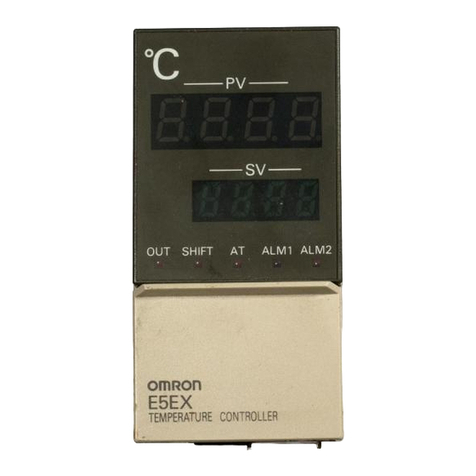
①PV: under working mode, display sensor 1 Temperature; under setting mode, display menu code.②SV: under working mode, display sensor 2 Temperature; under setting mode, display setting value.③SET key: press SET key for 3 seconds to enter setting.④SAV key: during the setting process, press SAV keyto save and exit setting.⑤INCREASE key: under setting mode, pressINCREASE key to increase value.⑥DECREASE key: under setting mode, pressDECREASE key to decrease value.⑦Indicator 1: the lights are on when outlet 1 is turned on.⑧Indicator 2:the lights are on when outlet 2 is turned on.⑨LED1-L: the light is on if outlet 1 is set for HEATING.⑩LED1-R: the light is on if outlet 1 is set for COOLING.⑪LED2-L: the light is on if outlet 2 is set for HEATING.⑫LED2-R: the light is on if outlet 2 is set for COOLING.1. Keys Instruction2. Setup InstructionWhen the controller is power on or working, press SETkey for over 3 seconds to enter setting mode, PV window displays the first menu code “CF”, while SV window displays according setting value. Press SET key to go to next menu, press INCREASE key or DECREASE key to set current parameter value. To simple setup, just need to set values for CF, 1on, 1oF, 2on, 2oF. C and F are the temp units; 1on/2on are the ON-point temp(start/turn on temp); 1oF/2oF are the OFF-point temp(stop/turn off temp), they are also the target temps.After setup done, press SAV key to save the settings and return to normal temperature display mode. During setting, if there is no operation for 30 seconds, the system will save the settings and return to normal temperature display mode. PY-20TTWebsite: www.pymeter.comEmail: support@pymeter.comOUT 2OUT 1
SETSAVPVSV
①②③④⑤⑥⑦⑧。。。。。。⑨⑩⑫⑪
on
off
on
offoff
on
OFF-pointON-pointtemptimeHeating DeviceONOFFONOFFONOFFheatingHigh limit(target temp)Low limit(start temp)1. For heating device, turn ON at Low temp and turn OFF at Hightemp. MUST set ON-point Temp < (lower than) OFF-point Temp;It will NOT work properly for heating if set ON-point Temp > = OFF-point Temp.2. After plug in, if current temp is lower than target temp (OFF- point), outlets turn on for heating till temp reaches OFF-point.3. After heating device is turn off, temp will auto fall down in thecold environment, outlets will not turn on until temp reaches ON-point.3. Use for heating device(1oF, 2oF)(1on, 2on)
on
off
on
On-pointOFF-pointtemptimeCooling DeviceONOFFONOFFONOFFcoolingHigh limit(start temp)Low limit(target temp)1. For cooling device, turn ON at High temp and turn OFF at Lowtemp. MUST set ON-point Temp > (higher than) OFF-point Temp;It will NOT work properly for cooling if set ON-point Temp < = OFF-point Temp.2. After plug in, if current temp is higher than target temp (OFF- point), outlets turn on for cooling till temp reaches OFF-point.3. After cooling device is turn off, temp will auto rise up in the hotenvironment, outlets will not turn on until temp reaches ON-point.4. Use for cooling device(1on, 2on)(1oF, 2oF)1. None controller can keep temp always at target temp, tonarrow down the temp range, please set ON-point closerto OFF-point(target temp).2. Each outlet supports Heating/Cooling mode.Note:
off
on
off