manuals.online logo
Brands
  1. Home
  2. •
  3. Brands
  4. •
  5. Qtx
  6. •
  7. Relay
  8. •
  9. Qtx RP12 User manual

Qtx RP12 User manual

Popular Relay manuals by other brands

Woodward BU1-DC2 manual

Woodward

Woodward BU1-DC2 manual

ABB SSR32 product manual

ABB

ABB SSR32 product manual

Siemens SIRIUS 3UG4633 operating instructions

Siemens

Siemens SIRIUS 3UG4633 operating instructions

Siemens SIRIUS 3TK2824 A.20 Series Original operating instructions

Siemens

Siemens SIRIUS 3TK2824 A.20 Series Original operating instructions

Shelly Pro Series user manual

Shelly

Shelly Pro Series user manual

GE MVAX 11 Technical manual

GE

GE MVAX 11 Technical manual

ABB RELION REF615R manual

ABB

ABB RELION REF615R manual

Kemo Electronic B197 quick guide

Kemo Electronic

Kemo Electronic B197 quick guide

Seg MRM3 manual

Seg

Seg MRM3 manual

Basler BE1-700C manual

Basler

Basler BE1-700C manual

CD Automation REVEX 2PH 280A user manual

CD Automation

CD Automation REVEX 2PH 280A user manual

ABB SPAJ 142 C User manual and technical description

ABB

ABB SPAJ 142 C User manual and technical description

Ruelco 1S04 Operation manual

Ruelco

Ruelco 1S04 Operation manual

Basler V3E Z1P B2C1F instruction manual

Basler

Basler V3E Z1P B2C1F instruction manual

GE DGP instruction manual

GE

GE DGP instruction manual

Kyongbo Electronics GDR-D01 user manual

Kyongbo Electronics

Kyongbo Electronics GDR-D01 user manual

Eaton easyE4 series Application note

Eaton

Eaton easyE4 series Application note

Siemens BD2-AK03X/FS Series installation instructions

Siemens

Siemens BD2-AK03X/FS Series installation instructions

manuals.online logo
manuals.online logoBrands
  • About & Mission
  • Contact us
  • Privacy Policy
  • Terms and Conditions

Copyright 2025 Manuals.Online. All Rights Reserved.

www.avsl.com 154.113UK User Manual
RP12
12-Channel DMX Relay Pack
Item ref: 154.113UK
User Manual
Caution: Please read this manual carefully before operating
Damage caused by misuse is not covered by the warranty
The 12CH DMX RELAY PACK can be controlled by DMX 512 console. Each output socket is controlled individually by one
relay. It can be widely applied to entertainment hall, stage, social club and indoor building decoration.
Front view:
Rear view:
- LED digital display for DMX addressing and work mode setting
- universal DMX512 (1990) multiplexed digital control
- DMX and Stand Alone operation modes
There are two modes of operation:
DMX: Either: 1, 2, 3, 6 or 12 channel.
Manual control mode.
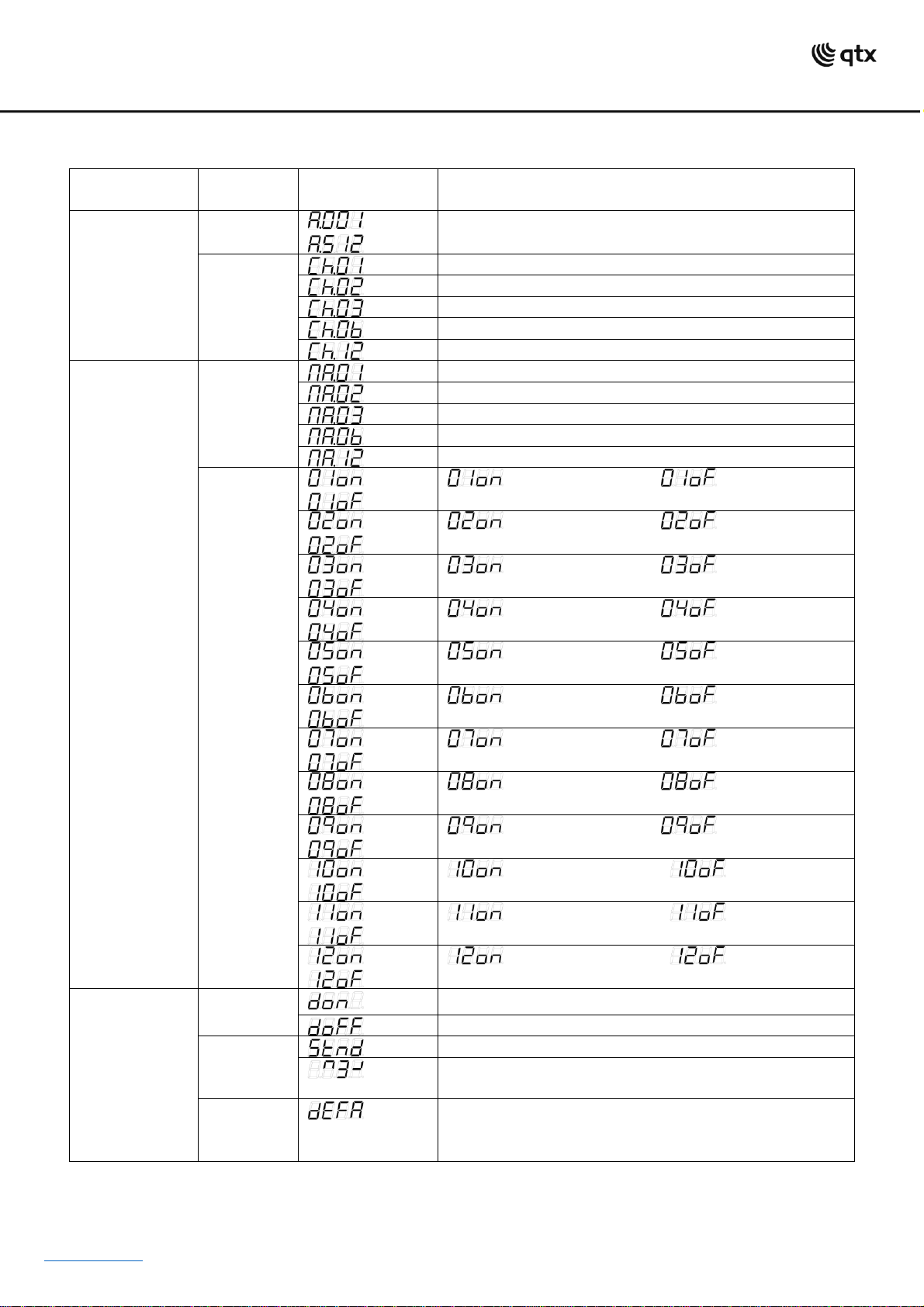
Each mode can be selected by first pressing the MODE button followed by the UP / DOWN buttons and SET to confirm.
Each of the modes is displayed below:
www.avsl.com 154.113UK User Manual
Control Panel Menu
MODE manual
SET UP
manual
UP/DOWN
manual
instruction
DMX MODE
Address
~
Sets the DMX starting address
DMX
Channels
set
The unit occupies 1 channels
The unit occupies 2 channels
The unit occupies 3 channels
The unit occupies 6 channels
The unit occupies 12 channels
MANUAL
CONTROL
MODE
Manual
Channels
set
12 output sockets occupy 1 channel
12 output sockets occupy 2 channels
12 output sockets occupy 3 channels
12 output sockets occupy 6 channels
12 output sockets occupy 12 channels
Manual
Channels
Open/
close
/
:set channel 1 open :set channel 1
close
/
:set channel 2 open :set channel 2
close
/
:set channel 3 open :set channel 3
close
/
:set channel 4 open :set channel 4
close
/
:set channel 5 open :set channel 5
close
/
:set channel 6 open :set channel 6
close
/
:set channel 7 open :set channel 7
close
/
:set channel 8 open :set channel 8
close
/
:set channel 9 open :set channel 9
close
/
:set channel 10 open :set channel 10
close
/
:set channel 11 open :set channel 11
close
/
:set channel 12 open :set channel 12
close
OTHER
MODE
Display
on/off
LED digital tube display always on
LED digital tube display off
Display
normal/
inversed
LED digital tube display normal
LED digital tube display inversed
Initializatio
n
mode
Initialize the unit at the extra factory setting

www.avsl.com 154.113UK User Manual
DMX mode
You can control devices individually via the sliders on your DMX-controller. Each of the values is
listed below
:1 channel mode
CH No.
DMX value
Function
CH1
000~010
CLOSE(No.1- 12 OUTPUT SOCKET)
011~255
OPEN(No.1-12 OUTPUT SOCKET)
:2 channels mode
CH No.
DMX value
Function
CH1
000~010
CLOSE(No.1-6 OUTPUT SOCKET)
011~255
OPEN(No.1-6 OUTPUT SOCKET)
CH2
000~010
CLOSE(No.7-12 OUTPUT SOCKET)
011~255
OPEN(No.7-12 OUTPUT SOCKET)
:3 channels mode
CH No.
DMX value
Function
CH1
000~010
CLOSE(No.1-4 OUTPUT SOCKET)
011~255
OPEN(No.1-4 OUTPUT SOCKET)
CH2
000~010
CLOSE(No.5-8 OUTPUT SOCKET)
011~255
OPEN(No.5-8 OUTPUT SOCKET)
CH3
000~010
CLOSE(No.9-12 OUTPUT SOCKET)
011~255
OPEN(No.9-12 OUTPUT SOCKET)
:6 channels mode
CH No.
DMX value
Function
CH1
000~010
CLOSE(No.1-2 OUTPUT SOCKET)
011~255
OPEN(No.1-2 OUTPUT SOCKET)
CH2
000~010
CLOSE(No.3-4 OUTPUT SOCKET)
011~255
OPEN(No.3-4 OUTPUT SOCKET)
CH3
000~010
CLOSE(No.5-6 OUTPUT SOCKET)
011~255
OPEN(No.5-6 OUTPUT SOCKET)
CH4
000~010
CLOSE(No.7-8 OUTPUT SOCKET)
011~255
OPEN(No.7-8 OUTPUT SOCKET)
CH5
000~010
CLOSE(No.9-10 OUTPUT SOCKET)
011~255
OPEN(No.9-10 OUTPUT SOCKET)
CH6
000~010
CLOSE(No.11-12 OUTPUT SOCKET)
011~255
OPEN(No.11-12 OUTPUT SOCKET)
www.avsl.com 154.113UK User Manual
:12 channels mode
CH No.
DMX value
Function
CH1
000~010
CLOSE(No.1 OUTPUT SOCKET)
011~255
OPEN(No.1 OUTPUT SOCKET)
CH2
000~010
CLOSE(No.2 OUTPUT SOCKET)
011~255
OPEN(No.2 OUTPUT SOCKET)
CH3
000~010
CLOSE(No.3 OUTPUT SOCKET)
011~255
OPEN(No.3 OUTPUT SOCKET)
CH4
000~010
CLOSE(No.4 OUTPUT SOCKET)
011~255
OPEN(No.4 OUTPUT SOCKET)
CH5
000~010
CLOSE(No.5 OUTPUT SOCKET)
011~255
OPEN(No.5 OUTPUT SOCKET)
CH6
000~010
CLOSE(No.6 OUTPUT SOCKET)
011~255
OPEN(No.6 OUTPUT SOCKET)
CH7
000~010
CLOSE(No.7 OUTPUT SOCKET)
011~255
OPEN(No.7 OUTPUT SOCKET)
CH8
000~010
CLOSE(No.8 OUTPUT SOCKET)
011~255
OPEN(No.8 OUTPUT SOCKET)
CH9
000~010
CLOSE(No.9 OUTPUT SOCKET)
011~255
OPEN(No.9 OUTPUT SOCKET)
CH10
000~010
CLOSE(No.10 OUTPUT SOCKET)
011~255
OPEN(No.10 OUTPUT SOCKET)
CH11
000~010
CLOSE(No.11 OUTPUT SOCKET)
011~255
OPEN(No.11 OUTPUT SOCKET)
CH12
000~010
CLOSE(No.12 OUTPUT SOCKET)
011~255
OPEN(No.12 OUTPUT SOCKET)
Specifications
Power supply
230Vac, 50Hz
Maximum current input
30A
Maximum current per channel
10A
IEC outputs
12
Dimensions
440 x 205 x 88mm
Weight
3.8kg
This product is classed as Electrical or Electronic equipment and should not be disposed with other household or commercial waste at
the end of its useful life. The goods must be disposed of according to your local council guidelines.
Errors and omissions excepted.
Copyright© 2021 AVSL Group Ltd, Unit 2 Bridgewater Park, AVSL (Europe) Ltd, Unit 3D North Point House,
Taylor Road, Trafford Park, Manchester. M41 7JQ. North Point Bus. Park, New Mallow Road, Cork, Ireland.