manuals.online logo
Brands
  1. Home
  2. •
  3. Brands
  4. •
  5. Quasar
  6. •
  7. LED TV
  8. •
  9. Quasar SQ4800U User manual

Quasar SQ4800U User manual

Other manuals for SQ4800U

1

Other Quasar LED TV manuals

Quasar SQ240W User manual

Quasar

Quasar SQ240W User manual

Quasar SQ4001 User manual

Quasar

Quasar SQ4001 User manual

Quasar SQ2400 User manual

Quasar

Quasar SQ2400 User manual

Quasar SQ4005M User manual

Quasar

Quasar SQ4005M User manual

Quasar SQ4044 User manual

Quasar

Quasar SQ4044 User manual

Quasar SQ4800U User manual

Quasar

Quasar SQ4800U User manual

Quasar SQ3208 User manual

Quasar

Quasar SQ3208 User manual

Quasar SQ5003 User manual

Quasar

Quasar SQ5003 User manual

Popular LED TV manuals by other brands

Samsung UE65C8000XK user manual

Samsung

Samsung UE65C8000XK user manual

VESTEL SATELLITE 22PF5045 operating instructions

VESTEL

VESTEL SATELLITE 22PF5045 operating instructions

Tokai TTE-48B4444K user manual

Tokai

Tokai TTE-48B4444K user manual

LG 55UR640S Easy setup guide

LG

LG 55UR640S Easy setup guide

LG 43UF680T-TA owner's manual

LG

LG 43UF680T-TA owner's manual

Bush DLED55UHDSFIRE instruction manual

Bush

Bush DLED55UHDSFIRE instruction manual

Logik L24FED12 instruction manual

Logik

Logik L24FED12 instruction manual

Samsung QE65QN85CATXXN user manual

Samsung

Samsung QE65QN85CATXXN user manual

Samsung 7 Series user manual

Samsung

Samsung 7 Series user manual

Insignia NS-42D240A13 brochure

Insignia

Insignia NS-42D240A13 brochure

Philips 32PFL3207H/12 Specifications

Philips

Philips 32PFL3207H/12 Specifications

LG 49UB850V owner's manual

LG

LG 49UB850V owner's manual

TCL Roku TV 55C807 user guide

TCL

TCL Roku TV 55C807 user guide

LG 43UF690V-ZC manual

LG

LG 43UF690V-ZC manual

Samsung UN50ES6900 Product highlights

Samsung

Samsung UN50ES6900 Product highlights

Philips 55PUT7805 user manual

Philips

Philips 55PUT7805 user manual

Vidao 58V850R user manual

Vidao

Vidao 58V850R user manual

LG 55UF671V owner's manual

LG

LG 55UF671V owner's manual

manuals.online logo
manuals.online logoBrands
  • About & Mission
  • Contact us
  • Privacy Policy
  • Terms and Conditions

Copyright 2025 Manuals.Online. All Rights Reserved.

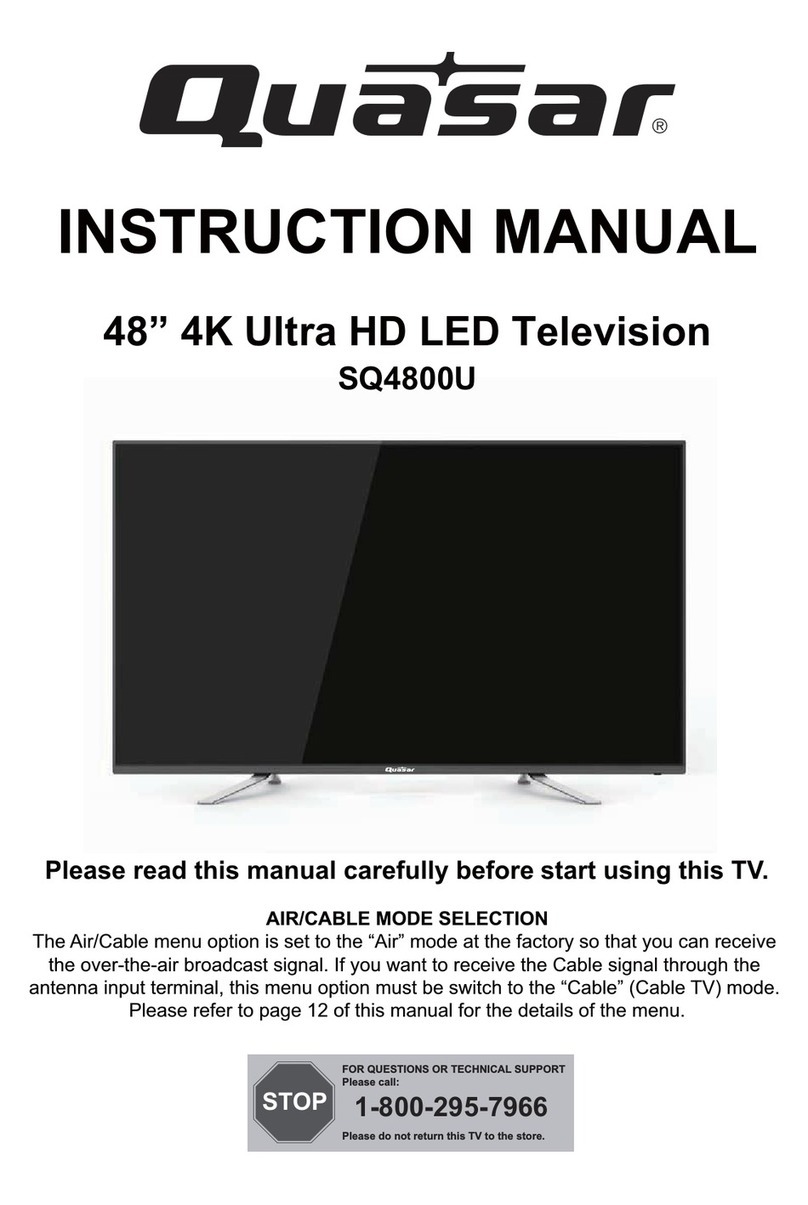
48” 4K Ultra HD LED Television
SQ4800U
INSTRUCTION MANUAL
Please read this manual carefully before start using this TV.
AIR/CABLE MODE SELECTION
The Air/Cable menu option is set to the “Air” mode at the factory so that you can receive
the over-the-air broadcast signal. If you want to receive the Cable signal through the
antenna input terminal, this menu option must be switch to the “Cable” (Cable TV) mode.
Please refer to page 12 of this manual for the details of the menu.
STOP
FOR QUESTIONS OR TECHNICAL SUPPORT
Please call:
Please do not return this TV to the store.
1-800-295-7966
All manuals and user guides at all-guides.com
all-guides.com
Contents
-1-
Safety and warnings...................................................................................... 2-3
Introduction................................................................................... ..............4
Installation...................................................................................................5-7
.................................................................................................. 8
Remote Control............................................................................ ...............9
Operation.....................................................................................................10-13
Trouble Shooting..........................................................................................14
Wall Mount
All manuals and user guides at all-guides.com
-2-
SAFETY AND WARNINGS
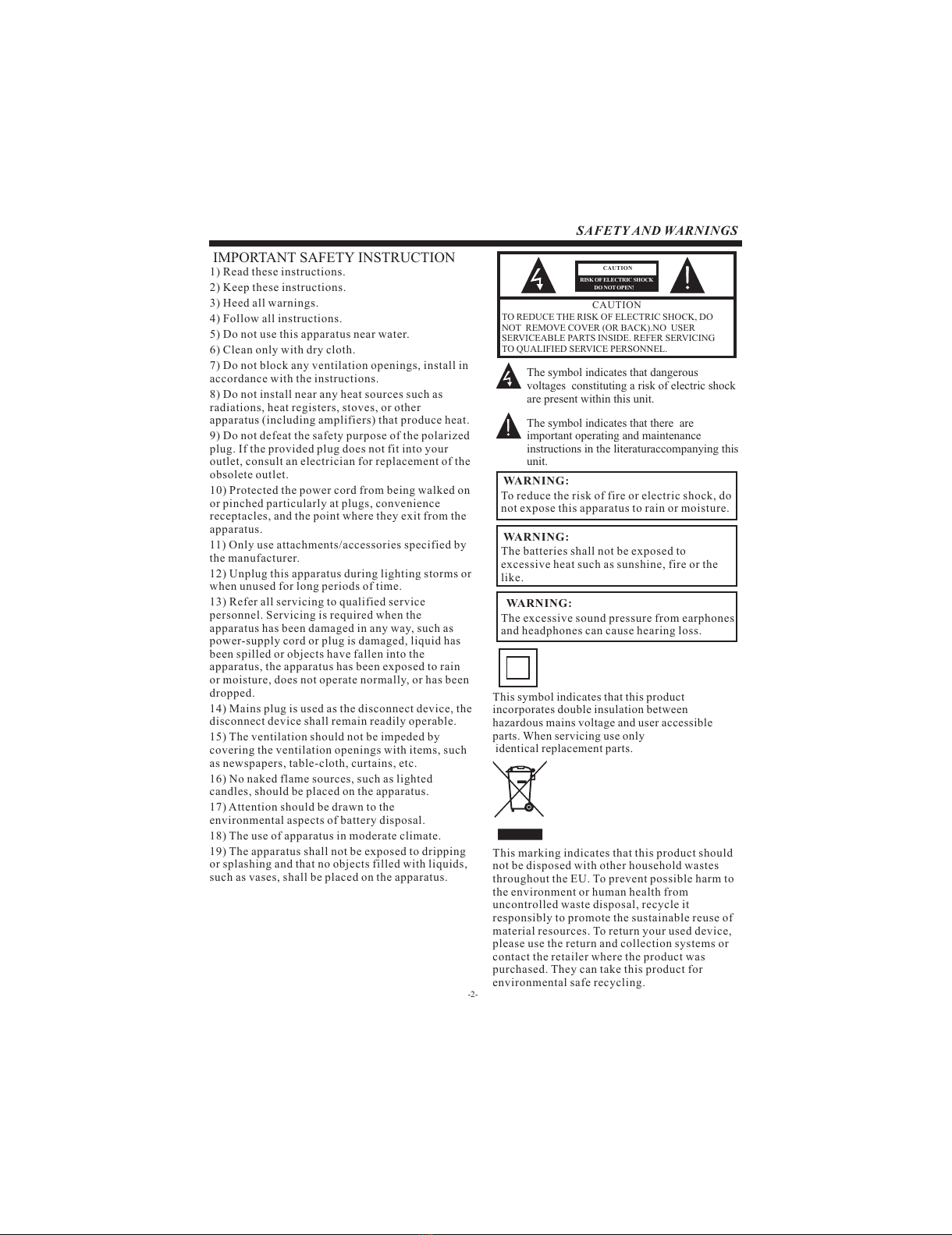
IMPORTANT SAFETY INSTRUCTION
TO REDUCE THE RISK OF ELECTRIC SHOCK, DO
NOT REMOVE COVER (OR BACK).NO USER
SERVICEABLE PARTS INSIDE. REFER SERVICING
TO QUALIFIED SERVICE PERSONNEL.
RISK OF ELECTRIC SHOCK
DO NOT OPEN!
CAUTION
CAUTION
The symbol indicates that dangerous
voltages constituting a risk of electric shock
are present within this unit.
The symbol indicates that there are
important operating and maintenance
instructions in the literaturaccompanying this
unit.
To reduce the risk of fire or electric shock, do
not expose this apparatus to rain or moisture.
WARNING:
1) Read these instructions.
2) Keep these instructions.
3) Heed all warnings.
4) Follow all instructions.
5) Do not use this apparatus near water.
6) Clean only with dry cloth.
7) Do not block any ventilation openings, install in
accordance with the instructions.
8) Do not install near any heat sources such as
radiations, heat registers, stoves, or other
apparatus (including amplifiers) that produce heat.
9) Do not defeat the safety purpose of the polarized
plug. If the provided plug does not fit into your
outlet, consult an electrician for replacement of the
obsolete outlet.
10) Protected the power cord from being walked on
or pinched particularly at plugs, convenience
receptacles, and the point where they exit from the
apparatus.
11) Only use attachments/accessories specified by
the manufacturer.
12) Unplug this apparatus during lighting storms or
when unused for long periods of time.
13) Refer all servicing to qualified service
personnel. Servicing is required when the
apparatus has been damaged in any way, such as
power-supply cord or plug is damaged, liquid has
been spilled or objects have fallen into the
apparatus, the apparatus has been exposed to rain
or moisture, does not operate normally, or has been
dropped.
14) Mains plug is used as the disconnect device, the
disconnect device shall remain readily operable.
15) The ventilation should not be impeded by
covering the ventilation openings with items, such
as newspapers, table-cloth, curtains, etc.
16) No naked flame sources, such as lighted
candles, should be placed on the apparatus.
17) Attention should be drawn to the
environmental aspects of battery disposal.
18) The use of apparatus in moderate climate.
19) The apparatus shall not be exposed to dripping
or splashing and that no objects filled with liquids,
such as vases, shall be placed on the apparatus.
This symbol indicates that this product
incorporates double insulation between
hazardous mains voltage and user accessible
parts. When servicing use only
identical replacement parts.
This marking indicates that this product should
not be disposed with other household wastes
throughout the EU. To prevent possible harm to
the environment or human health from
uncontrolled waste disposal, recycle it
responsibly to promote the sustainable reuse of
material resources. To return your used device,
please use the return and collection systems or
contact the retailer where the product was
purchased. They can take this product for
environmental safe recycling.
The batteries shall not be exposed to
excessive heat such as sunshine, fire or the
like.
WARNING:
The excessive sound pressure from earphones
and headphones can cause hearing loss.
WARNING:

All manuals and user guides at all-guides.com
-3-
High voltages are used in the operation of this television
receiver. Do not remove the cabinet back from your set.
Refer servicing to qualified service personnel.
SAFETY AND WARNINGS
To prevent fire or electrical shock hazard, do not expose
the television receiver to rain or moisture.
Do not drop or push objects into the television cabinet
slots or openings. Never spill any kind of liquid on the
television receiver.
Do not block the ventilation holes in the back cover.
Adequate ventilation is essential to prevent failure of
electrical components.
Do not trap the power supply cord under the television
receiver.
Never stand on, lean on, or suddenly push the television or
its stand. You should pay special attention to children.
Serious injury may result if it falls.
Do not place your television on an unstable cart, stand,
shelf or table. Serious injury to an individual , and damage
to the television, may result if it falls.
When the television receiver is not used for an
extended period of time, it is advisable to disconnect
the AC power cord from the AC outlet.
Avoid exposing the television receiver to direct sunlight
and other sources of heat. Do not stand the television
receiver directly on other products which give off heat,
e.g. video cassette players and audio amplifiers. Do not
place naked flame sources, such as lighted candles on
the television.
Dim:515*320mm(不包括底座)
If the television is to be built into a compartment or similar
enclosure, the minimum distances must be maintained. Heat
build-up can reduce the service life of your television, and
can also be dangerous.
All manuals and user guides at all-guides.com
-4-
INTRODUCTION
Main features Accessories
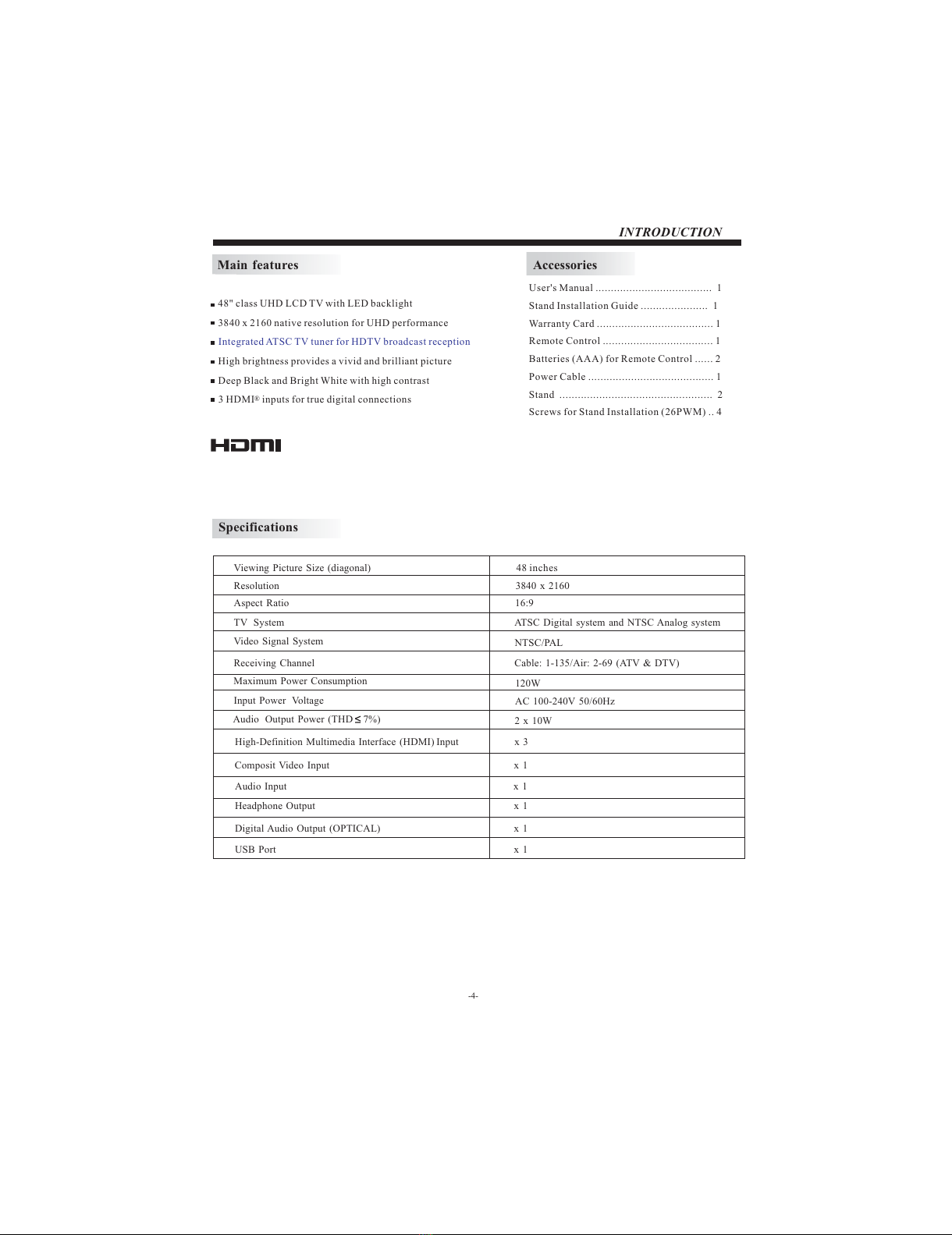
48" class UHD LCD TV with LED backlight
3840 x 2160 native resolution for UHD performance
High brightness provides a vivid and brilliant picture
Deep Black and Bright White with high contrast
3 HDMI® inputs for true digital connections
Integrated ATSC TV tuner for HDTV broadcast reception
User's Manual ...................................... 1
Stand Installation Guide ...................... 1
Warranty Card ...................................... 1
Remote Control .................................... 1
Batteries (AAA) for Remote Control ...... 2
Power Cable ......................................... 1
Stand .................................................. 2
Screws for Stand Installation (26PWM) .. 4
Specifications
Resolution
Aspect Ratio
TV System
Video Signal System
Receiving Channel
Input Power Voltage
Maximum Power Consumption
Composit Video Input
Viewing Picture Size (diagonal)
Audio Output Power (THD 7%)
2 x 10W
High-Definition Multimedia Interface (HDMI) Input x 3
x 1
3840 x 2160
16:9
120W
NTSC/PAL
Cable: 1-135/Air: 2-69 (ATV & DTV)
48 inches
AC 100-240V 50/60Hz
ATSC Digital system and NTSC Analog system
Audio Input
Headphone Output
Digital Audio Output (OPTICAL)
USB Port
x 1
x 1
x 1
x 1
All manuals and user guides at all-guides.com
INSTALLATION
KEYBOARD
-5-
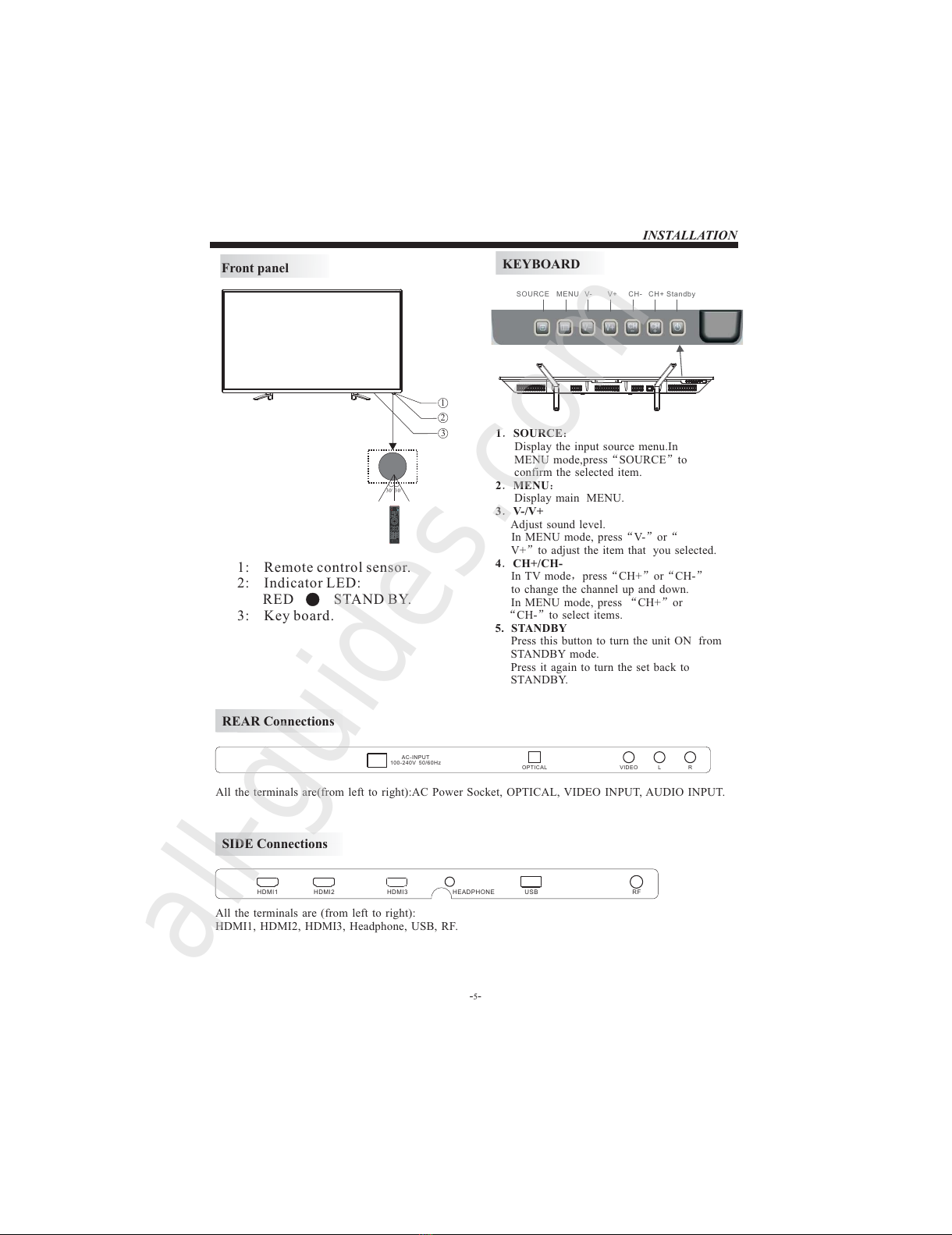
Front panel
1: Remote control sensor.
2: Indicator LED:
RED STAND BY.
3: Key board.
REAR Connections
SIDE Connections
1.SOURCE:
Display the input source menu.In
MENU mode,press“SOURCE”to
confirm the selected item.
2.MENU:
Display main MENU.
3.V-/V+
Adjust sound level.
In MENU mode, press“V-”or“
V+”to adjust the item that you selected.
4.CH+/CH-
In TV mode,press“CH+”or“CH-”
to change the channel up and down.
In MENU mode, press “CH+”or
“CH-”to select items.
5. STANDBY
Press this button to turn the unit ON from
STANDBY mode.
Press it again to turn the set back to
STANDBY.
30 30
3
1
2
SOURCE MENU V- V+ CH- CH+ Standby
All the terminals are(from left to right):AC Power Socket, OPTICAL, VIDEO INPUT, AUDIO INPUT.
All the terminals are (from left to right):
HDMI1, HDMI2, HDMI3, Headphone USB, RF
, .
HDMI1 HDMI2 HDMI3 HEADPHONE USB RF
VIDEO L ROPTICAL
AC-INPUT
100-240V 50/60Hz
All manuals and user guides at all-guides.com
all-guides.com
ANTENNA
INSTALLATION
-6-
PRESET MODE (HDMI)
1
2
3
800*600
1024*768
60
60
37.88
48.36
RESOLUTION V.Freq.(Hz) H.Freq.(KHz)
1360*768 60 47.7
4
1280*768 60 47.3
5
1920*1080 60 67.5
ANTENNA
Note:
Aerial connections:F connector.
Input impendance:75 unbalanced.
PLUG
75Ω CABLE
ANTENNA OR CABLE TV
ADAPTER (NOT SUPPLIED)
TWIN-LEADER FEEDER (300Ω)
OUTDOOR OR INDOOR ANTENNA
All manuals and user guides at all-guides.com
INSTALLATION
-7-
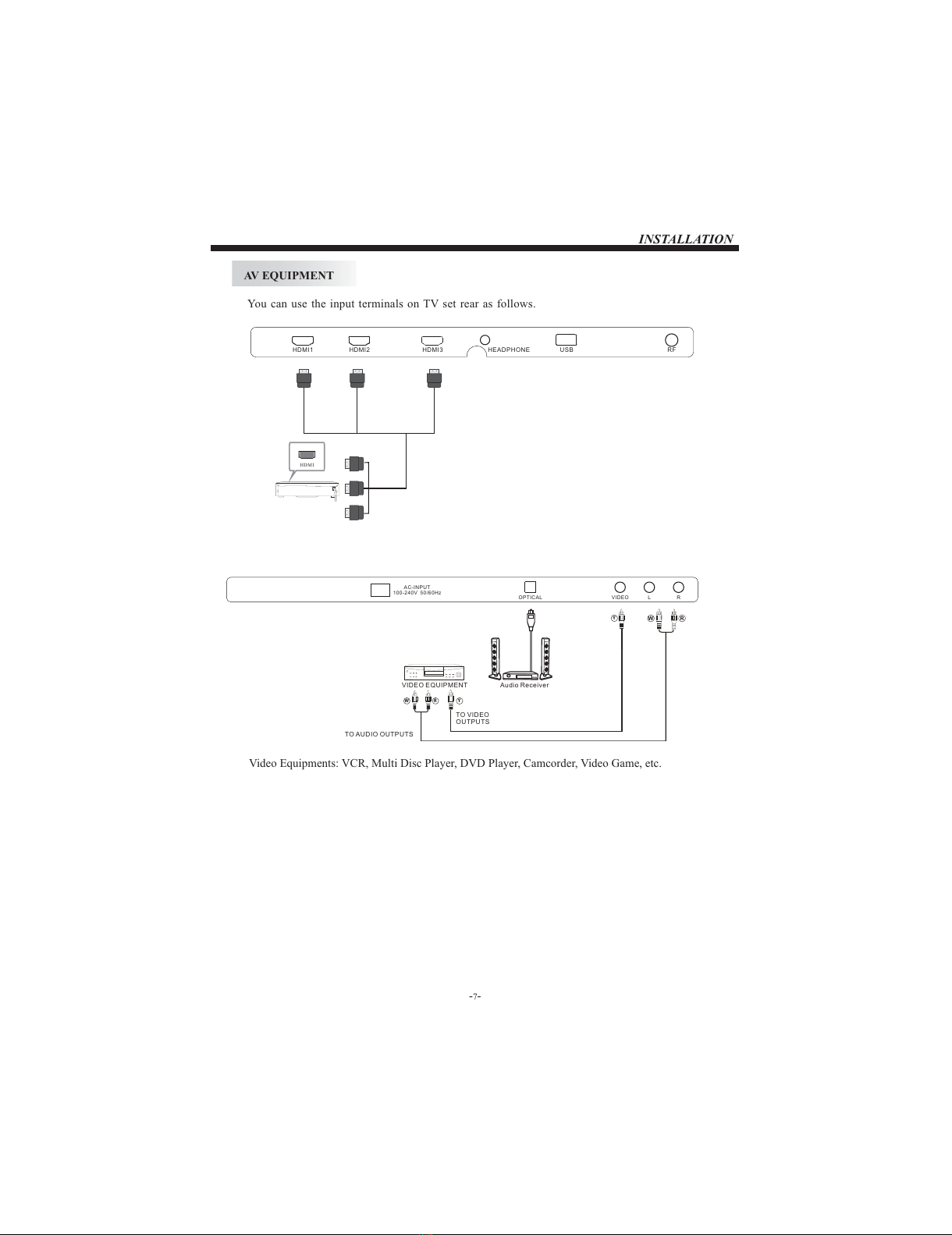
AV EQUIPMENT
You can use the input terminals on TV set rear as follows.
HDMI
HDMI1 HDMI2 HDMI3 HEADPHONE USB RF
Video Equipments: VCR, Multi Disc Player, DVD Player, Camcorder, Video Game, etc.
W R
VIDEO L ROPTICAL
AC-INPUT
100-240V 50/60Hz
Audio Receiver
Y
W R
TO AUDIO OUTPUTS
TO VIDEO
OUTPUTS
Y
VIDEO EQUIPMENT
All manuals and user guides at all-guides.com
Wall Mount
Dimensions for Mounting Hole Pattern
A wall mount kit (purchased separately) would allow you to mount your Quasar
TV on the wall. For detailed information on installing the wall mount, refer
to the instructions provided by the wall mount manufacturer. It is strongly
recommended to contact a technician for professional assistance for wall mount
installation. is not responsible for any damagQuasar e to the product or injury to
yourself or others resulting from the wall-mounting.
- This TV is compatible with a 400 mm x 200 mm mounting hole pattern.Quasar
- Do not mount your TV at more than a 15 degree tilt.Quasar
- Always use two people to mount the TV to a wall.
- Do not install your Wall Mount Kit while your TV is turned on. It may result in
personal injury due to electric shock.
- screws are required for installing the wall mount bracket to 4 pcs of type M6
your TV. Do not use screws that are longer than 10 mm. Screws that Quasar
are too long may cause damage to the inside of the TV set.
- Do not fasten the screws too tight for this may damage the TV or cause the
TV to fall, resulting in personal injury. is not liable for these kinds of Quasar
incidents.
Instruction for Wall Mount
-8-
400
200
All manuals and user guides at all-guides.com
-9-
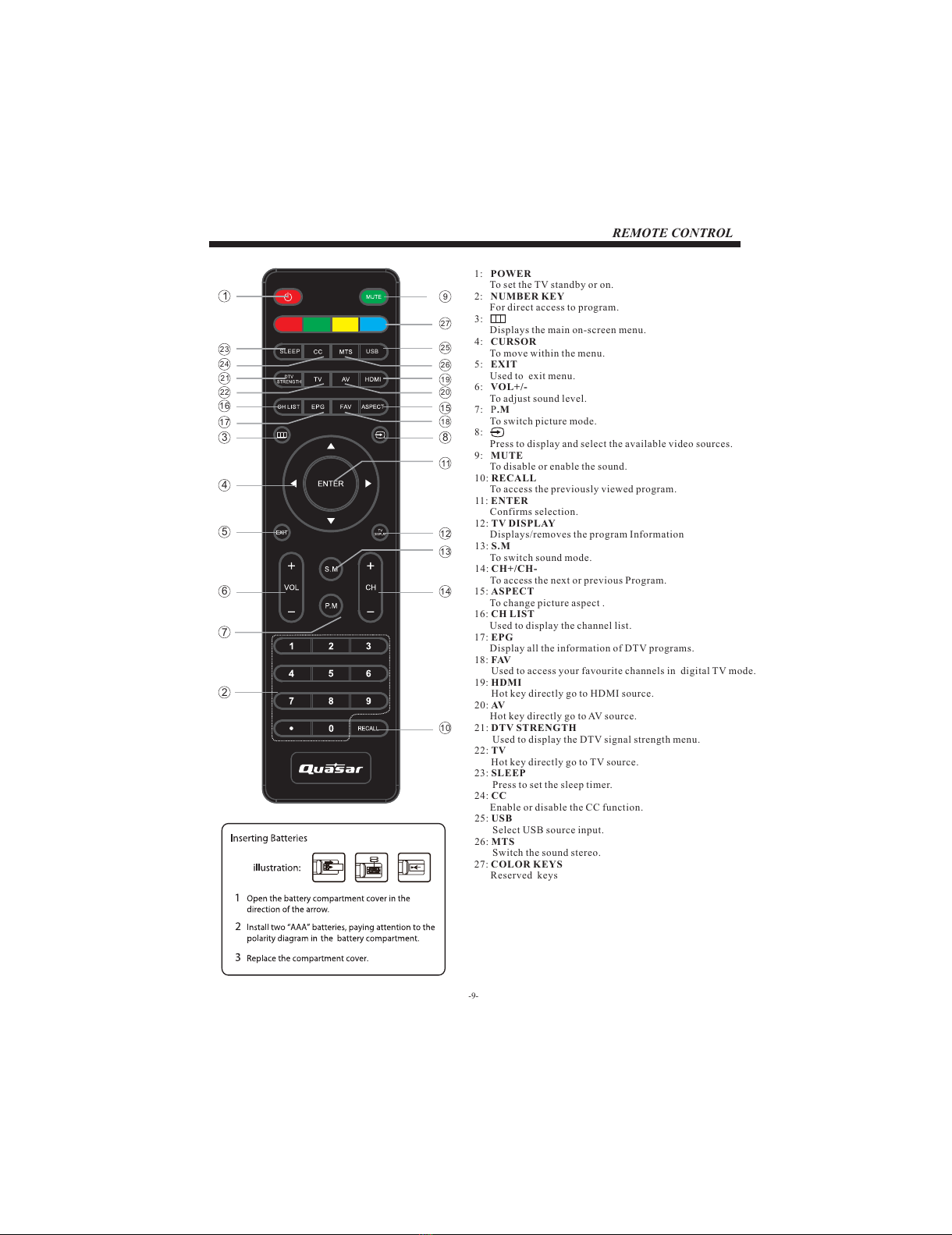
REMOTE CONTROL
1: POWER
To set the TV standby or on.
2: NUMBER KEY
For direct access to program.
3:
Displays the main on-screen menu.
4: CURSOR
To move within the menu.
5: EXIT
Used to exit menu.
6: VOL+/-
To adjust sound level.
7: P.M
To switch picture mode.
8:
Press to display and select the available video sources.
9: MUTE
To disable or enable the sound.
10: RECALL
To access the previously viewed program.
11: ENTER
Confirms selection.
12: TV DISPLAY
Displays/removes the program Information
13: S.M
To switch sound mode.
14: CH+/CH-
To access the next or previous Program.
15: ASPECT
To change picture aspect .
16: CH LIST
Used to display the channel list.
17: EPG
Display all the information of DTV programs.
18: FAV
Used to access your favourite channels in digital TV mode.
19: HDMI
Hot key directly go to HDMI source.
20: AV
Hot key directly go to AV source.
21: DTV STRENGTH
Used to display the DTV signal strength menu.
22: TV
Hot key directly go to TV source.
23: SLEEP
Press to set the sleep timer.
24: CC
Enable or disable the CC function.
25: USB
Select USB source input.
26: MTS
Switch the sound stereo.
27: COLOR KEYS
Reserved keys
9
14
13
10
12
11
15
18
20
19
25
26
1
2
4
5
6
7
24
23
21
22
16
17
27
3 8
SLEEP USB
All manuals and user guides at all-guides.com