Rocktron HUSH Ultra User manual

1
Instruction Manual
May be covered by one or more of the following: U.S. Patents #4538297, 4647876, 4696044, 4745309,
4881047, 4893099, 5124657, 5263091, 5268527, 5319713, 5333201, 5402498 and 5493617.
Other patents pending. Foreign patents pending.
®
HUSH ® is a registered trademark of GHS Corporation

2
Copyright © 2009 GHS Corporation
All Rights Reserved.
Your HUSH® Ultra noise reduction system has been tested and complies with the following Stan-
dards and Directives as set forth by the European Union:
Council Directive(s): 89/336/EEC Electromagnetic Compatibility
Standard(s): EN55013, EN50082-1
This means that this product has been designed to meet stringent guidelines on how much RF
energy it can emit, and that it should be immune from other sources of interference when properly
used. Improper use of this equipment could result in increased RF emissions, which may or may
not interfere with other electronic products.
To insure against this possibility, always use good shielded cables for all audio input and output
connections. Also, bundle audio cables separately from the AC power cables. These steps will help
insure compliance with the Directive(s).
For more information about other Rocktron products, please see your local dealer or one of our
importers closest to you (listed on the enclosed warranty sheet).

3
CONTENTS
1. Introduction 4
2. HUSH Ultra Front Panel 6
3. HUSH Ultra Back Panel 7
4. Quick Start 8
5. HUSH & GATE Threshold Controls 9
6. System Connections 10
7. HUSH Description 14
8. HUSH Ultra Edit Mode (Functions & Parameters) 16
� TITLE EDIT Function 17
� TRUE BYPASS Function 17
� HUSH® Function 18
� GLOBAL Function 19
� MIDI CTRLINK Function 21
� PRESET MAPPING Function 22
� MIDI DUMP/LOAD Function 22
� FUNCTION & PARAMETER, RANGE Listings 23
9. Operating the HUSH Ultra 24
� Display Description 24
� Selecting a preset 25
� Changing preset parameters: 26
� Storing changed preset parameters: 27
� Title Edit 28
� Preset Mapping 30
� MIDI DUMP/LOAD 31
�MIDIIN 33
� MIDI THRU/OUT 33
� Phantom Power 34
10. HUSH Ultra Specifications 35

4
1. Introduction
Congratulations on your purchase of the Rocktron HUSH® Ultra.
The HUSH Ultra is the ultimate noise reducing, eliminating and exterminating
processor. The HUSH Ultra’s innovative digital stereo noise exterminator provides
two channels of the same world renowned professional noise reduction patented by
Rocktron and used for years in thousands and thousands of guitar rigs and recording
studios! The HUSH Ultra features True Bypass, an LCD display and programmable
presets with MIDI control allowing you to tailor your HUSH settings on individual
presets to suit your needs. The HUSH Ultra provides BOTH 1/4” and XLR inputs and
outputs, and is easy to setup and easy to use.
Wipe out noise, eliminate hiss, crackle and other noise problems with the very best
noise reduction circuitry available today!

5
OPERATING PRECAUTIONS
NOTE: IT IS VERY IMPORTANT THAT YOU READ THIS SECTION TO
PROVIDE YEARS OF TROUBLE FREE USE. THIS UNIT REQUIRES CARE-
FUL HANDLING.
All warnings on this equipment and in the operating instructions should be
adhered to and all operating instructions should be followed.
Do not use this equipment near water. Care should be taken so that objects do
not fall and liquids are not spilled into the unit through any openings.
The power cord should be unplugged from the outlet when left unused for a
long period of time.
DO NOT ATTEMPT TO SERVICE THIS EQUIPMENT. THIS EQUIPMENT
SHOULD BE SERVICED BY QUALIFIED PERSONNEL ONLY. DO NOT
MAKE ANY INTERNAL ADJUSTMENTS OR ADDITIONS TO THIS EQUIP-
MENT AT ANY TIME. DO NOT TAMPER WITH INTERNAL ELECTRONIC
COMPONENTS AT ANY TIME. FAILURE TO FOLLOW THESE INSTRUC-
TIONS MAY VOID THE WARRANTY OF THIS EQUIPMENT, AS WELL AS
CAUSING SHOCK HAZARD.
POWER REQUIREMENTS
This unit accepts power from the 9VAC/1.5A adaptor supplied with the unit.
This 9 volt RMS AC voltage is internally processed by a voltage doubler which
generates a bipolar ±15 volts to maintain the headroom and sound quality of
professional, studio quality equipment. Using an external power source such as
this minimizes excessive noise and hum problems often associated with internal
transformers, providing optimal performance for the user.
OPERATING TEMPERATURE
Do not expose this unit to excessive heat. This unit is designed to operate be-
tween 32° F and 104° F (0° C and 40° C). This unit may not function properly
under extreme temperatures.
6
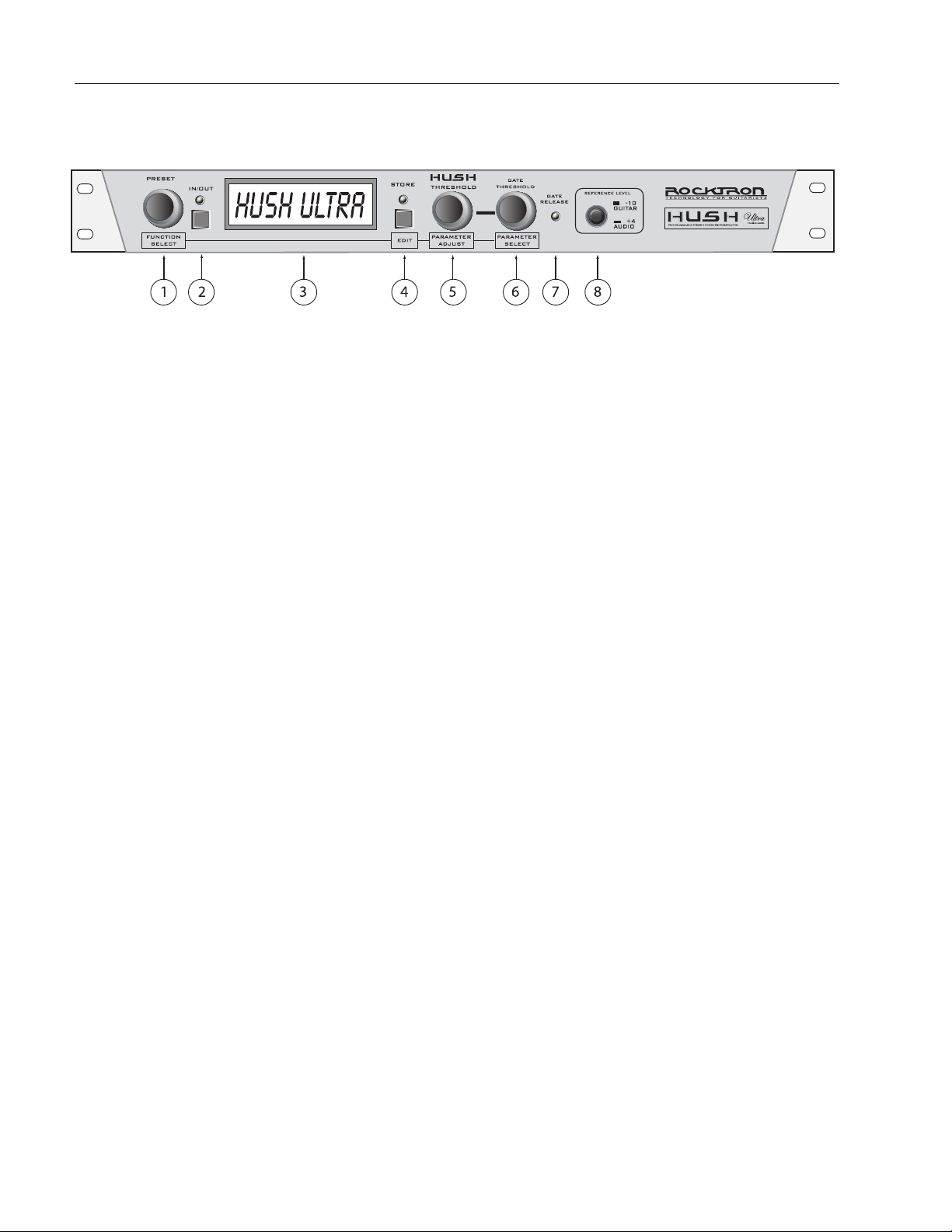
PRESET SELECT/FUNCTION SELECT
Use this knob to select the different presets available within the HUSH Ultra. See section titled "SELECTING A PRESET"
for more information on how to select a preset. When in "EDIT MODE" it is used to select the desired "FUNCTION"
(Title Edit, True, Bypass, HUSH, Global, MIDI CTRLINK, Preset Mapping, MIDI Dump/Load, or Global Restore)
to be altered. See section titled "CHANGING PRESET PARAMETERS" in this manual for more information on the
FUNCTION SELECT control
IN/OUT button & LED
This switch allows for the HUSH Ultra to be bypassed when noise reduction is not required. When lit, the LED indicates
that the HUSH Ultra is currently active in the signal path.
DISPLAY window
All of the HUSH Ultra's presets, functions and parameters, will be displayed in this window depending on what is being
selected or adjusted.
STORE/EDIT button
This button is used to STORE any changes you make to presets. It is also used to put the HUSH Ultra into "PRESET
EDIT" Mode. See PRESET EDIT mode later in this manual for more details on this function.
HUSH THRESHOLD/PARAMETER ADJUST
This control sets the point at which the downward expander and dynamic filter begin to operate. When in "EDIT
MODE" this control is used to ADJUST the selected PARAMETER, within the selected FUNCTION. See section titled
"CHANGING PRESET PARAMETERS" in this manual for more information on the PARAMETER ADJUST control.
GATE THRESHOLD/PARAMETER SELECT
This control is used to determine the level at which the gate will begin to operate. As the input signal drops below this
level, the gate will activate and downward expansion will begin. When in "EDIT MODE" this control is used to SELECT
a parameter with the selected FUNCTION to be altered. See section titled "CHANGING PRESET PARAMETERS" in
this manual for more information on the PARAMETER SELECT control.
GATE RELEASE LED
When lit, the Gate Release LED indicates that the input signal has dropped below the level set by the Gate Threshold
control, thus activating the gate and providing additional downward expansion.
REF switch
This switch determines the sensitivity of the HUSH Ultra. When using the HUSH Ultra with professional audio equip-
ment providing a nominal output level +4dB, it is recommended that the "+4dB" setting on the unit as the Threshold
adjustment will allow you to optimize noise reduction for this reference level.
If the "-10" setting is used and the unit is overdriven, the "+4" setting should be used.
**The -10db setting is recommended for all instrument rigs.
2. HUSH ULTRA Front Panel
1
2
3
4
5
6
7
8
7
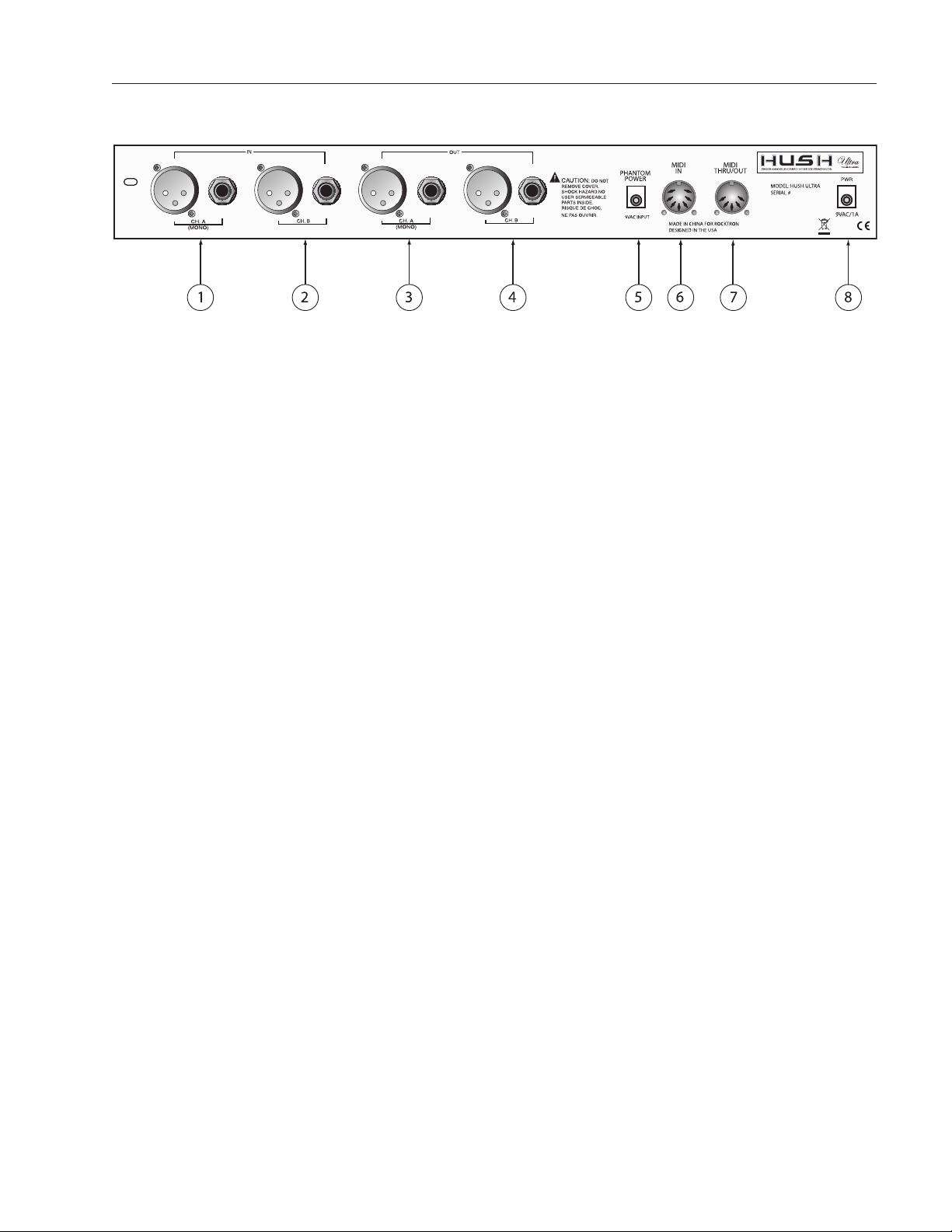
CH. A (MONO) IN jacks
This XLR and ¼" mono jack provide inputs to the left channel of the HUSH Ultra. Use either the XLR
jack or the ¼" jack when connecting, but not both together. When using only one input use the "CH. A
(MONO) XLR or ¼" jack".
CH. B IN jacks
This XLR and ¼" mono jack provide inputs to the right channel of the HUSH Ultra. Use either the XLR
jack or the ¼" jack when connecting, but not both together.
CH. A jacks
This XLR and ¼" mono jack provide the output from the "CH. A (MONO)" channel of the HUSH Ultra.
CH. B jacks
This XLR and ¼" mono jack provide the output from the "CH. B" channel of the HUSH Ultra.
Note: When "CH. A" is used as a single signal source, the signal will be present in both the "CH.
A" and "CH. B" outputs.
PHANTOM POWER jack
This 2.5mm pin jack accepts power from the 9VAC adapter supplied with a Rocktron foot controller (sold
seperately). See section called "PHANTOM POWER" for more information.
MIDI IN jack
Use this jack to plug in your MIDI controller. This jack is a 7 Pin MIDI Jack, however a standard 5 Pin
MIDI Cable can be used. If plugging into a Rocktron MIDI controller such as the All Access,
MIDI Mate or MIDI Xchange, we recommend using the Rocktron RMM900 7-Pin MIDI Cable
(sold separately). Pins 6 and 7 supply phantom power to the Rocktron MIDI controller when
using the RMM900.
MIDI THRU/OUT jack
Use this jack to plug into the first MIDI controllable device in your signal chain.
POWER jack
Plug the included 9VAC adapter into this jack to provide power to the unit. Please follow all
precautions as outlined in this manual and the manuals of the products that are being plugged
into the HUSH Ultra. Failure to follow these precautions may void the warranty.
3. HUSH ULTRA Rear Panel
1
2
3
4
5
6
7
8

8
The HUSH ULTRA default operation settings are:
MIDI CHANNEL = OMNI
PROGRAM CHANGES = ON
PROGRAM MAPPING = OFF
HUSH ACTIVE = IN
PROGRAMMING PRESETS:
1. Choose preset number by turning the PRESET/FUNCTION SELECT Knob or use Midi Controller.
2. Adjust Hush threshold control to eliminate noise and hiss by turning the HUSH THRESHOLD/PARAMETER
SELECT Knob
3. Adjust Gate Threshold by using the GATE THRESHOLD/PARAMETER SELECT knob
***Note: If you want desired preset to be a True Bypass preset press the Bypass button now***
4. Press and release the STORE/EDIT button to save your changes
5. The display will blink “ STORE AT PRESET “
***Note: to cancel the store mode at anytime turn the PARAMETER ADJUST KNOB***
6. Use the PRESET/FUNCTION SELECT knob and pick the destination preset where you would like to save your
changes.
7. Press and release the STORE/EDIT button.
* You must adjust the Hush Threshold or Gate Threshold in order to use the store function. When not in the EDIT
mode if you want to store the current changes to the preset the store button must be pressed within 5 seconds after
the initial change. After 5 secs the HUSH ULTRA will return to the preset name standby mode. To store the changes
simply re-adjust either the Hush Threshold or Gate Threshold and press store.
HUSH Ultra Quick Start

9
HUSH THRESHOLD CONTROL
The front panel HUSH Threshold control determines the minimum input level at which the HUSH filter and
downward expander will begin to operate. Setting this control too high will result in a loss of sustain, as
notes will tend to die out much faster than they should. Conversely, when set too low, the expander will close
too late (if at all) and the noise floor will remain audible
GATE THRESHOLD CONTROL
The other half of the HUSH Ultra consists of a noise gate. A noise gate completely shuts off the output signal when the input
signal level drops below a prescribed threshold level (volume). On the HUSH Ultra, this threshold is determined by the Gate
Threshold control on the front panel. This control should be set so that it doesn't cut notes off (i.e., set too high), yet doesn't
activate long after a note ends (allowing the noise floor to remain audible).
This circuit is combined with the Variable Integrated Release (V.I.R.) circuit to provide an internal variable release to the
downward expander. With the V.I.R. circuit, if the guitar signal decays slowly, the downward expander will engage slowly.
If the guitar signal stops quickly, the downward expander will engage quickly. The LED indicates when downward expan-
sion is active.
HUSH & GATE THRESHOLD
10
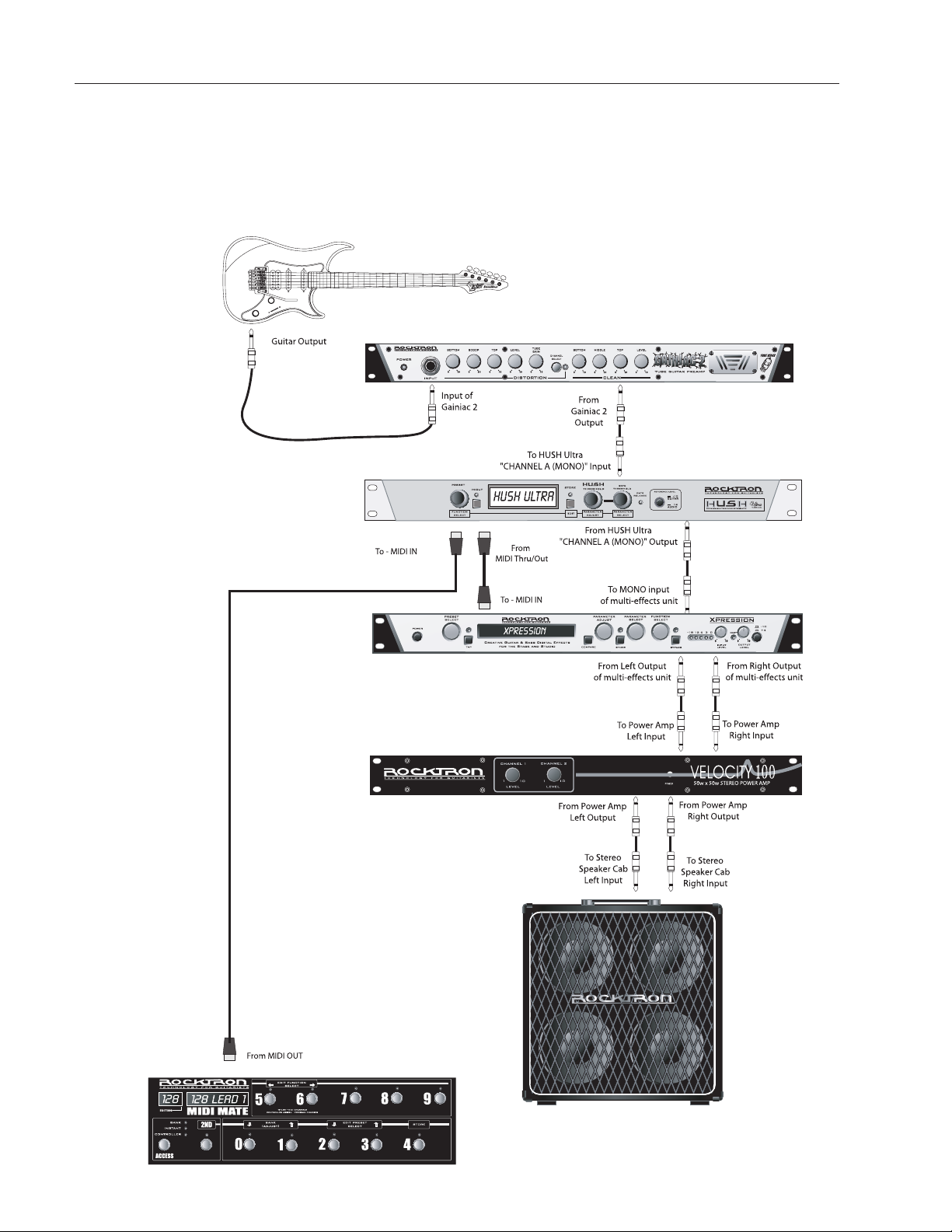
This connection is an example of a mono connection from a preamp and a multi-effects processor
System Connections
Table of contents