
RuggedCom RUGGEDBACKBONE RX1510 User manual

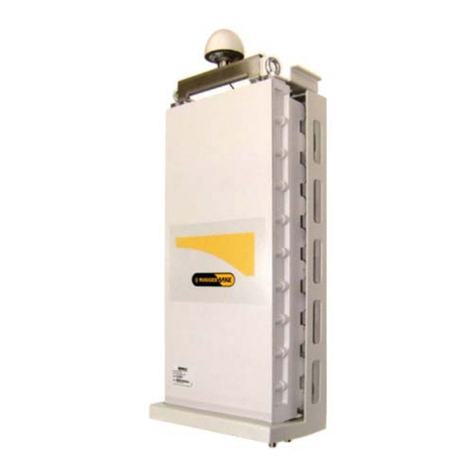
RuggedBackbone™RX1510
v2.4 Installation Guide
February 8, 2013
www.RuggedCom.com

RuggedBackbone™ RX1510
Installation Guide
ii
Copyright © 2013 RuggedCom Inc.
All rights reserved. Dissemination or reproduction of this document, or evaluation and communication of its contents, is not authorized
except where expressly permitted. Violations are liable for damages. All rights reserved, particularly for the purposes of patent application or
trademark registration.
This document contains proprietary information, which is protected by copyright. All rights are reserved. No part of this document may be
photocopied, reproduced or translated to another language without the prior written consent of RuggedCom Inc.
Disclaimer Of Liability
RuggedCom has verified the contents of this manual against the hardware and/or software described. However, deviations between the
product and the documentation may exist.
RuggedCom shall not be liable for any errors or omissions contained herein or for consequential damages in connection with the furnishing,
performance, or use of this material.
The information given in this document is reviewed regularly and any necessary corrections will be included in subsequent editions. We
appreciate any suggested improvements. We reserve the right to make technical improvements without notice.
Registered Trademarks
RuggedServer™, RuggedWireless™, RuggedCom Discovery Protocol (RCDP)™, RuggedExplorer™, Enhanced Rapid Spanning Tree
Protocol (eRSTP)™, ROX™, Rugged Operating System On Linux™, RuggedBackbone™, CrossBow™ and eLAN™ are trademarks of
RuggedCom Inc. Rugged Operating System (ROS)® and RuggedSwitch® are registered trademarks of RuggedCom Inc.
Other designations in this manual might be trademarks whose use by third parties for their own purposes would infringe the rights of the
owner.
Contacting RuggedCom
Corporate Headquarters US Headquarters Europe Headquarters
RuggedCom Inc.
300 Applewood Crescent
Concord, Ontario
Canada, L4K 5C7
Toll-free: 1 888 264 0006
Tel: +1 905 856 5288
Fax: +1 905 856 1995
RuggedCom
1930 Harrison St., Suite 209
Hollywood, Florida
USA, 33020
Toll-free: 1 888 264 0006
Tel: +1 954 922 7938 ext. 103
Fax: +1 954 922 7984
RuggedCom
Unit 41, Aztec Centre,
Aztec West, Almondsbury, Bristol
United Kingdom, BS32 4TD
Tel: +44 1454 203 404
Fax: +44 1454 203 403
E-mail: [email protected]
Web: www.RuggedCom.com

RuggedBackbone™ RX1510
Installation Guide RuggedBackbone™RX1510
iii
Table of Contents
FCC Statement And Cautions ............................................................................. v
Chapter 1
Product Overview ................................................................................................ 1
1.1 Functional Overview ..................................................................................................................... 1
1.2 Feature Highlights ........................................................................................................................ 1
Chapter 2
RuggedBackbone™ Modules .............................................................................. 5
2.1 Installing a Module ....................................................................................................................... 5
2.2 Front Panel .................................................................................................................................. 6
2.2.1 Module Status LEDs .......................................................................................................... 7
2.3 Line Modules (LM) ....................................................................................................................... 7
2.3.1 Ethernet - Copper ............................................................................................................. 7
2.3.2 Ethernet - Fiber ................................................................................................................. 8
2.3.3 SFP Modular ..................................................................................................................... 9
2.3.4 WAN ................................................................................................................................. 9
2.3.5 Serial .............................................................................................................................. 10
2.3.6 Cellular Modem ............................................................................................................... 10
2.3.7 DDS - Digital Data Services ............................................................................................. 10
2.3.8 RuggedAPE™ (Appplication Processing Engine) ............................................................... 11
2.4 Power Supply ............................................................................................................................ 11
Chapter 3
Installation .......................................................................................................... 13
3.1 Mounting .................................................................................................................................... 13
3.1.1 RX1510Dimensions ......................................................................................................... 15
3.2 Power Supply Wiring and Grounding ........................................................................................... 17
3.2.1 Connectors for HI and HIP Power Modules ....................................................................... 17
3.2.2 Connectors for 24, 24P, 48, and 48P Power Modules ......................................................... 18
3.2.3 Chassis Ground Connection ............................................................................................. 18
3.2.4 AC Power Supply Wiring ................................................................................................. 19
3.2.5 DC Power Supply Wiring Examples .................................................................................. 19
3.2.6 AC and DC Power Supply Wiring Example ....................................................................... 20
3.3 Critical Alarm Wiring ................................................................................................................... 20

RuggedBackbone™RX1510 RuggedBackbone™ RX1510
Installation Guide
iv
3.4 Serial Console Port .................................................................................................................... 21
3.5 WAN Ports: RJ45 ....................................................................................................................... 22
3.6 WAN Ports: BNC ........................................................................................................................ 22
3.7 Copper Ethernet Ports ................................................................................................................ 22
3.7.1 RJ45 Twisted-Pair Copper Ports ....................................................................................... 23
3.7.2 M12 Twisted Pair Copper Ports ........................................................................................ 23
3.7.3 Gigabit Ethernet 1000Base-TX Cabling Recommendations ................................................. 24
3.7.4 Transient Suppression ..................................................................................................... 25
3.8 Serial Ports: RJ45 ...................................................................................................................... 25
3.9 DDS Ports: RJ45 ....................................................................................................................... 26
3.10 DDS Rx and Tx LED Indications ............................................................................................... 26
3.11 SFP Optics – Installation, removal, and precautions .................................................................... 27
3.11.1 Module Insertion – SFP .................................................................................................. 27
3.11.2 SFP Module Removal .................................................................................................... 28
3.12 Fiber Ethernet Ports ................................................................................................................. 29
3.13 Cellular Modems ...................................................................................................................... 30
3.13.1 GSM, EDGE, HSPA+ Cellular Modem Card .................................................................... 31
3.13.2 Installing SIM Cards for GSM, EDGE, HSPA+ Cellular Modems ........................................ 32
Chapter 4
Technical Specifications ..................................................................................... 33
4.1 Power Supply Specifications ....................................................................................................... 33
4.2 Critical Alarm Relay Specifications .............................................................................................. 33
4.3 Copper Ethernet Port Specifications ............................................................................................ 34
4.4 Fiber Ethernet Port Specifications ............................................................................................... 34
4.4.1 Fast Ethernet (100Mbps) Optical Specifications ................................................................. 34
4.4.2 Gigabit Ethernet (1Gbps) Optical Specifications ................................................................. 35
4.5 Operating Environment ............................................................................................................... 36
4.6 RuggedAPE™ Specifications ...................................................................................................... 36
4.7 Mechanical Specifications ........................................................................................................... 37
Chapter 5
EMI And Environmental Type Tests .................................................................. 39
Chapter 6
Agency Approvals .............................................................................................. 43
Chapter 7
Warranty ............................................................................................................. 45

RuggedBackbone™ RX1510
Installation Guide FCC Statement And Cautions
v
FCC Statement And Cautions
Federal Communications Commission Radio Frequency Interference Statement
This equipment has been tested and found to comply with the limits for a Class A digital device pursuant to Part
15 of the FCC Rules. These limits are designed to provide reasonable protection against harmful interference
when the equipment is operated in a commercial environment. This equipment generates, uses and can radiate
radio frequency energy and, if not installed and used in accordance with the instruction manual, may cause
harmful interference to radio communications. Operation of this equipment in a residential area is likely to cause
harmful interference in which case the user will be required to correct the interference at his own expense.
CAUTION!
This product contains a LASER system and is classified as a CLASS 1 LASER PRODUCT. Use of
controls or adjustments or performance of procedures other than those specified herein may result in
hazardous radiation exposure.
CAUTION!
This product contains no user-serviceable parts. Attempted service by unauthorized personnel shall
render all warranties null and void.
Changes or modifications not expressly approved by RuggedCom Inc. could invalidate specifications,
test results, and agency approvals, and void the user’s authority to operate the equipment.
Should this device require service, refer to Chapter 7, Warranty in this guide.
CAUTION!
This product should be installed in a restricted access location where access can only be gained by
service personnel or users who have been instructed about the reasons for the restrictions applied to
the location and about any precautions that shall be taken; and access is through the use of a tool or
lock and key, or other means of security, and is controlled by the authority responsible for the location.

FCC Statement And Cautions RuggedBackbone™ RX1510
Installation Guide
vi

RuggedBackbone™ RX1510
Installation Guide
Chapter 1
Product Overview
Functional Overview 1
Product Overview
Section 1.1
Functional Overview
The RuggedBackbone™ RX1510 is a cost-efficient, rugged layer 3 switch and router. The RX1510’s modular
and field replaceable platform allows you to select WAN, serial, and Ethernet options, making it ideally suited for
electric power utilities, the industrial plant floor, and traffic control systems. The appliance’s compact form factor
makes it ideal for pole mount applications or installation in restricted spaces.
The RX1510 is designed to the RuggedRated™ specification, providing a high level of immunity to
electromagnetic interference (EMI) and heavy electrical surges typical of the harsh environments found in many
industrial applications. An operating temperature range of -40°C to +85°C (-40°F to +185°F) allows the RX1510 to
be placed in almost any location.
Section 1.2
Feature Highlights
Cyber Security Features
• Multi-level passwords
• SSH/SSL encryption
• Enable/disable ports, MAC-based port security
• Port-based network access control (802.1x)
• VLAN (802.1Q) to segregate and secure network traffic
• RADIUS centralized password management
• SNMPv3 encrypted authentication and access security
RuggedRated™ for Reliability in Harsh Environments
• Immunity to EMI and high voltage electrical transients:
○ Zero-Packet-Loss Technology
○ Meets IEEE 1613 (electric utility substations)
○ Exceeds IEC 61850-3 (electric utility substations)
○ Exceeds IEC 61800-3 (variable speed drive systems)
○ Exceeds IEC 61000-6-2 (generic industrial environment)
• -40°C to +85°C operating temperature (no fans)
• Optional conformal coated printed circuit boards
• Failsafe Output Relay: For critical failure or error alarming

Chapter 1
Product Overview
RuggedBackbone™ RX1510
Installation Guide
2 Feature Highlights
Physical Ports
• Field replaceable line modules
• Up to 24 ports 100FX
• Up to 24 ports 10/100TX
• Up to 8 ports Gigabit Ethernet
WAN Port Options
• Up to 4 T1/E1 ports via RJ45 connectors (channelized/unchannelized)
• Up to 2 E1 ports via BNC connectors (channelized/unchannelized)
• Cellular/DDS
Serial Ports
• Fully compliant EIA/TIA RS485, RS422, RS232 serial ports (software selectable) with RJ45 connectors
• Raw socket mode support allows conversion of any serial protocol
Protocols
•WAN
○ Frame Relay RFC 1490 or RFC 1294
○ PPP RFC 1661, 1332, 1321, 1334, PAP, CHAP Authentication
○ Multilink PPP RFC 1990
○ GOOSE messaging support
•IP
○ Routing: OSPF, BGP, RIPv1, RIPv2
○ VRRP Agent
○ Traffic control, NTP Server, IP Multicast Routing
○ DHCP Agent (Option 82 Capable)
Frame Relay Support
• ISO and ITU compliant, network certified.
• ANSI T1.617 Annex D, Q.933 or LMI Local Signaling
Management Tools
• Web-based, SSH, CLI management interfaces
• SNMP v1, v2, and v3
• Remote Syslog
• Rich set of diagnostics with logging and alarms
• Loopback diagnostic tests
• Raw and interpreted real-time line traces
Universal Power Supply Options
• Dual redundant, modular, hot-swappable power supplies
• Fully integrated power supplies (no external adaptors)
• Input voltage ranges: 10-36VDC, 36-72VDC, 88-300VDC, 85-264VAC

RuggedBackbone™ RX1510
Installation Guide
Chapter 1
Product Overview
Feature Highlights 3
• TUV/UL 60950 safety approved to 85°C
Warranty
• 5 Year Warranty

Chapter 1
Product Overview
RuggedBackbone™ RX1510
Installation Guide
4 Feature Highlights
Other manuals for RUGGEDBACKBONE RX1510
1
Table of contents
Other RuggedCom Network Hardware manuals
Popular Network Hardware manuals by other brands

Matrix Switch Corporation
Matrix Switch Corporation MSC-HD161DEL product manual

B&B Electronics
B&B Electronics ZXT9-IO-222R2 product manual

Yudor
Yudor YDS-16 user manual

D-Link
D-Link ShareCenter DNS-320L datasheet

Samsung
Samsung ES1642dc Hardware user manual

Honeywell Home
Honeywell Home LTEM-PV Installation and setup guide











