manuals.online logo
Brands
  1. Home
  2. •
  3. Brands
  4. •
  5. Samsung
  6. •
  7. Dryer
  8. •
  9. Samsung DV5471AE User manual

Samsung DV5471AE User manual

This manual suits for next models

1

Other Samsung Dryer manuals

Samsung DV350AEP User manual

Samsung

Samsung DV350AEP User manual

Samsung DVE50R8500 Series User manual

Samsung

Samsung DVE50R8500 Series User manual

Samsung DV203 SERIES User manual

Samsung

Samsung DV203 SERIES User manual

Samsung DV231A Series User manual

Samsung

Samsung DV231A Series User manual

Samsung DV409SEL User manual

Samsung

Samsung DV409SEL User manual

Samsung DV50K7500E(G) series User manual

Samsung

Samsung DV50K7500E(G) series User manual

Samsung SDC1A809 User manual

Samsung

Samsung SDC1A809 User manual

Samsung DV209AE series User manual

Samsung

Samsung DV209AE series User manual

Samsung DV520AE-02836A-01 User manual

Samsung

Samsung DV520AE-02836A-01 User manual

Samsung DVG50M7450P/A3-00 User manual

Samsung

Samsung DVG50M7450P/A3-00 User manual

Samsung DV50K7500EV/A3 User manual

Samsung

Samsung DV50K7500EV/A3 User manual

Samsung DV433ETGJWR/A1 User manual

Samsung

Samsung DV433ETGJWR/A1 User manual

Samsung DVE50T7450 Series User manual

Samsung

Samsung DVE50T7450 Series User manual

Samsung DV365ETBGWR/A3 User manual

Samsung

Samsung DV365ETBGWR/A3 User manual

Samsung DV52J8060E User manual

Samsung

Samsung DV52J8060E User manual

Samsung DV42H5200EW User manual

Samsung

Samsung DV42H5200EW User manual

Samsung DV9 T 2 Series User manual

Samsung

Samsung DV9 T 2 Series User manual

Samsung DVE22N6850W User manual

Samsung

Samsung DVE22N6850W User manual

Samsung DV220AEW User manual

Samsung

Samsung DV220AEW User manual

Samsung DVE45T3400P User manual

Samsung

Samsung DVE45T3400P User manual

Samsung FLEXDRY DV*60M9900 series User manual

Samsung

Samsung FLEXDRY DV*60M9900 series User manual

Samsung DV203AGW User guide

Samsung

Samsung DV203AGW User guide

Samsung DVG52M8650 Series User manual

Samsung

Samsung DVG52M8650 Series User manual

Samsung DVG54M8750W User manual

Samsung

Samsung DVG54M8750W User manual

Popular Dryer manuals by other brands

Whirlpool WED9270XL2 parts list

Whirlpool

Whirlpool WED9270XL2 parts list

Kleenmaid KED2000 Repair instructions

Kleenmaid

Kleenmaid KED2000 Repair instructions

SPI Supplies SPI-DRY Operation manual

SPI Supplies

SPI Supplies SPI-DRY Operation manual

Amana NGD5800DW Use & care guide

Amana

Amana NGD5800DW Use & care guide

Bosch WTG86402GB Installation and operating instructions

Bosch

Bosch WTG86402GB Installation and operating instructions

Maytag MED4200BW0 installation instructions

Maytag

Maytag MED4200BW0 installation instructions

ffuuss eos user manual

ffuuss

ffuuss eos user manual

KitchenAid 53-3498 installation instructions

KitchenAid

KitchenAid 53-3498 installation instructions

Schulthess Spirit topLine TW 8340 operating instructions

Schulthess

Schulthess Spirit topLine TW 8340 operating instructions

Whirlpool LGR4624BW0 parts list

Whirlpool

Whirlpool LGR4624BW0 parts list

World Dryer AirMax D M5-972A manual

World Dryer

World Dryer AirMax D M5-972A manual

Alliance Laundry Systems ADEE9BSS user guide

Alliance Laundry Systems

Alliance Laundry Systems ADEE9BSS user guide

Miele PDR 910 EL Operating and installation instructions

Miele

Miele PDR 910 EL Operating and installation instructions

Amana NGD5800TQ0 parts list

Amana

Amana NGD5800TQ0 parts list

Bosch WTA79200GB Installation and operating instructions

Bosch

Bosch WTA79200GB Installation and operating instructions

AEG TR838P4OB user manual

AEG

AEG TR838P4OB user manual

Asko T760 user guide

Asko

Asko T760 user guide

Electrolux EW2H328R2 user manual

Electrolux

Electrolux EW2H328R2 user manual

manuals.online logo
manuals.online logoBrands
  • About & Mission
  • Contact us
  • Privacy Policy
  • Terms and Conditions

Copyright 2025 Manuals.Online. All Rights Reserved.

Fast Track Troubleshooting
Publication # nwDV5471 Revision Date 09/23/11
IMPORTANT SAFETY NOTICE – “For Technicians Only” This service data sheet is
intended for use by persons having electrical, electronic, and mechanical experience
and knowledge at a level generally considered acceptable in the appliance repair trade.
Any attempt to repair a major appliance may result in personal injury and property
damage. The manufacturer or seller cannot be responsible, nor assume any liability for
injury or damage of any kind arising from the use of this data sheet.
Models:
DV5471AE DV5471AG
Location consideration In the USA:
 All Dryers Must be vented to the outside.
 Only rigid or flexible metal duct should be
used for venting.
Electrical Dryers 240 VAC, 60 Hz, 30 Amps, 3
-wire or 4-wire installations
Gas Dryers 120 VAC, 60 Hz, 15 Amps, 3-wire
installations
Description Trigger Action Taken
Dryer Thermistor Short
Sensed
The Thermistor resistance is
ve ry l o w.
Check for: Clogged lint screen,
Restricted vent system, Thermistor
resistance.
Dryer Thermistor Open
Sensed
The Thermistor resistance is
very high.
Check for: Clogged lint screen,
Restricted vent system, Thermistor
resistance.
dO
dE Door Open Running the dryer with door
open
Check for: Loose or open wire
terminals in Door Sense circuit.
FE Power source frequency
Error Invalid power source Frequency Check for: Non Utility power supply
dF Door Circuit Failure Invalid state for more than 256
milliseconds
Check for: Loose or open wire
terminals in Door Sense circuit.
hE or HE Heater Error Invalid heating Temp in running
the dryer
Check for: Restricted vent system,
Thermistor resistance.
bE Button Error PCB key closed for 75 sec. Check Display PCB for stuck button
od Over Dry Invaled Dry Time Excessive Dry
Time Inspect seensor bars
EEprom Fail Invalid state of Eeprom
communication Replace Main PCB
Samsung 'Dryer' Diagnostic Code Quick Guide
Display
NOTICE: All Dryers Parts
Change 6/2010: Motor Pulley,
page 5; Blower Housing, page 4
SUPPORT INFORMATION
Training — Plus One
http://my.plus1solutions.net/clientPortals/samsung/
Help — GSPN http://service.samsungportal.com/
Samsung Product Support TV
http://support-us.samsung.com/spstv/howto.jsp
Customer information videos and chat programs
Programs for Fridges, Laundry, Ranges & D/W
Ass’y Duct Heater (Electric)
Ass’y Duct (Gas)
Ass’y Fan
F0005 = DC47-00017A
A0369 = DC47-00015A
F0005 = DC47-00018A
Thermistor W0035 = DC32-00007A
F0005 = DC47-00016A
►CN1
1. AC Power Port
2. AC Power off
Detection Sensor
3. Door Detection
Sensor
(LOCK,UNLOCK)
Relay 1
1 Motor Belt Sw (Brn)
2 120vac L1 (Blk)
Relay 6
1 Heater Cut Off T-Stat (Blu)
2 120vac L1 (Blk)
►CN6
1. SET GND
New Version of
Blower Housing, it
may be necessary to
separate the harness
wrap on replacement
housing. Please
maintain shielding
on the low voltage
wires.
►CN3
1. 5V
2. SO
3. SI
4. RESET
5. CLOCK
6. FLMDO
7. DGND
8. Empty
Pin
►CN4
1. DGND
2. 5V
3. TEMP Sensor1
4. Fabric Detection
Sensor
5. Fabric Detection
Sensor
6. 5V
7. TEMP Sensor2
►CN2
1. Communications Port(Rx)
2. Communications Port(Tx)
3. SUB RESET
4. 5V
5. DGND
6. 12V
►CN5
1. STEAM VALVE1
2. Empty Pin
3. LAMP
4. Empty Pin
5. STEAM VALVE2
6. Empty Pin
Sensor Bar Touch TEST
How to Enter:
With the power on, pressing Wrinkle Prevent and Temp Keys for
3 seconds. This action will put the dryer into sensor bar touch
data mode. This mode is default mode of entering service mode
Cycle Count Test Mode How to Enter:
To enter cycle count mode press the Wrinkle Prevent in Service
Mode.
Software Version Test Mode
How to Enter:
To enter Special Test Mode press Temp Button until the control
beep. (same for all Frontier models.) ex) In case of “U105”, U0
means major version “v1“05 means minor version “05
Temperature Test Diagnostic Mode
How to Enter:
Press Adjust Time Up + Down Keys for 7 sec during
Power On State.
Press Adjust Time Up and it will display the temperature
in Celsius.
Compare vent temp to drum temp to see air flow.
This can be with just power on or dryer running.
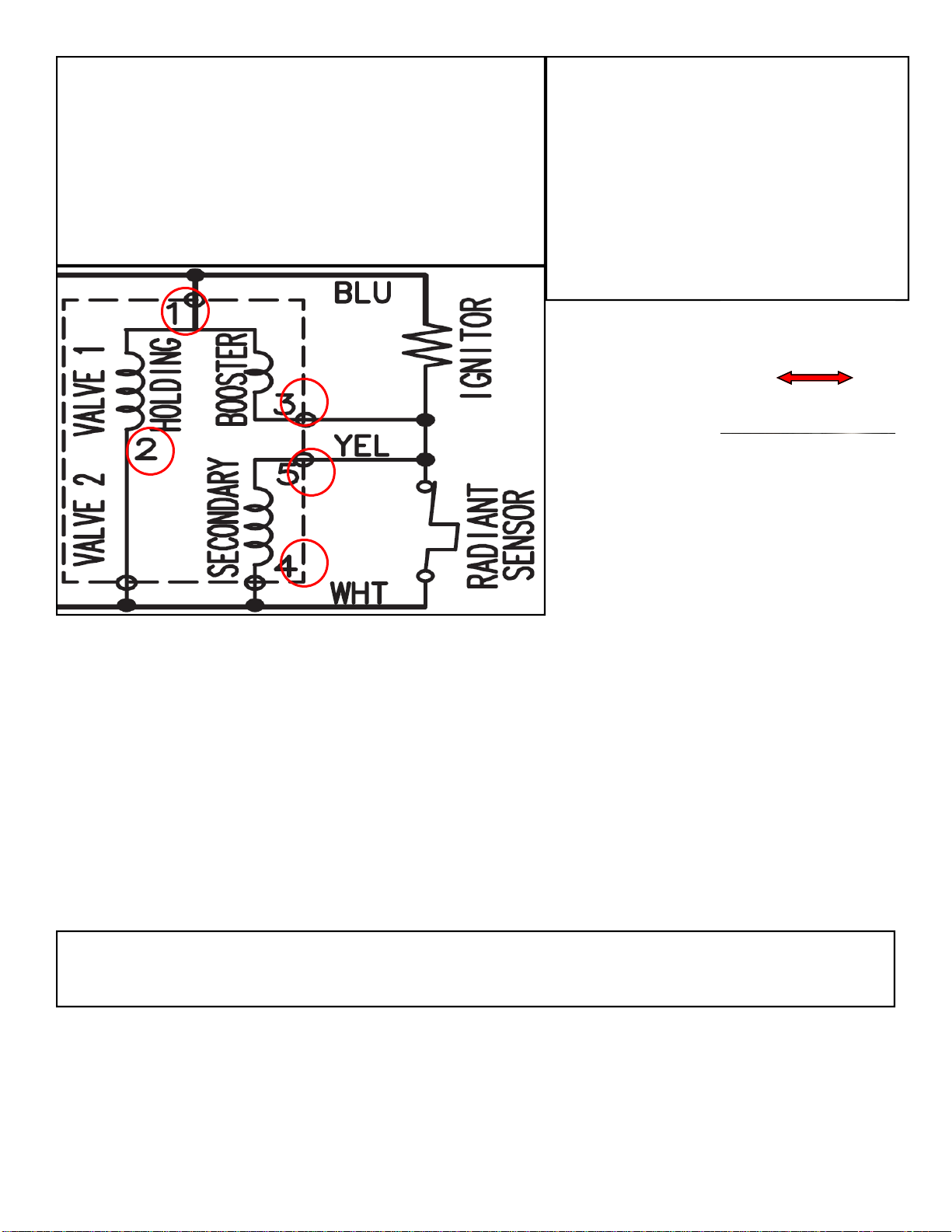
Gas Valve Testing
Unplug connectors and test valve terminals
(its numbering is from the front terminal.)
Check across terminals #1 and #3 (Booster Coil). 550 Ω
Check across terminals #1 and #2 (Holding Coil). 1350 Ω
Check across terminals #2 and #3 (Both coils in series). 1900 Ω
Check across terminals #4 and #5 (Secondary Coil). 1300 Ω
Dryer continues to run after cycle completed
Wrinkle Prevent option provides approximately 90 minutes (20 continuous and 70 intermittent) of tumbling in
unheated air at the end of the cycle to reduce wrinkling. Press the Wrinkle Prevent button to activate or deac-
tivate this feature. The indicator light above the pad will illuminate when Wrinkle Prevent is selected. Chasing
lights appear in the display when the Wrinkle Prevent option is selected. The load is dry, and can be removed
at any time during the Wrinkle Prevent cycle.
SUBJECT: Dryer belt slides off the pulley when
manually rotated counter-clockwise (ccw)
SYMPTOM: The dryer drum will not turn. On occa-
sions, the customer will rotate the drum counter
clockwise (CCW) to check for any remaining
clothes left in the dryer drum. By rotating the drum
CCW, the idler arm may shift causing the belt to
slide off the pulley.
SOLUTION: To prevent the dryer belt from sliding
off the pulley, the pulley has been redesigned.
The Outside Diameter has been changed from
22mm to 27mm.
New
DC81-00220A
Special Test Mode:
Press power button & Dry level buttons
simultaneously will put you in System Check Mode..
Display will show t2
Press Start/Pause to toggle through the following
operations
Motor (CW) relay on— Heater Relay on—- Heater
Relay Off—-Motor (CW) Relay Off
Do not use dryer to dry clothes which have traces of any flammable substance, such as vegetable oil, cooking
oil, machine oil, flammable chemicals, thinner, etc., or anything containing wax or chemicals, such as mops
and cleaning cloths. Flammable substances may cause fabric to catch fire by itself.
Make sure the idler pulley and the
motor pulley are straight in line
with each other, bend to correct
Service Mode:::
To enter Service Mode, press Wrinkle Prevent and Temp Keys for
3 seconds, until it sends out a beeping sound.

RY6CN6
Testing Electric Heater circuit.

Disconnect Blue wire from RY6, turn power on, start dryer read voltage between RY6 Blue wire and CN6
Green wire.
Reading of 120VAC means a proper operating heater circuit. 0VAC means open in circuit.
To test thermostats use ohm meter on lowest scale, any resistance replace component
See page 4 for Main PCB layout for testing.
RY 6 RY 5
RY 5 CN7
Testing Main PCB power output to Heating
& Motor circuit.
With motor running in the heating mode,
read AC voltage across RY6 and RY5.
Any voltage reading means Main PCB is
defective.
See page 4 for Main PCB layout for testing.
Testing Motor circuit.
With power off read
resistance between
RY5 Brown and CN7
Blue.
Resistance reading of
good motor circuit is
about 1.9Ω. To test
thermostat and switch
use ohm meter on
lowest scale, any
resistance replace
component.
See page 4 for Main
PCB layout for testing.